1
This item allows the user to select I/O port address. Range is from
2E8 to 3F8.
- Onboard Serial Port 2 [2F8/IRQ3]
This item allows the user to select I/O port address. Range is from
2E8 to 3F8.
- Onboard Parallel Port [378/IRQ7]
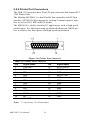
This field sets the address of the on-board parallel port connector.
You can select either 3BCH/IRQ7, 378H/IRQ7, 278H/IRQ5 or Disabled. If you install an I/O card with a parallel port, make sure there is
no conflict in the address assignments. The CPU card can support up
to three parallel ports, as long as there are no port has any conflicts.
- Parallel Port Mode [SPP]
This field allows you to set the operation mode of the parallel port.
The “Normal” setting allows normal speed operation, but in one
direction only. “EPP” allows bidirectional parallel port operation at
maximum speed. “ECP” allows the parallel port to operate in bidirectional mode and at a speed faster than the maximum data transfer rate. “ECP + EPP” allows normal speed operation in a two-way
mode.
- EPP Mode Select [EPP1.7]
This field allows you to select EPP port type 1.7 or 1.9. The choices:
EPP1.7, EPP1.9.
- ECP Mode Use DMA [3]
This selection is available only if you select “ECP” or “ECP + EPP”
in the Parallel Port Mode field. In ECP Mode Use DMA, you can
select DMA channel 1, DMA channel 3, or Disable. Leave this field
on the default setting.
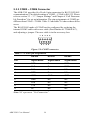
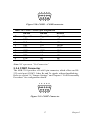
• COM3 / 4 / 5 / 6 Mode [RS232]
This item allows users to select the MIO COM Port Output Mode.
Function includes RS-232, RS-422 and RS-485 Mode.
• Watch Dog Timer Select [Disabled]
This item allows the user to enable or disable the watch dog timer. If
enabled, a timer value may be set in either minutes or seconds.
• AutoFlow Control [Enable]
Auto flow control is used in RS-485 to tri-state the transmitter when no
other data is available, so that other nodes can use the shared lines.
49
Chapter 4