1
IMPORTANT
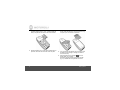
Warning! Use only the approved rechargeable Ni-MH battery
cells (2 x AAA Ni-MH 550mA rechargeable batteries)
supplied with your O1.
After charging your handset for the first time, subsequent
charging time is about 6–8 hours a day. Batteries and
handset may become warm during charging. This is normal.
BATTERY LOW WARNING
If
icon flashes on the display and you hear a warning
beep every minute during a call, you will need to recharge
the handset before you can use it again.
1
All talk and standby times are approximate and depend on
features selected and usage pattern.
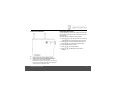
When charging,
icon will scroll on the display, once the
battery is fully charged the icon will stop scrolling.
If you have subscribed to a Caller ID Service, the date and
time is set automatically for all handsets when you receive
your first call.
BATTERY PERFORMANCE
In ideal conditions, fully charged batteries should give up to
10 hours talk time or up to 150 hours standby time on a
single charge1.
Note that new batteries do not reach their full capacity until
they have been put to normal use for several days.
To keep your batteries in the best condition, leave the
handset off the base for a few hours at a time.
Running the batteries right down at least once a week will
help them last as long as possible.
The charge capacity of rechargeable batteries will reduce
with time as they wear out, giving the handset less talk/
standby time. Eventually they will need to be replaced.
Getting started
Date and time
If you do not have Caller ID service, you can set the date and
time manually.
Set the date manually
1. Press m to open the main menu.
2. Press u or d until Date & Time is displayed, then press
m.
3. Set Date is displayed, press m.
4. Enter the date (dd/mm) e.g. for 15th February, press 1,
5, 0, 2, then press m.
9