1
Games & Applications (M 11)
Games & Applications (M 11-1)
Using Applications
Various kinds of Vodafone specific applications can be
used on this phone. To use applications, download the
applications via the mobile Internet. Some applications
offer the ability to connect to a network either within a
game or a network-based application.
Note
• Applications may be both localised (no connectivity)
and network-based (using the mobile Internet to
update information/play games). The network may
charge you more for using network-based
applications. Please contact your service provider
for more information.
Downloading Applications
“Games & Applications” → “Games & Applications”
→ “More Applications”
1. Select the desired application.
Before downloading the application you are asked
to confirm what you are about to receive. After
checking the information on the confirmation
screen, the application can be downloaded.
2. Press B to start downloading.
3. Press B when finished.
Note
• User authentication may be required before
downloading the application on some information
screens.
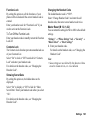
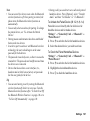
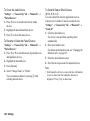
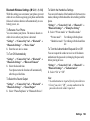
Games & Applications 113