1
2000W Electric
Chain Saw
Original Instructions_MNL_MCS2000_V06_111108
MIN
MCS2000
Barcode: 5052931013883
MNL_MCS2000_DFT_GB_V06_111108.indd 1
11/8/11 5:11:03 PM
GB
IE
Let’s
get started...
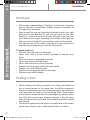
These instructions are for your safety. Please read through them
thoroughly before use and retain them for future reference.
Getting started...
03
Before you start
Safety
03
12
In more detail...
13
Product functions
Operation
Care and maintenance
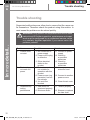
Trouble shooting
Recycling and disposal
Technical and legal information
Guarantee
EC declaration of conformity
14
17
25
32
33
34
45
46
02
MNL_MCS2000_DFT_GB_V06_111108.indd 2
11/8/11 5:11:03 PM
Before you start
MCS2000 by MacAllister
GB
IE
1
12
2
3
4
5
MIN
6
10
11
9
13
8 7
Getting started...
Your product
14
15
18
17
16
03
MNL_MCS2000_DFT_GB_V06_111108.indd 3
11/8/11 5:11:04 PM
Getting started...
GB
IE
Before you start
MCS2000 by MacAllister
19
20
21
23
22
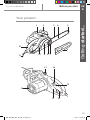
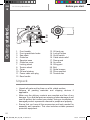
1. Front handle
2. Front guard/chain brake
3. Saw chain
4. Guide bar
5. Sprocket nose
6. Guide bar cover
7. Locking wheel
8. Tension wheel
9. Cover
10. Oil level window
11. Power cable with plug
12. Rear handle
13. Oil tank cap
14. Lock-off button
15. On/off switch
16. Cable strain relief
17. Rear guard
18. Air vents
19. Oiling port
20. Bolt
21. Spike bumper
22. Drive sprocket
23. Tension disc
Unpack
>> Unpack all parts and lay them on a flat, stable surface.
>> Remove all packing materials and shipping devices if
applicable.
>> Make sure the delivery contents are complete and free of any
damage. If you find that parts are missing or show damage do not
use the product but contact your dealer. Using an incomplete or
damaged product represents a hazard to people and property.
>> Ensure that you have all the accessories and tools needed for
assembly and operation. This also includes suitable personal
protective equipment.
04
MNL_MCS2000_DFT_GB_V06_111108.indd 4
11/8/11 5:11:04 PM
Before you start
MCS2000 by MacAllister
GB
IE
(items not supplied)
Saw chain oil
(items supplied)
Saw chain
Guide bar cover
Assembly
Assemble the guide bar and saw chain before operation. Follow the
operating instructions step-by-step and use the pictures provided
as a visual guide to easily assemble the product.
WARNING! Read all the instructions carefully! Do not
connect the product to the power supply until it is completely
assembled! Always wear gloves during assembly!
Chain and guide bar
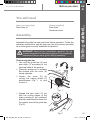
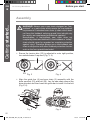
>> Use only the guide bar (4) and
saw chain (3) according to the
technical data of the product.
>> Place the product on a suitable
flat surface with the cover (9)
facing upwards.
>> Loosen the cover (9) by
turning the locking wheel (7)
anticlockwise (Fig. 1, a) and
remove it.
a
b
9
7
Fig. 1
3
>> Spread the saw chain (3) out
with the cutting edges of the
chain pointing in the rotational
direction and slide the chain into
the groove around the guide bar
(Fig. 2).
Fig. 2
MNL_MCS2000_DFT_GB_V06_111108.indd 5
Getting started...
You will need
05
11/8/11 5:11:05 PM
GB
IE
Before you start
MCS2000 by MacAllister
Getting started...
Assembly
WARNING! Always use a saw chain designed as “lowkickback” or a saw chain which meets the low-kickback
requirements! A standard saw chain (a chain which does
not have the kickback reducing guard links) should only
be used by an experienced professional operator!
Nevertheless, a low-kickback saw chain does not
completely eliminated kickback! A low-kickback or “safety”
chain should never be regarded as complete protection
against injury! Therefore always use a low-kickback saw
chain in conjunction with other kickback protection devices
such as the front guard/chain brake!
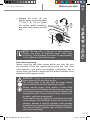
>> Ensure the tension disc (23) is adjusted to outer right position,
turn anticlockwise if required (Fig. 3, 4).
4
23
Fig. 3
Fig. 4
>> Align the guide bar (4) and saw chain (3) assembly with the
drive sprocket (22) and bolt (20). Lay the saw chain around the
drive sprocket and then lower the guide bar to install it to the bolt
(Fig. 5, 6).
22
20
3
4
Fig. 5
Fig. 6
06
MNL_MCS2000_DFT_GB_V06_111108.indd 6
11/8/11 5:11:08 PM
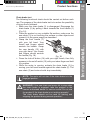
>> Replace the cover (9) and
slightly tighten the locking wheel
(7) (Fig. 7, b). Do not tighten
the locking wheel completely;
saw chain tensioning is required
first.
a
b
9
7
Fig. 7
NOTE: The saw chain (3) has not yet been tensioned.
Tension the chain as described under “Saw chain
tensioning”. After operating the product for approximately
1 hour, adjust the chain tension again.
GB
IE
Getting started...
Before you start
MCS2000 by MacAllister
Saw chain tensioning
Always check the saw chain tension before use, after first cuts
and regularly during use, approximately every five cuts. After
initial operation, new chains can lengthen considerably. This is
normal during the break-in period and the interval between future
adjustments will lengthen quickly.
WARNING! Unplug the product from the power source
before adjusting the saw chain tension!
The cutting edges of the saw chain are sharp. Always
wear protective gloves when handling the chain!
Always maintain proper chain tension! A loose chain
increases the risk of kickback! A loose chain may jump out
of the guide bar groove! This may injure the operator and
damage the chain! A loose chain will cause rapid wear to
the chain, guide bar and sprocket!
Tensioning the chain too tightly will overload the motor and
cause damage, and insufficient tension can cause chain
derailing, whereas a correctly tightened chain provides
the best cutting characteristics and prolonged working life!
The chain life mainly depends upon sufficient lubrication
and correct tensioning!
07
MNL_MCS2000_DFT_GB_V06_111108.indd 7
11/8/11 5:11:08 PM
GB
IE
Before you start
MCS2000 by MacAllister
Getting started...
Assembly
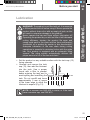
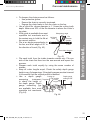
>> Set the product on a suitable flat
surface.
>> Turn the tension wheel (8) until
the chain “tie straps” are just
touching the bottom edge of the
guide bar (4) (Fig. 8).
4
7
8
Fig. 8
>> Check the chain tension using one hand to lift the saw chain
(3) against the weight of the product. The correct chain tension
is achieved when the saw chain can be lifted by approximately
2 - 4 mm from the guide bar (4) in the centre (Fig. 9, 10).
2-4 mm
Fig. 9
>> Turn the locking wheel (7) to
tighten the cover (9) completely
(Fig. 11).
Fig. 10
a
b
08
MNL_MCS2000_DFT_GB_V06_111108.indd 8
7
Fig. 11
11/8/11 5:11:09 PM
MCS2000 by MacAllister
Before you start
GB
IE
WARNING! The product is not filled with oil. It is essential
to fill the product with oil before using it! Never operate the
product without chain oil or with an empty oil tank, as this
will result in extensive damage to the product!
Never operate the bar and chain without lubrication oil!
Operating the product dry or with too little oil will decrease
cutting efficiency, shorten the product life span and
cause rapid wear to the chain and bar from overheating!
Insufficient oil is evident by smoke or bar discoloration!
Adequate lubrication of the saw chain during cutting
operations is essential to minimise friction with the guide
bar. Your product is equipped with an automatic oiling
system! The oiling system automatically delivers the
proper amount of oil to the bar and chain!
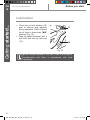
>> Set the product on any suitable surface with the tank cap (13)
facing upwards.
>> Unscrew and remove the tank
cap (13), then add the lubricant
into the tank. Use a proper
funnel with a filter to prevent
debris entering the tank and to
5 mm
avoid spilling and overfilling the
tank. Do not overfill and leave
approximately 5 mm of space
to the lower edge to allow the
lubricant to expand (Fig. 12).
Fig. 12
Getting started...
Lubrication
NOTE: In summer use SAE #30; in winter, or if the trees
have excessive sap, use SAE #10.
09
MNL_MCS2000_DFT_GB_V06_111108.indd 9
11/8/11 5:11:10 PM
GB
IE
Before you start
MCS2000 by MacAllister
Getting started...
Lubrication
>> Check the oil level window (10)
prior to start-up and regularly
during operation. Refill oil when
the oil level is lower than “MIN”
marking (Fig. 13).
>> Wipe up spilled lubricant with a
soft cloth and refit the tank cap
(13).
13
10
MIN
Fig. 13
NOTE: Always dispose of lubricant, used oil and objects
contaminated with them in accordance with local
regulations.
10
MNL_MCS2000_DFT_GB_V06_111108.indd 10
11/8/11 5:11:10 PM
MCS2000 by MacAllister
Before you start
GB
IE
WARNING! For your safety, it is required that the plug
attached to this product is always connected to an
extension cable! The extension cable must be suitable
for outdoor use with sockets protected against water
splashing! Ensure the extension cable is of the proper
size and type for your product (≥ 1.5mm2)!
The extension cable must always be used with the cable
strain relief! Do not use the product without an extension
cable connected. Always use a residual current supply
(RCD) protected supply!
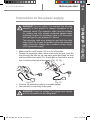
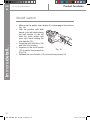
>> Make sure the on/off switch (15) is in its off position.
>> Double the extension cable, about a foot from the end. Lead the
loop through the hole on the rear safe guard and hook the loop
over the cable strain relief (16). Gently pull on the cord to ensure
that it is firmly attached at the handle (Fig. 14, 15).
Getting started...
Connection to the power supply
16
13
11
Fig. 14
Fig. 15
>> Connect the extension cable to a suitable socket.
>> Your product is now ready to be used.
WARNING! Check the voltage! The voltage must comply
with the information on the rating label!
11
MNL_MCS2000_DFT_GB_V06_111108.indd 11
11/8/11 5:11:11 PM
GB
IE
MCS2000 by MacAllister
Safety
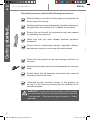
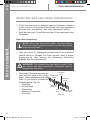
Check that you have noted all the following instructions:
Getting started...
Before starting you must have fully read and understood the
entire instruction manual.
Working with this product is demanding; therefore ensure you
are physically and mentally fit to complete the job safely.
Ensure that you have all the accessories and tools needed
for assembly and operation.
Make sure that you wear suitable personal protective
equipment.
Ensure that no unauthorised people, especially children,
and pets are nearby or could enter the working area.
Ensure that the product is free from damage and that it is
not worn.
Make sure that safety devices and accessories are correctly
fixed.
Double check that all assembly tools have been removed
from the product before use.
Undertake periodic structural checks of this product; do
not use it if you have any doubts about its suitability for its
intended purpose.
WARNING! For your own and the safety of other people
you must read and follow the safety instructions in section
“In more detail – Technical and legal information – Safety
warnings”.
12
MNL_MCS2000_DFT_GB_V06_111108.indd 12
11/8/11 5:11:11 PM
GB
IE
MCS2000 by MacAllister
Product functions
14
Operation
17
Care and maintenance
25
Trouble shooting
32
Recycling and disposal
33
Technical and legal information
34
Guarantee
45
EC declaration of conformity
46
MNL_MCS2000_DFT_GB_V06_111108.indd 13
In more detail...
In more detail...
11/8/11 5:11:11 PM
GB
IE
MCS2000 by MacAllister
Product functions
In more detail...
Intended use
This chain saw MCS2000 is designated with a rated input of 2000
Watts. The product is intended for cutting logs with a thickness of
max. 380 mm. It must not be used for cutting other materials, such
as plastic, stone, metal or wood that contains foreign objects.
The product may only be used with the guide bar/saw chain
combination stated in these instructions. It is not permitted to use
other types or sizes.
Vertical and horizontal cuts can be performed with this product.
Longitudinal sections can only be cut by professionals.
This product should not be used outside of domestic premises e.g.
for cutting firewood in forested areas.
The product should not be used on masonry and materials that are
harmful to health.
This product is intended for private domestic use only, not for any
commercial trade use. It must not be used for any purposes other
than those described.
Chain brake
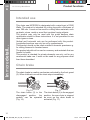
The chain brake is a safety mechanism activated by the front guard
(2). When kickback occurs the chain stops immediately.
Fig. 16
The chain brake (2) in the
disengaged position, the
product can be operated
(Fig. 16).
Fig. 17
The chain brake (2) in the engaged
position, the saw chain is stopped
as soon as the chain brake is
activated (Fig. 17).
14
MNL_MCS2000_DFT_GB_V06_111108.indd 14
11/8/11 5:11:12 PM
Product functions
Chain brake test
The following functional check should be carried out before each
use. The purpose of the chain brake test is to reduce the possibility
of injury due to kickback.
>> Make sure the chain brake (2) is disengaged. Disengage the
chain brake (2) by pulling it back towards the front handle (1)
(Fig. 16).
>> Place the product on any suitable flat surface, make sure the
saw chain (3) is not touching the surface or other objects and
connect it to the power supply as described.
>> Grasp the front handle (1)
with your left hand. Your
thumb and fingers should
encircle the handle. Grasp
the rear handle (12) with
your right hand. Your thumb
and fingers should encircle
the handle (Fig. 18).
Fig. 18
>> Press the lock-off button (14) with your right thumb, then fully
squeeze in the on/off switch (15) with your index finger and hold
it in position.
>> While the motor is running, activate the chain brake (2) by
moving your left hand forward against the chain brake (2). The
saw chain (3) and motor should stop immediately.
NOTE: The motor will not start if the chain brake is in the
engaged position.
GB
IE
In more detail...
MCS2000 by MacAllister
WARNING! If the saw chain and motor fail to stop when
the chain brake is engaged, take the product to the
nearest authorised dealer or service centre! Do not use
the product if the chain brake is not working properly!
The chain brake should not be used for starting and
stopping the product during normal operation!
15
MNL_MCS2000_DFT_GB_V06_111108.indd 15
11/8/11 5:11:12 PM
GB
IE
MCS2000 by MacAllister
Product functions
In more detail...
On/off switch
>> Make sure the safety chain brake (2) is disengaged (see above
Fig. 14).
>> Grip the product with both
hands, your left hand holding
the front handle (1) (do not
1.
hold the chain brake) and
your right hand holding the
rear handle (12).
>> Press the lock-off button (14)
and hold it in position.
2.
>> Squeeze in the on/off switch
Fig. 19
(15) to switch the product on
(Fig. 19).
>> Release the on/off switch (15) to switch the product off.
16
MNL_MCS2000_DFT_GB_V06_111108.indd 16
11/8/11 5:11:13 PM
MCS2000 by MacAllister
Operation
GB
IE
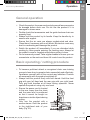
>> Check the product, its power cord and plug as well as accessories
for damage before each use. Do not use the product if it is
damaged or shows wear.
>> Double check that accessories and the guide bar/saw chain are
properly fixed.
>> Always hold the product by its handle. Keep the handle dry to
ensure safe support.
>> Ensure that the air vents are always unobstructed and clear.
Clean them if necessary with a soft brush. Blocked air vents may
lead to overheating and damage the product.
>> Switch the product off immediately if you are disturbed while
working by other people entering the working area. Always let
the product come to complete stop before putting it down.
>> Do not overwork yourself. Take regular breaks to ensure you can
concentrate on the work and have full control over the product.
Basic operating / cutting procedure
>> To become proficient attend a recognised chain saw training
course to learn how to operate chain saws safely and effectively.
Familiarise yourself with all the controls and switches. Practise
all movements with the product switched off.
>> Always hold the product firmly with both hands. Hold the front
grip with your left hand and the rear grip with your right hand.
Fully grip both handles at all times during operation. Never
operate the product using only one hand.
>> Ensure the power cord is located
to the rear, away from the chain
and the wood and is positioned
so that it cannot be caught on
branches or similar objects during
cutting.
>> Only use the product with a
secure stance. Hold the product
to the right-hand side of your
body (Fig. 20).
Fig. 20
In more detail...
General operation
17
MNL_MCS2000_DFT_GB_V06_111108.indd 17
11/8/11 5:11:13 PM
GB
IE
Operation
MCS2000 by MacAllister
Basic operating / cutting procedure
In more detail...
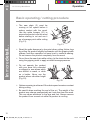
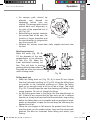
>> The saw chain (3) must be
running at full speed before it
makes contact with the wood.
Use the spike bumper (21) to
secure the product onto the wood
before starting to cut and use it
as a leverage point while cutting
(Fig. 21).
Fig. 21
>> Reset the spike bumper at a low point when cutting thicker logs
by pulling the product slightly backwards until the gripping teeth
release, and then reposition at lower level to continue sawing.
Do not remove the product completely from the wood.
>> Do not force the saw chain while cutting, let the chain do the work
using the gripping teeth to apply minimal leverage pressure.
>> Do not operate the product
with your arms fully extended
or attempt to saw areas which
are difficult to reach, or while
on a ladder. Never use the
product above shoulder height
(Fig. 22).
Fig. 22
>> Optimum sawing is achieved if the chain speed remains constant
during cutting.
>> Be careful when reaching the end of the cut. The weight of the
product may change unexpectedly as it cuts free from the wood.
This can cause accidents to the legs and feet. Always remove
the product from a wood cut while the product is running.
18
MNL_MCS2000_DFT_GB_V06_111108.indd 18
11/8/11 5:11:14 PM
Operation
MCS2000 by MacAllister
GB
IE
Kickback
Kickback may occur if the nose or tip of the guide bar touches an
object, or if wood pinches the saw chain in the cut.
In some cases, contact with the tip of the guide bar (4) may cause
a lightning-fast reverse reaction, kicking the guide bar up and back
toward the operator (Figs. 23 - 25).
Fig. 23
Fig. 24
Fig. 25
>> Pinching of the saw chain (3)
along the bottom of the guide bar
(4) may pull the product forward
away from the operator (Fig. 26).
In more detail...
WARNING! Beware of kickback! Kickback can lead to
dangerous loss of control of the product and result in
serious or fatal injury to the operator or anyone standing
close by! Always be alert because rotational kickback and
pinch kickback are major product operational dangers and
the leading cause of most accidents!
Fig. 26
>> Pinching of the saw chain (3)
along the top of the guide bar
(4) may push the guide bar
rapidly back toward the operator
(Fig. 27).
Fig. 27
>> Any of these reactions may cause a loss of control over the
product, which could result in serious personal injury or even
death.
19
MNL_MCS2000_DFT_GB_V06_111108.indd 19
11/8/11 5:11:15 PM
GB
IE
MCS2000 by MacAllister
Operation
In more detail...
Kickback
>> With a basic understanding of ‘kickback’, the element of surprise
can be reduced or eliminated. Sudden surprise contributes to
the majority of accidents.
>> Keep a good firm grip on the product with both hands, your right
hand on the rear handle (12) and your left hand on the front
handle (1), when the motor is running. Maintain a firm grip with
your thumbs and fingers encircling the handles. A firm grip will
help you reduce ‘kickback’ and maintain control of the product.
>> You should read all the safety warnings and user instructions
carefully before attempting to operate this product.
To avoid kickback:
• Saw with the guide bar at a flat angle.
• Never work with a loose, widely stretched or heavily worn
chain.
• Ensure the chain is sharpened correctly.
• Never saw above shoulder height.
• Never work with the tip of the guide bar.
• Always hold the product firmly with both hands.
• Always use a low kickback chain.
• Apply the metal gripping teeth for leverage.
• Ensure correct chain tension.
Felling a tree
>> When bucking and felling operations are being performed by
two or more persons at the same time, the felling operations
should be separated from the bucking operation by a distance
of at least twice the height of the tree being felled. Trees should
not be felled in a manner that would endanger any person, strike
any utility line or cause any property damage. If the tree does
make contact with any utility line, the company should be notified
immediately.
>> The product operator should keep on the uphill side of the terrain
as the tree is likely to roll or slide downhill after it is felled.
20
MNL_MCS2000_DFT_GB_V06_111108.indd 20
11/8/11 5:11:16 PM
Notching undercut
Make the notch (Fig. 29, B)
1/3 the diameter of the tree,
perpendicular to the direction
of falls (Fig. 29). Make the
lower horizontal notching cut
first. This will help to avoid B
pinching either the saw chain or
the guide bar when the second
notch is being made.
50 mm
C
50 mm
>> An escape path should be
planned
and
cleared
as
necessary before cuts are
started. The escape path should
extend back and diagonally to
the rear of the expected line of
fall (Fig. 28).
>> Before felling is started, consider
the natural lean of the tree, the
Fig. 28
location of larger branches and
the wind direction to judge which
way the tree will fall.
>> Remove dirt, stones, loose bark, nails, staples and wire from
the tree.
A
Fig. 29
Felling back cut
>> Make the felling back cut (Fig. 29, A) at least 50 mm higher
than the horizontal notching cut (Fig. 29). Keep the felling back
cut parallel to the horizontal notching cut. Make the felling
back cut so enough wood is left to act as a hinge. The hinge
(Fig. 29, C) wood keeps the tree from twisting and falling in the
wrong direction. Do not cut through the hinge.
>> As the felling gets close to the hinge, the tree should begin to
fall. If there is any chance that the tree may not fall in desired
direction or it may rock back and bind the saw chain, stop cutting
before the felling back cut is complete and use wedges of wood,
plastic or aluminium to open the cut and drop the tree along the
desired line of fall.
>> When the tree begins to fall remove the product from the cut,
stop the motor, put the product down, then use the retreat path
planned. Be alert for overhead limbs falling and watch your
footing.
MNL_MCS2000_DFT_GB_V06_111108.indd 21
GB
IE
In more detail...
Operation
MCS2000 by MacAllister
21
11/8/11 5:11:16 PM
GB
IE
Operation
MCS2000 by MacAllister
In more detail...
Limbing and pruning
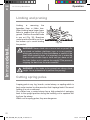
Limbing
is
removing
the
branches from a fallen tree.
When limbing leave larger lower
limbs to support the log off the
ground. Remove the small limbs
in one cut (Fig. 30). Branches
under tension should be cut from
the bottom up to avoid binding
the product.
Fig. 30
WARNING! Never climb into a tree to limb or prune! Do
not stand on ladders, platforms, logs, or in any position
which may cause you to lose the balance or control of the
saw! When pruning trees, it is important not to make the
flush cut next to main limp or trunk until you have cut off
the limb further out to reduce the weight! This prevents
stripping the bark from the main member!
WARNING! If the limbs to be pruned are above chest
height, hire a professional to perform the pruning!
Cutting spring poles
A spring pole is any log, branch, rooted stump, or sapling which is
bent under tension by other wood so that it springs back if the wood
holding it is cut or removed.
On a fallen tree, a rooted stump has a high potential of springing
back to the upright position during the bucking cut to separate the
log from the stump.
Watch out for spring poles, they are dangerous.
22
MNL_MCS2000_DFT_GB_V06_111108.indd 22
11/8/11 5:11:16 PM
Operation
MCS2000 by MacAllister
GB
IE
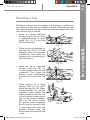
Bucking is cutting a log into lengths. It is important to make sure
your footing is firm and your weight is evenly distributed on both
feet. When possible, the log should be raised and supported by the
use of limbs, logs or chocks.
>> Follow the simple directions
for easy cutting. When the log
is supported along its entire
length (Fig. 31), it is cut from
the top (overbuck).
Fig. 31
>> When the log is supported on
one end (Fig. 32), cut 1/3 the
diameter from the underside
(underbuck). Then make the
finished cut by overbucking to
meet the first cut.
Fig. 32
>> When the log is supported
on both ends (Fig. 33), cut
1/3 the diameter from the top
(overbuck). Then make the
finished cut by underbucking
the lower 2/3 to meet the first
cut.
>> When bucking on a slope
always stand on the uphill
side of the log (Fig. 34). When
“cutting through”, to maintain
complete control release the
cutting pressure near the end
of the cut without relaxing your
grip on the product handles.
Don’t let the chain contact
the ground. After completing
the cut, wait for the saw chain
to stop before you move the
product. Always stop the
motor before moving from tree
to tree.
MNL_MCS2000_DFT_GB_V06_111108.indd 23
In more detail...
Bucking a log
Fig. 33
Fig. 34
23
11/8/11 5:11:18 PM
GB
IE
Operation
MCS2000 by MacAllister
Bucking a log
In more detail...
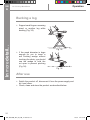
>> Support small logs on a sawing
stand or another log while
bucking (Fig. 35).
Fig. 35
>> If the wood diameter is large
enough for you to insert a
soft bucking wedge without
touching the chain, you should
use the wedge to hold the
cut open to prevent pinching
(Fig. 36).
Fig. 36
After use
>> Switch the product off, disconnect it from the power supply and
let it cool down.
>> Check, clean and store the product as described below.
24
MNL_MCS2000_DFT_GB_V06_111108.indd 24
11/8/11 5:11:18 PM
MCS2000 by MacAllister
Care and maintenance
GB
IE
The golden rules for care
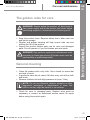
>> Keep the product clean. Remove debris from it after each use
and before storage.
>> Regular and proper cleaning will help ensure safe use and
prolong the life of the product.
>> Inspect the product before each use for worn and damaged
parts. Do not operate it if you find broken and worn parts.
WARNING! Only perform repairs and maintenance work
according to these instructions! All further works must be
performed by a qualified specialist!
General cleaning
>> Clean the product with a dry cloth. Use a brush for areas that
are hard to reach.
>> In particular clean the air vents (18) after every use with a cloth
and brush.
>> Remove stubborn dirt with high pressure air (max. 3 bar).
In more detail...
WARNING! Always switch the product off, disconnect it
from power supply and let the product cool down before
performing inspection, maintenance and cleaning work!
NOTE: Do not use chemical, alkaline, abrasive or other
aggressive detergents or disinfectants to clean this
product as they might be harmful to its surfaces.
>> Check for worn or damaged parts. Replace worn parts as
necessary or contact an authorised service centre for repair
before using the product again.
25
MNL_MCS2000_DFT_GB_V06_111108.indd 25
11/8/11 5:11:19 PM
GB
IE
MCS2000 by MacAllister
Care and maintenance
Sprocket nose
In more detail...
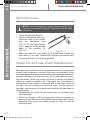
NOTE: It is not necessary to remove the saw chain (3) to
lubricate the sprocket nose (5). Lubrication can be done
on the job.
>> Clean the sprocket nose (5).
A
>> Using a disposable lube gun,
insert the nose of the needle
into the lubrication hole
(Fig. 37, A) and inject grease
until it appears on the outside
edge of the sprocket (5)
(Fig. 37).
Fig. 37
>> Make sure that the chain brake (2) is deactivated. Rotate the
saw chain (3) by hand. Repeat the lubrication procedure until
the entire sprocket (5) has been greased.
MIN
Guide bar and saw chain maintenance
Most guide bar problems can be prevented merely by keeping the
product well maintained. Incorrect filing and non-standard cutter
and depth gauge settings are the causes of most guide bar problems,
primarily resulting in uneven bar wear. As the bar wears unevenly,
the rails widen, which may cause the chain to clatter and make it
difficult to complete straight cuts. If the guide bar is insufficiently
lubricated and the product is operated with a saw chain which is
too tight, this will contribute to rapid bar wear. To help minimise
bar wear, maintenance of the guide bar as well as the saw chain is
recommended.
>> Disassemble the guide bar and saw chain in reversed order
from assembly.
>> Check the oiling port (19) for clogging and clean if necessary to
ensure proper lubrication of the guide bar and saw chain during
operation. Use a soft wire small enough to insert into the oil
discharge hole.
26
MNL_MCS2000_DFT_GB_V06_111108.indd 26
11/8/11 5:11:19 PM
Care and maintenance
MCS2000 by MacAllister
GB
IE
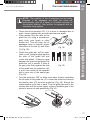
>> Check the drive sprocket (22). If it is worn or damaged due to
strain, have it replaced by an authorised service agent.
>> Clear residue from the rails on the
guide bar (4) using a screwdriver,
putty knife, wire brush or other
similar tool. This will keep the oil
passages open to provide proper
lubrication to the bar (4) and chain
Fig. 38
(3) (Fig. 38).
>> Check the guide bar ‘rail’ for wear:
Hold a ruler (straight edge) against
the side of the guide bar and
‘cutter side plates’. If there is a gap
between the ruler and guide bar the
guide bar ‘rail’ is normal. If there is
Fig. 39
no gap (ruler flush against the side
of the guide bar) the guide bar ‘rail’
is worn and needs to be replaced
with a new one of the same type
(Fig. 39).
>> Turn the guide bar 180° to allow even wear, thereby extending
the life span of the guide bar (4). Loosen the screw and remove
the tension disc (23) from the guide bar (Fig. 40). Ensure the
rubber washer (a) is free of wear. Turn the guide bar and fix the
tension disc with the screw. Apply a drop of suitable glue to the
screw to ensure its safe positioning (Fig. 41).
In more detail...
NOTE: The condition of the oil passages can be easily
checked. If the passages are clear, the chain will
automatically give off a spray of oil within seconds of
the product starting. Your product is equipped with an
automatic oiling system.
23
Fig. 40
Fig. 41
27
MNL_MCS2000_DFT_GB_V06_111108.indd 27
11/8/11 5:11:20 PM
GB
IE
Care and maintenance
MCS2000 by MacAllister
Guide bar and saw chain maintenance
>> Check the saw chain for possible wear and damages. Replace
it with a new one if required. Experienced users can sharpen a
dull saw chain (see section “Saw chain sharpening” below).
>> Refit the saw chain (3) and the guide bar (4) as described under
“Assembly”.
In more detail...
Saw chain sharpening
NOTE: Never saw with a blunt chain. The saw chain is
blunt if you have to push the product into the tree and the
chips are very small.
>> Have your chain (3) sharpened professionally at an authorised
service centre or sharpen the chain yourself using a proper
sharpening kit. Also observe the sharpening instructions
supplied with the sharpening kit.
WARNING! Only sharpen the saw chain yourself if you
are trained and have experience! Use proper tools to
sharpen the saw chain!
>> The height difference between the
tooth and the ridge is the cutting
depth. When sharpening the saw
chain (3) you have to consider the
following points (Fig. 42).
• File angle
• Cutting angle
• File position
• Diameter of round file
• File depth
Left-hand
Right-hand cutter
cutter
Bumper tie
strap
Bumper
drive link
Tie
strap
Fig. 42
Saw chain
direction
28
MNL_MCS2000_DFT_GB_V06_111108.indd 28
11/8/11 5:11:20 PM
Care and maintenance
>> To sharpen the chain proceed as follows:
• Use protective gloves.
• Ensure the chain is correctly tensioned.
• Engage the chain brake to lock the chain on the bar.
>> Use a round file, whose diameter is 1.1 times the cutting tooth
depth. Make sure 20% of the file diameter is above the cutter’s
top plate.
Sharpening angle
>> A file guide is available from most
25°
reputable tool merchants and is
File
Left-hand
the easiest way to hold the file at
direction
cutter
Outside
the correct position.
>> File at an angle perpendicular to
Inside
the bar, and at an angle of 25° to
the direction of travel (Fig. 43).
Saw chain direction
Fig. 43
>> File each tooth from the inside towards outside only. File one
side of the chain first than turn the saw around and repeat the
process.
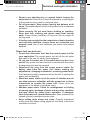
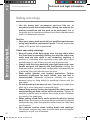
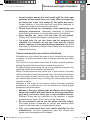
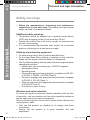
>> Sharpen each tooth equally by using the same number of
strokes.
>> Keep all cutter lengths equal. Check the safety depth gauge
height every 5 sharpenings. If the depth gauges are also trimmed
it is essential that the original profile is restored.
Cutting tip
>> Use a depth gauge
Depth gauge
position
setting 0.025”
measuring
instrument Top plate File Cutter
to check the height of
length
the depth gauge. Depth
gauge measuring jigs
are available from most
reputable tool merchants
Depth gauge
(Fig. 44).
Fig. 44
GB
IE
In more detail...
MCS2000 by MacAllister
29
MNL_MCS2000_DFT_GB_V06_111108.indd 29
11/8/11 5:11:20 PM
GB
IE
MCS2000 by MacAllister
Care and maintenance
Power cord
>> If the power cord is damaged, it must be replaced by the
manufacturer, its service agent or similarly qualified persons in
order to avoid a safety hazard.
In more detail...
UK plug
If you need to replace the fitted plug, then follow the instructions
below. IMPORTANT: The wires in the mains lead are coloured in
accordance with the following code:
Blue – Neutral
Brown – Live
As the colours of the wire in the mains lead of this product may not
correspond with the coloured marking identifying the terminals in
your plug, proceed as follows. The wire, which is coloured blue, must
be connected to the terminal, which is marked with N or coloured
black. The wire, which is coloured brown, must be connected to the
terminal, which is marked L or coloured red.
Connect
Blue to
N(Neutral)
13AMP fuse
approved to
BS 1362
Brown L(Live)
Outer sleeve
firmly clamped
Cable grip
WARNING! Never connect live or neutral wires to the
earth terminal of the plug.
Only fit an approved 13 Amp BS 1363 or BS 1363/A plug and the
correctly rated fuse.
If in doubt, consult a qualified electrician.
NOTE: If a moulded plug is fitted and has to be removed
take great care in disposing of the plug and severed cable,
it must be destroyed to prevent engaging into a socket.
30
MNL_MCS2000_DFT_GB_V06_111108.indd 30
11/8/11 5:11:21 PM
MCS2000 by MacAllister
Care and maintenance
GB
IE
Repair
>> This product does not contain any parts that can be repaired by
the consumer. Contact a qualified specialist to have it checked
and repaired.
>> Clean the product as described above.
>> Store the product and its accessories in a dry, frost-free place.
>> Always store the product in a place that is inaccessible to children.
The ideal storage temperature is between 10 and 30°C.
>> We recommend using the original package for storage or
covering the product with a suitable cloth to protect it against
dust.
Transportation
>> Switch the product off and disconnect it from power supply
before transporting it anywhere.
>> Attach transportation guards, if applicable.
>> Always carry the product by its handle.
>> Protect the product from any heavy impact or strong vibrations
which may occur during transportation in vehicles.
>> Secure the product to prevent it from slipping or falling over.
In more detail...
Storage
31
MNL_MCS2000_DFT_GB_V06_111108.indd 31
11/8/11 5:11:21 PM
GB
IE
Trouble shooting
MCS2000 by MacAllister
Trouble shooting
Suspected malfunctions are often due to causes that the users can
fix themselves. Therefore check the product using this section. In
most cases the problem can be solved quickly.
In more detail...
WARNING! Only perform the steps described within these
instructions! All further inspection, maintenance and repair
work must be performed by an authorised service centre
or a similarly qualified specialist if you cannot solve the
problem yourself!
Problem
Possible cause
Solution
1. Product does
not start
1.1 Not connected to
power supply
1.2 Power cord or plug
is defective
1.1 Connect to power
supply
1.2. Check by
a specialist
electrician
1.3. Check by
a specialist
electrician
2.1 Use a proper
extension cord
2. Product does
not reach full
power
3. Unsatisfactory
cutting
performance
1.3 Other electrical
defect to the
product
2.1 Extension cord
not suitable for
operation with this
product
2.2 Power source (e.g.
generator) has too
low voltage
2.3 Air vents are
blocked
3.1.Saw chain not
tensioned properly
3.2 Blunt saw chain
2.2. Connect to another
power source
2.3. Clean the air vents
3.1.Tension properly
3.2 Sharpen or replace
the saw chain
32
MNL_MCS2000_DFT_GB_V06_111108.indd 32
11/8/11 5:11:21 PM
MCS2000 by MacAllister
Recycling and disposal
GB
IE
>> Waste electrical products should not be disposed of
with household waste. Please recycle where facilities
exist. Check with your Local Authority or local store for
recycling advice.
>> Petrol, oil, old oil, a mixture of oil and petrol and objects
soiled with oil e.g. cleaning cloths do not belong in the
household rubbish. Dispose of oily items in accordance
with local guidelines and hand them in at recycling
centres.
In more detail...
Recycling and disposal
33
MNL_MCS2000_DFT_GB_V06_111108.indd 33
11/8/11 5:11:21 PM
GB
IE
MCS2000 by MacAllister
Technical and legal information
In more detail...
Technical specifications
General
>> Rated voltage
>> Rated input
>> Rated no load speed n0
>> Guide bar length
>> Guide bar type
>> Saw chain type
>> Volume of oil tank
>> Chain oil type
:
:
:
:
:
:
:
:
230 - 240 V~, 50 Hz
2000 W
8000 min-1
405 mm (16 “)
OREGON 160SDEA041
OREGON 91PJ057X
200 ml
SAE #30 in summer and
SAE #10 in winter
>> Protection class
: II
>> Weight
: approx. 5.1 kg
Sound level according to EN60745-1, EN60745-2-13 and
2000/14/EC
>> Sound pressure level LpA
: 95 dB(A)
>> Sound power level LWA
: 106.5 dB(A)
>> Uncertainty KpA, KWA
: 0.5 dB(A)
>> Guaranteed power level LWA
: 107 dB(A)
Hand arm vibration according to EN60745-1 and
EN60745-2-13
>> Front handle ah
: 3.558 m/s²
>> Rear handle ah
: 4.145 m/s²
>> Uncertainty K
: 1.5 m/s²
The declared vibration value has been measured in accordance
with a standard test method and may be used for comparing one
product with another.
The declared vibration value may also be used to evaluate the
exposure for the user caused by vibration in advance.
34
MNL_MCS2000_DFT_GB_V06_111108.indd 34
11/8/11 5:11:21 PM
Technical and legal information
MCS2000 by MacAllister
GB
IE
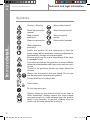
Symbols
On the product, the rating label and within these instructions you
will find among others the following symbols and abbreviations.
Familiarise yourself with them to reduce hazards like personal
injuries and damage to property.
V~
W
A
Hz
kW
Volt, (alternating voltage)
Watt
Ampere
Hertz
Kilowatt
cm³
Cubic centimetre
min-1
mm
kg
dB(A)
m/s²
Per minute
Millimetre
Kilogram
Decibel (A-rated)
Metres per seconds
squared
In more detail...
WARNING! Depending on the actual use of the product the
vibration values can differ from the declared total! Adopt
proper measures to protect yourself against vibration
exposures! Take the whole work process including times
the product is running under no load or switched off into
consideration!
Proper measures include among others regular
maintenance and care of the product and application
tools, keeping hands warm, periodical breaks and proper
planning of work processes!
RyyWxx Manufacturing date code; year of manufacturing (20yy)
and week of manufacturing (Wxx); “R”: Complies with
Directive 2002/95/EC on the restriction of the use of
certain hazardous substances in electrical and electronic
equipment.
35
MNL_MCS2000_DFT_GB_V06_111108.indd 35
11/8/11 5:11:21 PM
GB
IE
MCS2000 by MacAllister
Technical and legal information
In more detail...
Symbols
Caution / Warning.
Wear safety helmet!
Read the instruction
manual.
Wear face protection!
Wear hearing
protection.
Wear protective
gloves.
Wear eye protection.
Wear safety footwear.
Wear respiratory
protection.
Switch the product off and disconnect it from the
power supply before assembly, cleaning, adjustments,
maintenance, storage and transportation.
Remove plug from the mains immediately if the cable
is damaged or cut.
Tip contact may cause the guide bar to move suddenly
upward and backwards what may cause serious injury
to user.
Contact of the guide bar tip with any object should be
avoided.
Always use the product with two hands. Do not use
one handed when operating the product.
Correct direction of cutting-teeth.
Chain brake.
Do not expose to rain.
Objects thrown by the product could hit the user or
other bystanders. Always ensure that other people
and pets remain at a safe distance from the product
when it is in operation. In general, children must not
come near the area where the product is.
36
MNL_MCS2000_DFT_GB_V06_111108.indd 36
11/8/11 5:11:21 PM
Technical and legal information
MCS2000 by MacAllister
GB
IE
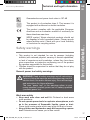
Guaranteed sound power level value in 107 dB
This product is of protection class II. That means it is
equipped with enhanced or double insulation.
The product complies with the applicable European
directives and an evaluation method of conformity for
these directives was done.
Safety warnings
>> This product is not intended for use by persons (including
children) with reduced physical, sensory or mental capabilities,
or lack of experience and knowledge, unless they have been
given supervision or instruction concerning use of the product
by a person responsible for their safety.
>> Children should be supervised to ensure that they do not play
with the product.
General power tool safety warnings
WARNING! Read all safety warnings and all instructions.
Failure to follow the warnings and instructions may result in
electric shock, fire and/or serious injury. Save all warnings
and instructions for future reference.
The term “power tool” in the warnings refers to your
mains-operated (corded) power tool or battery-operated
(cordless) power tool.
In more detail...
WEEE symbol. Waste electrical products should not
be disposed of with household waste. Please recycle
where facilities exist. Check with your Local Authority
or local store for recycling advice.
Work area safety
>> Keep work area clean and well lit. Cluttered or dark areas
invite accidents.
>> Do not operate power tools in explosive atmospheres, such
as in the presence of flammable liquids, gases or dust.
Power tools create sparks which may ignite the dust or fumes.
>> Keep children and bystanders away while operating a power
tool. Distractions can cause you to lose control.
MNL_MCS2000_DFT_GB_V06_111108.indd 37
37
11/8/11 5:11:21 PM
GB
IE
MCS2000 by MacAllister
Technical and legal information
Safety warnings
In more detail...
Electrical safety
>> Power tool plugs must match the outlet. Never modify the
plug in any way. Do not use any adapter plugs with earthed
(grounded) power tools. Unmodified plugs and matching
outlets will reduce risk of electric shock.
>> Avoid body contact with earthed or grounded surfaces,
such as pipes, radiators, ranges and refrigerators. There is
an increased risk of electric shock if your body is earthed or
grounded.
>> Do not expose power tools to rain or wet conditions. Water
entering a power tool will increase the risk of electric shock.
>> Do not abuse the cord. Never use the cord for carrying,
pulling or unplugging the power tool. Keep cord away from
heat, oil, sharp edges or moving parts. Damaged or entangled
cords increase the risk of electric shock.
>> When operating a power tool outdoors, use an extension
cord suitable for outdoor use. Use of a cord suitable for
outdoor use reduces the risk of electric shock.
>> If operating a power tool in a damp location is unavoidable,
use a residual current device (RCD) protected supply. Use
of an RCD reduces the risk of electric shock.
Personal safety
>> Stay alert, watch what you are doing and use common
sense when operating a power tool. Do not use a power tool
while you are tired or under the influence of drugs, alcohol
or medication. A moment of inattention while operating power
tools may result in serious personal injury.
>> Use personal protective equipment. Always wear eye
protection. Protective equipment such as dust mask, non-skid
safety shoes, hard hat, or hearing protection used for appropriate
conditions will reduce personal injuries.
>> Prevent unintentional starting. Ensure the switch is in the
off-position before connecting to power source and/or
battery pack, picking up or carrying the tool. Carrying power
tools with your finger on the switch or energising power tools
that have the switch on invites accidents.
38
MNL_MCS2000_DFT_GB_V06_111108.indd 38
11/8/11 5:11:21 PM
Technical and legal information
>> Remove any adjusting key or wrench before turning the
power tool on. A wrench or a key left attached to a rotating part
of the power tool may result in personal injury.
>> Do not overreach. Keep proper footing and balance at all
times. This enables better control of the power tool in unexpected
situations.
>> Dress properly. Do not wear loose clothing or jewellery.
Keep your hair, clothing and gloves away from moving
parts. Loose clothes, jewellery or long hair can be caught in
moving parts.
>> If devices are provided for the connection of dust extraction
and collection facilities, ensure these are connected and
properly used. Use of dust collection can reduce dust-related
hazards.
Power tool use and care
>> Do not force the power tool. Use the correct power tool for
your application. The correct power tool will do the job better
and safer at the rate for which it was designed.
>> Do not use the power tool if the switch does not turn it on
and off. Any power tool that cannot be controlled with the switch
is dangerous and must be repaired.
>> Disconnect the plug from the power source and/or the
battery pack from the power tool before making any
adjustments, changing accessories, or storing power tools.
Such preventive safety measures reduce the risk of starting the
power tool accidentally.
>> Store idle power tools out of the reach of children and do
not allow persons unfamiliar with the power tool or these
instructions to operate the power tool. Power tools are
dangerous in the hands of untrained users.
>> Maintain power tools. Check for misalignment or binding
of moving parts, breakage of parts and any other condition
that may affect the power tool’s operation. If damaged,
have the power tool repaired before use. Many accidents are
caused by poorly maintained power tools.
>> Keep cutting tools sharp and clean. Properly maintained
cutting tools with sharp cutting edges are less likely to bind and
are easier to control.
GB
IE
In more detail...
MCS2000 by MacAllister
39
MNL_MCS2000_DFT_GB_V06_111108.indd 39
11/8/11 5:11:21 PM
GB
IE
MCS2000 by MacAllister
Technical and legal information
Safety warnings
>> Use the power tool, accessories and tool bits etc. in
accordance with these instructions, taking into account the
working conditions and the work to be performed. Use of
the power tool for operations different from those intended could
result in a hazardous situation.
In more detail...
Service
40
>> Have your power tools serviced by a qualified repair person
using only identical replacement parts. This will ensure that
safety of the power tool is maintained.
Chain saw safety warnings
>> Keep all parts of the body away from the saw chain when
the chain saw is operating. Before you start the chain saw,
make sure the saw chain is not contacting anything. A
moment of inattention while operating chain saws may cause
entanglement of your clothing or body with the saw chain.
>> Always hold the chain saw with your right hand on the rear
handle and your left hand on the front handle. Holding the
chain saw with a reversed hand configuration increases the risk
of personal injury and should never be done.
>> Wear safety glasses and hearing protection. Further
protective equipment for head, hands, legs and feet is
recommended. Adequate protective clothing will reduce
personal injury by flying debris or accidental contact with the
saw chain.
>> Do not operate a chain saw in a tree. Operation of a chain saw
while up in a tree may result in personal injury.
>> Always keep proper footing and operate the chain saw only
when standing on fixed, secure and level surface. Slippery or
unstable surfaces such as ladders may cause a loss of balance
or control of the chain saw.
>> When cutting a limb that is under tension be alert for spring
back. When the tension in the wood fibres is released the spring
loaded limb may strike the operator and/or throw the chain saw
out of control.
>> Use extreme caution when cutting brush and saplings.
The slender material may catch the saw chain and be whipped
toward you or pull you off balance.
MNL_MCS2000_DFT_GB_V06_111108.indd 40
11/8/11 5:11:22 PM
Technical and legal information
>> Carry the chain saw by the front handle with the chain saw
switched off and away from your body. When transporting
or storing the chain saw always fit the guide bar cover.
Proper handling of the chain saw will reduce the likelihood of
accidental contact with the moving saw chain.
>> Follow instructions for lubricating, chain tensioning and
changing accessories. Improperly tensioned or lubricated
chain may either break or increase the chance for kickback.
>> Keep handles dry, clean, and free from oil and grease.
Greasy, oily handles are slippery causing loss of control.
>> Cut wood only. Do not use chain saw for purposes not
intended. For example: do not use chain saw for cutting
plastic, masonry or non-wood building materials. Use of the
chain saw for operations different than intended could result in a
hazardous situation.
Causes and operator prevention of kickback
Kickback may occur when the nose or tip of the guide bar touches
an object, or when the wood closes in and pinches the saw chain
in the cut.
Tip contact in some cases may cause a sudden reverse reaction,
kicking the guide bar up and back towards the operator.
Pinching the saw chain along the top of the guide bar may push the
guide bar rapidly back towards the operator.
Either of these reactions may cause you to lose control of the saw
which could result in serious personal injury. Do not rely exclusively
upon the safety devices built into your saw. As a chain saw user,
you should take several steps to keep your cutting jobs free from
accident or injury.
Kickback is the result of tool misuse and/or incorrect operating
procedures or conditions and can be avoided by taking proper
precautions as given below:
>> Maintain a firm grip, with thumbs and fingers encircling the
chain saw handles, with both hands on the saw and position
your body and arm to allow you to resist kickback forces.
Kickback forces can be controlled by the operator, if proper
precautions are taken. Do not let go of the chain saw.
>> Do not overreach and do not cut above shoulder height.
This helps prevent unintended tip contact and enables better
control of the chain saw in unexpected situations.
>> Only use replacement bars and chains specified by the
manufacturer. Incorrect replacement bars and chains may
cause chain breakage and/or kickback.
MNL_MCS2000_DFT_GB_V06_111108.indd 41
GB
IE
In more detail...
MCS2000 by MacAllister
41
11/8/11 5:11:22 PM
GB
IE
MCS2000 by MacAllister
Technical and legal information
Safety warnings
>> Follow the manufacturer’s sharpening and maintenance
instructions for the saw chain. Decreasing the depth gauge
height can lead to increased kickback.
In more detail...
Additional safety warnings
>> The product should be supplied via a residual current device
(RCD) with a tripping current of not more than 30 mA.
>> Position the cord so that it will not be caught on branches and
the like, during cutting.
>> It is recommended that first-time user should, as a minimum
practice, cutting logs on a saw-horse or cradle.
Clothing and protective equipment
>> Do secure long hair so that it is above shoulder level.
>> Do not wear loose fitting clothing or jewellery as this could be
drawn into the engine, catch the chain or undergrowth.
>> Use the following safety clothing and protective equipment when
operating the product:
• Helmet with visor and neck guard - (EN397 compliant),
• Hearing protectors,
• Breathing mask,
• Gloves with approved saw protection (compliant to EN 3814, EN 381-7, EN420:1, EN 388 Class 0),
• Protective leggings with approved saw protection (compliant
to EN 381-5, EN 340 Class 1),
• Steel toe cap boots with approved saw protection (compliant
to EN 345-2 Class 2),
• First Aid kit in case of injury.
Vibration and noise reduction
42
To reduce the impact of noise and vibration emission, limit the time
of operation, use low-vibration and low-noise operating modes as
well as wear personal protective equipment.
Take the following points into account to minimize the vibration and
noise exposure risks:
>> Only use the product as intended by its design and these
instructions.
>> Ensure that the product is in good condition and well
maintained.
MNL_MCS2000_DFT_GB_V06_111108.indd 42
11/8/11 5:11:22 PM
MCS2000 by MacAllister
Technical and legal information
GB
IE
>> Use correct application tools for the product and ensure they in
good condition.
>> Keep tight grip on the handles/grip surface.
>> Maintain this product in accordance with these instructions and
keep it well lubricated (where appropriate).
>> Plan your work schedule to spread any high vibration tool use
across a number of days.
Familiarise yourself with the use of this product by means of
this instruction manual. Memorise the safety directions and
follow them to the letter. This will help to prevent risks and
hazards.
>> Always be alert when using this product, so that you can
recognise and handle risks early. Fast intervention can
prevent serious injury and damage to property.
>> Switch off and disconnect from the power supply if there
is any malfunction. Have the product checked by a qualified
specialist and repaired, if necessary, before you put it into
operation again.
Residual risks
Even if you are operating this product in accordance with all
the safety requirements, potential risks of injury and damage
remain. The following dangers can arise in connection with the
structure and design of this product:
>> Health defects resulting from vibration emission if the product is
being used over long periods of time or not adequately managed
and properly maintained.
>> Injuries and damage to property due to broken application tools
or the sudden impact of hidden objects during use.
>> Danger of injury and property damage caused by flying objects.
>> Injuries and damage to property to due to thrown and fallen
objects.
>> Prolonged use of this product expose the operator to vibrations
and may produce ‘whitefinger’ disease. In order to reduce the
risk, please wear gloves and keep your hands warm. If any of the
‘whitefinger’ symptoms appear, seek medical advice immediately.
‘Whitefinger’ symptoms include: numbness, loss of feeling,
tingling, pricking, pain, loss of strength, changes in skin colour
or condition. These symptoms normally appear in the fingers,
hands or wrists. The risk increases at low temperatures.
In more detail...
Emergency
43
MNL_MCS2000_DFT_GB_V06_111108.indd 43
11/8/11 5:11:22 PM
GB
IE
MCS2000 by MacAllister
Technical and legal information
In more detail...
WARNING! This product produces an electromagnetic
field during operation! This field may under some
circumstances interfere with active or passive medical
implants! To reduce the risk of serious or fatal injury, we
recommend persons with medical implants to consult
their doctor and the medical implant manufacturer before
operating this product!
44
MNL_MCS2000_DFT_GB_V06_111108.indd 44
11/8/11 5:11:22 PM
Guarantee
MCS2000 by MacAllister
GB
IE
>> This product has been manufactured to a high quality standard.
It is guaranteed against faulty materials and workmanship for 24
months from purchase, please retain your till receipt as proof of
purchase.
>> If the product is found to be defective within the relevant time
period, we will either replace all defective parts or, at our
discretion, replace the unit free of charge with the same item or
items of a greater value and/or specification.
>> This guarantee does not cover defects caused by or resulting
from:
• Misuse, abuse or neglect,
• Trade, professional or hire use,
• Repairs attempted by anyone other than our authorised repair
centre (call 0845 300 2577);
• Damage caused by foreign objects, substances or accident.
>> In the unlikely event that this product does develop a fault please
call the helpline on 0845 300 2577.
>> This guarantee does not affect your statutory rights. B&Q plc.
Chandlers Ford,Hants,SO53 3LE (Registered in England under
no. 973387)
In more detail...
Guarantee
www.diy.com
B&Q plc
Chandlers Ford, Hants,
SO53 3LE, United Kingdom
45
MNL_MCS2000_DFT_GB_V06_111108.indd 45
11/8/11 5:11:22 PM
GB
IE
MCS2000 by MacAllister
EC declaration of conformity
EC declaration of conformity
In more detail...
We
B&Q PLC.
CHANDLERS FORD, HANTS,
SO53 3LE
Declare that the product
2000W Electric Chain Saw MCS2000
Complies with the essential health and safety requirements of the
following Directives:
EC Machinery Directive 2006/42/EC
The Low Voltage Directive 2006/95/EC
The EMC Directive 2004/108/EC
The Outdoor Noise Directive 2000/14/EC&2005/88/EC
Standards and technical specifications referred to:
EN 60745-1
EN 55014-1
EN 60745-2-13
EN 55014-2
EN 61000-3-2
EN 61000-3-11
Measured Sound Power Level: 106.5 dB(A)
Guaranteed Sound Power Level: 107 dB(A)
The conformity assessment followed was according to Annex V of
the Directive
Notified body: TÜV Rheinland
Notified body identification number: 0197
Authorised Signatory
Name: Peter Brownhill
QA Product Development Manager
For and on behalf of B&Q plc
Date: 10/11/2011
All technical information is held at the address detailed above
B&Q PLC.
CHANDLERS FORD,
HANTS, SO53 3LE, UNITED KINGDOM
www.diy.com
46
MNL_MCS2000_DFT_GB_V06_111108.indd 46
11/8/11 5:11:22 PM
GB-IE
www.diy.com
B&Q plc.
Chandlers Ford, Hants,
SO53 3LE, United Kingdom
MNL_MCS2000_DFT_GB_V06_111108.indd 47
11/8/11 5:11:22 PM