1
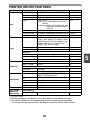
PRINTER DRIVER FEATURES
Tab
Setting
Copies
Initial setting
1
Collate
On/Off
On
N-Up Printing
1-Up/2-Up/4-Up/6-Up
1-Up
Order
1-Up: None
None
2-Up: Left To Right/Right To Left/Top To
Bottom
4-Up/6-Up: Right, and Down/Down, and
Right/Left, and Down/Down,
and Left
Border
On/Off
Document Style*1
1-Sided/2-Sided (Book)/2-Sided (Tablet) 1-Sided
Image Orientation
Portrait/Landscape/Rotate 180 degrees Portrait
Paper Size
A3 [Fit To Page]*2, A4, A5, A6, B4 [Fit To A4*3
Page]*2, B5, Ledger [Fit To Page]*2, Letter,
Legal, Executive, Invoice, Foolscap, Folio,
COM10, Monarch, DL, C5, 8K [Fit To
Page]*2, 16K, Custom Paper
Main
Paper
Selections
1 to 999
Off
Zoom settings
Normal/Fit To Paper Size/Zoom
Normal
Paper Source
Tray 1, Bypass Tray
Tray 1
Width
98.3 to 215.9 (mm.)/3.87 to 8.50 (in.)
98.3 (mm.)*3
Length
148.0 to 355.6 (mm.)/5.83 to 14.00 (in.) 148.0 (mm.)*3
Size
millimeters/inches
millimeters*3
Text To Black
On/Off
Off
Vector To Black
On/Off
Off
[Custom]
Advanced
Watermarks
[Image Adjustment]
Brightness
0 to 100
50
Contrast
0 to 100
50
Watermark
(None)/TOP SECRET/CONFIDENTIAL/ (None)
DRAFT/ORIGINAL/COPY
Text
-
Size
6 to 300
100
Angle
-90 to +90
+45
-
On First Page Only On/Off
Configuration ROPM
Main, Paper,
Advanced,
Watermarks
Off
On/Off
On
Up to 30 names, 20 characters each
-
[User Settings]
Setting Name
*1 AL-2041 only
*2 Will be reduced to A4 (letter) size or the specified size before printing.
*3 This initial setting may vary depending on your operating user programs.
For information on each setting, see Help in the printer driver setup screen.
51
5