1
5 When your friend accepts, the video chat starts.
For additional information, go to http://messenger.msn.com .
Video chat using Yahoo Messenger
To use Yahoo Messenger:
1 If you don’t have Yahoo Messenger, go to http://messenger.yahoo.com
to download it.
2 After you register, download, and install the software, sign on to the
Yahoo Messenger service.
3 From the main window, click Tools, then select Start My Webcam.
4 Right-click on a friend’s name in your Messenger List, then choose View
Webcam. Your friend receives an invitation message to chat with you.
5 When your friend clicks YES, the video chat starts.
For additional information, go to http://messenger.yahoo.com .
Video chat using AOL Instant Messenger
To use AOL Instant Messenger:
1 If you don’t have AOL Instant Messenger, go to http://www.aim.com to
download it.
2 After you register, download, and install the software, sign on to the AOL
Instant Messenger service.
3 Click Show Messenger Lists, then choose the friend you want to video chat
with. Your friend receives an invitation message to chat with you.
4 When your friend accepts, the video chat starts.
For additional information, go to http://www.aim.com .
Adjusting Skype settings
To adjust Skype settings:
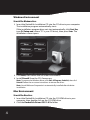
1 Open the Skype program and click Tools, Options, then Sound Devices.
2 Uncheck the Enable automating sound-device setting adjustment box.
Changing the Windows sound configuration
To change the Windows sound configuration:
1 Click Start, Programs, Accessories, Entertainment, then Volume Control.
RF-NBCAM
7