1
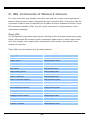
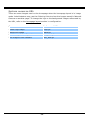
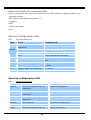
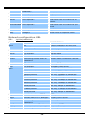
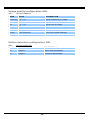
Erase snapshots stored in Flash memory
Typing "erase image" will clear all snapshots saved in Flash memory.
Erase logo and graphic buttons
Typing "erase graph" will clear all images used on the homepage. If no new images are
uploaded, the system will switch to text mode and use default images instead.
Skip installation at next boot
Typing "lock" will inform Network Camera to fix current network settings. It need not
wait for installation during the next boot.
Reset network for new settings
Typing "unlock" will make Network Camera give up current settings and wait for
installation.
Restore factory default settings
Typing "clear" will make Network Camera restore factory settings but not restart. To
validate new settings, type "reset" to make the system restart.
Reset system
Typing "reset" will make Network Camera perform a software reset.
- 66 -