1
OPERATION
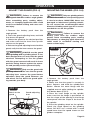
2. Depress the battery-release button
located on the front of the battery pack to
release the battery pack.
3. Pull the battery pack forward to remove it
from the tool.
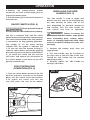
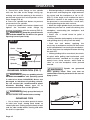
ON/OFF SWITCH (FIG. 2)
WARNING: Firmly grasp the body of
the tool and the side handle before starting.
The tool is switched “ON” with the switch
button located at the top of the motor housing.
The switch can be locked in the “ON” position,
a convenience for long grinding operations.
The symbol “O” on the motor housing
indicates OFF; the symbol “l” indicates ON.
1. To turn the tool ON without locking it,
slide the switch button forward by applying
pressure only at the rear portion of the button.
2. To unlock the switch and turn the tool
OFF, press and release the rear portion of
the switch button; it will return to the OFF
position automatically.
FOR CONTINUOUS
OPERATION (FIG. 2)
1. Push the switch button forward to the ON
position and press the front of the button
down until the switch clicks into position.
2. To unlock the switch and turn the
tool OFF, press the rear of the button.
FIG. 2
Page 11
Switch button
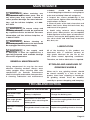
INSTALLING THE SIDE
HANDLE (FIG. 3)
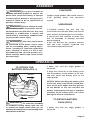
The side handle is used to guide and
balance the tool and can be threaded into
the front housing on either side of the
tool, depending on personal preference
and comfort. Use the side handle for
safe control and ease of operation.
WARNING: Failure to remove the
battery pack from the cordless angle grinder
when assembling parts, making adjustments, or changing application tools could
result in accidental starting and cause serious injury.
1. Remove the battery pack from the
angle grinder.
2. The side handle may be installed on
the right side or the left side of the tool.
Thread the side handle into the desired
operating position.
3. Securely tighten the side handle by
turning it clockwise.
FIG. 3