1
ENGLISH
Menu Settings:
Set up Menu / Configuring Scale
1
2
3
4
5
6
7
8
9
(Factory set parameters are marked “0”.)
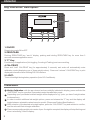
Turn off scale.
Turn on while holding the ZERO/TARE key.
Page or level value “1” will be displayed.
To navigate within a menu level press “F”, when you reach the last menu item, the first item is shown again.
To select the next line or level within a group press and release “CAL/PRINT” key.
To return to the previous level (or page) press “ZERO/TARE” Key.
To confirm selected parameters press and hold the “CAL/PRINT” key for more than 3 seconds.
“0” indicates the selected menu setting.
To store selected codes and exit menu press and hold “ZERO/TARE” key for 3 seconds or until display
returns to weigh mode.
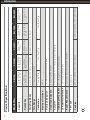
Scale Operating Menu:
Unit Toggling
141 Unlocked “0”
142 Locked
No. Of Stop Bits
231 1 “0”
232 2
Auto Zero
151 On “0”
152 Off
Manual / Auto Print Mode
311 Manual without stability
312 Manual after stability
313 Auto without stability
314 Auto at stability
Calibration Setting
171 Calibration on “0”
172 Calibration off
Baud Rate
211 1200 Baud “0”
212 2400 Baud
213 4800 Baud
214 9600 Baud
Parity
221 Mark
222 Space
223 Odd “0”
224 Even
5
Disable Keys
(Disables All Keys Except for “ZERO/T
TARE” Key)
411 On
412 Off “0”
Battery ON/OFF Mode
511 Turns off after 4 minutes of in-activity “0”
512 Always on
513 Turns off after 10 minutes of in-activity
Factory Settings
911 Reset