1
Dell
™
POWEREDGE
M610
™
technical guidebook
Inside the poweredge M610
Dell™ PowerEdge™ M610 Technical Guidebook
TABLE OF CONTENTS
Section 1. System overview
A. Overview / Description
5
5
Section 2. Mechanical
A. Dimensions and Weight (blade only)
B. Front Panel View and Features
C. Side Views and Features
D. Security
E. USB Key
F. Battery
G. Field Replaceable Units (FRU)
6
6
6
8
8
9
9
9
Section 3. Power, Thermal, Acoustic
A. Environmental Specifications
B. Acoustics
9
9
10
Section 4. block diagram
10
Section 5. PROCESSORS
A. Overview / Description
B. Features
C. Supported Processors
D. Processor Configurations
11
11
12
12
12
Section 6. Memory
A. Overview / Description
B. DIMMs Supported
C. Speed
14
14
15
16
Section 7. CHIPSET
A. Overview / Description
18
18
Section 8. bios
A. Overview / Description
B. I2C (Inter-Integrated Circuit)
19
19
20
Section 9. Embedded NICs / LOMs
A. Overview / Description
20
20
Section 10. MEZZANINE CARD SLOTS
A. Overview / Description
20
20
Dell™ PowerEdge™ M610 Technical Guidebook
Section 11. STORAGE
A. Overview / Description
B. Storage Controllers
21
21
21
Section 12. video
A. Overview / Description
22
22
Section 13. OPERATING SYSTEMS
A. Overview / Description
23
23
Section 14. Virtualization
25
Section 15. SYSTEMS MANAGEMENT
A. Overview / Description
B. Server Management
C. Embedded Server Management
I. Unmanaged Persistent Storage
II. Lifecycle Controller / Unified Server Configurator
III. iDRAC6 Express / Enterprise
25
25
25
26
26
27
27
Section 16. Peripherals
A. USB peripherals
29
29
Section 17. DOCUMENTATION
A. Overview, Description, and List
29
29
Section 18. Packaging Options
30
Dell™ PowerEdge™ M610 Technical Guidebook
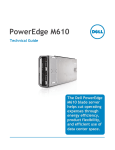
The Dell™ PowerEdge™ M610
The Dell PowerEdge M-Series blade servers help cut operating expenses through energy efficiency,
product flexibility, and efficient use of data center space. When combined with Dell’s world-class
storage, management, and support offerings, the result is a total enterprise solution that can help
you simplify and save on IT expenses.
Strong IT Foundation
To build the most efficient data center solutions, Dell sought input from IT professionals. You asked for
reliability, scalability, energy efficiency, and a lower total cost of ownership. Our next-generation M610
blade servers deliver, becoming the cornerstone of a high-performance data center capable of keeping
pace with your changing business demands.
Purposeful Design
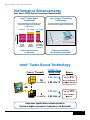
Designed with your needs in mind, these M-Series blades use the Intel® Xeon® 5500 Series Processor.
This processor series adapts to your software in real time, processing more tasks simultaneously. Using
Intel Turbo Boost Technology, the M-Series blades can increase performance during peak usage periods.
When demand decreases, Intel Intelligent Power Technology helps reduce operating costs and energy
usage by proactively putting your server into lower power states.
To enhance virtualization and database performance, the M610 is designed with 50% more memory
capacity than its predecessor. This increased memory capacity saves money by enabling you to use
smaller, less-expensive DIMMs to meet your computing needs.
Scalability for Growth
As your application needs increase, M-Series blades allow you to scale up to 128 cores and 1536GB of
memory per 10U chassis, with opportunities for even greater capacities in the future. To keep pace with
changing requirements, you can effectively scale I/O application bandwidth with end-to-end 10Gbe or
FC8 solutions. Virtualize I/O within your M-Series chassis using Cisco’s Virtual Blade Switch technology,
and manage up to nine Cisco Ethernet switches as a single switch.
Additionally, use NPIV and Port Aggregator modes on a variety of switches to virtualize Ethernet or
Fibre Channel ports for integration into heterogeneous fabrics. By harnessing Dell’s FlexIO modular
switches, you can scale your I/O needs cost effectively, adding ports and functionality through switch
modules, including 10Gb uplinks and stacking ports instead of needing to buy complete new switches.
Simplified Systems Management
Gain more control with the next-generation Dell OpenManage™ suite of management tools. These tools
provide enhanced operations and standards-based commands designed to integrate with existing
systems for effective control. Dell Management Console (DMC) helps simplify operations and creates
stability by shrinking infrastructure management to a single console. This delivers a single view and
a common data source for your entire infrastructure management. Built on Symantec® Management
Platform, it has an easily extensible, modular foundation that can provide basic hardware management
all the way up to more advanced functions, such as asset and security management. Dell Management
Console reduces or eliminates manual processes, enabling you to save time and money for more
strategic technology usage.
The Dell Management Console integrates with the Chassis Management Controller allowing a single
view of the chassis. The DMC allows the customer to manage the chassis as one entity, further
simplifying management.
4
Dell™ PowerEdge™ M610 Technical Guidebook
Section 1. System Overview
A. Overview / Description
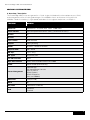
The PowerEdge M610 is the next generation of Intel single-slot blade with enhanced processors, RAM,
and management while still taking advantage of the M1000e chassis architecture. Along with the
M1000e, it leads the industry in high speed, redundant IO throughput and power consumption.
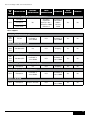
Feature
Details
Processor
Nehalem EP - 2-Socket Intel® Xeon® 5500 Series
Front Side Bus
Intel Quickpath Interconnect (QPI) @ maximum of 6 GT/s
# Procs
2S
# Cores
4
L2/L3 Cache
4MB and 8MB
Chipset
Intel Tylersberg
DIMMs
12 DDR3 – RDIMM or UDIMM
Min/Max RAM
1GB - 96GB
HD Bays
2 (2.5” only)
HD Types
SAS/SATA/SSD
Int. HD Controller
SATA
Opt. HD Controller
CERC. PERC available end of June 2009
Video
Matrox G200 (8MB memory)
Server Management
OpenManage
Dell Management Console
CMC on chassis
iDRAC Express
iDRAC Enterprise,
CMC (on M1000e)
Mezz Slots
2 x8 (PCI 2.0)
RAID
0, 1
NIC/LOM
2 Broadcom 5709 1Gb
USB
2 external
1 internal
5
Dell™ PowerEdge™ M610 Technical Guidebook
Section 2. Mechanical
A. Dimensions and Weight (blade only)
Height: 38.5cm (15.2in)
Width: 5cm (2in)
Depth: 48.6cm (19.2in)
Weight: 11.1kg (24.5lbs.) - Maximum configuration
B. Front Panel View and Features
1
2
3
4
5
6
1. Blade Handle Release Button
2. Blade Power Indicator
3. Blade Power Button
4. USB Connectors (2)
5. Blade Status / Indentification Indicator
6. Hard Drives (2)
Figure: Front Panel Features PowerEdge M610
6
Dell™ PowerEdge™ M610 Technical Guidebook
FEATURE
icon
description
Off – Power is not available to the blade, the blade is in standby
mode, the blade is not turned on, or the blade is installed
incorrectly. For detailed information on installing a blade, see
"Installing a Blade."
Blade Power
Indicator
Green increasing from low brightness to full brightness – Blade
power on request is pending.
Green on – The blade is turned on.
Off – The blade power is off.
Blue – Normal operating state.
Blade Status/
Identification
Indicator
Blue Blinking – The blade is being remotely identified via the CMC.
Amber Blinking – Blade has either detected an internal error, or
the installed mezzanine card(s) does not match the I/O modules
installed in the M1000e enclosure. Check the CMC for an I/O
configuration error message and correct the error.
Turns blade power off and on.
• If you turn off the blade using the power button and the blade
is running an ACPI-compliant operating system, the blade can
perform an orderly shutdown before the power is turned off.
Blade Power
Button
N/A
• If the blade is not running an ACPI-compliant operating system,
power is turned off immediately after the power button is pressed.
• Press and hold the button to turn off the blade immediately.
The blade power button is enabled by default by the System Setup
program. (If the power button option is disabled, you can only use
the power button to turn on the blade. The blade can then only be
shut down using system management software.)
USB Connector
Connects external USB 2.0 devices to the blade.
7
Dell™ PowerEdge™ M610 Technical Guidebook
C. Side Views and Features
D. Security
Trusted Platform Module (TPM)
The TPM is used to generate/store keys, protect/authenticate passwords, and create/store digital
certificates. TPM can also be used to enable the BitLocker™ hard drive encryption feature in Windows
Server® 2008. TPM is enabled through a BIOS option and uses HMAC-SHA1-160 for binding. There will be
different part numbers to accommodate different TPM solutions around the world.
Power Off Security
Through the CMC the front USB’s and power button can be disabled so as to not allow any control of
the system from the front of the blade.
Intrusion Alert
A switch mounted on the left riser board is used to detect chassis intrusion. When the cover is opened,
the switch circuit closes to indicate intrusion to ESM. When enabled, the software can provide
notification to the customer that the cover has been opened.
Secure Mode
BIOS has the ability to enter a secure boot mode via Setup. This mode includes the option to lock out
the power and NMI switches on the Control Panel or set up a system password.
8
Dell™ PowerEdge™ M610 Technical Guidebook
E. USB Key
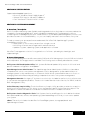
The PowerEdge M610 supports the following USB devices:
• DVD (bootable; requires two USB ports)
• USB Key (bootable)
• Keyboard (only one USB keyboard is supported)
• Mouse (only one USB mouse is supported)
F. Battery
A replaceable coin cell CR2032 3V battery is mounted on the planar to provide backup power for the
Real-Time Clock and CMOS RAM on the ICH9 chip.
G. Field Replaceable Units (FRU)
The planar contains a serial EEPROM to contain FRU information including Dell part number, part
revision level, and serial number. The Advanced Management Enablement Adapter (AMEA) also contains
a FRU EEPROM. The backplane’s SEP and the power supplies’ microcontroller are also used to store
FRU data.
Section 3. Environmental Specifications and Acoustics
A. Environmental Specifications
Environmental
Temperature
Operating
10° to 35°C (50° to 95°F)
NOTE: Decrease the maximum temperature by 1°C (18°F) per 300m (985 ft.) above 900m (2955 ft.)
Storage
-40° to 65°C (-40° to 149°F)
Relative Humidity
Operating
8% to 85% (noncondensing) with a maximum humidity gradation of
10% per hour
Storage
5% to 95% (noncondensing)
Maximum Vibration
Operating
0.26 Grms at 10-350Hz for 15 mins
Storage
1.54 Grms at 10-250Hz for 15 mins
Maximum Shock
Operating
One shock pulse in the positive z axis (one pulse on each side of the
system) of 41 G for up to 2 ms
Storage
Six consecutively executed shock pulses in the positive and negative
x, y, and z axes (one pulse on each side of the system) of 71 G for up
to 2 ms
Altitude
Operating
-16 to 3048 m (-50 to 10,000 ft.)
Storage
-16 to 10,600 m (-50 to 35,000 ft.)
9
Dell™ PowerEdge™ M610 Technical Guidebook
B. Acoustics
The acoustical design of the PowerEdge M610 reflects the following:
• Adherence to Dell’s high sound quality standards. Sound quality is different from sound power
level and sound pressure level in that it describes how humans respond to annoyances in sound,
like whistles, hums, etc. One of the sound quality metrics in the Dell specification is prominence
ratio of a tone, and this is listed in the table below.
• Hardware configurations and types of applications affect system noise levels. Dell’s advanced
thermal control provides for optimized cooling with varying hardware configurations and
component utilizations. Most typical configurations will perform as listed in the table below.
However, some less typical configurations and components can result in higher noise levels.
Higher application loads, e.g., CPU utilization, can also result in higher noise levels.
PowerEdge M610 typically configured blade in an m1000e chassis
Condition in 23±2° C ambient
LwA-UL, bels
Tones
Idle
7.4
No prominent tones
Definitions
Idle: Reference ISO7779 (1999) definition 3.1.7; system is running in its OS but no other specific activity.
LwA-UL: The upper limit sound power level (LwA) calculated per section 4.4.2 of ISO 9296 (1988) and
measured in accordance with ISO7779 (1999).
Tones: Criteria of D.5 and D.8 of ECMA-74 9th ed. (2005) are followed to determine if discrete tones
are prominent. The system is placed in a rack with its bottom at 75 cm from the floor. The acoustic
transducer is at front bystander position, ref ISO7779 (1999), Section 8.6.2.
Section 4. Block Diagram
10
Dell™ PowerEdge™ M610 Technical Guidebook
1
2
3
4
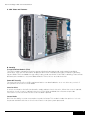
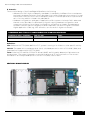
1. 2
2.5” Hard Drives
Hard drive controller underneath
2. Internal USB
3. Chipset
4. 2 Processor Sockets
5
6
7 8
5. 12 DDR3 DIMM Slots
6. High-speed Mezz Card Slots
On-board NICs underneath
7. iDRAC6 Enterprise
8. Persistent Storage (underneath iDRAC6)
Figure: PowerEdge M610 Main Components
Section 5. Processors
A. Overview / Description
The Intel® 5500 series 2S processor (Nehalem - Efficient Processor (EP)), is the microprocessor
designed specifically for servers and workstation applications. The processor features quad-core
processing to maximize performance and performance/watt for data center infrastructures and highly
dense deployments. The Nehalem-EP 2S processor also features Intel’s Core™ micro-architecture and
Intel 64 architecture for flexibility in 64-bit and 32-bit applications and operating systems.
The 5500 series 2S processor (Nehalem EP) utilizes a 1366-contact Flip-Chip Land Grid Array (FC-LGA)
package that plugs into a surface mount socket. PowerEdge M610 provides support for up to two 5500
series 2S processors (Nehalem EP).
Nehalem-EP 2S Processor
Cache Size
Features
32KB instruction, 32KB data, 4 or 8MB (shared)
Multi-processor Support
1-2 CPUs
Package
LGA1366
Table: Nehalem-EP Features
11
Dell™ PowerEdge™ M610 Technical Guidebook
B. Features
Key features of the 5500 series 2S processor (Nehalem EP) include:
• Four or two cores per processor
• Two point-to-point QuickPath Interconnect links at up to 6.4 GT/s
• 1366-pin FC-LGA package
• 45 nm process technology
• No termination required for non-populated CPUs (must populate CPU socket 1 first)
• Integrated three-channel DDR3 memory controller at up to 1333MHz
• Compatible with existing x86 code base
• MMX™ support
• Execute Disable Bit Intel Wide Dynamic Execution
• Executes up to four instructions per clock cycle
• Simultaneous Multi-Threading (Hyper-Threading) capability
• Support for CPU Turbo Mode (on certain SKUs)
• Increases CPU frequency if operating below thermal, power, and current limits
• Streaming SIMD (Single Instruction, Multiple Data) Extensions 2, 3, and 4
• Intel 64 Tecnology for Virtualization
• Intel VT-x and VT-d Technology for Virtualization
• Demand-based switching for active CPU power management as well as support for ACPI
P-States, C-States, and T-States
C. Supported Processors
model
speed
power
cache
cores
X5570
2.93GHz
95W
8M
4
X5560
2.80GHz
95W
8M
4
X5550
2.66GHz
95W
8M
4
E5540
2.53GHz
80W
8M
4
E5530
2.40GHz
80W
8M
4
E5520
2.26GHz
80W
8M
4
L5520
2.26GHz
60W
8M
4
E5506
2.13GHz
80W
4M
4
L5506
2.13GHz
60W
4M
4
E5504
2.00GHz
80W
4M
4
E5502
1.86GHz
80W
4M
2
D. Processor Configurations
Single CPU Configuration
The PowerEdge M610 is designed such that a single processor placed in the CPU1 socket will function
normally, however PowerEdge M610 systems require a CPU blank in the CPU2 socket for thermal
reasons. The system will be held in reset if a single processor is placed in the CPU2 socket.
12
Dell™ PowerEdge™ M610 Technical Guidebook
Performance Enhancements
Intel Xeon® 5500 Series Processor (Nehalem-EP)
Intel® Turbo Boost
Technology
Intel® Hyper-Threading
Technology
Increases performance by increasing processor
frequency and enabling faster speeds when
conditions allow
Increases performance for threading applications
delivering greater throughput and responsiveness
All cores
operate
at rated
frequency
All cores
operate
at higher
frequency
Core 0
Core 1
Core 0
Core 1
Core 2
Core 3
4C Turbo <4C Turbo
Core 1
Core 1
Core 2
Core 3
Frequency
Normal
Fewer cores
may operate
at even higher
frequencies
Higher performance
on demand
Higher performance
for threaded workloads
Intel® Turbo Boost Technology
Cores / Threads
Core Core
Core 0Core 1
0
1
Core Core
Core 2Core 3
2
3
16
(2 socket/HT on)
TURBO Freq
BASE Freq
Benefit
3.20 GHz
up to 6%†
2.93 GHz
for 16 concurrent
software threads
3.33 GHz
up to 10%
2.93 GHz
for 2 software
threads
OR
Core IDLE
Core 0IDLE
0
IDLE IDLE
IDLE IDLE
2
(2 socket/HT on)
Improves application responsiveness
Delivers higher processor frequency on demand
13
Dell™ PowerEdge™ M610 Technical Guidebook
model
speed
power
cache
cores
X5570
2.93GHz
95W
8M
4
X5560
2.80GHz
95W
8M
4
X5550
2.66GHz
95W
8M
4
E5540
2.53GHz
80W
8M
4
E5530
2.40GHz
80W
8M
4
E5520
2.26GHz
80W
8M
4
L5520
2.26GHz
60W
8M
4
E5506
2.13GHz
80W
4M
4
L5506
2.13GHz
60W
4M
4
E5504
2.00GHz
80W
4M
4
E5502
1.86GHz
80W
4M
2
CPU Power Voltage Regulation Modules (EVRD 11.1)
Voltage regulation to the 5500 series 2S processor (Nehalem EP) is provided by EVRD (Enterprise
Voltage Regulator-Down). EVRDs are embedded on the planar. CPU core voltage is not shared between
processors. EVRDs support static phase shedding and power management via the PMBus.
Section 6. Memory
A. Overview / Description
The PowerEdge M610 utilizes DDR3 memory providing a high performance, high-speed memory
interface capable of low latency response and high throughput. The PE M610 supports registered ECC
DDR3 DIMMs (RDIMM) or unbuffered ECC DDR3 DIMMs (UDIMM).
Key features of the PowerEdge M610 memory system include:
• Registered (RDIMM) and Unbuffered (UDIMM) ECC DDR3 technology
• Each channel carries 64 data and eight ECC bits
• Support for up to 96GB of RDIMM memory (with twelve 8GB RDIMMs)
• Support for up to 24GB of UDIMM memory (with twelve 2GB UDIMMs)
• Support for 1066/1333MHz single and dual-rank DIMMs
• Support for 1066MHz quad rank DIMMs Single DIMM configuration only with DIMM in socket A1
• Support ODT (On Die Termination) Clock gating (CKE) to conserve power when DIMMs are not
accessed
• DIMMs enter a low-power self-refresh mode
• I2C access to SPD EEPROM for access to RDIMM thermal sensors
• Single Bit Error Correction
• SDDC (Single Device Data Correction – x4 or x8 devices)
• Support for closed loop
• Thermal Management on RDIMMs and UDIMMs Multi Bit Error Detection Support for Memory
Optimized Mode
• Support for Advanced ECC mode
• Support for Memory Mirroring
• Support for Memory Sparing
14
Dell™ PowerEdge™ M610 Technical Guidebook
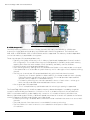
B1
B6
A6
A1
Figure: Memory Locations for Poweredge M610
B. DIMMs Supported
The DDR3 memory interface consists of three channels, with up to two RDIMMs or UDIMMs per
channel for single-/dual-rank and up to two RDIMMs per channel for quad rank. The interface uses
2GB, 4GB, or 8GB RDIMMs. 1GB, or 2GB UDIMMs are also supported. The memory mode is dependent
on how the memory is populated in the system:
Three channels per CPU populated identically:
• Typically, the system will be set to run in Memory Optimized (Independent Channel) mode in
this configuration. This mode offers the most DIMM population flexibility and system memory
capacity, but offers the least number of RAS (reliability, availability, service) features.
• All three channels must be populated identically.
• Users wanting memory sparing must also populate the DIMMs in this method, but one channel
is the spare and is not accessible as system memory until it is brought online to replace a failing
channel.
• The first two channels per CPU populated identically with the third channel unused
• Typically, two channels operate in Advanced ECC (Lockstep) mode with each other by
having the cache line split across both channels. This mode provides improved RAS
features (SDDC support for x8-based memory).
• For Memory Mirroring, two channels operate as mirrors of each other — writes go to
both channels and reads alternate between the two channels.
• One channel per CPU populated
• This is a simple memory optimized mode. No mirroring or sparing is supported.
The PowerEdge M610 memory interface supports memory demand and patrol scrubbing, single-bit
correction and multi-bit error detection. Correction of a x4 or x8 device failure is also possible with
SDDC in the Advanced ECC mode. Additionally, correction of a x4 device failure is possible in the
Memory Optimized mode. If DIMMs of different speeds are mixed, all channels will operate at the fastest
common frequency. RDIMMs and UDIMMs cannot be mixed.
• If memory mirroring is enabled, identical DIMMs must be installed in the same slots across both
channels.
• The third channel of each processor is unavailable for memory mirroring.
• The first DIMM slot in each channel is color-coded with white ejection tabs for ease
of installation.
15
Dell™ PowerEdge™ M610 Technical Guidebook
• The DIMM sockets are placed 450 mils (11.43 mm) apart, center-to-center in order to provide
enough space for sufficient airflow to cool stacked DIMMs.
• The PowerEdge M610 memory system supports up to 12 DIMMs. DIMMs must be installed in each
channel starting with the DIMM farthest from the processor. Population order will be identified by
the silkscreen designator and the System Information Label (SIL) located on the chassis cover.
• Memory Optimized: {1, 2, 3}, {4, 5, 6}, {7, 8, 9}
• Advanced ECC or Mirrored: {2, 3}, {5, 6}, {8, 9}
• Quad Rank or UDIMM: {1, 2, 3}, {4, 5, 6}, {7, 8, 9}
C. Speed
Memory Speed Limitations
The memory frequency is determined by a variety of inputs:
• Speed of the DIMMs
• Speed supported by the CPU
• Configuration of the DIMMs
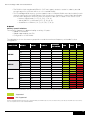
The table below shows the memory populations and the maximum frequency achievable for that
configuration.
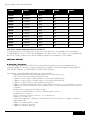
dimm type
UDIMM
RDIMM
dimm type
RDIMM
DImm 0
SR
DR
SR
SR
DR
SR
DR
DImm 0
QR
SR
SR
DR
QR
QR
QR
SR
SR
SR
DR
dimm 1
dimm 2
SR
DR
DR
dimm 1
SR
DR
DR
SR
DR
QR
SR
SR
DR
DR
dimm 2
SR
DR
DR
DR
number
of dimms
1
1
2
2
2
1
1
number
1of dimms
2
2
2
2
2
2
3
3
3
3
800
1066
1333
800
1066
1333
Note: For QR mixed with a SR/DR DIMM, the QR needs to be in the white DIMM connector. There is no requirement in the order of SR and DR DIMMs.
Supported
Not Supported
NOTE: For Quad-Rank DIMMs mixed with single- or dual-rank DIMMs, the QR DIMM needs to be in the slot with the white ejection tabs (the first DIMM slot in each channel).
There is no requirement for the order of SR and DR DIMMs
16
Dell™ PowerEdge™ M610 Technical Guidebook
NHM-EP Platform Memory Overview
•P
latform capability (18 DIMMs):
– Up to 3 channels per CPU
– Up to 3 DIMMS per channel
1
•M
emory Types Supported:
– DDR 1333, 1066, and 800
– Registered (RDIMM) and unbuffered (UDIMM)
– Single-rank (SR), dual-rank (DR), quad-rank (QR)
Up to 3
channels
per CPU
2
NHM-EP
NHM-EP
3
1 2 3
Up to 3
DIMMs per
Channel
• System memory Speed (i.e. the speed at which the memory is
actually running) is set by BIOS depending on:
– CPU capability
– DIMM type(s) used (memory speed, U/RDIMM, SR/DR/QR)
– DIMM populated per channel
• All channels in a system will run at the fastest common frequency
Memory Population Scenarios
• Maximum B/W:
– DDR3 1333 across 3 channels
– 1 DPC (6 DIMMs)
– Max capacity: 48 GB+
• Balanced Performance:
– DDR3 1066 across 3 channels
– Up to 2 DIMMs per Channel
(DPC) (12 DIMMs)
– Max capacity: 96 GB+
• Maximum capacity:
– DDR3 800 across 3 channels
– Up to 3 DPC (18 DIMMs total)
– Max capacity: 144 GB+
CPUs
10.6 GB/s
10.6
CPU
E5550
CPU
and above
10.6
8.5 GB/s
8.5
CPU
E5520
CPU
and above
8.5
6.4 GB/s
6.4
CPU
All
NHM-EP
SKUs
CPU
6.4
•R
AS capabilities:
Mirroring
Channel
0&1
mirror
each other
Channel
2 unused
CPU
Lockstep
Channel
0&1
operate in
lockstep
CPU
Channel
2 unused
17
Dell™ PowerEdge™ M610 Technical Guidebook
Section 7. Chipset
A. Overview / Description
The PowerEdge M610 planar incorporated the Intel 5520 chipset (code named Tylersburg) for I/O and
processor interfacing. Tylersburg is designed to support Intel's 5500 series processors (code named
Nehalem-EP), QPI interconnect, DDR3 memory technology, and PCI Express Generation 2. The
Tylersburg chipset consists of the Tylersburg-36D IOH and ICH9.
Delivering Intelligent Performance
Next Generation Intel® Microarchitecture
Bandwidth Intensive
Intel® QuickPath Technology
Integrated Memory Controller
Threaded Applications
45nm Quad-Core Intel® Xeon® processors
Intel® Hyper-Threading Technology Controller
Performance On Demand
Intel® Turbo Boost Technology
Intel® Intelligent Power Technology
Performance that adapts to your software environment
The Intel 5520 chipset (code named Tylersburg) I/O Hub (IOH)
The planar uses the The Intel® 5520 chipset (code named Tylersburg) I/O Hub (IOH)-36D IOH to provide
a link between the 5500 series 2S processor (Nehalem EP) and I/O components. The main components
of the IOH consist of two full-width QuickPath Interconnect links (one to each processor), 36 lanes of
PCI Express Gen2, a x4 Direct Media Interface (DMI), and an integrated IOxAPIC.
IOH QuickPath Interconnect (QPI)
The QuickPath Architecture consists of serial point-to-point interconnects for the processors and the
IOH. The PowerEdge T610 has a total of three QuickPath Interconnect (QPI) links: one link connecting
the processors and links connecting both processors with the IOH. Each link consists of 20 lanes
(full-width) in each direction with a link speed of up to 6.4 GT/s. An additional lane is reserved for a
forwarded clock. Data is sent over the QPI links as packets.
The QuickPath Architecture implemented in the IOH and CPUs features four layers. The Physical layer
consists of the actual connection between components. It supports Polarity Inversion and Lane Reversal
for optimizing component placement and routing. The Link layer is responsible for flow control and the
reliable transmission of data. The Routing layer is responsible for the routing of QPI data packets. Finally,
the Protocol layer is responsible for high-level protocol communications, including the implementation of
a MESIF (Modify, Exclusive, Shared, Invalid, Forward) cache coherence protocol.
Intel Direct Media Interface (DMI)
The DMI (previously called the Enterprise Southbridge Interface) connects the Tylersburg IOH with the
Intel I/O Controller Hub (ICH). The DMI is equivalent to a x4 PCIe Gen1 link with a transfer rate of 1 Gb/s
in each direction.
18
Dell™ PowerEdge™ M610 Technical Guidebook
PCI Express Generation 2
PCI Express is a serial point-to-point interconnect for I/O devices. PCIe Gen2 doubles the signaling bit
rate of each lane from 2.5 Gb/s to 5 Gb/s. Each of the PCIe Gen2 ports are backwards-compatible with
Gen1 transfer rates.
In the Tylersburg-36D IOH, there are two x2 PCIe Gen2 ports (1Gb/s) and eight x4 PCIe Gen2 ports (2
Gb/s). The x2 ports can be combined as a x4 link; however, this x4 link cannot be combined with any of
the other x4 ports. Two neighboring x4 ports can be combined as a x8 link, and both resulting x8 links
can combine to form a x16 link.
Intel I/O Controller Hub 9 (ICH9)
ICH9 is a highly integrated I/O controller, supporting the following functions:
• Six x1 PCIe Gen1 ports, with the capability of combining ports 1-4 as a x4 link
• These ports are unused on the PowerEdge M610
• PCI Bus 32-bit Interface Rev 2.3 running at 33MHz
• Up to six Serial ATA (SATA) ports with transfer rates up to 300 MB/s
• The PowerEdge M610 features two SATA port for optional internal optical drive or
tape backup
• Six UHCI and two EHCI (High-Speed 2.0) USB host controllers, with up to twelve USB ports
• The PowerEdge M610 has eight external USB ports and two internal ports dedicated for
UIPS. Refer to the Whoville Hardware/BIOS Specification for the USB assignments for
each platform
• Power management interface (ACPI 3.0b compliant)
• Platform Environmental Control Interface (PECI)
• Intel Dynamic Power Mode Manager
• I/O interrupt controller
• SMBus 2.0 controller
• Low Pin Count (LPC) interface to Super I/O, Trusted Platform Module (TPM), and SuperVU
• Serial Peripheral Interface (SPI) support for up to two devices
• The PowerEdge M610’s BIOS is connected to the ICH using SPI
Section 8. BIOS
A. Overview / Description
The PowerEdge M610 BIOS is based on the Dell BIOS core, and supports the following features:
• Nehalem-EP 2S Support
• Simultaneous Multi-Threading (SMT) support
• CPU Turbo Mode support
• PCI 2.3 compliant
• Plug n’ Play 1.0a compliant
• MP (Multiprocessor) 1.4 compliant
• Boot from hard drive, external optical drive, iSCSI drive, USB key, and SD card
• ACPI support
• Direct Media Interface (DMI) support
• PXE and WOL support for on-board NICs
• Memory mirroring and spare bank support
• SETUP access through <F2> key at end of POST
• USB 2.0 (USB boot code is 1.1 compliant)
• F1/F2 error logging in CMOS
• Virtual KVM, CD, and floppy support
• Unified Server Configurator (UEFI 2.1) support
• Power management support including DBS, Power Inventory and multiple Power Profiles
19
Dell™ PowerEdge™ M610 Technical Guidebook
The PowerEdge M610 BIOS does not support the following:
• Embedded Diagnostics (embedded in MASER)
• BIOS language localization
• BIOS recovery after bad flash (but can be recovered from iDRAC6 Express)
B. I2C (Inter-Integrated Circuit)
What is I2C? A simple bi-directional 2-wire bus for efficient inter-integrated circuit control. All I2C-bus
compatible devices incorporate an on-chip interface which allows them to communicate directly with
each other via the I2C-bus. This design concept solves the many interfacing problems encountered when
designing digital control circuits. These I2C devices perform communication functions between
intelligent control devices (e.g., microcontrollers), general-purpose circuits (e.g., LCD drivers, remote I/O
ports, memories) and application-oriented circuits.
Section 9. Embedded NICs/LOMs
A. Overview/Description
Embedded Gigabit Ethernet Controllers with TCP Offload Engine (TOE) support
One embedded dual-port Broadcom 5709C LAN controller is on the PowerEdge M610 planar as an independent
Gigabit Ethernet interface device. The following information details the features of the LAN devices.
• x4 PCI Express Gen2 capable interface
• The M610 operates this controller at Gen1 speed
• Integrated MAC and PHY 3072x18 byte context memory
• 64KB receive buffer
• TOE (TCP Offload Engine)
• iSCSI controller (enabled through an optional hardware key)
• RDMA controller (RNIC) (enabled post-RTS through an optional hardware key)
• NC-SI (Network Controller-Sideband Interface) connection for manageability
• Wake-On-LAN (WOL)
• PXE 2.0 remote boot
• iSCSI boot
• IPv4 and IPv6 support
• Bare metal deployment support
• ISCSI offload - Used for offloading iSCI traffic as an iSCSI accelerator/HBA
SECTION 10. Mezzanine Card Slots
A. Overview/Description
The PowerEdge M610 contains 2 PCIe x8 Gen 2 mezzanine card slots. Each card is a dual port.
Every M610 blade can support up to 4 I/O ports (2 from each of the 2 mezzanine cards) plus the
two integrated NIC/LOM ports. PLEASE NOTE: For space, the size of new mezzanine cards has been
reduced and in the M610 only ONE of some older size cards can fit. Fabric C can fit any card. Fabric B
can NOT fit: FC4 HBAs, Infiniband HCAs or Broadcom 5708 1Gb NICs. Mezzanine card options include:
• Emulex and QLogic dual-port 8Gb FC HBA
• Broadcom 5709 dual-port Gb Ethernet w/ TOE and iSCSI offload
• Supports IPv6 offloads, improved virtualization performance, enables
M610 to support 2 Ethernet mezzanine cards, and lowers power consumption
• Mellanox ConnectX dual-port Double Data Rate (DDR – 20Gbps) Infiniband HCA or
Quad Data Rate (QDR – 40Gbps) HCA
• Broadcom dual-port 10Gb Ethernet w/ TOE and iSCSI offload
20
Dell™ PowerEdge™ M610 Technical Guidebook
SECTION 11. Storage
A. Hard Drive Overview / Description
The PowerEdge M610 supports 2 2.5" hard drives. These drives can be either SATA, SAS or SSD.
Both RAID 0 and RAID 1 are supported as long as a RAID card is included.
Hard Disk Drive Carriers
Hard drives must use the new Dell drive carrier for 2.5" drives.
Empty Drive Bays
For the slots that are not occupied by drives, a carrier blank is provided to maintain proper cooling,
maintain a uniform appearance to the unit, and provide EMI shielding.
Diskless Configuration Support
The system supports diskless configuration with no storage controller installed in the system.
Hard Drive LED Indicators
Each disk drive carrier has two LED indicators visible from the front of the system. One is a green LED
for disk activity and the other is a bi-color (green/amber) LED for status information. The activity LED
is driven by the disk drive during normal operation. The bi-color LED is controlled by the SEP device on
the backplane. Both LEDs are used to indicate certain conditions under direction of a storage controller.
B. Storage Controllers
The PowerEdge M610 will support a variety of RAID cards
• A SATA controller comes standard and supports both the SATA drives and some SSD.
• CERC6 - The M610 supports this card with 128MB of RAID cache.
21
Dell™ PowerEdge™ M610 Technical Guidebook
Section 12. Video
A. Overview / Description
The PowerEdge M610 Integrated Dell Remote Access Controller 6 (iDRAC6) incorporates an integrated
video subsystem, connected to the 32-bit PCI interface of the ICH9. This logic is based on the Matrox
G200 with 8MB of cache. The device only supports 2D graphics. The video device outputs are
multiplexed between the front and rear video ports. If a monitor is connected to the front video connector,
it will take precedence over the rear connection, thereby removing the display from the rear connection.
The PowerEdge M610 system supports the following 2D graphics video modes:
Resolution
Refresh Rate (Hz)
Color Depth (bit)
640 x 480
60, 72, 75, 85
8, 16, 32
800 x 600
56, 60, 72, 75, 85
8, 16, 32
1024 x 768
60, 72, 75, 85
8, 16, 32
1152 x 864
75
8, 16, 32
1280 x 1024
60, 75, 85
8, 16
1280 x 1024
60
32
22
Dell™ PowerEdge™ M610 Technical Guidebook
section 13. Operating Systems
A. Overview / Description
The PowerEdge M610 supports Windows®, Linux®, and Solaris™ Operating Systems.
Windows® Support:
x86
or
x64
INSTALLATION
Factory
INSTALLATION
logo
certification
schedule
Test/
Validate
support
Windows
Hardware
Quality Labs Windows 2008
Shipping
Yes
Yes
Yes
Windows
Hardware
Quality Labs Windows 2008
Shipping
Yes
Yes
Yes
Windows
Hardware
Quality Labs Windows 2008
Shipping
Yes
Yes
Yes
Windows
Hardware
Quality Labs Windows 2008
Shipping
Yes
Yes
Yes
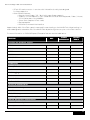
Windows
Hardware
Quality Labs Windows 2008
Available in
August October
2009
Yes
Yes
Yes
Windows
Hardware
Quality Labs Windows 2008
Available in
August October
2009
Yes
Yes
Windows
Hardware
Quality Labs Windows 2008
Available in
August October
2009
Yes
Yes
Windows® Essential Business Server 2008
x64
Standard/
Premium
Yes
Windows Server® 2008 (x64 includes Hyper-V™)
Standard
x64
Enterprise
Datacenter
Windows Server® 2008
Standard
x86
Enterprise
Windows® Web Server 2008
x86
and
x64
Web
Windows Server® 2008, SP2 (x64 includes Hyper-V™)
Standard
x64
Enterprise
Datacenter
Windows Server® 2008, SP2
Standard
x86
Enterprise
Windows® Web Server 2008, SP2
x86
and
x64
Web
Yes
23
Dell™ PowerEdge™ M610 Technical Guidebook
x86
or
x64
INSTALLATION
Factory
INSTALLATION
logo
certification
schedule
Test/
Validate
support
Yes
Windows
Hardware
Quality Labs Windows 2008
Release 2
Available in
November
2009 January
2010
Yes
Yes
Available in
June 2009
n/A
Available in
June 2009
Yes
Yes
Yes
n/A
Shipping
Yes
Yes
Available in
June 2009
n/A
Available in
June 2009
Yes
Yes
n/A
Shipping
Yes
Yes
Available in
June 2009
n/A
Available in
June 2009
Yes
Yes
Drop in the box
n/A
Available in
June 2009
Yes
Yes
Windows Server® 2008, R2, (x64 includes Hyper-V™)
Standard
x64
Enterprise
Datacenter
Linux support:
Red Hat® Enterprise Linux 4.7
x86
and
x64
ES/AS
Red Hat Enterprise Linux 5.2
x86
and
x64
Standard/AP
Red Hat Enterprise Linux 5.3
x86
and
x64
Standard/AP
Novell® SUSE® Linux Enterprise Server 10 SP2
x64
Enterprise
Yes
Novell SUSE Linux Enterprise Server 11
x64
Enterprise
Solaris™ 10 05/09
x64
Enterprise
24
Dell™ PowerEdge™ M610 Technical Guidebook
Section 14. virtualization
Supported embedded hypervisors:
• Microsoft® Windows Server® 2008 Hyper-V™
• VMware® ESXi Version 4.0 and 3.5 update 4
• Citrix® XenServer™ 5.0 with Hotfix 1 or later
Section 15. Systems Management
A. Overview / Description
Dell is focused on delivering open, flexible, and integrated solutions the help our customers reduce the
complexity of managing disparate IT assets. We build comprehensive IT management solutions.
Combining Dell PowerEdge Servers with a wide selection of Dell-developed management solutions, we
provide customers choice and flexibility – so you can simplify and save in environments of any size.
To help you meet your server performance demands, Dell offers Dell OpenManage™ systems
management solutions for:
• Deployment of one or many servers from a single console
• Monitoring of server and storage health and maintenance
• Update of system, operating system, and application software
We offer IT management solutions for organizations of all sizes – priced right, sized right, and
supported right.
B. Server Management
A Dell Systems Management and Documentation DVD and a Dell Management Console DVD are included
with the product. ISO images are also available. The following sections briefly describe the content.
Dell Systems Build and Update Utility: Dell Systems Build and Update Utility assists in OS install and
pre-OS hardware configuration and updates.
OpenManage Server Administrator: The OpenManage Server Administrator (OMSA) tool provides a
comprehensive, one-to-one systems management solution, designed for system administrators to
manage systems locally and remotely on a network. OMSA allows system administrators to focus on
managing their entire network by providing comprehensive one-to-one systems management.
Management Console: Our legacy IT Assistant console is also included, as well as tools to allow access
to our remote management products. These tools include: Remote Access Service, for iDRAC, and the
BMC Management Utility.
Active Directory Snap-in Utility: The Active Directory Snap-in Utility provides an extension snap-in to
the Microsoft Active Directory. This allows you to manage Dell specific Active Directory objects. The
Dell-specific schema class definitions and their installation are also included on the DVD.
Dell Systems Service Diagnostics Tools: Dell Systems Service and Diagnostics tools deliver the latest
Dell optimized drivers, utilities, and operating system-based diagnostics that you can use to update
your system.
eDocs: The section includes Acrobat files for PowerEdge systems, storage peripheral and
OpenManage software.
25
Dell™ PowerEdge™ M610 Technical Guidebook
Dell Management Console DVD: The Dell Management Console is a Web-based systems management
software that enables you to discover and inventory devices on your network. It also provides advanced
functions, such as health and performance monitoring of networked devices and patch management
capabilities for Dell systems.
Server Update Utility: In addition to the Systems Management Tools and Documentation and Dell
Management Console DVDs, customers have the option to obtain Server Update Utility DVD. This
DVD has an inventory tool for managing updates to firmware, BIOS and drivers for either Linux or
Windows varieties.
C. Embedded Server Management
The PowerEdge M610 implements circuitry for the next generation of Embedded Server Management. It
is Intelligent Platform Management Interface (IPMI) v2.0 compliant. The iDRAC6 (Integrated Dell Remote
Access Controller) is responsible for acting as an interface between the host system and its management
software and the periphery devices. These periphery devices consist of the PSUs, the storage backplane,
integrated SAS HBA or PERC 6/i and control panel with semi-intelligent display.
The iDRAC6 provides features for managing the server remotely or in data center lights-out
environments.
Advanced iDRAC features require the installation of the iDRAC6 Enterprise card.
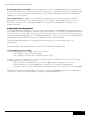
I. Unmanaged Persistent Storage
The unmanaged persistent storage consists of two ports:
• one located on the control panel board
• one located on the Internal SD Module (formerly UIPS).
The port on the control panel is for an optional USB key and is located inside the chassis. Some of the
possible applications of the USB key are:
• User custom boot and pre-boot OS for ease of deployment or diskless environments
• USB license keys for software applications like eToken™ or Sentinel Hardware Keys
• Storage of custom logs or scratch pad for portable user-defined information (not hot-pluggable)
The Internal SD Module is dedicated for an SD Flash Card with embedded Hypervisor for virtualization.
The SD Flash Card contains a bootable OS image for virtualized platforms.
26
Dell™ PowerEdge™ M610 Technical Guidebook
II. Lifecycle Controller / Unified Server Configurator
Embedded management is comprised of several pieces which are very interdependent.
• Lifecycle Controller
• Unified Server Configurator
• iDRAC6
• vFLASH
Lifecycle controller is the hardware component that powers the embedded management features. It is
integrated and tamperproof storage for system-management tools and enablement utilities (firmware,
drivers, etc.). It is flash partitioned to support multiple, future use cases
Dell Unified Server Configurator is a 1:1 user interface exposing utilities from Lifecycle Controller. Customers
will use this interface to configure hardware, update server, run diagnostics, or deploy the operating
system. This utility resides on Lifecycle Controller. To access the Unified Server Configurator, press <F10>
key within 10 seconds of the Dell logo display during the system boot process. Current functionality
enabled by the Unified Server Configurator includes:
feature
description
Faster O/S
Installation
Drivers and the installation utility are embedded on system, so no need to
scour DELL.COM
Faster System Updates
Integration with Dell support automatically directed to latest versions of
the Unified Server Configurator
More Comprehensive
Diagnostics
Diagnostic utilities are embedded on system
Simplified Hardware
Configuration
Detects RAID controller and allows user to configure virtual disk and
choose virtual disk as boot device, eliminating the need to launch a
separate utility
III. iDRAC6 Express/Enterprise
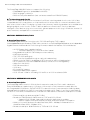
For the M610, all features of both the iDRAC6 Express and Enterprise are included with each server. The
iDRAC6 is a managed persistent storage space for server provisioning data and consists of 1GB flash and
VFlash. VFlash offers the hot-plug portability and increased storage capacity benefits of SD while still
being managed by the system. iDRAC6 is currently partitioned to support the following applications:
• Unified Server Configurator Browser and System Services Module (SSM) (25MB): The Unified
Server Configurator browser provides a consistent graphical user interface for bare metal
deployment and is ideal for 1-to-1 deployment. The SSM supports automatic 1-to-N deployment
• Service Diagnostics (15MB): Formerly on the hard drive as the Utility Partition, this is a bootable
FAT16 partition for Service Diagnostics
• Deployment OS Embedded Linux (100MB): Storage space to hold embedded Linux
• Deployment OS WinPE (200MB): Storage space to hold Windows Preinstallation Environment
• Driver Store (150MB): Holds all files required for OS deployment
• iDRAC6 firmware (120MB): Holds the two most recent versions of iDRAC6 firmware
• Firmware Images (160MB): Holds the two most recent versions of BIOS, RAID, embedded
NIC, power supplies, and hard drive firmware. This partition also holds the BIOS and option
ROM configuration data
• Life Cycle Log (2MB): Stores initial factory configuration as well as all detectable hardware
and firmware changes to the server since its deployment. The Life Cycle Log is stored on the
BMC SPI flash
• RJ-45 Management 10/100Mbps Ethernet port
27
Dell™ PowerEdge™ M610 Technical Guidebook
• VFlash SD card connector - Launches with limited functionality but designed
for future expansion
• Other iDRAC6 features:
• Remote virtual floppy / CD / disk (with super floppy support)
• Graphics console redirection (also called remote virtual KVM-Keyboard / Video / Mouse)
(For M Series part of the M1000e)
• Virtual flash (requires VFlash card)
• Rip and replace
• RACADM Command Line Interface
Approximately 20% of the Flash space is reserved for wear leveling on the NAND Flash. Wear leveling is a
method designed to extend the life of the NAND Flash by balancing the use cycles on the Flash’s blocks.
For more information on iDRAC6 Express/Enterprise features see the table below.
BMC
iDRAC6
Enterprise
VFlash
Media
4
4
4
Web-based GUI
4
4
SNMP
4
4
WSMAN
4
4
SMASH-CLP
4
4
Racadm command-line
4
4
Feature
Interface and Standards Support
IPMI 2.0
Conductivity
Shared/Failover Network Modes
4
4
4
IPv4
4
4
4
VLAN tagging
4
4
4
IPv6
4
4
Dynamic DNS
4
4
Dedicated NIC
4
4
Security & Authentication
Role-based Authority
4
4
4
Local Users
4
4
4
Active Directory
4
4
SSL Encryption
4
4
Remote Management & Remediation
Remote Firmware Update
41
4
4
Server power control
41
4
4
28
Dell™ PowerEdge™ M610 Technical Guidebook
BMC
iDRAC6
Enterprise
VFlash
Media
4
4
4
Serial-over-LAN (no proxy)
4
4
Power capping
4
4
Last crash screen capture
4
4
Boot capture
4
4
Serial-over-LAN
4
4
4
iDRAC6
Enterprise
4
4
VFlash
Media
4
4
4
Feature
Serial-over-LAN (with proxy)
Virtual media
Feature
Virtual console
BMC
Virtual console sharing
Virtual flash
4
Monitoring
Sensor Monitoring and Alerting
41
4
4
Real-time Power Monitoring
4
4
Real-time Power Graphing
4
4
Historical Power Counters
4
4
4
4
RAC Log
4
4
Trace Log
4
4
Logging Features
System Event Log
4
Section 16. Peripherals
A. USB peripherals
The PowerEdge M610 supports the following USB devices with its 2 externally accessible USB ports:
• DVD (bootable; requires two USB ports)
• USB Key (bootable)
• Keyboard (only one USB keyboard is supported)
• Mouse (only one USB mouse is supported
Section 17. Documentation
A. Overview, Description, and List
PowerEdge M610 and other 11G systems use the new Enterprise documentation set. The following is a
summary of some of the documents slated for the M610 product. For the complete list of documents,
including language requirements and delivery scheduling, refer to the Documentation Matrix and the
Documentation Milestones in the InfoDev Functional Publications Plan.
29
Dell™ PowerEdge™ M610 Technical Guidebook
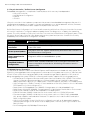
• Getting Started Guide: This guide provides initial setup steps, a list of key system features, and
technical specifications. This document is required for certain worldwide regulatory submittals.
This guide is printed and shipped with the system, and is also available in PDF format on the
Dell support site.
• Hardware Owner’s Manual: This document provides troubleshooting and remove/replace
procedures, as well as information on the System Setup program, system messages, codes,
and indicators. This document is provided to customers in HTML and PDF format at the Dell
support site.
• System Information Label: The system information label documents the system board layout
and system jumper settings and is located on the system cover. Text is minimized due to space
limitations and translation considerations. The label size is standardized across platforms.
• Information Update: This is a PDF document that provides information on late changes and
issues having significant customer impact which were discovered after document signoff.
• General System Information Placemat: This is a paper document that is provided with every
system. The document provides general information about the system, including software
license agreement information and the location of the service tag.
• Rack Placemat: This is a paper document that is provided with the rack kits. The document
provides an overview of procedures for setting up the rack.
Section 18. Packaging Options
The PowerEdge M610 can ship in three ways:
1. Integrated into the M1000e chassis in one large box
2. In a multi-pack box holding up to eight single-slot blades
3. As a single server in one box
30