1
Quick Install Overview
See Installation Diagram on page 3. Contact Wilson Electronics
Technical Support Team with any questions at .
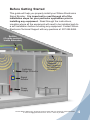
1. Select a location to install the signal booster that is away
from excessive heat, direct sunlight, moisture and has proper
ventilation. Do not place the signal booster in an air-tight
enclosure.
2. Select a location on the roof of the building to install the outside
antenna. Use a cell phone in test mode to find the strongest signal
from the cell tower. Visit www.WilsonElectronics.com to find test
mode function for your particular cell phone. See page 6.
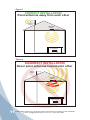
3. Select a location for the inside antenna, preferably in the
center of where the signal needs to be amplified. A minimum
separation distance (combined vertical/horizontal) of 20
feet is necessary for operation. If the inside coverage is not
sufficient you may need as much as 50 feet of separation. See
installation diagram on pages 3 & 4.
4. Run the outside antenna cable to the signal booster and attach
it to the connector labeled “Outside Antenna” on the signal
booster. Run the inside antenna cable to the signal booster
and attach it to the connector labeled “Inside Antenna” on the
signal booster. Note: Be careful when plugging the connectors
in so as not to bend the center pins on the connectors. See
page 8 for more information on running cable.
5. Before powering up the signal booster, verify that both the
outside antenna and the inside antenna are connected and
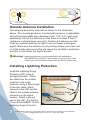
check that all connections are tight. Lightning surge protection
is recommended for all in-building installations. See page 7.
6. The Signal Booster has been packaged with the gain control
knobs adjusted to the highest gain position. If one or both of
the lights are not green, please refer to pages 12-14.
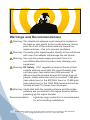
7. Warning: Connecting the signal booster directly to a cell phone
with use of an adapter will damage the cell phone and the
signal booster.
Contact Wilson Electronics Technical Support Team with any questions at 507-282-8484
or email: [email protected]. Hours: 7 am to 6 pm MST.
2