1
Boot Booster
English
The Boot Booster item in BIOS setup helps shorten your EeeBox PC
bootup time. However, you MUST disable this BIOS item before you
change any EeeBox PC components or perform system recovery
(from hidden partition). Follow the instructions below to disable
Boot Booster:
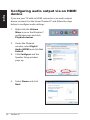
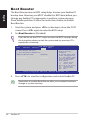
1. Start the system and press <F2> on bootup to show the POST
screen. Press <F2> again to enter the BIOS setup.
2. Set Boot Booster to [Disabled]
If you fail to see the POST screen or enter the BIOS setup by doing
the instruction above, restart the system and try pressing <F2>
repeatedly on bootup.
Main
Advanced
Security
BIOS SETUP UTILITY
Boot
Exit
Boot Device Priority
Boot Settings Configuration
OnBoard LAN Boot ROM
[Enabled]
Boot Booster
[Disabled]
Specifies the Boot
Device Priority
sequence.
A virtual floppy disk
drive (Floppy Drive
B: ) may appear when
you set the CD-ROM
drive as the first
boot device.
←→
↑↓
Enter
F1
F10
ESC
Select Screen
Select Item
Go to Sub Screen
General Help
Save and Exit
Exit
v02.58 (C)Copyright 1985-2009, American Megatrends, Inc.
3. Press <F10> to save the configuration and restart EeeBox PC.
Remember to enable Boot Booster after you complete hardware
change or system recovery.
46
Eee Box PC