1
3 PPCBug Firmware
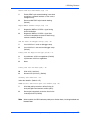
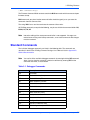
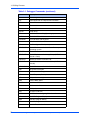
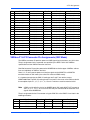
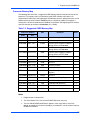
Table 3-1. Debugger Commands (continued)
Command
Description
PF
Port Format
PFLASH
Program FLASH Memory
PS
Put RTC into Power Save Mode
RB
ROMboot Enable
RD
Register Display
REMOTE
Remote
RESET
Cold/Warm Reset
RL
Read Loop
RM
Register Modify
RS
Register Set
RUN
MPU Execution/Status
SD
Switch Directories
SET
Set Time and Date
SROM
SROM Examine/Modify
ST
Self Test
SYM
Symbol Table Attach
SYMS
Symbol Table Display/Search
T
Trace
TA
Terminal Attach
TIME
Display Time and Date
TM
Transparent Mode
TT
Trace to Temporary Breakpoint
VE
Verify S-Records Against Memory
VER
Revision/Version Display
WL
Write Loop
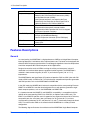
!
Caution
Although a command (PFLASH) to allow the erasing and reprogramming of
Flash memory is available to you, keep in mind that reprogramming any portion
of Flash memory will erase everything currently contained in Flash, including
the PPCBug debugger, if the target address addresses the bank in which it
resides.
Diagnostics
The PPCBug hardware diagnostics are intended for testing and troubleshooting the
MVME5100.
34
MVME51005E Single Board Computer Installation and Use (6806800A38B)