1
51
Problems Solving
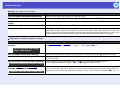
Image colours are not right
Check
Remedy
Do the input signal settings match the
signals from the connected device?
If a composite videog or S-Videog source is connected to the projector, use the "Video Signal" menu
command to select the video signal format.
"Signal" - "Video Signal" sp.34
Has the image brightness been adjusted
correctly?
Use the "Brightness" menu command to adjust the brightness. "Image" - "Brightness" sp.33
Are the cables connected correctly?
Check that all of the cables required for projection are securely connected. sQuick Start Guide
Has the image contrastg been adjusted
correctly?
Use the "Contrast" menu command to adjust the contrast. "Image" - "Contrast" sp.33
Has the colour been adjusted correctly?
Use the "Color Adjustment" menu command to adjust the colour. "Image" - "Color Adjustment" sp.33
Have the colour saturation and tint been
adjusted correctly?
Use the "Color Saturation" and "Tint" menu commands to adjust the colour and tint. "Image" - "Color
Saturation", "Tint" sp.33
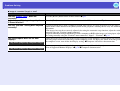
Only when projecting images
from a video source
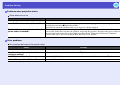
Images appear dark
Check
Remedy
Have the image brightness and luminance Use the "Brightness" and "Brightness Control" menu commands to adjust the brightness and luminance.
"Image" - "Brightness" sp.33 "Settings" - "Brightness Control" sp.35
been adjusted correctly?
Has the image contrastg been adjusted
correctly?
Use the "Contrast" menu command to adjust the contrast. "Image" - "Contrast" sp.33
Is the lamp due for replacement?
When the lamp is nearly due for replacement, the images will become darker and the colour quality will
become poorer. When this happens, the lamp should be replaced with a new one. sp.59
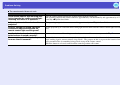
Nothing appears on the external monitor
Check
Are images from a port other than the
Computer port being projected?
Remedy
The only images that can be displayed on an external monitor are those from the Computer port. You
cannot output video equipment images to an external monitor. sp.63