1
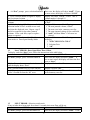
The Password Mode prevents the operator from accidentally entering the protected modes: “CASH”
through “tctl”.
ACTION
CONDITION
Press the mode switch one time while in DoorDisplay will show “Eror”
Open Standby mode
Press selection button #2 four times
Display will show “PASS”
To advance to “rtn” or to return to “tESt” mode,
Press selection button #2 or #3, respectively, or
Press the selection button #4, #2, #3, #1, #4 in
Display will show “CASH”
sequence within 10 seconds to enter “CASH”
mode. Then go to step #5 of “CASH” mode in
section 3.7
NOTE: After entering the correct password, the “PASS” prompt will be removed from the service
mode.
2.7
CASH AUDIT MODE (CASH)
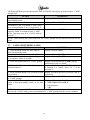
ACTION
1. Press the mode switch one time while in
Door-Open Standby mode
2. Press selection button #2 four times
3. Press the selection button #4, #2, #3, #1, and
#4 in sequence within 10 seconds
4. Press selection button #4 at “CASH” prompt
CONDITION
Display will show “Eror”
Display will show “PASS”
Display will show ”CASH”
Display will scroll between “CASH” and the
total historical cash as “xxxx”
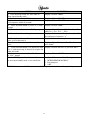
5. While “CASH” or “xxxx” is displayed, press Display will scroll between “CL 1” and the cash
selection button #2
of selection 1 as “xxxx”, where “CL 1” is the
selection “1”
6. Press selection button #2 to see the next cash Display will show the next or previous “CL x”
per selection.
respectively
7. Press selection button #1 at “CL x” to return Display will show “CASH”
to “CASH” prompt.
8. At “CASH”, press selection button #1 to Display will show one of the followings:
return to door-open-standby mode, or see note 1. “ICE COLD COCA COLA”
below
2. Selection price
3. “.00”
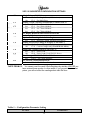
NOTE: To advance to “SALE” mode or to return to “tESt”, press selection button #2 respectively.
To leave the “CASH” mode, press selection button #1 “CASH” prompt close the or wait 5 minutes.
10