1
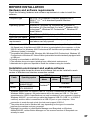
BEFORE INSTALLATION
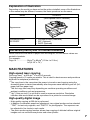
Hardware and software requirements
Check the following hardware and software requirements in order to install the
software.
Computer type
IBM PC/AT or compatible computer equipped with a
USB2.0*1/1.1*2 or bi-directional parallel interface
(IEEE1284)
Operating system*3 *4 Windows 95, Windows 98, Windows Me, Windows NT
Workstation 4.0 (ServicePack 5 or later)*5, Windows 2000
Professional*5, Windows XP Professional*5, Windows XP
Home Edition*5
Display
800 x 600 dots (SVGA) display with 256 colours (or better)
Hard disk free space 150MB or more
Other hardware
An environment on which any of the operating systems
requirements
listed above can fully operate
*1 The machine's USB connector will transfer data at the speed specified by the USB 2.0
(Hi-Speed) only if the Microsoft USB 2.0 driver is preinstalled in the computer, or if the
USB 2.0 driver for Windows 2000 Professional/XP that Microsoft provides through its
"Windows Update" is installed.
*2 Compatible with Windows 98, Windows Me, Windows 2000 Professional, Windows XP
Professional or Windows XP Home Edition preinstalled model standardly equipped with
a USB port.
*3 Printing is not available in MS-DOS mode.
*4 The machine does not support printing from a Macintosh environment.
*5 Administrator's rights are required to install the software using the installer.
5
Installation environment and usable software
The following table shows the drivers and software that can be installed for each
version of Windows and interface connection method.
Cable
USB*1
Parallel
Operating system
Windows
98/Me/2000/XP
Windows 95/98/Me/
NT 4.0/2000/XP
MFP Driver
Printer
Scanner
driver
driver
Available*2
Button
Sharpdesk
Manager
Available
Not Available*3
*1 Windows 98/Me does not support USB 2.0. A USB 2.0 connection can be used in
Windows 98/Me, however, the performance will be the same as USB 1.1. The print
speed based on USB 2.0 specifications can only be attained if your computer is running
Windows 2000/XP, you are using a cable that supports USB 2.0 (USB 1.1 or USB 2.0
certified), and the cable is connected to a USB 2.0 port on your computer. If the
connection is made through a hub, the hub must support USB 2.0.
*2 The printer driver that is installed will vary depending on the type of connection
between the machine and your computer.
*3 Although it is possible to install Button Manager and Sharpdesk on Windows
98/Me/2000/XP, neither Button Manager nor the scanner function of Sharpdesk can
actually be used.
37