1
Leave to air dry thoroughly before
replacing into the cleaner.
Dust disposal
To obtain the best results from your cleaner
be sure to check and empty the dust
compartment regularly, otherwise the airflow
and cleaning power will be reduced and you
may damage your cleaner.
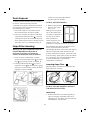
1 Ensure the cleaner is switched off and
disconnected from the mains supply.
2 Hold over a dustbin and press in the dust
compartment release button 6 , the dust
compartment door will automatically drop
down. Shake the vacuum to release the dirt
and make sure it is completely empty. I
DO NOT USE DETERGENTS
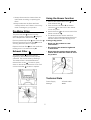
3 Replace the pleated
filter into the mesh
filter cover
Making sure the yellow
tab on the Hepa Filter
moulding is adjacent to
the clip on the mesh
filter cover L and
replace back into the
cleaner. Ensure the
hepa filter is securely fitted back into place.
Blocked filters will reduce the airflow to the
motor, should the airflow become
substantially blocked, the product will then be
liable to overheat and the thermal fuse will
activate. Should this activate, the product will
stop functining, unplug the product and allow
it to cool down (ths can take between 30-40
minutes depending on the ambient
temperature conditions).
Hepa Filter cleaning
Warning: The dust compartment must be
emptied BEFORE the Hepa filter is
removed. Every time you empty the
cleaner the Hepa filter must be cleaned.
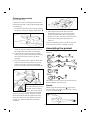
1 Once the dust compartment is empty,
remove the pleated hepa filter 22 & mesh
filter 23 by pushing the tab to release. J
2 Pull the pleated hepa filter 22 out of the
mesh filter cover 23 & clean both by gently
brushing over the dustbin. Wash the filters
regularly in warm water. K
Inserting Hepa Filter M
Warning: Make sure that the Hepa filter has
been placed in correctly.
DO NOT USE THE PRODUCT WITHOUT
THE HEPA FILTER FITTED.
IMPORTANT
• All filters should be checked regularly for
signs of damage, preferably after each
cleaning task. The filters must be replaced
immediately if they become
6