1
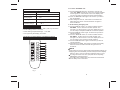
Remote Controller Specifications
R71A/E
Model
Rated Voltage
3.0V
Lowest Voltage of CPU
Emitting Signal
2.0V
Reaching Distance
8m (when using 3.0 voltage, it Gets 11m)
Environment
Temperature Range
-5 C 60 C
~
HEAT
DRY
FAN only and AUTO .
2. Timer Setting Function in 24 hours.
3. Indoor Setting Temperature Range : 17 C~30 C.
4. LCD (Liquid Crystal Display) of functions.
Introduction of Function Buttons on the Remote Controller
On/Off
Auto
2
Mode
SET TEMP
3
Fan
Turbo
ON
TIMER
Off
TIMER
Hr.
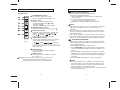
3.1 Push the Timer on button, the remote controller will show
ON TIMER, the last set time for START operation and
the signal "Hr" will be shown on the Timer display area. You
are now ready to readjust the Timer on to start the operation.
3.2 Push the Timer on button again to set the time you want to
start the operation.
3.3 Push the Timer off button, the remote controller will show
OFF TIMER, the last set time for STOP operation and
the signal "Hr" will be shown on the Timer display area. You
are now ready to reset the time to STOP operation.
3.4 Push the Timer off button again to set the time you want to
stop the operation.
3.5 After setting the TIMER, there will be a one-half second delay
before the remote controller transmits the signal to the Air
Conditioner.
4
NOTE
5
If the same time is set for both START and STOPPING settings, the
stopping time will automatically increase 0.5hr(the set time displays
less than 10Hr) or one hour (the set time displays 10Hr or more).
To change the Timer on/off time, just press the corresponding
TIMER button and reset the time.
The setting time is relative time. That is the time set is based
on the delay of the current time.
Sleep/Turbo
6
Swing
7
Air Direction
8
Timer On
9
Timer Off
10
Hr.
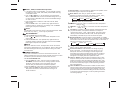
2.1 Push the Timer off button and the remote controller will
show OFF TIMER, the last set time for the stopping operation
and the signal "Hr" will be shown on the Timer display area.
You are now ready to reset the time of the STOP operation.
2.2 Push the Timer off button again to set the time you want to
stop the operation.
2.3 After setting the Timer off ,there will be a one-half second
delay before the remote controller transmits the signal to
the air conditioner.
3. Set the starting & stopping time
Performance Features
1. Operating Mode: COOL
2. To set the STOPPING time.
Fig. 1
1
6