1
HOW TO CONNECT YOUR VCR
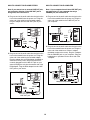
Note: If your VCR has an unused AUDIO OUT jack,
see instruction A below. If the AUDIO OUT jack is
being used, see instruction B. If you have a TV
with a built-in VCR, see instruction B. If your VCR
is connected to your home stereo, see HOW TO
CONNECT YOUR HOME STEREO on page 14.
A. Plug one end of the audio cable into the jack on the
front of the treadmill near the power cord. Plug the
other end of the cable into the included adapter.
Plug the adapter into the AUDIO OUT jack on your
VCR.
A
ANT. IN
VIDEO AUDIO
IN
RF OUT
CH
3 4
OUT
HOW TO USE IFIT.COM CD AND VIDEO
PROGRAMS
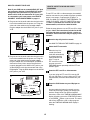
To use iFIT.com CDÕs or videocassettes, the treadmill
must be connected to your portable CD player, portable
stereo, home stereo, computer with CD player, or
VCR. See HOW TO CONNECT THE TREADMILL TO
YOUR CD PLAYER, VCR, OR COMPUTER on page
13. Note: To purchase iFIT.com CDÕs or iFIT.com
videocassettes, call toll-free 1-800-735-0768.
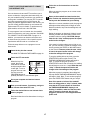
Follow the steps below to use an iFIT.com CD or video
program. Note: The instructions included in the CD
case describe how to use the CD with a variety of
treadmills. Some instructions may not apply to this
treadmill.
AUDIO OUT
RIGHT
1
LEFT
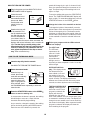
Insert the key fully into the console.
See HOW TO TURN ON THE POWER on page 10.
Audio
Cable
Adapter
2
When the key is inserted, the manual
mode will automatically
be selected and the
manual indicator will
light. To use an
iFIT.com CD or video
program, press the
PROGRAM button repeatedly until the iFIT.com
indicator lights.
B. Plug one end of the audio cable into the jack on the
front of the treadmill near the power cord. Plug the
other end of the cable into the included adapter.
Plug the adapter into an RCA adapter (available at
electronics stores). Next, remove the wire that is
currently plugged into the AUDIO OUT jack on your
VCR and plug the wire into the unused side of the
RCA adapter. Plug the RCA adapter into the AUDIO
OUT jack on your VCR.
3
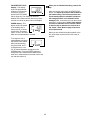
Insert the iFIT.com CD or videocassette.
If you are using an iFIT.com CD, insert the CD
into your CD player. If you are using an iFIT.com
videocassette, insert the videocassette into your
VCR.
B
ANT. IN
VIDEO AUDIO
IN
RF OUT
CH
3 4
OUT
4
RCA Adapter
Audio
Cable
Select the iFIT.com mode.
Adapter
Press the PLAY button on your CD player or
VCR.
A moment after the button is pressed, your personal trainer will begin guiding you through your
workout. Simply follow your personal trainerÕs
instructions. Note: If the TIME/INCLINE/MIN-MILE
display is flashing, press the START/STOP button
or the SPEED ▲ button on the console. The treadmill will not respond to a CD or video program
when the TIME/INCLINE/MIN-MILE display is
flashing.
Wire removed from
AUDIO OUT jack
15