1
Configuration
Before establishing the connection with your Wireless USB Adapter
to your network:
1. Be sure that the wireless indicator light in your
router or access point is on.
2. Check that you have the network name (SSID) and
the network key so that connection can be established. This
information can be found in the sticker situated on the bottom
panel of the router or, in case they were changed, in the router
configuration.
Once the previous steps are passed, follow the instructions
described in the following lines to configure Movistar USB Wireless
Adapter network connection.
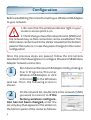
Run Movistar Wireless USB Adapter Utility clicking in
Start/Programs/Movistar
Wireless USB Adapter or click
in the icon
in the Windows
task bar. Then, the following screen is
shown:
1
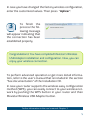
On the network list, double click in the network (SSID)
you want to connect to. If the
factory wireless configuration has not been changed, enter the
security key that appears in the sticker on
the bottom panel of the router as follows:
2
4