1
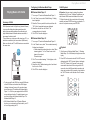
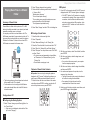
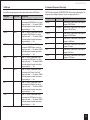
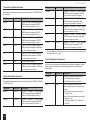
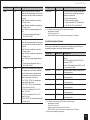
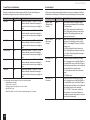
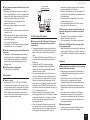
Reference Information ■■ Modem (when Internet radio is used) Device that connects home network (LAN) and Internet There are many kinds of modems depending on the forms of Internet connection. In addition, when connecting to the Internet, it is required to conclude an agreement with a company that provides Internet connection service, called ISP (Internet Service Provider). Use a modem that is recommended by your ISP company for the Internet connection. There are some devices that have both router and modem functions. Within above network components, prepare a router, Ethernet cable, and network server when the NET function "network server" is used. For enjoying the NET function "Internet radio," it is necessary to use the router, Ethernet cable, and modem (and agreement with ISP). ¼¼ The setting varies depending on the media server or controller components. Refer to your devices’ instruction manual for details. If the operating system of your personal computer is Windows 8/Windows 7, Windows Media Player 12 is already installed. For more information, see the Microsoft web site. USB Storage Device Requirements USB mass storage device class (but not always guaranteed). FAT16 or FAT32 file system format. If the USB storage device has been partitioned, each section will be treated as an independent device. Up to 20,000 folders can be displayed, and folders may be nested up to 16 levels deep. USB hubs and USB storage devices with hub functions are not supported. Do not connect these devices to the unit. Server Requirements ■■ Server playback This unit can play digital music files stored on a PC or media server and supports the following technologies: Windows Media Player 11 Windows Media Player 12 DLNA-certified media server The network server must be connected to the same network as this unit. Up to 20,000 folders can be displayed, and folders may be nested up to 16 levels deep. Note: Depending on the media server, the unit may not recognize it, or may not be able to play its music files. ■■ Remote playback Remote playback is the function that enables this AV receiver to play music files saved in different devices by operating the DLNA-compliant controller device and PC in the home network. Windows Media Player 12 DLNA-certified (within DLNA Interoperability Guidelines version 1.5) media server or controller component. 46 Note: If the media you connect is not supported, the message “No Storage” will be displayed. Sound files that are protected by copyright can not be played. When the USB audio player and this unit are connected, the audio player screen and the screen of the unit may be different. In addition, control functions of the audio player (classifying and sorting music files and adding information, etc.) are not available on this unit. Do not connect a PC to the USB port of the unit. Inputting sound to the USB port of the unit from a PC is not possible. Media inserted to the USB card reader may not be available in this function. Some USB storage devices and its contents may require some time to be read. Depending on the USB storage device, proper reading of the contents and proper supply of the power supply may not be possible. Onkyo accepts no responsibility whatsoever for the loss or damage to data stored on a USB storage device when that device is used with this unit. We recommend that you back up your important music files beforehand. Performance of the hard disk that receive power from the USB port of the unit is not guaranteed. If you connect a USB hard disk drive to the USB port of the unit, we recommend that you use its AC adapter to power it. When an audio player that are operated with batteries is used, make sure that the batteries have enough remaining power. USB devices with security functions can not be played. Supported Audio Formats For server playback and playback from a USB storage device, this unit supports the following music file formats. Music files of the following formats that can be played depend on the network server. For example, when using Windows Media® Player 12, not all music files in the PC can be played. The music files that can be played are the ones registered to the Windows Media® Player 12 library. Variable bit-rate (VBR) files are supported. However, playback times may not be displayed correctly. This unit supports the gapless playback of the USB storage device in the following conditions. When WAV, FLAC and Apple Lossless files are continuously played back with the same format, sampling frequency, channels and quantization bit rate. Remote playback does not support the gapless playback. Note: With remote playback, this unit does not support the following music file formats: −− FLAC, Ogg Vorbis, DSD ■■ MP3 (.mp3 or .MP3) Supported formats: MPEG-1/MPEG-2 Audio Layer 3 Supported sampling rates: 8 kHz, 11.025 kHz, 12 kHz, 16 kHz, 22.05 kHz, 24 kHz, 32 kHz, 44.1 kHz, 48 kHz Supported bitrates: Between 8 kbps and 320 kbps. Incompatible files can not be played. ■■ WMA (.wma or .WMA) WMA stands for Windows Media Audio and is an audio compression technology developed by Microsoft Corporation. Audio can be encoded in WMA format by using Windows Media® Player. WMA files must have the copyright option turned off. Supported sampling rates: 8 kHz, 11.025 kHz, 22.05 kHz, 32 kHz, 44.1 kHz, 48 kHz