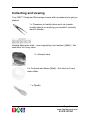
1
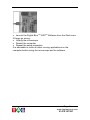
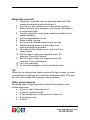
Installation Minimum System requirements PC with USB port (most computers made after June 1998 have a USB port) Microsoft Windows 98SE 200MHz processor (Special effects enhanced for Intel® Pentium® 4 processor) 32MB RAM 150 MB free hard disk space 4x CD-ROM drive SVGA 800x600 resolution video support, 16-bit colour 16 – bit Windows –compatible sound device Video and sound compatible with DirectX8 (included at install) Installation NB: do not plug in the microscope until you have installed the software. Insert the Digital Blue QX5 Wait for auto play to start Click the install button TM TM Software CD-ROM If auto play does not start automatically, go to the desktop and double-click on My Computer. Double-click the icon for the CD-ROM/DVD drive that contains the CD. Open the set-up folder, double-click on set-up.exe and follow the on screen instructions. Restart the computer Plug in the microscope to the USB port Page 2 www.taglearning.com 01474 357350