1
Replacing the Lamp ........................................................................................ 26
To check the current lamp use time ........................................................................... 26
When to replace the lamp .......................................................................................... 27
Replacing the Lamp ................................................................................................... 27
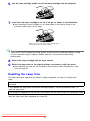
To replace the lamp ................................................................................................... 28
Resetting the Lamp Time ........................................................................................... 29
To reset the lamp time ............................................................................................... 30
To reset the lamp time after exceeding the lamp life ................................................. 30
Appendix........................................................................ 31
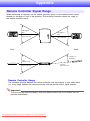
Remote Controller Signal Range .................................................................... 31
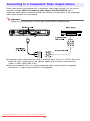
Connecting to a Component Video Output Device ......................................... 32
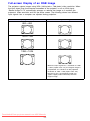
Full-screen Display of an RGB Image........................................................................ 33
Reattaching the Lens Cover............................................................................ 34
About this manual...
z All of the operations in this manual are explained using the remote controller that comes
with the projector. The following key operations can also be performed on the projector
instead of the remote controller: [MENU], [S], [T], [X], [W], [ENTER], [ESC], [
],
[INPUT], [AUTO], [ZOOM +], [ZOOM –], [FOCUS S], [FOCUS T].
To perform this remote
controller operation:
Use this projector button:
[ENTER]
Button in the center of the cursor keys
[ZOOM +], [ZOOM –]
[ZOOM] button in combination with the [W] and [X] buttons
[FOCUS S], [FOCUS T]
[FOCUS] button in combination with the [S] and [T] buttons
Downloaded From projector-manual.com ASK Manuals
2