1
ENGLISH
MODEL
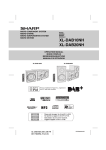
XL-DH259N
MICRO COMPONENT SYSTEM
OPERATION MANUAL
XL-DH259N Micro Component System consisting of XL-DH259N (main unit) and CP-DH259N (speaker system).
CD
USB
MICR
T
NEN
MPO
O C O XL-DH259
SYST
EM
iPod is a trademark of Apple Inc., registered in the
U.S. and other countries.
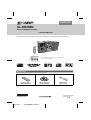
Accessories
Please confirm that only the following accessories are included.
Remote control x 1
(RRMCGA204AWSA)
TINSZA605AWZZ
04/1/28
XL-DH259N_Front EN
AM loop antenna x 1
(QANTLA004AWZZ)
FM antenna x 1
(92LFANT1535A)
Printed in Malaysia
09L R AS 1
Special Note
Supply of this product does not convey a license nor imply
any right to distribute content created with this product in
revenue-generating broadcast systems (terrestrial,
satellite, cable and/or other distribution channels),
revenue-generating streaming applications (via Internet,
intranets and/or other networks), other revenue-generating
content distribution systems (pay-audio or audio-ondemand applications and the like) or on revenuegenerating physical media (compact discs, digital versatile
discs, semiconductor chips, hard drives, memory cards
and the like). An independent license for such use is
required. For details, please visit http://mp3licensing.com
MPEG Layer-3 audio coding technology licensed from
Fraunhofer IIS and Thomson.
ENERGY STAR® Program Information
Products that have earned
the ENERGY STAR® are
designed to protect the
environment through
superior energy efficiency.
ENERGY STAR® is a U.S. registered mark.
“Made for iPod” means that an electronic accessory has been designed to connect specifically to iPod and has been
certified by the developer to meet Apple performance standards.
Apple is not responsible for the operation of this device or its compliance with safety and regulatory standards.
For U.S. customer only
SHARP ELECTRONICS CORPORATION
Sharp Plaza, Mahwah, New Jersey 07495-1163
E-1
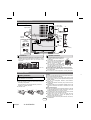
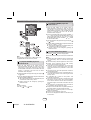
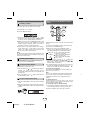
System connections
Make sure to unplug the AC power cord before making any connections.
Video cable
(not supplied)
Right speaker
TV
To video input jack
Left
speaker
AM loop
antenna
Installing the AM loop
antenna
< Assembling >
Red
Black
FM
antenna
< Attaching to the
wall >
AC outlet
(AC 120 V ~ 60 Hz)
wall
screws
(not supplied)
Precautions
Speaker connection
● Please ensure that the equipment is positioned in a well
ventilated area and ensure that there is at least 4" (10 cm)
of free space along the sides, top and back of the
equipment.
4" (10 cm)
4" (10 cm)
4" (10 cm)
MICRO COMPONENT SYSTEM
XL-DH259
4" (10 cm)
● Connect the black wire to the minus (–)
terminal, and the red wire to the plus
(+) terminal.
● Use speakers with an impedance of 4
ohms or more, as lower impedance
speakers can damage the unit.
● Do not make a mistake when
connecting the right and left speakers.
The right speaker is the one on the
Incorrect
right side when you face the unit.
● Do not let the bare speaker wires touch each other.
● Do not allow any objects to fall into or to be placed in the
bass reflex ducts.
● Do not stand or sit on the speakers. You may be injured.
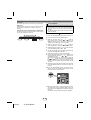
Remote control
Battery installation
Use 2 “AAA” size batteries (UM/SUM-4, R3, HP-16 or
similar). Batteries are not included.
1 Open the battery cover.
2 Insert the batteries according to the direction indicated in
the battery compartment.
When inserting or removing the batteries, push them
toward the (–) battery terminals.
3 Close the cover.
E-2
09/9/8
XL-DH259N EN
Caution:
● Replace all old batteries with new ones at the same time.
● Do not mix old and new batteries.
● Remove the batteries if the unit will not be used for a long
period of time. This will prevent potential damage due to
battery leakage.
● Do not use rechargeable batteries (nickel-cadmium
battery, etc.).
● Installing the batteries incorrectly may cause the unit to
malfunction.
● Batteries (battery pack or batteries installed) shall not be
exposed to excessive heat such as sunshine, fire or the
like.
Notes concerning use:
● Replace the batteries if the operating distance is reduced
or if the operation becomes erratic. Purchase 2 “AAA” size
batteries (UM/SUM-4, R3, HP-16 or similar).
● Periodically clean the transmitter on the remote control
and the sensor on the unit with a soft cloth.
● Exposing the sensor on the unit to strong light may
interfere with operation. Change the lighting or the
direction of the unit if this occurs.
● Keep the remote control away from moisture, heat, shock,
and vibrations.
1
2
3
4
5
6
7
8
9
General control
To turn the power on
Auto power on function
The first time the unit is plugged in, the unit will enter the
demonstration mode. You will see words scroll.
When you press any of these buttons during stand-by
mode, the unit turns on.
●
/ button on the main unit : The unit turns on and
playback of the last function will start (iPod, CD,
TUNER, USB, AUDIO IN).
● iPod button on the remote control : The unit turns on
and iPod function is activated.
● CD button on the remote control : The unit turns on and
CD function is activated.
● TUNER button on the remote control : The unit turns on
and TUNER function is activated.
● USB button on the remote control : The unit turns on
and USB function is activated.
● AUDIO IN button on the remote control : The unit turns
on and AUDIO IN function is activated.
1 Press the DEMO button to cancel the demonstration
mode.
2 Press the ON/STAND-BY button to turn the power on.
Function
Main unit
Power on /
off
POWER
ON/STAND-BY
Demo on /
off
Remote
control
Operation
Press to turn the
power on or to
go to stand-by
mode.
____
Press to enter to
demonstration
on or off mode.
Auto power off function
Display brightness control
To dim the display brightness, hold down the CLEAR/
DIMMER button on the remote control for 2 seconds or
more.
Volume auto fade-in
If you turn off and on the main unit with the volume set to
27 or higher, the volume starts at 16 and fades in to the last
set level.
Volume control
Turn the volume knob toward VOL +/– (on main unit) or
press VOLUME +/– (on remote control) to increase or
decrease the volume.
X-Bass control
When the power is first turned on, the unit will enter the
extra bass mode which emphasizes the bass frequencies,
and “X-BASS” will appear. To cancel the extra bass mode,
press the X-BASS button on the remote control.
Bass control
1 Press the BASS/TREBLE button to select “BASS”.
2 Within 5 seconds, press the VOLUME (+ or –) button to
adjust the bass.
Treble control
1 Press the BASS/TREBLE button to select “TREBLE”.
2 Within 5 seconds, press the VOLUME (+ or –) button to
adjust the treble.
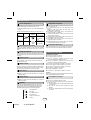
Equalizer
When the EQUALIZER MODE button is pressed, the
current mode setting will be displayed. To change to a
different mode, press the EQUALIZER MODE button
repeatedly until the desired sound mode appears.
FLAT
No
Noequalization.
equalization.
GAME
For
music.
Forrock
game.
music.
CLASSIC For
Forclassical
classical
music.
POPS
For
music.
Forpop
pop
music.
VOCAL
Vocals
enhanced.
Vocalsareare
enhanced.
JAZZ
09/9/8
For
Forjazz.
jazz.
XL-DH259N EN
E-3
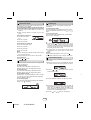
In the stop mode of disc or USB operation, the main unit
enters the stand-by mode after 15 minutes of inactivity.
Listening to the iPod
Supported iPod models:
● iPod nano (software 1.2 above)
● iPod mini (software 1.2 above)
● iPod (5th generation) (software 1.3 above) (Dock
connector equipped Click Wheel model)
● iPod (4th generation) (software 3.0.2 above) (Dock
connector equipped Click Wheel model)
● iPod nano (2nd generation) (software 1.0.0 above)
● iPod nano (3rd generation) (software 1.0.3 above)
● iPod nano (4th generation) (software 1.0.3 above)
● iPod classic (software 1.0.3 above)
● iPod touch (software 1.1 above)
● iPod touch (2nd generation) (software 2.1 above)
Caution:
Please update your iPod unit to the latest software version
from Apple’s homepage before using it.
iPod adaptor connection
Notes:
● iPhone is not supported by this system.
● You can use an audio cable to connect your iPod to the
AUDIO IN jack if:
1. your iPod adaptor does not fit into the iPod dock on
the main unit.
2. you have an iPod that does not have an iPod
adaptor.
3. you have an iPod that does not have an iPod 30 pin
connector.
Listening to the iPod (continued)
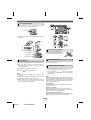
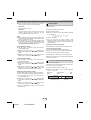
To insert iPod adaptor
1 Open the iPod cover by pulling up the tip.
pull up
2 Insert the iPod adaptor into the iPod dock and connect
your iPod.
CD
USB
iPod
iPod (bottom)
Dock connector
To remove iPod adaptor
iPod adaptor
(not supplied)
Insert the tip of a screwdriver (“–”
type, small) into the iPod adaptor hole
as shown and lift upward to remove.
iPod dock
iPod connector
To disconnect iPod
iPod playback
Simply remove the iPod from the iPod dock. It is safe to do
so even during playback.
1 Press the ON/STAND-BY button to turn the power on.
2 Press the iPod button on the remote control or
FUNCTION button repeatedly on the main unit to
select iPod function.
Navigating the iPod menus
1 Press the MENU button to view the menu on iPod unit.
3 Insert iPod unit in iPod dock of main unit.
4 Press the
Press it again to go back to previous menu.
/ button to start playback.
2 Use the TUNING (
Notes:
● Once the iPod is connected to the unit it will begin
charging.
● The iPod unit cannot be charged while the main unit is
in the stand-by mode or during USB mode.
● Please make sure to set iPod unit to either NTSC or
PAL to match your TV signal. Please visit Apple’s
homepage for further information.
or
) button on the remote
control to select an item on the menu and then press
ENTER button.
Note:
When navigating the iPod menus with remote control, do
not operate any of the buttons on the iPod unit. The volume
level is adjusted by pressing the VOL (+ or –) button on the
main unit or the remote control. Adjusting the volume on
the iPod unit gives no effect.
iPod operation:
The operations described below depend on the generation
iPod you are using.
System on operation:
When the main unit is powered on, the iPod unit will
automatically power on when docked in the unit (including
TIMER function/exclude USB function).
System off (stand-by operation):
When the main unit is turned to stand-by mode, the docked
iPod unit will automatically turn to stand-by mode.
E-4
09/9/8
XL-DH259N EN
1
2
3
4
5
6
7
8
9
Listening to the iPod (continued)
Listening to a CD or MP3/WMA disc
Watching videos on a TV connected to
iPod
1 Press the DISPLAY (TV OUT) button for more than 2
seconds. “TV DISP” will appear on display.
2 Press the ENTER button to start playback.
Notes:
● If the TV Out setting is already turned on at video menu, the
video is automatically displayed on the TV screen when
ENTER key is pressed.
● To return to watching video on iPod screen, press the MENU
button to enter video menu. Then press the DISPLAY (TV
OUT) button for more than 2 seconds until “iPod DISP”
appears.
● During iPod video playback, pressing the DISPLAY (TV OUT)
button will not toggle video out display between iPod and TV.
CD
USB
iPod playback detection function:
Once the play button on the iPod unit is pressed, the main unit
will automatically change to iPod function overriding the previous
function selected.
Caution:
● Unplug all accessories for the iPod before inserting it into the
iPod dock.
● Stop button ( ) at main unit is invalid during iPod function.
Various iPod functions
Function
Main
unit
Play
Remote
control
Disc playback
Operation
1 Press the ON/STAND-BY button to turn the power on.
2 Press the CD button on the remote control or FUNCTION
Press in the pause
mode.
Pause
button repeatedly on the main unit to select CD function.
Press the OPEN/CLOSE button to open the disc tray.
Place the disc on the disc tray, label side up.
Press the OPEN/CLOSE button to close the disc tray.
Press the / (CD / ) button to start playback. After the
last track is played, the unit will stop automatically.
Notes for CD or MP3/WMA disc:
● When the end of the last track is reached during fast forward,
“END” will appear on the display and CD operation will be
paused. When the beginning of the first track is reached
during fast reverse, the unit will enter the playback mode
(only for CD).
● Rewritable multi-session discs with unfinished writing, can
still be played.
3
4
5
6
Press in the playback
mode.
Track up/
down
____
Fast
forward/
reverse
____
Display
____
Press in the playback or
pause mode.
If you press the button in
the pause mode, press
the / button to start
the desired track.
Press and hold down in
the playback mode.
Release the button to
resume playback.
iPod back light ON.
Press for more than 2
seconds to toggle the
video out display
between iPod or TV.
Press to toggle repeat
mode.
Repeat
____
Shuffle
____
Press and hold down to
toggle shuffle mode.
iPod
Menu
____
iPod
Enter
____
Press to view the iPod
menu during iPod
function.
Press to confirm the
selection.
iPod
Cursor
Up/Down
____
Various disc functions
Function
Pause
Press to select the iPod
menu.
E-5
09/9/8
XL-DH259N EN
Main
unit
Track
up/down
____
Fast
forward/
reverse
____
Remote
control
Operation
Press in the playback
mode. Press the /
button to resume
playback from the
paused point.
Press in the playback or
stop mode.
If you press the button in
the stop mode, press the
/ button to start the
desired track.
Press and hold down in
the playback mode.
Release the button to
resume playback.
Listening to a CD or MP3/WMA disc (continued)
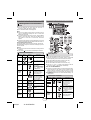
Direct track search
Random play
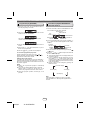
By using the Direct Search buttons, the desired tracks on
the current disc can be played.
Use the Direct Search buttons on the remote control to
select the desired track while playing the selected disc.
● The Direct Search buttons allow you to select up to
number 9.
● When selecting number 10 or higher, use the “10+”
button.
A. For example, to choose 13
The tracks on the disc can be played in random order
automatically.
To random play all tracks:
Press and hold down PLAY MODE button on the remote
control until “RANDOM” appears. Press the / (CD / )
button.
To cancel random play:
Press and hold the PLAY MODE button until “NORMAL”
appears and “R” disappears.
1 Press the “10+” button
once.
2 Press the “1” button.
3 Press the “3” button.
Selected track number
B. For example, to choose 130
1
2
3
4
Press the “10+” button twice.
Press the “1” button.
Press the “3” button.
Press the “0” button.
Notes:
● A track number higher than the number of tracks on the
disc cannot be selected.
● During random play, direct search is not possible.
To stop playback:
Press the (CD ) button.
Notes:
● If you press the
button during random play, you can
move to the track selected next by the random
operation. On the other hand, the button does not allow
you to move to the previous track. The beginning of the
track being played will be located.
● In random play, the unit will select and play tracks
automatically. (You cannot select the order of the
tracks.)
Caution:
After performing repeat play, be sure to press the
(CD ) button. Otherwise, the disc will play continuously.
Programmed play (CD)
You can choose up to 32 selections for playback in the
order you like.
Repeat play
Repeat play can play one track, all tracks or a programmed
sequence continuously.
1 While in the stop mode, press the MEMORY button on
the remote control to enter the programing save mode.
To repeat one track:
Press the PLAY MODE button repeatedly until “1REPEAT” appears. Press the / (CD / ) button.
2 Press the
To repeat all tracks:
Press the PLAY MODE button repeatedly until “ALL
REPEAT” appears. Press the / (CD / ) button.
or
buttons on the remote control to
select the desired track.
To repeat desired tracks:
Perform steps 1 - 5 in “Programmed play” section on pages
6 - 7 and then press the PLAY MODE button repeatedly
until “ALL REPEAT” appears.
To cancel repeat play:
Press the PLAY MODE button repeatedly until “NORMAL”
appears and “
” disappears.
Selected track number
3 Press the MEMORY button to save the track number.
4 Repeat steps 2 - 3 for other tracks. Up to 32 tracks can
be programmed. If you want to check the programmed
tracks, press the MEMORY button repeatedly. If you
make a mistake, the programmed tracks can be cleared
by pressing the CLEAR/DIMMER button.
5 Press the
E-6
09/9/8
XL-DH259N EN
/ (CD
/ ) button to start playback.
1
2
3
4
5
6
7
8
9
Listening to a CD or MP3/WMA disc (continued)
Procedure to playback MP3/WMA disc
with folder mode on
Programmed play (MP3/WMA)
1 While in the stop mode, press the MEMORY button to
To play back CD-R/RW.
enter the programing save mode.
1 Press the CD button, and load an MP3/WMA disc. After
disc is loaded, disc info will be displayed.
2 Press the TUNING (
or ) button on the remote
control to select the desired folder.
Disc
Name
MP3 indicator
WMA indicator
TOTAL indicator
Total number of
files
Total number
of folder
Then press the
or
button on the remote
control to select the desired tracks.
2 Press the FOLDER button, and press the TUNING (
or ) button to select desired playback folder. (Folder
mode on)
FOLDER
indicator
3 Press the MEMORY button to save the folder and track
number.
tracks can be programmed.
5 Press the
/ (CD
First track
number in the
folder
FOLDER
number
4 Repeat steps 2 – 3 for other folder/tracks. Up to 32
3 Select desired file to be played back by pressing the
/ ) button to start playback.
or
button.
4 Press the
To cancel the programmed play mode:
During programmed stop mode, press the (CD )
button. The display will show “MEM CLEAR” and all the
programmed contents will be cleared.
Adding tracks to the program:
If a program has been previously stored, the “MEMORY”
indicator will be displayed. Then follow steps 1 - 3 to add
tracks. The new tracks will be stored after the last track of
the previous program.
Notes:
● When a disc is ejected, the program is automatically
canceled.
● If you press the ON/STAND-BY button to enter the
stand-by mode or change the function from CD to
another, the programmed selections will be cleared.
● During the program operation, random play is not
possible.
/ (CD / ) button. Playback will start and
file name will be displayed.
● Title, Artist and Album name are displayed if they are
recorded on the disc.
● In case of playback with the folder mode on, press
the TUNING ( or ) button, and the folder can be
selected even though it is in playback/pause mode.
It will continue playback/pause mode in the 1st track
of the selected folder.
● Display content can be changed by pressing the
DISPLAY button.
File name display
Title display
Album display
Artist display
Note:
If “NO SUPPORT” is displayed, it means “Copyright
protected WMA file” or “Not supported playback file” is
selected.
E-7
09/9/8
XL-DH259N EN
Listening to USB mass storage device/MP3 player
To playback USB/MP3 player with
folder mode on
1 Press the USB button on the remote control or
FUNCTION button repeatedly on main unit to select
USB function. Connect the USB memory device that
has MP3/WMA format files on the unit. When the USB
memory is connected to the main unit, the device
information will be displayed.
2 Press the FOLDER button, and press the TUNING (
or ) button to select desired playback folder. To start
playback with folder mode on, go to step 4. To change
the playback folder, press the TUNING ( or ) button
to select another folder.
3 Select desired file to be played back by pressing the
or
button.
4 Press the / (USB / ) button. Playback will start and
the file name will be displayed.
● Title, Artist and Album name are displayed if they are
recorded in the USB memory device.
● Display content can be changed by pressing the
DISPLAY button.
CD
USB
To remove USB memory device
1 Press the (USB ) button to stop playback.
2 Disconnect USB memory device from the USB terminal.
Note:
This USB mass storage device or MP3 player is not
compatible with MTP and AAC file systems.
To playback USB/MP3 player with
folder mode off
1 Press the USB button on the remote control or
FUNCTION button repeatedly on main unit to select
USB function. Connect the USB memory device that
has MP3/WMA format files on the unit. When the USB
memory is connected to the main unit, the device
information will be displayed.
2 Select desired file to be played back by pressing the
or
button.
3 Press the / (USB / ) button. Playback will start and
the file name will be displayed.
● Title, Artist and Album name are displayed if they are
recorded in the USB memory device.
● Display content can be changed by pressing the
DISPLAY button.
Note:
To pause playback:
Press the / (USB
/ ) button.
E-8
09/9/8
XL-DH259N EN
Notes:
● SHARP will not be held liable for the loss of data while
the USB memory device is connected to the audio
system.
● This USB memory’s format supports FAT 16 or FAT 32.
● SHARP cannot guarantee that all USB memory
devices will work on this audio system.
● USB cable is not recommended for use in this audio
system to connect to USB memory device. Use of the
USB cable will affect the performance of this audio
system.
● This USB memory cannot be operated via USB hub or
external HDD-storage.
● The USB terminal in this unit is not intended for a PC
connection but is used for music streaming with a USB
memory device.
● If unplayable file is played on this product, “NO
SUPPORT” is indicated.
● This product relates to USB mass storage devices and
MP3 players. It may however face some irregularities
due to various unforeseen reasons from some devices.
Should this happen, turn off the unit and then turn it on
again.
● The USB port is only intended for direct connection to
a USB memory device without any cable.
● Playback order for MP3 files may differ depending on
the writing software used during file download.
● Bitrate which is supported by MP3 is 32~320 kbps,
WMA is 64~160 kbps.
● Playlists are not supported on this unit.
● This unit can display Folder Name or File Name up to
32 characters.
1
2
3
4
5
6
7
8
9
Listening to the radio
Listening to USB mass storage
device/MP3 player (continued)
● Folders with non playable files are also counted.
● The display playback time may not be displayed
correctly when playing back a variable bitrate file.
● The ID3TAG information supported are TITLE, ARTIST
and ALBUM only. Title name, artist name and album
name can be displayed by pressing the DISPLAY
button during file playback or pause mode.
● WMA meta tag also supports title, artist and album
name which are recorded in WMA files. Copyright
protected WMA files cannot be played back.
Advanced USB playback
The following functions are the same as CD
operations:
Page
Direct track search . . . . . . . . . . . . . . . . . . . . . . . . . . . . 6
Repeat play . . . . . . . . . . . . . . . . . . . . . . . . . . . . . . . . . . 6
Random play . . . . . . . . . . . . . . . . . . . . . . . . . . . . . . . . . 6
Programmed play . . . . . . . . . . . . . . . . . . . . . . . . . . 6 - 7
CD
USB
Note:
If USB memory device is not connected, “NO MEDIA” will
be shown on the display.
Tuning
1 Press the ON/STAND-BY button to turn the power on.
2 Press the FUNCTION button on the main unit or TUNER
(BAND) button repeatedly to select the desired
frequency band (FM or AM).
3 Press the TUNING (
or
) button on the remote
control to tune in to the desired station.
Manual tuning:
Press the TUNING ( or ) button repeatedly to tune
in to the desired station.
Auto tuning:
When the TUNING ( or ) button is pressed for more
than 0.5 seconds, scanning will start automatically and
the tuner will stop at the first receivable broadcast
station.
Notes:
● When radio interference occurs, auto scan tuning may
stop automatically at that point.
● Auto scan tuning will skip weak signal stations.
● To stop the auto tuning, press the TUNING ( or )
button again.
To receive an FM stereo transmission:
● Press the TUNER (BAND) button to select stereo mode
and “ST” indicator will be displayed. “
” will appear
when an FM broadcast is in stereo.
● If the FM reception is weak, press the TUNER (BAND)
button to extinguish the “ST” indicator. The reception
changes to monaural, and the sound becomes clearer.
E-9
09/9/8
XL-DH259N EN
Listening to the radio (continued)
Setting the clock (Remote control
only)
Presetting a station
You can store 40 AM and FM stations in memory and
recall them at the push of a button. (Preset tuning)
1 Perform steps 1 - 3 in “Tuning”.
2 Press the MEMORY button.
CD
USB
3 Within 30 seconds, press the PRESET (
or ) button
to select the preset channel number. Store the stations
in memory, in order, starting with preset channel 1.
4 Within 30 seconds, press the MEMORY button to store
that station in memory. If the “MEMORY” and preset
number indicators disappear before the station is
memorized, repeat the operation from step 2.
5 Repeat steps 1 - 4 to set other stations, or to change a
preset station. When a new station is stored in the
memory, the station previously memorized for that
preset channel number will be erased.
Note:
The backup function protects the memorized stations for a
few hours should there be a power failure or the AC power
cord become disconnected.
To recall a preset station
Press the PRESET ( or ) button for less than 0.5
seconds to select the desired station.
To scan the preset stations
The stations saved in the memory can be scanned
automatically. (Preset memory scan)
1 Press the PRESET (
or ) button for more than 0.5
seconds. The preset number will flash and the
programmed stations will be tuned in sequentially, for 5
seconds each.
2 Press the PRESET (
or
desired station is located.
) button again when the
To erase entire preset memory
1 Press the ON/STAND-BY button to enter the stand-by
mode.
2 While pressing down the FUNCTION button, press the
POWER ON/STAND-BY button until “TUNER CLEAR”
appears.
In this example, the clock is set for the 12-hour (AM 12:00)
display.
1 Press the ON/STAND-BY button to turn the power on.
2 Press the CLOCK/TIMER button.
3 Within 10 seconds, press the MEMORY button.
Press the
or
button to select 12-hour or 24hour display and then press the MEMORY button.
“AM 12:00”
The 12-hour display will appear.
(AM 12:00 - PM 11:59)
The 12-hour display will appear.
(AM 0:00 - PM 11:59)
The 24-hour display will appear.
“0:00”
(0:00 - 23:59)
4 To adjust the hour, press the
or
button and
then press the MEMORY button. Press the
or
button once to advance the time by 1 hour. Hold it
down to advance continuously.
5 To adjust the minutes, press the
or
button and
then press the MEMORY button. Press the
or
button once to advance the time by 1 minute.
“AM 0:00”
To confirm the time display:
Press the CLOCK/TIMER button. The time display will
appear for about 5 seconds.
Note:
The “CLOCK” will appear or time will be displayed when
the AC power supply is restored after a power failure or
unplugging the unit. If incorrect, readjust the clock as
follows.
To readjust the clock:
Perform “Setting the clock” from step 1. If the “CLOCK”
does not appear in step 2, step 3 (for selecting the 12-hour
or 24-hour display) will be skipped.
To change the 12-hour or 24-hour display:
1 Clear all the programmed contents. [Refer to “Factory
reset, clearing all memory” on page 14 for details.]
2 Perform “Setting the clock” from step 1 onwards.
E-10
09/9/8
XL-DH259N EN
1
2
3
4
5
6
7
8
9
Timer and sleep operation (Remote control only)
Once timer:
Once timer play works for one time only at a preset time.
Timer playback
Daily timer:
Daily timer play works at the same preset time every day.
For example, set the timer as a wake-up call every
morning.
Before setting timer:
● Check that the clock is set to the correct time (refer to
page 10). If it is not set, you cannot use the timer
function.
● For timer playback: Plug in USB or load disc or dock
iPod to be played.
Using the once timer and daily timer in combination:
For example, use the once timer to listen a radio program,
and use the daily timer to wake up.
1 minute or more
Start
1 Press the ON/STAND-BY button to turn the power on.
Once timer
Daily timer
Stop
Start
Stop
2 Press and hold the CLOCK/TIMER button.
3 Within 10 seconds, press the
or
button to
select “ONCE SET” or “DAILY SET”, and press the
MEMORY button. Set the clock to the correct time if
“ONCE SET” or “DAILY SET” does not appear.
4 Within 10 seconds, press the
or
button to
select “TIMER SET”, and press the MEMORY button.
5 To adjust the hour, press the
or
button and then
press the MEMORY button.
6 To adjust the minutes, press the
or
button and
then press the MEMORY button.
7 Set the time to finish as in steps 5 and 6 above.
8 To select the timer playback source (CD, TUNER, USB,
iPod or AUDIO IN), press the
or
button. Press
the MEMORY button.
When you select the tuner, select a station by pressing
the
or
button, and then press the MEMORY
button. If a station has not been programmed, “NO
PRESET” will be displayed and timer setting will be
canceled.
9 Adjust the volume using the VOLUME control, and then
press the MEMORY button. Do not turn the volume up
too high.
10 Press the ON/STAND-BY button to enter the power
stand-by mode. The “TIMER” indicator lights up and
the unit is ready for timer playback.
11 When the preset time is reached, playback will start.
The volume will increase gradually until it reaches the
preset volume. The “ ” indicator will blink during timer
playback.
The “DAILY” indicator will blink during timer playback.
E-11
09/9/8
XL-DH259N EN
Timer and sleep operation (Remote control only) (continued)
Sleep operation
12 When the timer end time is reached, the system will
enter the power stand-by mode automatically.
The radio, compact disc, iPod and USB can all be turned
off automatically.
Once timer:
The timer will be canceled.
Daily timer:
The timer operates at the same time every day. It will
continue until the daily timer setting is canceled.
Cancel the daily timer when it is not in use.
Notes:
● When performing timer playback using another unit
connected to the USB terminal or AUDIO IN jack select
“USB” or “AUDIO IN” in step 8.
● This unit will turn on or enter the power stand-by mode
automatically. However, the connected unit will not turn
on or off. To stop the timer playback, follow step
“Canceling the timer setting” of this page.
1 Play back the desired sound source.
2 Press the SLEEP button.
3 Within 10 seconds, press the SLEEP button repeatedly
to select the time.
10
20
30
....... 80
90
4 “SLEEP” will appear.
5 The unit will enter the power stand-by mode
automatically after the preset time has elapsed. The
volume will be turned down 1 minute before the sleep
operation finishes.
To confirm the remaining sleep time:
Checking the timer setting:
1 While “SLEEP” is indicated, press the SLEEP button.
1 Turn the power on and press and hold down the
2 Within 10 seconds, press the
To cancel the sleep operation:
Press the ON/STAND-BY button while “SLEEP” is
indicated. To cancel the sleep operation without setting
the unit to the stand-by mode, proceed as follows.
3 Within 10 seconds, press the
1 While “SLEEP” is indicated, press the SLEEP button.
CLOCK/TIMER button.
or
button to select
“ONCE SET” or “DAILY SET”, and press the MEMORY
button.
or
button to select
“TIMER CALL”, and press the MEMORY button.
2 Within 10 seconds, press the SLEEP button repeatedly
to select “SLEEP 00”.
Canceling the timer setting:
1 Turn the power on and press and hold down the
To use timer and sleep operation together
CLOCK/TIMER button.
2 Within 10 seconds, press the
or
button to select
“ONCE SET” or “DAILY SET”, and press the MEMORY
button.
3 Within 10 seconds, press the
or
button to select
“TIMER OFF”, and press the MEMORY button. Timer
will be canceled (the setting will not be canceled).
Sleep and timer playback:
For example, you can fall asleep listening to the radio and
wake up to CD in the next morning.
1 Set the sleep time (see above, steps 1 - 5).
2 While the sleep timer is set, set the timer playback
(steps 2 - 9, page 11).
Reusing the memorized timer setting:
The timer setting will be memorized once it is entered. To
reuse the same setting, perform the following operations.
1 Turn the power on and press and hold down the
CLOCK/TIMER button.
2 Within 10 seconds, press the
or
button to select
“ONCE SET” or “DAILY SET”, and press the MEMORY
button.
3 Within 10 seconds, press the
or
button to select
“TIMER ON”, and press the MEMORY button.
4 Press the ON/STAND-BY button to enter the power
stand-by mode.
E-12
09/9/8
XL-DH259N EN
Sleep timer
setting
Timer playback
setting
90 minutes
Sleep operation will
automatically stop
End
time
Desired time
Timer playback
start time
1
2
3
4
5
6
7
8
9
Enhancing your system
Troubleshooting chart
Many potential problems can be resolved by the owner
without calling a service technician.
If something is wrong with this product, check the following
before calling your authorized SHARP dealer or service
center.
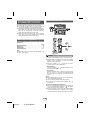
The connection cord is not included. Purchase a
commercially available cord as shown below.
Portable audio
player, etc.
General
Audio cable
(not supplied)
Symptom
● Did a power failure occur?
Reset the clock. (Refer
page 10)
● When a button is
pressed, the unit
does not respond.
● Set the unit to the power
stand-by mode and then
turn it back on.
● If the unit still malfunctions,
reset it. (Refer page 14)
● No sound is heard.
● Is the volume level set to
“0”?
● Are the headphones
connected?
● Are the speaker wires
disconnected?
MICRO COMPONENT SYSTEM
XL-DH259
Listening to the playback sounds of
portable audio player, etc.
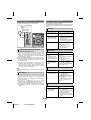
CD player
1 Use a connection cord to connect the portable audio
Symptom
player etc. to the AUDIO IN jack. When using video
equipment, connect the audio output to this unit and the
video output to a television.
2 Press the ON/STAND-BY button to turn the power on.
3 Press the AUDIO IN button on the remote control or
FUNCTION button repeatedly on main unit to select
AUDIO IN function.
4 Play the connected equipment. If volume level of the
connected device is too high, sound distortion may
occur. Should this happen, lower the volume of the
connected device. If volume level is too low, increase
the volume of the connected device.
● Playback does not
start.
● Playback stops in
the middle or is not
performed properly.
Note:
To prevent noise interference, place the unit away from the
television.
Headphones
Remote control
Symptom
XL-DH259N EN
Possible cause
● Is the AC power cord of the
unit plugged in?
● Is the battery polarity
correct?
● Are the batteries dead?
● Is the distance or angle
incorrect?
● Does the remote control
sensor receive strong
light?
Tuner
Symptom
● The radio makes
unusual noises
continuously.
E-13
Possible cause
● Is the disc loaded upside
down?
● Does the disc satisfy the
standards?
● Is the disc distorted or
scratched?
● Playback sounds are ● Is the unit located near
skipped, or stopped
excessive vibrations?
in the middle of a
● Is the disc very dirty?
track.
● Has condensation formed
inside the unit?
● The remote control
does not operate.
● Do not turn the volume on to full at switch on and listen
to music at moderate levels. Excessive sound pressure
from earphones and headphones can cause hearing
loss.
● Before plugging in or unplugging the headphones,
reduce the volume.
● Be sure your headphones have a 1/8" (3.5 mm)
diameter plug and impedance between 16 and 50
ohms. The recommended impedance is 32 ohms.
● Plugging in the headphones disconnects the speakers
automatically. Adjust the volume using the VOLUME
control.
09/9/8
Possible cause
● The clock is not set
to the correct time.
Possible cause
● Is the unit placed near the
TV or computer?
● Is the FM antenna or AM
loop antenna placed
properly? Move the
antenna away from the AC
power cord if it is located
nearby.
Troubleshooting chart (continued)
USB
Factory reset, clearing all memory
Symptom
● Device cannot be
detected.
● Playback does not
start.
● Wrong time display.
● Wrong file name
display.
Possible cause
● Is there any MP3/WMA file
available?
● Is the device properly
connected?
● Is it an MTP device?
● Does the device contain
AAC file only?
● Is it a copyright protected
WMA file?
● Is it a false MP3 file?
● Is Variable Bitrate file being
played back?
● Is the File Name written in
Chinese or Japanese
characters?
1 Press the ON/STAND-BY button to enter the power
stand-by mode.
2 While pressing down the OPEN/CLOSE button, press
the POWER ON/STAND-BY button until “ALL CLEAR”
appears.
Caution:
This operation will erase all data stored in memory
including clock, timer settings, tuner preset, and CD
program.
iPod
Before transporting the unit
Symptom
● No sound is
produced.
No image appears
on the TV/monitor.
●
●
●
●
●
● iPod will not charge. ●
●
●
●
Possible cause
The iPod is not playing.
The iPod is not properly
connected to the unit.
Is the AC power cord of the
unit plugged in?
The video cable is not
properly connected.
The TV/monitor’s input
selection is not properly
set.
Wrong iPod adaptor is
used.
The iPod is not making full
contact with the iPod
connector.
The main unit is in stand-by
mode.
Using 3rd generation iPod.
Condensation
Sudden temperature changes, storage or operation in an
extremely humid environment may cause condensation
inside the cabinet (CD pickup, etc.) or on the transmitter on
the remote control. Condensation can cause the unit to
malfunction. If this happens, leave the power on with no
disc in the unit until normal playback is possible (about 1
hour). Wipe off any condensation on the transmitter with a
soft cloth before operating the unit.
If problem occurs
When this product is subjected to strong external
interference (mechanical shock, excessive static
electricity, abnormal supply voltage due to lightning, etc.)
or if it is operated incorrectly, it may malfunction.
If such a problem occurs, do the following:
1 Set the unit to the stand-by mode and turn the power on
again.
2 If the unit is not restored in the previous operation,
unplug and plug in the unit again, and then turn the
power on.
Note:
If neither operation above restores the unit, clear all the
memory by resetting it.
Remove the iPod, USB memory device and disc from the
unit. Then, set the unit to the power stand-by mode.
Carrying the unit with iPod or USB memory device left
docked or discs left inside might damage the unit.
Care of compact discs
Compact discs are fairly resistant to damage, however
mistracking can occur due to an accumulation of dirt on the
disc surface. Follow the guidelines below for maximum
enjoyment from your CD collection and player.
● Do not write on either side of the disc, particularly the
non-label side from which signals are read. Do not
mark this surface.
● Keep your discs away from direct sunlight, heat, and
excessive moisture.
● Always hold the CDs by the edges. Fingerprints, dirt, or
water on the CDs can cause noise or mistracking. If a
CD is dirty or does not play properly, clean it with a soft,
dry cloth, wiping straight out from the center, along the
radius.
Maintenance
Cleaning the CD pickup lens
In order to ensure proper operation of the CD player,
preventative maintenance (cleaning of the laser pickup
lens) should be performed periodically. Lens cleaners are
commercially available. Contact your local CD software
dealer for options.
Cleaning the cabinet
Periodically wipe the cabinet with a soft cloth and a diluted
soap solution, then with a dry cloth.
Caution:
● Do not use chemicals for cleaning (gasoline, paint
thinner, etc.). It may damage the cabinet.
● Do not apply oil to the inside of the unit. It may cause
malfunctions.
E-14
09/9/8
XL-DH259N EN
1
2
3
4
5
6
7
8
9
Specifications
As part of our policy of continuous improvement, SHARP
reserves the right to make design and specification
changes for product improvement without prior notice. The
performance specification figures indicated are nominal
values of production units. There may be some deviations
from these values in individual units.
General
Power source
AC 120 V ~ 60 Hz
Power
consumption
55 W
Dimensions
Width: 6-1/2" (165 mm)
Height: 8-2/3" (220 mm)
Depth: 9-1/4" (235 mm)
Weight
9 lbs. (4.1 kg)
Amplifier
Output power
RMS: Total 160 Watts (80 Watts per
channel into 4 ohms at 1 kHz, 10%
total harmonic distortion.)
FTC: 60 Watts minimum RMS per
channel into 4 ohms from 100 Hz to
20 kHz, 10% total harmonic
distortion.
USB
USB host interface ● Complies with USB 1.1 (Full
Speed)/ 2.0 Mass Storage
Class.
● Support Bulk only and CBI
protocol.
Support file
● MPEG 1 Layer 3
● WMA (Non DRM)
Bitrate support
● MP3 (32 ~ 320 kbps)
● WMA (64 ~ 160 kbps)
Other
● Maximum total number of
MP3/WMA files is 1024.
● Maximum total number of
folders is 255 INCLUSIVE of
root directory.
● The ID3TAG information
supported are TITLE, ARTIST
and ALBUM only.
● Supports ID3TAG version 1
and version 2.
File system
● Support USB devices with
Microsoft Windows/DOS/FAT
support
12/FAT 16/ FAT 32.
● 2 kbyte block length for sector.
Tuner
Frequency range
Output terminals Speakers: 4 ohms
Headphones: 16 - 50 ohms
(recommended: 32 ohms)
Speaker
Video output: 1 Vp-p
Input terminals
FM: 87.5 - 108 MHz
AM: 530 - 1,720 kHz
Audio In (audio signal):
250 mV/47 k ohms
Type
2-way type speaker system
2" (5 cm) tweeter
4-3/4" (12 cm) woofer
Maximum input
power
160 W
Single disc multi-play compact disc
player
Rated input power
80 W
Signal readout
Non-contact, 3-beam
semiconductor laser pickup
Impedance
4 ohms
Dimensions
D/A converter
Multi bit D/A converter
Width: 5-13/16" (148 mm)
Height: 10-1/4" (220 mm)
Depth: 7-3/16" (182 mm)
Frequency
response
20 - 20,000 Hz
Weight
4.21 lbs. (1.91 kg)/each
Dynamic range
90 dB (1 kHz)
CD player
Type
E-15
09/9/8
XL-DH259N EN