1
Troubleshooting
1) I don’t see a weight on the scale display.
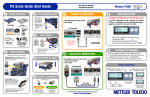
The scale may not be plugged into a wall outlet. The scale needs power and must be plugged into a wall outlet. The
scale comes with a wall mount power supply. One end plugs into a wall outlet. The other end plugs into the scale
circuit board. The power receptacle on the scale can be found underneath the scale next to the display and serial
connector. Once the scale is powered, it steps through its normal start-up sequence and will soon show the weight
display. Make sure there is nothing on the scale or touching the top when it first powers-up. If you have verified
that the outlet is fine, the scale is plugged in, and you still have nothing on the display, then contact our MT Express
technical support department 1-800-786-0812.
2) The scale is showing funny brackets on the display.
This generally means that the scale was originally powered up with some weight (maybe a package) on it. Simply
un-plug the scale from the wall, make sure there is no weight on the scale or that the scale is touching anything, and
plug the scale back in. The scale will go through its usual start-up sequence, and the problem should be solved.
7