1
Installation
GPS Device
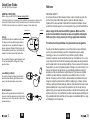
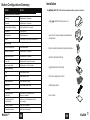
Install Speakers
• Use the plastic inserts (optional) to ensure a firm and
secure mounting area for the speaker.
• Insert the plastic inserts in the ear pocket/pads. If necessary
carefully trim the plastic inserts with a pair of scissors to fit helmet.
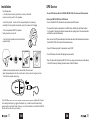
To use a GPS device with the UCLEAR HBC120 PLUS, the two must first be paired.
Pairing the HBC120 PLUS to a GPS Device
•Turn on the HBC120 PLUS helment communicator and GPS device
• The microphones MUST be placed
facing toward your mouth.
•To connect the helmet communicator to a GPS device, hold the Up and Down buttons
for 2 seconds. This puts the helmet communicator into paring mode. The status indicator
will blink blue and red alternately.
• Left and right speakers must be installed
symmetrically.
•Next, turn on the GPS device Bluetooth functions and search for Bluetooth audio devices.
Select ‘HBC120 PLUS’ to pair with the desired device.
•If your GPS device prompts for a passcode, enter ‘0000’.
•Your GPS device will confirm that pairing has succeeded.
*Note: To make calls through the HBC120 PLUS, you may need to pair your mobile phone
to the GPS device by following the instructions of the GPS device.
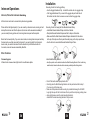
• Make sure the speaker wire is inserted into the main unit.
lnsert the speaker wire into the control unit until you can no longer see the
3 ribs on the speaker wire plug.
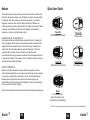
Your UCLEAR HBC120 PLUS helmet communication system comes with 3 types
of mounting brackets: a goggle attachment clip, a side mounted helmet strap
and a metal mounting bracket. Use any one of the brackets to install the HBC120
PLUS control unit onto your helmet.
11
EN
EN
20