1
R-657_[Cov+EN].qxd
4/4/07
11:05 AM
Page 3
CONTROL PANEL
CONTROL PANEL
1
2
10
MIN
1
MIN
10
3
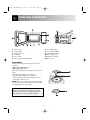
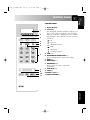
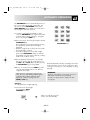
1 Digital Display
2 Indicators
The appropriate indicator will flash or light up, just
above each symbol according to the instruction.
When an indicator is flashing, press the suitable
key (having the same symbol) or do the necessary
operation.
S
Stir
4
Turn over
5
6
Weight/Power level
Grill
Microwave
7
3
4
5
6
8
9
10
7 AUTOMATIC keys
Press to select one of the 12 automatic
programmes.
8 LESS/PLUS keys
9 STOP key
10 START/+1MIN key
11 CLOCK SETTING key
11
ENGLISH
STOP
Cooking in progress
TIME keys
MICROWAVE POWER LEVEL key
Press to change the microwave power setting
GRILL key
DUAL GRILL key
5