1
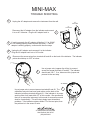
MINI-MAX
OPERATION
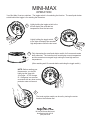
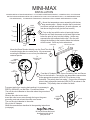
Your Mini-Max II has two switches. The toggle switch is for selecting the function. The small push button
switch behind the toggle is for resetting the memories.
1
Lightly holding the toggle switch to the
left will display the recorded low
temperature since the last reset.
Lightly holding the toggle switch 2
to the right will display the recorded
high temperature since the last reset.
3
Fully depressing the small push button switch for five seconds resets
both memories. The instrument will now display current temperature
and the memories once again begin storing the new high and low
temperatures.
(After resetting wait 10 seconds before activating the toggle switch.)
NOTE: Before reading your
thermometer, you should
lightly tap the case with
your finger. A TAP change
of 1-2 degrees is a common
occurance with any slow moving
precision meter movement.
4
The trend register needle can be set by turning the center
knob on the indicator dial.
30 Samuel Barnett Boulevard
New Bedford, MA 02745
(508) 995-2200