1
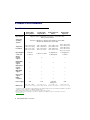
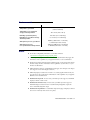
Product information Specifications DualHead2Go Analog Edition DualHead2Go Digital Edition DualHead2Go DP Edition DualHead2Go Digital SE Key features Supports notebook and desktop computers Stretched modes Wide-screen resolutions Supported operating systems Windows 8, Windows 7, Windows Vista, Windows Server 2008, Windows XP, and Windows Server 2003 3840 × 1200 @ 60 Hz 2560 × 1024 @ 60 Hz 3840 × 1200 @ 58Hz 3840 × 1200 @ 60 Hz 2048 × 768 @ 60 Hz 3200 × 1200 @ 60 Hz 3360 × 1050 @ 60 Hz 2048 × 768 @ 75 Hz† 2048 × 768 @ 85 Hz† 2560 × 1024 @ 60 Hz 2880 × 900 @ 60 Hz 2048 × 768 @ 60 Hz 2560 × 1024 @ 60 Hz 1× HD-15 / 2× HD-15 1× HD-15 / 2× DVI-I 1× DisplayPort / 2× DisplayPort 1× DisplayPort / 2× DVI-D Analog monitor support 9 9‡ — — Digital (DVI) monitor support — 9 9‡ 9 DisplayPort monitor support — — 9 — Multi-GXM support — 9 9 9 Clone mode support 9 — 9 9 HDCP compliant — — — 9 USB USB USB and DisplayPort USB 3.8" × 3.6" × 0.94" 4.4" × 5.5" × 1.1" Supported resolutions* Input /Output connectors Power supply Dimensions (9.6 cm × 9.2 cm × 2.4 cm) (11.3 cm × 14 cm × 2.8 cm) 3360 × 1050 @ 60 Hz 2880 × 900 @ 60 Hz 2560 × 1024 @ 60 Hz 4096 × 1152 @ 60 Hz 3.5" × 3.54" × 1.1" 3.85" × 2.5" × 1.1" (8.9 cm × 9 cm × 2.8 cm) (9.78 cm × 6.35 cm × 2.8 cm)) * Your Matrox product ships with four default display modes. Additional display modes are available through Matrox PowerDesk software. For more information, see Matrox PowerDesk help. † While using flat panel monitors, we recommend using a refresh rate of 60 Hz. ‡ Requires adapter (sold separately). To purchase an adapter for your Matrox product, see the Matrox online store (shopmatrox.com). 36 Matrox DualHead2Go – User Guide