1
Hardware Manual
Connecting Multiple Cameras
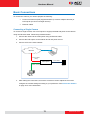
To connect multiple cameras, use a PoE switch.
1. Connect the camera(s) to the PoE switch using Ethernet cables.
2. Connect the PoE switch to a network and an AC power source.
3. Connect a PC to the same network.
Network
Ethernet Cable
Ethernet Cable
(Data)
PoE Switch
Ethernet Cables
(Data+Power)
Power Cable
AC Power
Source
Cameras
4. After making the connections, access the cameras live view to adjust the focus and
configure the camera settings according to your preference. See Access the Camera on
page 15 for more information.
14
www.acti.com