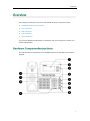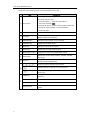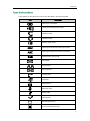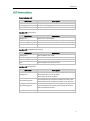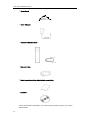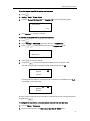
1
Copyright © 2012 YEALINK NETWORK TECHNOLOGY Copyright © 2012 Yealink Network Technology CO., LTD. All rights reserved. No parts of this publication may be reproduced or transmitted in any form or by any means, electronic or mechanical, photocopying, recording, or otherwise, for any purpose, without the express written permission of Yealink Network Technology CO., LTD. Under the law, reproducing includes translating into another language or format. When this publication is made available on media, Yealink Network Technology CO., LTD. gives its consent to downloading and printing copies of the content provided in this file only for private use and not for redistribution. No parts of this publication may be subject to alteration, modification or commercial use. Yealink Network Technology CO., LTD. will not be liable for any damages arising from use of an illegally modified or altered publication. THE SPECIFICATIONS AND INFORMATION REGARDING THE PRODUCTS IN THIS GUIDE ARE SUBJECT TO CHANGE WITHOUT NOTICE. ALL STATEMENTS, INFORMATION, AND RECOMMENDATIONS IN THIS GUIDE ARE BELIEVED TO BE ACCURATE BUT ARE PRESENTED WITHOUT WARRANTY OF ANY KIND, EXPRESS OR IMPLIED. USERS MUST TAKE FULL RESPONSIBILITY FOR THEIR APPLICATION OF PRODUCTS. YEALINK NETWORK TECHNOLOGY CO., LTD. MAKES NO WARRANTY OF ANY KIND WITH REGARD TO THIS GUIDE, INCLUDING, BUT NOT LIMITED TO, THE IMPLIED WARRANTIES OF MERCHANTABILITY AND FITNESS FOR A PARTICULAR PURPOSE. Yealink Network Technology CO., LTD. shall not be liable for errors contained herein nor for incidental or consequential damages in connection with the furnishing, performance, or use of this guide. Hereby, Yealink Network Technology CO., LTD. declares that this phone is in conformity with the essential requirements and other relevant provisions of the CE, FCC. This device is marked with the CE mark in compliance with EC Directives 2006/95/EC and 2004/108/EC. This device is compliant with Part 15 of the FCC Rules. Operation is subject to the following two conditions: 1. This device may not cause harmful interference, and 2. This device must accept any interferences received, including interference that may cause undesired operation. Note: This device is tested and complies with the limits for a Class B digital device, pursuant to Part 15 of the FCC Rules. These limits are designed to provide reasonable protection against harmful interference in a residential installation. This equipment generates, uses, and can radiate radio frequency energy and, if not installed and used in accordance with the instructions, may cause harmful interference to radio communications. However, there is no guarantee that interference will not occur in a particular installation. If this equipment does cause harmful interference to radio or television reception, which can be determined by turning the equipment off and on, the user is encouraged to try to correct the interference by one or more of the following measures: 1. Reorient or relocate the receiving antenna. 2. Increase the separation between the equipment and receiver. 3. Connect the equipment into an outlet on a circuit different from that to which the receiver is connected. 4. Consult the dealer or an experience radio/TV technician for help. To avoid the potential effects on the environment and human health as a result of the presence of hazardous substances in electrical and electronic equipment, end users of electrical and electronic equipment should understand the meaning of the crossed-out wheeled bin symbol. Do not dispose of WEEE as unsorted municipal waste and have to collect such WEEE separately. About This Guide Thank you for choosing the SIP-T20P IP phone, an exquisitely designed SIP IP phone. This unit provides business telephony features such as Call Hold, Call Transfer, Busy Lamp Field, Shared Line, Multicast Paging and Conference over an IP network. This guide provides everything you need to quickly use your new phone. Be sure to verify with your system administrator that your network is prepared for configuring your IP phone. As well, be sure to read the Packaging Contents and Regulatory Notices sections in this guide before you set up and use the SIP-T20P IP phone. If this is your first time using SIP-T20P IP phone, we recommend that you first refer to the Quick Installation Guide and Quick Reference Guide. Documents are available for download at: http://www.yealink.com/Support.aspx. This is the first edition based on firmware version 70. The topics provided in this guide include: Chapter 1 Overview Chapter 2 Getting Started Chapter 3 Customizing Your Phone Chapter 4 Basic Call Features Chapter 5 Advanced Phone Features Major updates have occurred to the following: Keypad Lock on page 20 Volume on page 22 Ring Tones on page 23 Call Completion on page 51 DSS Keys on page 31 Do Not Disturb (DND) on page 53 v User Guide SIP-T20P IP Phone vi Call Forward on page 55 Busy Lamp Field (BLF) on page 69 Shared Line on page 72 BLF List on page 72 Table of Contents About This Guide ...................................................................... v In This Guide ......................................................................................................................... v Changes from Previous Versions ........................................................................................ v Changes from Version 61.1 .............................................................................................. v Table of Contents ..................................................................... vii Overview .................................................................................. 1 Hardware Component Instructions .................................................................................... 1 Icon Instructions .................................................................................................................... 3 LED Instructions ..................................................................................................................... 5 User Interfaces ..................................................................................................................... 6 Phone User Interface ........................................................................................................ 6 Web User Interface ........................................................................................................... 6 Documentations ................................................................................................................... 8 Getting Started ......................................................................... 9 Packaging Contents ............................................................................................................. 9 Phone Installation ............................................................................................................... 11 Phone Initialization ............................................................................................................. 13 Phone Status ....................................................................................................................... 14 Basic Network Settings ...................................................................................................... 14 Registration ......................................................................................................................... 15 Idle Screen .......................................................................................................................... 15 Customizing Your Phone ......................................................... 17 General Settings ................................................................................................................ 17 Language......................................................................................................................... 17 Time and Date ................................................................................................................. 18 Administrator Password ................................................................................................. 19 Key as Send ..................................................................................................................... 20 Keypad Lock .................................................................................................................... 20 Audio Settings .................................................................................................................... 22 Volume ............................................................................................................................. 22 Ring Tones ........................................................................................................................ 23 Contact Management ....................................................................................................... 24 vii User Guide SIP-T20P IP Phone Local Directory ................................................................................................................ 24 Blacklist ............................................................................................................................ 28 Call History Management ................................................................................................ 28 System Customizations ...................................................................................................... 29 Logo Customization ........................................................................................................ 29 Headset Use .................................................................................................................... 30 DSS Keys .......................................................................................................................... 31 Account Management ................................................................................................... 38 Dial Plan ........................................................................................................................... 39 Emergency Number........................................................................................................ 42 Live Dialpad .................................................................................................................... 42 Hot Line ............................................................................................................................ 43 Basic Call Features ................................................................. 45 Placing Calls ....................................................................................................................... 45 Answering Calls ................................................................................................................. 47 Ending Calls ........................................................................................................................ 48 Redialing Numbers ............................................................................................................ 49 Auto Answer ....................................................................................................................... 49 Auto Redial.......................................................................................................................... 50 Call Completion ................................................................................................................. 51 Call Return ........................................................................................................................... 52 Call Mute ............................................................................................................................. 52 Call Hold/Resume ............................................................................................................... 52 Do Not Disturb (DND) ........................................................................................................ 53 Call Forward ....................................................................................................................... 55 Call Transfer ........................................................................................................................ 60 Call Waiting ........................................................................................................................ 61 Conference ......................................................................................................................... 61 Local Conference ............................................................................................................ 62 Network Conference ...................................................................................................... 62 Call Park .............................................................................................................................. 63 Call Pickup .......................................................................................................................... 64 Anonymous Call ................................................................................................................. 66 Anonymous Call Rejection ................................................................................................ 67 Advanced Phone Features ..................................................... 69 Busy Lamp Field (BLF) ....................................................................................................... 69 BLF List ................................................................................................................................. 72 Shared Line ......................................................................................................................... 72 Call Recording .................................................................................................................... 74 Intercom .............................................................................................................................. 76 Outgoing Intercom Calls ................................................................................................ 76 viii Table of Contents Incoming Intercom Calls ................................................................................................ 77 Multicast Paging ................................................................................................................. 79 Sending RTP Stream ....................................................................................................... 79 Receiving RTP Stream ..................................................................................................... 80 Music on Hold ..................................................................................................................... 81 Automatic Call Distribution (ACD).................................................................................... 82 Voice Mail ........................................................................................................................... 83 Message Waiting Indicator (MWI)................................................................................... 85 Troubleshooting ...................................................................... 87 Regulatory Notices ................................................................. 93 Service Agreements .......................................................................................................... 93 Limitations of Liability ........................................................................................................ 93 Safety Instructions .............................................................................................................. 93 Appendix A - Time Zones ....................................................... 97 Index ....................................................................................... 99 ix Overview This chapter provides the overview of the SIP-T20P IP phone. The topics include: Hardware Component Instructions Icon Instructions LED Instructions User Interfaces Documentations If you require additional information or assistance with your new phone, contact your system administrator. The main hardware components of the SIP-T20P IP phone are the LCD screen and the keypad. 1 User Guide SIP-T20P IP Phone Hardware component instructions of the SIP-T20P IP phone are: Item Description Shows information about calls, messages, time, date and other relevant data. • Call information — Caller ID, call duration ① LCD Screen • Icons (for example, ) • Missed call text or second incoming caller information • Prompt text (for example, ―New Voice Mail‖) • Time and date ② Power Indicator LED ③ Line Keys ④ MESSAGE Key Indicates and accesses voice messages. ⑤ HEADSET Key Toggles the headset mode. ⑥ TRAN Key Transfers a call to another party. ⑦ Redial Key Redials a previously dialed number. ⑧ Speakerphone Key Toggles the hands-free speakerphone mode. ⑨ Volume Key ⑩ Keypad Indicates phone power status. Use these keys to activate up to two accounts and assign various functionalities. Adjusts the volume of the handset, headset, speaker, and ringer. Provides the digits, letters, and special characters in context-sensitive applications. Scroll through the displayed information. Confirms actions or answers an incoming call. ⑪ Cancels actions, rejects incoming calls, or mutes an active call. MENU Key ⑫ interface. HOLD Key Places a call on hold or resumes a held call. CONF Key Conducts a conference call with multiple other parties. Directory Key 2 Enters the main menu of phone or returns to the previous Enters the directory interface or switches the input mode. Overview Icons appear on the phone LCD screen are described in the following table: Icon Description Network is unavailable Hands-free speakerphone mode Handset mode Headset mode 123 Numeric input mode abc Multi-lingual lowercase letters input mode ABC Multi-lingual uppercase letters input mode 2aB Alphanumeric input mode Voice Mail Auto Answer Do Not Disturb Call Forward Call Mute Keypad Lock Received Calls Dialed Calls Missed Calls Recording box is full A call cannot be recorded 3 User Guide SIP-T20P IP Phone Icon Description Recording starts successfully Recording cannot be started Recording cannot be stopped 4 Overview Power Indicator LED LED Status Description Solid green The phone is powered on. Flashing green The phone is ringing. Off The phone is powered off. Line key LED (private line) LED Status Description Solid green The line is in conversation. Fast flashing green The line receives an incoming call, the phone is ringing. Slow flashing green The call is placed on hold. Off The line is inactive. Line key LED (configured as BLF key) LED Status Description Solid green The monitored user is idle. Fast flashing green The monitored user receives an incoming call.. Slow flashing green The monitored user is busy. Off The monitored user does not exist. Line key LED (shared line) LED Status Description The shared line is seized. Solid green The shared line is in conversation. Some party receives ringback. Slow flashing green The shared line conversation is placed on public hold. The shared line conversation is placed on private hold. The shared line receives an incoming call. Fast flashing green For a multi-party call, all the parties place the shared line conversation on hold. Off The shared line is idle. 5 User Guide SIP-T20P IP Phone There are two ways to customize specific configurations on your SIP-T20P IP phone: Using the User Interface on the IP phone. Using the User Interface in an Internet browser window from your PC. The hardware components keypad and LCD screen constitute the phone user interface, which allows the user to execute all call operation tasks and basic configuration changes directly on the phone. In addition, each phone has a web user interface to access all configuration settings. In many instances, it is possible to use both the phone user interface and the web user interface to operate the phone and change settings. However, in some instances, it is only possible to use the phone or the web user interface. You can customize your phone by pressing the MENU key to access the phone user interface. The "Advanced Settings" options are administrator level features only, the default password is admin (case-sensitive). For more information on customizing your phone using the available options from the phone user interface, refer to Customizing Your Phone on page 17. In addition to the phone user interface, you can also customize your phone via web user interface. In order to access the web user interface, you need to know the IP address of your new phone. To obtain the IP address, press the OK key on the phone. Enter the IP address (e.g. http://192.168.0.10 or 192.168.0.10) in the address bar of web browser on your PC. The default user name is admin (case-sensitive) and the password is admin (case-sensitive). The options you can use to customize the IP phone via phone user interface and/or via web user interface are listed in the following table: Option Phone User Interface Web User Interface Status --IP --MAC --Firmware --Network --Phone --Accounts 6 √ √ Overview Option Phone User Interface Web User Interface Basic Call Features --Auto Answer √ --Auto Redial √ --Call Completion √ --Call Forward √ --Call Waiting √ --Call Park √ --Call Pickup √ --Call Return √ √ --Conference --Anonymous Call √ --Anonymous Call Rejection √ --DND √ Basic Phone Settings --Language √ --Time & Date √ --Administrator Password √ --Ring Tones √ --Call Waiting √ --Keypad Lock √ --Phone Volume √ --Logo Customization √ --Contact Management --Local Directory √ --Blacklist √ --Dial Plan --DSS Keys √ --Key as Send √ --Hot Line √ --Live Dialpad --Emergency Advanced Phone Features --BLF √ --BLF List --Shared Line --Intercom √ --Call Recording √ --Multicast Paging √ --Music on Hold √ --ACD √ --Messages √ √ 7 User Guide SIP-T20P IP Phone Option Phone User Interface Web User Interface SIP Account --User Option --Register Status √ --Activation √ --Label √ --Display Name √ --Register Name √ --User Name √ --Password √ --SIP Server √ √ --Server Option --Registrar Port --Outbound √ --Outbound Host √ --Backup Outbound Proxy --NAT Traversal Note --STUN Status √ --STUN Server √ The table above lists most of the feature options. Please refer to the relevant sections for more information. The following table shows documentations available for the SIP-T20P IP phone. Name Contents Quick Installation Basic set up of the Guide phone Quick Reference Guide Where found Format/ Language In the package PDF/English In the package PDF/English Basic call features and phone customization Phone or web user interface settings User Guide Basic call features and advanced phone CD attached in the package features Note 8 You can also download the latest documentations from website: http://www.yealink.com/Support.aspx PDF/English Getting Started This chapter provides basic installation instructions and information for obtaining the best performance with the SIP-T20P IP phone. The topics include: Packaging Contents Phone Installation Phone Initialization Phone Status Basic Network Settings Registration Idle Screen If you require additional information or assistance with your new phone, contact your system administrator. The following components are included in your SIP-T20P IP phone package: SIP-T20P IP phone 9 User Guide SIP-T20P IP Phone Phone Stand Power Adapter Handset & Handset Cord Ethernet Cable Quick Installation Guide & Quick Reference Guide CD-ROM Check this list before installation. If you find anything missing, contact your system administrator. 10 Getting Started If your phone is already installed, proceed to Phone Initialization on page 13. This section introduces how to install the phone with the components in the packaging contents: Note Attach the Stand Connect the Handset and optional Headset Connect the Network and Power 1) Attach the Stand: 2) Connect the Handset and optional Headset: A headset is not provided in the packaging contents. Contact your system administrator for more information. 11 User Guide SIP-T20P IP Phone 3) Connect the Network and Power: You have two options for power and network connections. Your system administrator will advise you which one to use. AC power Power over Ethernet (PoE) AC Power To connect the AC power: 1. Connect the DC plug on the power adapter to the DC5V port on the phone and connect the other end of the power adapter into an electrical power outlet. 2. Connect the supplied Ethernet cable between the Internet port on the phone and the Internet port in your network or switch/hub device port. Power over Ethernet Using a regular Ethernet cable, the SIP-T20P IP phone can be powered from a PoE (IEEE 802.3af) compliant switch or hub. 12 Getting Started To connect the PoE: 1. Connect the Ethernet cable between the Internet port on the phone and an available port on the in-line power switch/hub. Note If in-line power is provided, you don’t need to connect the AC adapter. Make sure the Ethernet cable and switch/hub is PoE compliant. The phone can also share the network with other network device such as a PC (personal computer). It is an optional connection. Important! Do not unplug or remove power to the phone while it is updating firmware and configurations. After your phone has been powered up, the system boots up and performs the following steps: Automatic Phone Initialization The phone finishes the initialization process by loading the saved configuration. The phone LCD screen will display ―Initializing, Please wait‖ during the initialization. DHCP (Dynamic Host Configuration Protocol) By default the phone attempts to contact a DHCP server in your network in order to obtain its valid network settings, e.g. IP address, subnet mask, gateway, DNS server. Note If your network does not use DHCP, proceed to Basic Network Settings on page 14. 13 User Guide SIP-T20P IP Phone You can view the system status of your phone via phone user interface or web user interface. Available information of phone status includes: Network status including WAN port and LAN port information. Phone status including device model, firmware version and MAC address. Account status indicating the register status of sip accounts. To view the phone status via phone user interface: 1. Press or press 2. Press or and then select Status. to scroll through the list and view the specific information. 1. IP: 192.168.0.10 To view the phone status via web user interface: 1. Open the web browser of your computer. 2. Enter the IP address in the browser’s address bar, and then click Enter. 3. Enter the User Name (admin) and Password (admin) in the pop-up dialogue box. 4. Click OK to log in. If your phone cannot contact a DHCP server for any reason, you need to configure a static IP address manually. To configure a static IP address via phone user interface: 1. Press . 2. Select Settings->Advanced (password: admin) ->Network->WAN Port->Static IP. 3. Enter the parameters: IP, subnet mask, gateway, primary DNS, second DNS in the corresponding fields. 1. IP: 192.168.0.3 123 4. 14 Press to accept the change. Getting Started If you are using an xDSL modem, you can connect your phone to the Internet via PPPoE mode. You can set a WAN port to be a PPPoE port. The PPPoE port will perform a PPP negotiation to obtain the IP address. Contact your system administrator for the PPPoE username and password. To configure PPPoE via phone user interface: 1. Press . 2. Select Settings->Advanced (password: admin) ->Network->WAN Port->PPPoE. 3. Enter the username and password in the corresponding fields. 1. PPPoE User: 2aB 4. Note Press to accept the change. Using the wrong network parameters may result in inaccessibility of your phone and may also have an impact on your network performance. For more information about these parameters, contact your system administrator. Generally, your phone will be deployed with multiple other phones. In this case, your system administrator will configure the phone parameters beforehand, so that after you start up your phone, the phone will be registered and ready to use. If your phone is not registered, you may have to register it. For more information on how to register your phone, refer to Account Management on page 38. If the phone has successfully started up, the idle screen appears on the phone LCD screen as shown below. 1234 17 Jul 09:20 The idle screen shows the label of current account, time and date. 15 User Guide SIP-T20P IP Phone 16 Customizing Your Phone You can customize your SIP-T20P IP phone by configuring the setting for time and date, and ring tones, for example. You can handle incoming calls from different contacts in different ways. This chapter provides basic operating instructions for customizing your phone. The topics include: General Settings Audio Settings Contact Management Call History Management System Customizations If you require additional information or assistance with your new phone, contact your system administrator. The default language of the phone user interface is English. The phone will detect and use the same language as which of your internet browser for the web user interface. If the language is not supported by the phone, the web user interface will use English by default. You can change the language for the phone user interface and the web user interface respectively. Note Not all languages are available for selection. The available languages depend on the language packs currently loaded to the IP phone. Please contact your system administrator for more information about the available languages of your new phone. To change the language for the phone user interface: 1. Press . 2. Select Settings->Basic->Language. 3. Press or to select the desired language. *1. English 2. Français 17 User Guide SIP-T20P IP Phone 4. Press to accept the change. Text appears on the LCD screen will change to the selected language. To change the language for web user interface: 1. Click on Phone->Preference. 2. Select the desired language from the pull-down list of Web Language. 3. Click Confirm to accept the change. Text displays on the web user interface will change to the selected language. The time and date display on the LCD screen when the phone is idle. If the phone cannot obtain the time and date from the Simple Network Time Protocol (SNTP) server, contact your system administrator for more information. You can configure the phone to obtain the time and date from the SNTP server automatically, or configure the time and date manually. To configure the SNTP settings via phone user interface: 1. 2. 3. Press . Select Settings->Basic->Time & Date->SNTP. Press or to select the time zone that applies to your area from the Time Zone field. The default time zone is ―+8 China (Beijing)‖. 1. Time Zone: ◄ *+8 China (Beijing) ▶ 4. Enter the domain names or IP addresses in the NTP Server1 and NTP Server2 fields, respectively. Note 5. Press or to select Automatic from the DST field. 6. Press to accept the change. Please refer to Appendix A - Time Zones for the list of available time zones on the IP phone. To configure the time and date manually via phone user interface: 18 1. Press . 2. Select Settings->Basic->Time & Date->Manual. 3. Enter the specific date in the Date field. Customizing Your Phone 4. Enter the specific time in the Time field. 1. Date (D-M-Y): 17-07-12 5. Press to accept the change. The time that displays on the LCD screen will change accordingly. To configure the time format via phone user interface: 1. Press . 2. Select Settings->Basic->Time & Date->Time & Date. 1. Clock: ◄ *24 Hour ► 3. Press or to select the desired time format: 12 Hour or 24 Hour. 4. Press to accept the change. You can also configure the time settings via web user interface at the path Phone->Preference. You can change the administrator password to protect your phone from unauthorized use. Only the users owning the administrator password have the permission to change the advanced settings. To change the administrator password via phone user interface: 1. Press . 2. Select Settings->Advanced (password: admin) ->Set Password. 1. Current PWD: abc 3. Enter the old password in the Current PWD field. 4. Enter the new password in the New PWD field. 5. Enter the new password again in the Confirm PWD field. 6. Press to accept the change. 19 User Guide SIP-T20P IP Phone You can set the ―#‖ or ―*‖ to act as the send key while dialing a call. To set the send key via phone user interface: 1. Press . 2. Select Features->Key as Send. Key as Send: ◄ *# 3. Press or ► to select ―#‖ or ―*‖ from the Key as Send field, or select Disable from the Key as Send field to disable this feature. 4. Press to accept the change. You can also configure a send key via web user interface at the path Phone->Features->General Information>>. You can lock the keypad of your phone when you are temporarily not using it. This feature helps you to protect your phone from unauthorized use. This feature allows you to perform the following: Menu Key: The MENU key is locked. You cannot access the menu of the phone until unlocked. A new voice mail can be accessed by pressing or the MESSAGE key, but cannot be configured. Function Key: The function keys are locked. You cannot use the MESSAGE, CONF, HOLD, MENU, MUTE, TRAN, RD, Directory, OK, X, line keys and navigation keys until unlocked. All Keys: All keys are locked, except the Volume key. You are only allowed to dial emergency numbers, reject incoming calls by pressing the X key, answer incoming calls by lifting the handset, pressing the Speakerphone key, the HEADSET key or the OK key, place an active call on hold by pressing the HOLD key and mute/un-mute the call during an active call. Lock&Answer: All keys are locked, except the HEADSET key and the Volume key. Incoming calls will be answered automatically, but cannot be ended by your party. The previous conversation is placed on hold. Note 20 The emergency number setting, if desired, must be made before lock activation. For more information, refer to Emergency Number on page 42. Customizing Your Phone To set the keypad lock PIN via phone user interface: 1. Press . 2. Setting->Basic->Phone Unlock. 3. Enter the Current PIN, New PIN and Confirm PIN in the corresponding fields. 1. Current PIN: 123 4. Click Confirm to accept the change. To activate the keypad lock via phone user interface: 1. Press . 2. Select Settings->Advanced (password: admin) ->Keypad Lock. 3. Press or to select desired type from the Keypad Lock field. Keypad Lock: ◄ Menu Key ► 4. Press to accept the change. 5. Long press to lock the keypad immediately when the phone is idle. The LCD screen prompts ―Keypad Locked!‖ and displays the icon . Keypad Locked! If the keypad lock feature is activated to be Lock&Answer, an additional icon will appear on the LCD screen. Keypad Locked! You can configure the interval (in seconds) to automatically lock the keypad instead of long pressing . To configure the time out for automatic keypad lock via web user interface: 1. Click on Phone->Preference. 2. Enter the desired time in the Phone Lock Time Out (0~3600s) field. 21 User Guide SIP-T20P IP Phone 3. Note Click Confirm to accept the change. The default time out is 0 seconds, that is, you can long press only. to lock the keypad You can configure the time out for automatic keypad lock via web user interface only. To unlock the keypad via phone user interface: 1. Press any locked key. 2. Enter the PIN in the PIN field. 3. Press the The to unlock the keypad. icon disappears from the LCD screen. You can long press to lock the keypad again. To deactivate the keypad lock via phone user interface: 1. Press . 2. Select Settings->Advanced (password: admin) ->Keypad Lock. 3. Press 4. Press or to select Disable from the Keypad Lock field. to deactivate the keypad lock. You can also activate or deactivate the keypad lock via web user interface at the path Phone->Preference. Note The default PIN for unlock is 123, you can also unlock the keypad by administrator password. When you enter the administrator password to unlock the keypad, the phone will then turn to the Reset Phone PIN interface. You can press the Volume key to adjust the receiver volume of currently used audio devices (handset, speakerphone or headset), when the phone is in the dialing interface or during a call. You can also press the Volume key to adjust the ringer volume when the phone is idle. 22 Customizing Your Phone To adjust the volume: 1. Press to adjust the ringer volume when the phone is in the idle screen. 1009 ___________ 2. When the phone is during a call, press to adjust the volume of currently used audio device (handset, speakerphone or headset). 1008 ___________ Ring tones are used to indicate incoming calls. You can select different ring tones to distinguish the accounts or to distinguish your phone from your neighbor’s. To select a ring tone for the phone via phone user interface: 1. Press . 2. Select Settings->Basic ->Ring Tones. 3. Press or to select the desired ring tone. *1. Ring1.wav 2. Ring2.wav 4. Press to accept the change. To select a ring tone for the phone via web user interface: 1. Click on Phone->Preference. 2. Select the desired ring tone from the pull-down list of Ring Tone. 3. Click Confirm to accept the change. To select a ring tone for each account via web user interface: 1. Click on Account. 2. Select the account from the pull-down list of Account. 3. Select the desired ring tone from the pull-down list of Ring Tone. 4. Click Confirm to accept the change. 23 User Guide SIP-T20P IP Phone You can also customize ring tones for your phone, contact your system administrator for more information. Note The ring tone for an incoming call on the phone may be different. For example, when the phone receives an incoming call from a contact stored in the local directory, it will play the ring tone assigned to the contact in the contact directory (refer to Adding Contacts in the Contact Management section). Otherwise, the phone will play the ring tone assigned to the account. If both the contact ring tone and the account ring tone are not assigned, then the phone will play the ring tone assigned to the phone. This section provides the operating instructions for managing contacts. The topics include: Local Directory Blacklist The built-in phone directory stores the names and phone numbers of your contacts. You can store up to 300 contacts in your phone's local directory. You can add, edit, delete or search for a contact in the local directory. You can also dial a contact from the local directory. You can add contacts to your local directory in the following ways: Manually From call history Adding Contacts Manually To add a contact to the local directory manually: 24 1. Press . 2. Select Local Directory. 3. Select the desired contact group (For example, select Contact List). 4. Press or to select Enter and then press 5. Press or to scroll to New Item. . Customizing Your Phone 6. Press to add a new contact. 1. Name: abc 7. Press to switch the input mode. 8. Enter the Name and the Office, Mobile or Other numbers. 9. Press or to select the desired account from the Account field. If Auto is selected, the phone will use the first available account when placing calls to the contact from the local directory. Note 10. Press or to select the desired ring tone from the Ring Tones field. 11. Press to accept the change. If the contact has existed in the directory, the LCD screen prompts ―Name exists in contactlist!‖. Adding Contacts from Call History To add a contact to the local directory from the call history: 1. Press . 2. Press or 3. Press . 4. Press to switch the input mode, and enter the contact name in the Name field. to select the desired entry. 1. Name: Empty abc 5. Press to accept the change. The entry is successfully saved in the local directory. To edit a contact in the local directory: 1. Press . 2. Select Local Directory->Contact List. 3. Press or to select Enter and then press . 25 User Guide SIP-T20P IP Phone 4. Select the desired contact and press or to select Edit. 1. Name: john abc 5. Press or to select the contact information and then edit. 6. Press to accept the change. To delete a contact from the local directory: 1. Press . 2. Select Local Directory->Contact List. 3. Press or to select Enter and then press 4. Press or to select the desired contact. 5. Press or to select Deland then press . . The LCD screen prompts ―Delete selected Item?‖. 6. Press to confirm the deleting. To place a call to a contact in the local directory: 1. Press 2. Select Local Directory->Contact List. 3. Press or to select Enter and then press 4. Press or to select the desired contact. 5. Press or to select Dial. 6. Do as below: - . . If only one number of the contact is stored in the local directory, press to dial out the number. - If multiple numbers of the contact are stored in the local directory, press display a list of numbers. 26 Press or to select the desired number. Press to dial out the number. to Customizing Your Phone To search for a contact in the local directory: 1. Press . 2. Select Local Directory->Contact List. 3. Press 4. Enter a few continuous characters of the contact name or continuous numbers of the or to select Enter and then press . contact phone number using the keypad. Search: tom abc 5. Press . The contacts whose name or phone number matches the characters you entered will appear on the LCD screen. You can dial from the query result. You can manage your phone’s local directory via phone or web user interface. But you can only import or export the contact list via web user interface. To import an XML file of contact list via web user interface: 1. Click on Contacts->Local Directory. 2. Click Browse to select a contact list file (file format must be .xml) from your local system. 3. Click Import XML to import the contact list. The web user interface prompts ―The original contact will be covered, continue?‖. 4. Click OK to complete importing the contact list. To import a CSV file of contact list via web user interface: 1. Click on Contacts->Local Directory. 2. Click Browse to select a contact list file (file format must be .csv) from your local system. 3. Click Import CSV to import the contact list. You can then select whether to delete all old contacts while importing the contact list, and select the contact information you want to import into the local directory. Such as contact name, office number or mobile number. 4. Click Import to complete importing the contact list. 27 User Guide SIP-T20P IP Phone To export contact list via web user interface: 1. Click on Contacts->Local Directory. 2. Click Export XML (or Export CSV). 3. Click Save to save the contact list to your local system. The built-in phone directory stores the names and phone numbers of the blacklist. You can store up to 30 contacts in your phone’s blacklist directory. You can add, edit, delete or search for a contact in the blacklist directory. You can also dial a contact in the blacklist directory, but an incoming call from the blacklist directory will be rejected automatically. Operating instructions of adding blacklists, editing blacklists, deleting blacklists, placing call to blacklists and searching for a contact in the blacklist, refer to the operating instructions of Local Directory on page 24. The SIP-T20P IP phone maintains call history lists of Dialed Calls, Received Calls, Missed Calls and Forwarded Calls. The call history lists support to store 100 entries in all. You can check the call history, dial a call, add a contact or delete an entry from the call history list. You should enable the history record feature in advance. To enable the history record feature via phone user interface: 1. Press . 2. Select Features->History Setting. 3. Press or to select Enable from the History Record field. 1. History Record: ◄*Enable 4. Press ► to accept the change. To check the call history: 1. Press . The LCD screen displays the call list. 2. Press or to switch between Dialed Calls, Received Calls, Missed Calls and Forwarded Calls. 28 3. Press or 4. Press . to select the desired entry. Customizing Your Phone The detailed information of the entry appears on the LCD screen. To dial a call from the call history list: 1. Press . The LCD screen displays the call list. 2. Press or to switch between Dialed Calls, Received Calls, Missed Calls and Forwarded Calls. 3. Press or to select the desired entry. 4. Press to dial out. To add a contact from the call history list: 1. Press . The LCD screen displays the call list. 2. Press or to switch between Dialed Calls, Received Calls, Missed Calls and Forwarded Calls. 3. Press or to select the desired entry. 4. Press . 5. Enter the desired values in the corresponding fields. 6. Press . For more information, refer to Contact Management on page 24. To delete an entry from the call history list: 1. Press . The LCD screen displays the call list. 2. Press or to switch between Dialed Calls, Received Calls, Missed Calls and Forwarded Calls. 3. Press or to select the desired entry. 4. Press to delete the entry. You can customize text logo which would be shown on the idle screen. To customize a text logo via web user interface: 1. Click on Phone->Features->General Information>>. 2. Select Enabled from the pull-down list of Use Logo. 3. Enter the desired text in the Text Logo field. 29 User Guide SIP-T20P IP Phone 4. Click Confirm to accept the change. 5. Reboot the phone, the text logo will be shown on the LCD screen. Note The maximum length of text logo is 15 characters. Physically connect your headset, refer to Phone Installation on page 11 and activate/deactivate it for use. To activate the headset: 1. Press The on the phone. icon on the LCD screen indicates that the headset mode is activated. Press the line key to answer a call, the call will connect to your headset automatically. To deactivate the headset: 1. Press again on the phone. The headset icon disappears when the headset mode is deactivated. You can use headset in priority when enabling the headset prior feature. This feature is especially useful for permanent or full-time headset users. To enable the Headset Prior via web user interface: 1. Click on Phone->Features->Audio Settings>>. 2. Select Enabled from the pull-down list of Headset Prior. 3. Click Confirm to accept the change. To use headset prior, you should activate the headset mode in advance: Note 30 1. Physically connect the headset. 2. Press to activate the headset mode. If the headset prior feature is enabled, the headset mode will not be deactivated until you press the HEADSET key again. Customizing Your Phone You can use two headsets when enabling the dual headset feature. To use this feature, you must physically connect headsets to the headset jack and handset jack respectively. Once the phone joins in a call, people with the headset connected to the headset jack has a full-duplex conversation, another people with the headset connected to the handset jack is only allowed to listen to. To enable Dual Headset via web user interface: 1. Click on Phone->Features->Audio Settings>>. 2. Select Enabled from the pull-down list of Dual Headset. 3. Click Confirm to accept the change. There are two types of DSS keys: Line Keys and Programmable Keys. The details will be introduced as following. SIP-T20P IP phone supports 2 Line keys. You can assign predefined functionalities to the line keys located on the right of the phone. Line keys allow you to use quick access features such as call return or voice mail. The line keys LEDs will indicate the extension status when being assigned specific feature, such as BLF. The default key type of each line key is Line. To configure the line key via phone user interface: 1. Press . 2. Select Features->DSS Keys. 3. Select the desired DSS key, and then press 4. Select the desired type from the Type field. 5. (Optional.) Select the desired key event from the Key Type field. 6. (Optional.) Select the desired line from the Account ID field. 7. (Optional.) Enter the corresponding value in the Extension field. 8. Press . to accept the change. You can also configure the line key via web user interface at the path Phone->DSS Keys->Line Keys. The line key features are explained in the following subchapters in detail: Speed Dial Voice Mail 31 User Guide SIP-T20P IP Phone Direct Pickup Group Pickup DTMF Prefix Local Group Conference Forward Transfer Hold DND Redial Group Listening Public Hold Private Hold Zero Touch Keypad Lock For more information, contact your system administrator. Speed Dial You can use this key feature to speed up dialing the numbers often used or hard to remember. Dependencies: Type (Speed Dial) Account ID (the account this feature will be applied to) Value (the number you want to dial out) Usage: Press the DSS key to dial out the number specified in the Value field, using the account selected from the Account ID field. Voice Mail You can use this key feature to connect voice mail quickly. For more information, refer to Voice Mail on page 83. Dependencies: Type (Key Event) Key Type (Voice Mail) Account ID (the account this feature will be applied to) Value (the voice mail access code) Usage: Press the DSS key to dial out the voice mail access code, you can follow the voice prompt to listen to the voice mails. 32 Customizing Your Phone Direct Pickup You can use this key feature to answer someone else’s incoming call on the phone. Dependencies: Type (Key Event) Key Type (Direct Pickup) Account ID (the account this feature will be applied to) Value (the direct pickup code followed by the specific phone number) Usage: Press the DSS key on your phone when the specific phone number receives an incoming call. The call is answered on your phone. Group Pickup You can use this key feature to answer incoming calls in a group that is associated with their own group. Dependencies: Type (Key Event) Key Type (Group Pickup) Account ID (the account this feature will be applied to) Value (the group pickup feature code) Usage: Press the DSS key on your phone when a phone number in the group receives an incoming call. The call is answered on your phone. DTMF You can use this key feature to send the specification of arbitrary key sequences via DTMF. Dependencies: Type (Key Event) Key Type (DTMF) Value (DTMF sequence) Note DTMF sequence is allowed to be: "0-9", "*", "#" and "A-D". Usage: Press the DSS key during an active call to send the key sequence specified in the Value field. Prefix You can use this key feature to add a specified prefix number before the dialed number. Dependencies: Type (Key Event) Key Type (Prefix) Value (the prefix number) Usage: Press the DSS key when the phone is idle, the phone enters into the dialing interface and displays the prefix number which you specified in the Value field, enter other digits to dial out. 33 User Guide SIP-T20P IP Phone Local Group You can use this key feature to access the contact group in the local directory quickly. For more information, refer to Local Directory on page 24. Dependencies: Type (Key Event) Key Type (Local Group) Local Group (the contact group name you want to access) Label (key label displays on the LCD screen) Usage: Press the DSS key to access the contact group specified in the Local Group field. Conference You can use this key feature to set up a conference call. For more information, refer to Conference on Page 61. Dependencies: Type (Key Event) Key Type (Conf) Value (the number you want to add to the conference) Usage: Press the DSS key during an active call to set up a conference with the number specified in the Value field. Note When leaving the Value field blank, the DSS key performs the same as the CONF key during a call. Forward You can use this key feature to forward an incoming call to someone else. For more information, refer to Call Forward on page 55. Dependencies: Type (Key Event) Key Type (Forward) Value (the number you want to forward to) Usage: Press the DSS key to forward an incoming call to the number specified in the Value field. Note When leaving the Value field blank, the DSS key performs the same as the TRAN key when receiving an incoming call. Transfer You can use this key feature to handle the call differently depending on the transfer mode on DSS key when there is an active call on the phone. Dependencies: Type (Key Event) Key Type (Transfer) Value (the number you want to transfer to) 34 Customizing Your Phone Usage: When the transfer mode on DSS key is Blind Transfer, press the DSS key to complete the blind transfer to the number specified in the Value field. When the transfer mode on DSS key is Attended Transfer, press the DSS key to dial out the number specified in the Value field and then you can complete the attended or semi-attended transfer. When the transfer mode on DSS key is New Call, press the DSS key to place a new call to the number specified in the Value field. Note You can configure the transfer mode on DSS key via web user interface at the path Phone->Features->Transfer Settings. For more information on how to configure the transfer mode on DSS key, refer to Busy Lamp Field (BLF) on page 69. When leaving the Value field blank, the DSS key performs the same as the TRAN key during a call. For more information, refer to Call Transfer on page 60. Hold You can use this key feature to hold an active call or retrieve a held call. Dependencies: Type (Key Event) Key Type (Hold) Usage: 1. Press the DSS key during an active call to place the call on hold. 2. Press the DSS key again to retrieve the held call. DND You can use this key feature to activate or deactivate the DND mode. You can also use this key feature to access the custom DND interface. For more information, refer to Do Not Disturb (DND) on page 53. Dependencies: Type (Key Event) Key Type (DND) Usage: When the phone is in phone mode: 1. Press the DSS key to activate the DND mode. 2. Press the DSS key again to deactivate the DND mode. When the phone is in custom mode: Note 1. Press the DSS key to access the custom DND interface. 2. Activate or deactivate the DND mode for an account. When the DND mode is activated, the incoming calls will be rejected automatically. 35 User Guide SIP-T20P IP Phone Redial You can use this key feature to access the Dialed Call list by pressing the DSS key when the phone is idle, then you can select an entry to redial. Dependencies: Type (Key Event) Key Type (Redial) Usage: 1. Press the DSS key when the phone is idle to access the dialed calls list. 2. Select an entry and press the DSS key again to redial the call. Group Listening You can use this key feature to activate the Speakerphone and Handset/Headset mode at the same time. It is suitable for the group conversation which has more than one person at one side. You are able to speak and listen through the handset/headset, meanwhile the others nearby can only listen through the speaker. Dependencies: Type (Key Event) Key Type (Group Listening) Usage: 1. During a call, press the DSS key to activate the group listening mode. You can then speak and listen through the handset/ headset, other people at your side can listen through speaker at the same time. 2. Press the DSS key again to deactivate the group listening mode. Public Hold You can use this key feature to place an active call on public hold or retrieve a public held call. The public hold feature is often used in the shared line. Dependencies: Type (Key Event) Key Type (Public Hold) Usage: 1. Press the DSS key when there is an active call on the shared line. The active call is placed on public hold. 2. Note Press the DSS key again to retrieve the public held call. When the DSS key is used in the private line, it performs the same as the HOLD key during a call. Private Hold You can use this key feature to place an active call on private hold or retrieve a private held call. The private hold feature is often used in the shared line. Dependencies: Type (Key Event) 36 Customizing Your Phone Key Type (Private Hold) Usage: 1. Press the DSS key when there is an active call on the shared line. The active call is placed on private hold. 2. Note Press the DSS key again to retrieve the private held call. When the DSS key is used in the private line, it performs the same as the HOLD key during a call. Zero Touch You can use this key feature to configure the network parameters quickly. Dependencies: Type (Key Event) Key Type (Zero Touch) Usage: 1. Press the DSS key to access the zero touch screen. 2. Press 3. Configure the network parameters in the corresponding fields. 4. Press within a few seconds. . The phone will reboot to update configurations. Keypad Lock You can use this key feature to immediately lock the keypad of your phone instead of long pressing . For more information, refer to Keypad Lock on page 20. Dependencies: Type (Keypad Lock) Usage: Press the DSS key to immediately lock the keypad of your phone instead of long pressing . You can customize the navigation keys, HOLD, CONF, TRAN keys on the keypad. To customize the programmable keys via web user interface: Note 1. Click on Phone->DSS Keys->Programmable Keys>>. 2. Customize specific features for these keys. 3. Click Confirm to accept the change. You can configure the programmable keys via web user interface only. 37 User Guide SIP-T20P IP Phone You can register one or multiple accounts on the SIP-T20P IP phone. You can also configure each line key associated with an account or configure multiple line keys associated with an account. To register an account via phone user interface: 1. Press . 2. Select Settings->Advanced->Accounts. 3. Select the desired line. 4. Select Enable from the Activation field. 5. Enter the desired values in the Label, Display Name, Register Name, User Name, Password and SIP Server fields respectively. Contact your system administrator for more information. 6. Press to accept the change. To disable an account via phone user interface: 1. Press . 2. Select Settings->Advanced ->Accounts. 3. Select the desired line. 4. Select Disable from the Activation field. 5. Press to accept the change. You can also register or disable an account via web user interface at the path Account->Basic>>. You can configure multiple line keys associated with an account. This enhances call visualization and simplifies call handling. Incoming calls to this line will be distributed evenly among the available line keys. Similarly, outgoing calls will be distributed. Your phone can be configured to have a combination of lines with a single line key and lines with multiple line keys. 38 Customizing Your Phone Dial plan is a string of characters that governs the way your SIP-T20P IP phone processes the inputs received from your phone keypad. The SIP-T20P IP phone supports the following dial plan features: Replace Rule Dial-now Area Code Block Out The basic expression syntax you need to know: The dot ‖.‖ can be used as a placeholder or multiple placeholders for any . character. Example: ―12.‖ would match ―123‖, ―1234‖, ―12345‖, etc. x An ―x‖ can be used as a placeholder for any character. Example: ―12x‖ would match ―121‖, ―122‖, ―123‖, etc. The square brackets ―[]‖can be used as a placeholder for a single character [] which matches any of a set of characters. Example: ―91[3-8][0-9]1234‖ would match ―91301234‖, ―91591234‖, ―91851234‖, etc. The parentheses ―( ) ―can be used to group together patterns, for instance, to () logically combine two or more patterns. Example: ―91([5-7])1(x)‖ would match ―91511‖, ―91618‖, ―91715‖, etc. The ―$‖ should be followed by the sequence number of a parenthesis. The ―$‖ plus the sequence number means the whole character or characters placed in the parenthesis. The number directs to the right parenthesis when there are $ more than one. Example: A replace rule configuration: Number: "9([5-7]) (.)", Replace: "5$2". When you enter "96123" to dial out on your phone, the number will be replaced as "5123" and then dialed out. ―$2‖ means the characters in the second parenthesis, that is, ―123‖. Note You can configure the dial plan rules via web user interface only. You can configure one or more replace rules to remove the specified string and replace it with another string. You can configure a pattern with wildcards (refer to the expression syntax in the table above), so that any string that matches the pattern will be replaced. This feature is convenient for you to dial out a long number. For example, a replace rule is configured as ―Number: 1‖ and ―Replace: 1234567‖, when you try to dial out the number ―1234567‖, you just need to enter ―1‖ on the phone and then press the OK key 39 User Guide SIP-T20P IP Phone to dial out. To add a replace rule via web user interface: 1. Click on Phone->Dial Plan->Replace Rule>>. 2. Enter the string (e.g. 2xx) in the Number field. 3. Enter the string (e.g. 12345) in the Replace field. 4. Enter the desired line ID in the Account field or leave it blank. 5. Click Add to add the replace rule. When you enter the number ―234‖ using the keypad and then dial out, the phone will dial out ―12345‖ instead. Note The valid value of Account field can be one or more digits among 1 and 2. Each digit must be separated by a ―,‖. For example: when you enter the value ―1, 2‖ in the Account field, this replace rule will apply to account1 and account2. If you leave the Account field blank or enter an invalid value, then the replace rule will apply to all accounts. To edit a replace rule via web user interface: 1. Click on Phone->Dial Plan->Replace Rule>>. 2. Select the desired replace rule by checking the check box. 3. Edit the values in the Number and Replace fields. 4. Enter the desired line ID in the Account field or leave it blank. 5. Click Edit to accept the change. To delete one or more replace rules via web user interface: 1. Click on Phone->Dial Plan->Replace Rule>>. 2. Select one or more replace rules by checking the check box(es). 3. Click Delete to delete the replace rule(s). You can configure one or more dial-now rules on your phone. When the dialed out number matches the dial-now string, the number will be dialed out automatically. For example, a dial-now rule is configured as ―2xx‖, then entering any three-digit string begins with 2 will be dialed out automatically on the phone. To add dial-now rule via web user interface: 40 1. Click on Phone->Dial Plan->Dial now>>. 2. Enter the desired value (e.g. 1234) in the Dial-now Rule field. 3. Enter the desired line ID in the Account field or leave it blank. 4. Click Add to add the dial-now rule. Customizing Your Phone When you enter the number ―1234‖ using the keypad, the phone will dial out ―1234‖ automatically without pressing any key. Note You can also edit or delete the dial-now rule, refer to Replace Rule on page 39 for more information. Delay Time for Dial-now Rule You can configure the interval for dial-now rules. That is, you can configure your phone to dial out the phone number automatically, which matches a dial-now rule, after the specified delay time. To configure the timeout for dial-now rule via web user interface: 1. Click on Phone->Features->General Information>>. 2. Enter the desired time within 0-14 (in seconds) in the Time Out for Dial-now Rule field. 3. Click Confirm to accept the change. Area codes are also known as Numbering Plan Areas (NPAs). They usually indicate geographical areas in a country. This feature is necessary only when dialing the number outside the code area. For example, area code is configured as ―code: 011, Minimum Length: 4, Maximum Length: 11‖, then when you dial out the number ―56789‖, the phone will add the area code and dial out the number ―01156789‖. To configure the area code and lengths via web user interface: 1. Click on Phone->Dial Plan->Area Code>>. 2. Enter the desired values in the Code, Minimum Length (1-15) and Maximum Length (1-15) fields. Note 3. Enter the desired line ID in the Account field or leave it blank. 4. Click Confirm to accept the change. The default values of minimum and maximum lengths are 1 and 15 respectively. You can block the dialing of specific numbers. When you dial a block out number on your phone, the dialing will fail and the LCD screen will prompt ―Forbidden Number‖. To add a block out number via web user interface: 1. Click on Phone->Dial Plan->Block Out>>. 2. Enter the desired value in the Block Out Number field. 41 User Guide SIP-T20P IP Phone 3. Enter the desired line ID in the Account field or leave it blank. 4. Click Add to add the block out number. Public telephone networks in countries around the world have a single emergency telephone number (emergency services number), that allows a caller to contact local emergency services for assistance when required. The emergency telephone number may differ from country to country. It is typically a three-digit number so that it can be easily remembered and dialed quickly. Some countries have a different emergency number for each of the different emergency services. You can specify the emergency telephone numbers on the IP phone for contacting the emergency services in an emergency situation. Note Contact your local phone service provider for available emergency numbers in your area. To specify emergency numbers via web user interface: 1. Click on Phone->Preference. 2. Enter the emergency services number in the Emergency field. For multiple numbers, enter a ―,‖ between each emergency number. The default emergency numbers are 112, 911 and 110. 3. Click Confirm to accept the change. You can enable the live dialpad feature on the SIP-T20P IP phone, which enables the IP phone to automatically dial out the phone number without pressing any other key. You can also configure a period of time before automatically dialing out the phone number. To enable the live dialpad via web user interface: Note 1. Click on Phone->Preference. 2. Select Enabled from the pull-down list of Live Dialpad. 3. Enter the desired delay time (1~14s) in the Inter Digit Time (1~14) (seconds) field. 4. Click Confirm to accept the change. The default delay time of live dialpad is 4s. You can configure live dialpad via web user interface only. 42 Customizing Your Phone You can dial a hotline number immediately once you lift the handset, press the speakerphone key or press a line key. You can also configure a period of delay time to dial out the hotline number, the phone will dial out the hotline number automatically after the specified delay time. To configure the hot line number via phone user interface: 1. Press . 2. Select Features->Hot Line. 3. Enter the desired numbers in the Hot Number field. 4. Enter the delay time (in seconds) in the HotLine Delay field. 1. Hot Number: 123 5. Press to accept the change. You can also configure hot line via web user interface at the path Phone->Features->General Information>>. 43 User Guide SIP-T20P IP Phone 44 Basic Call Features The SIP-T20P IP phone is designed to be easily used like a regular phone on a public switched telephone network (PSTN). You can place calls, answer calls, transfer a call to someone else, or conduct a conference call. This chapter provides basic operating instructions for the SIP-T20P IP phone. The topics include: Placing Calls Answering Calls Ending Calls Redialing Numbers Auto Answer Auto Redial Call Completion Call Return Call Mute Call Hold/Resume Do Not Disturb (DND) Call Forward Call Transfer Call Waiting Conference Call Park Call Pickup Anonymous Call Anonymous Call Rejection If you require additional information or assistance with your new phone, contact your system administrator. You can place a call in three ways using your SIP-T20P IP phone: Using the handset Using the speakerphone 45 User Guide SIP-T20P IP Phone Using the headset You can also dial the number first, and then choose the way you want to speak to the other party. You can search the call history, the local contact directory and dial from the search results. For more information, refer to Contact Management on page 24 and Call History Management on page 28. During a call, you can alternate between Speakerphone, Headset, or Handset modes by pressing the Speakerphone key, HEADSET key, or picking up the handset. The call duration of active calls is visible on the LCD screen. In the figure below, the call to John has lasted 1 minute and 6 seconds. John 01:06 To place a call using the handset: 1. Pick up the handset. 2. Enter the desired number using the keypad. 3. Press or . By default, the # key is set as send. You can set the * key as send key or set neither of them as send keys. For more information, refer to Key as Send on page 19. Note You can also dial using the SIP URI or IP address. To obtain the IP address of your phone, press the OK key. The maximum SIP URI or IP address length is 32 characters. For example, IP: 192.168.1.15, SIP URI: [email protected]. Your phone may not support direct IP dialing. Contact your system administrator for more information. To place a call using the hands-free speakerphone mode: Do one of the following: - With the handset on-hook, press or the line key to obtain a dial tone. Enter the desired number using the keypad. Press - . With the handset on-hook, enter the desired number using the keypad. Press 46 or , or . Basic Call Features To place a call using the headset: Do one of the following: With the optional headset connected, press - to activate headset mode. Press the line key to obtain a dial tone. Enter the desired number using the keypad. Press or . With the optional headset connected, press - to activate headset mode. Enter the desired number using the keypad. Press Note or . To permanently enable your headset, refer to Headset Prior on page 30. To place multiple calls: You can have more than one call on your SIP-T20P IP phone. 1. Press the line key. The active call is placed on hold. 2. Enter the desired number using the keypad. 3. Press You can press , or or . to switch between the calls, and then press again to resume the desired call. When you are not in another call, you can answer a call in three ways: Note Using the handset Using the speakerphone Using the headset You can ignore incoming calls by pressing the X key. You can also activate Do Not Disturb mode to ignore all incoming calls without ring on your phone. For more information, refer to Do Not Disturb (DND) on page 53. You can forward incoming calls to someone else by pressing the TRAN key. For more information, refer to Call Forward on page 55. Answering When Not in Another Call In all cases, the active call will appear on the LCD screen showing call duration and destination. 47 User Guide SIP-T20P IP Phone To answer a call using the handset: 1. Pick up the handset. To answer a call using the hands-free speakerphone mode: Do one of the following: - Press . - With the handset on-hook and headset mode deactivated, press - With the handset on-hook and headset mode deactivated, press the line key (the . line LED flashes green). To answer a call using the headset: Do one of the following: - Press . - With the headset mode activated, press - With the headset mode activated, press the line key (the line LED flashes green). . Answering When in Another Call If you have an active call, and an incoming call arrives on the phone, do one of the following: - Press . The incoming call is answered and the original call is placed on hold. - Press to access the new call. Press . The incoming call is answered and the original call is placed on hold. To end a call: Do one of the following: Note 48 - If you are using the handset, hangs up the handset or press - If you are using the headset, press - If you are using the speakerphone, press . . or . To end a call placed on hold, you should press the HOLD key to resume the call firstly before ending it. Basic Call Features To redial the last placed call from your phone: 1. Press twice. A call to your last placed call is attempted. To redial a previously placed call from your phone: 1. Press 2. Press when the phone is idle. or or to select the desired entry from the dialed calls list, and then press . You can enable the auto answer feature for a line. You can use the auto answer feature to allow the phone to automatically answer an incoming call on the line. To configure auto answer via phone user interface: 1. Press . 2. Select Settings ->Advanced (password: admin) ->Accounts. 3. Select the desired account and then press 4. Press or . to select Enable from the Auto Answer field. 12. Auto Answer: ◄ Enable 5. Press The ► to accept the change. icon appears on the LCD screen. 1234 14 Jun 03:16 You can also configure auto answer via web user interface at the path Account. Note The auto answer feature is not applicable to answer another incoming call automatically when there is an active call on the phone. 49 User Guide SIP-T20P IP Phone You can enable the auto redial feature to redial the phone number automatically when the called party is busy. You can also configure the times of the auto redial and the time to wait between redial attempts. To configure auto redial via phone user interface: 1. Press . 2. Select Features->Auto Redial. 3. Press or to select Enable from the Auto Redial field. 1. Auto Redial: ◄ Enable ► 4. Enter the desired time in the Interval field (the default time interval is 10s). 5. Enter the desired times in the Times field (the default times are 10). 6. Press to accept the change. You can also configure auto redial via web user interface at the path Phone->Features->General Information>>. To use auto redial: When the called party is busy, the following prompt will appear on the LCD screen of the phone: Auto Redial? 1. Press to activate auto redial. The following prompt will appear on the LCD screen of the phone: Redialing 111 10s 2. Wait for a period of time or press to redial the phone number. The phone will retry as many times as you configured until the called party is idle. 50 Basic Call Features You can use the call completion feature to notify the caller of a failed call when the callee becomes available to receive a call. To configure call completion via phone user interface: 1. Press . 2. Select Features->Call Completion. 1. Call Completion: ◄ Enable ► 3. Press or to select Enable from the Call Completion field. 4. Press to accept the change. You can also configure call completion via web user interface at the path Phone->Features->General Information>>. To use call completion: When the called party is busy, the following prompt will appear on the LCD screen of the phone: Call Completion Wait for 112 ? 1. Press . The phone returns to the idle screen and call completion is activated. 2. When the called party becomes idle, the following prompt appears on the LCD screen of the phone: Call Completion Dial 112 ? 3. Note Press to redial the number. The call completion feature is not available on all servers. For more information, contact your system administrator. 51 User Guide SIP-T20P IP Phone You can press a call return key to place a call back to the last incoming call. To configure a call return key via phone user interface: 1. Press . 2. Select Features->DSS Keys. 3. Select a desired DSS key. 4. Press or to select Key Event from the Type field. 5. Press or to select Call Return from the Key Type field. 1. Type: ◄ Key Event 6. Press ► to accept the change. You can also configure a call return key via web user interface at the path Phone->DSS Keys. You can mute the microphone of the active audio device during an active call, then the other party cannot hear you. To mute a call: 1. Press during an active call. The phone LCD screen indicates that the call is on mute. 1234 Mute 01:20 To un-mute a call: 1. Press again to un-mute a call. You can place an active call on hold. At any time, at most one active call can be in progress on your phone, other calls can be received and made while placing the original call on hold. When placing a call on hold, your IP PBX might play a melody or 52 Basic Call Features message to the other party while waiting. To place a call on hold: 1. Press during a call. The phone LCD screen shows the call is on hold and the line LED flashes green. 1234 Hold Note 01:20 The phone will beep softly every 30 seconds to remind you that you still have a call on hold. To resume a held call: 1. Press again. Multiple Calls on Hold: If multiple calls are placed on hold, press then press or to switch between the calls, and to retrieve the desired call. If more than two calls are on hold, an indication appears on the LCD screen, for example ―1/3‖, indicating that this is the first call out of three calls. If multiple calls are on hold on more than one line keys, you can view the details of the calls by pressing the corresponding line key, and then press to retrieve the call. You can use the DND feature to reject the incoming calls automatically on the phone and the callers can hear a busy signal or a message depending on your server. You can enable/disable the DND feature for the phone, or you can customize the DND feature for each account. The following describes the DND key modes: Phone (default): When the DND key mode is ―phone‖, it means the DND feature applies to all accounts. Custom: When the DND key mode is ―custom‖, it means that you can configure the DND feature for each account. To configure the DND key mode via web user interface: 1. Click on Phone->Features->DND>>. 53 User Guide SIP-T20P IP Phone Note 2. Mark the desired radio box in the DND Key Mode field. 3. Click Confirm to accept the change. You can configure the DND key mode via web user interface only. To activate DND in phone mode: 1. Press . 2. Select Features->DND. 3. Press 4. Select Enable from the DND field. or to select Phone Mode from the User Name field. 2. DND: ◄ *Enable 5. ► (Optional.) Enter the DND on code or off code respectively in the DND On Code or DND Off Code field. 6. Press The to accept the change. icon on the idle screen indicates that the Do Not Disturb mode is enabled. Incoming calls will be rejected automatically and "n Missed Call" ("n" indicates the number of the missed calls) will prompt on the LCD screen. 1 Missed Call 18 Jul 20:35 54 Basic Call Features To activate DND in custom mode: 1. Press . 2. Select Features->DND. 3. Press 4. Select Enable from the DND field. or to select the desired account from the User Name field. 2. DND: ◄ *Enable 5. ► (Optional.) Enter the DND on code or off code respectively in the DND On Code or DND Off Code field. 6. Press The to accept the change. icon appears on the idle screen and the prompt ―DND: ―appears in front of the account. DND: 1008 18 Jul 20:30 Incoming calls on the specific line will be rejected automatically and "n Missed Call" ("n" indicates the number of the missed calls) will prompt on the LCD screen. 1 Missed Call 18 Jul 20:35 Note The Do Not Disturb feature is local to the phone, and may be overridden by the server settings. For more information, contact your system administrator. You can configure your phone to forward incoming calls to another party by the static forwarding. You can also forward calls while your phone is ringing, refer to the dynamic forwarding. Static Forwarding You can configure three types of call forward: Always Forward: Incoming calls are immediately forwarded. 55 User Guide SIP-T20P IP Phone Busy Forward: Incoming calls are immediately forwarded if the phone is busy. No Answer Forward: Incoming calls are forwarded if not answered after a period of time. You can configure the phone to support the call forward feature for the phone system, or for each account. The following describes the call forward key modes: Phone: Call forward in phone mode means that the call forward feature is effective for the phone system. Custom: Call forward in custom mode means that you can configure the call forward feature for each account. To configure the call forward key mode via web user interface: Note 1. Click on Phone->Features->Forward>>. 2. Mark the desired radio box in the Call Forward Key Mode field. 3. Click Confirm to accept the change. You can configure the call forward key mode via web user interface only. To enable call forward in phone mode: 56 1. Press . 2. Select Features->Forward. Basic Call Features 3. Press 4. Depending on your selection: a.) or to select the forwarding type, and then press . If you select Always: 1) Press or to select Enable from the Always field. 2) Enter the destination number you want to forward all incoming calls to in the Forward to field. 3) (Optional.) Enter the always forward on code or off code respectively in the On Code or Off Code field. 1. Always: ◄ Enable b.) ► If you select Busy: 1) Press or to select Enable from the Busy field. 2) Enter the destination number you want to forward all incoming calls to when the phone is busy in the Forward to field. 3) (Optional.) Enter the busy forward on code or off code respectively in the On Code or Off Code field. 1. Busy: ◄ Enable c.) ► If you select No Answer: 1) Press or to select Enable from the No Answer field. 2) Enter the destination number you want to forward all unanswered incoming calls to in the Forward to field. 3) Press or to select the ring time to wait before forwarding in the After duration field (The default ring time is 12 seconds). 4) (Optional.) Enter the no answer forward on code or off code respectively in the On Code or Off Code field. 1. Always: ◄ *Disable 5. The Press ► to accept the change. icon on the LCD screen indicates that call forward is enabled. 57 User Guide SIP-T20P IP Phone To enable call forward in custom mode: 1. Press 2. Select Features->Forward. 3. Press or to select the desired account, and then press 4. Press or to select the forwarding type, and then press 5. Depending on your selection: a.) . . . If you select Always: 1) Press or to select Enable from the Always field. 2) Enter the destination number you want to forward all incoming calls to in the Forward to field. 3) (Optional.) Enter the always forward on code or off code respectively in the On Code or Off Code field. 1. Always: ◄ Enable b.) ► If you selected Busy: 1) Press or to select Enable from the Busy field. 2) Enter the destination number you want to forward all incoming calls to when the phone is busy in the Forward to field. 3) (Optional.) Enter the busy forward on code or busy off code respectively in the On Code or Off Code field. 1. Busy: ◄ Enable c.) ► If you select No Answer: 1) Press or to select Enable from the No Answer field. 2) Enter the destination number you want to forward all unanswered incoming calls to in the Forward to field. 3) Press or to select the ring time to wait before forwarding in the After duration field (The default ring time is 12 seconds). 4) (Optional.) Enter the no answer forward on code or off code respectively in the On Code or Off Code field. 1. Always: ◄ *Disable 58 ► Basic Call Features 6. Press The to accept the change. icon appears on the LCD screen and the prompt ―FWD:‖ appears in front of the account. FWD: 1003 24 Jul 10:39 You can also configure call forward feature via web user interface at the path Phone->Features->Forward>>. Note You can also enter the SIP URL or IP address in the Forward to field. For more information on using the SIP URL or IP address, refer to Placing Calls on page 45. Call forward feature is local to the phone, and may be overridden by the server settings. Call forward on code or off code may be different between servers. For more information, contact your system administrator. To disable call forward in phone mode: Do one of the following: - Press when the phone is idle. - Press , select Features->Forward. Press or to select the forwarding type, then press Press or to select Disable to disable the call forward. Press to accept the change. . To disable call forward in custom mode for a specific account: Do one of the following: - - Press when the phone is idle. Press or to select the desired account. Press or to select Off to disable the call forward. Press to accept the change. Press , select Features->Forward. Press or to select the desired account, then press . Press or to select the desired forwarding type, then press Press or to select Disable to disable the call forward. Press to accept the change. . 59 User Guide SIP-T20P IP Phone Dynamic Forwarding To forward an incoming call to another party: 1. When the phone is ringing, press . 2. Enter the number you want to forward the incoming call to. FWD: 1234 123 3. Press or . The LCD screen prompts a call forwarded message. You can transfer a call to another party in one of the three ways: Blind Transfer: Transfer a call directly to another party without consulting. Semi-Attended Transfer: Transfer a call when the target phone is ringing. Attended Transfer: Transfer a call with prior consulting. To perform a blind transfer: 1. Press during a call. 2. Enter the number you want to transfer the call to. Tran: 1234 123 3. Press again to complete the transfer. Then the call is connected to the number to which you are transferring. To perform a semi-attended transfer: 1. Press during a call. 2. Enter the number you want to transfer the call to. 3. Press 4. Press or to dial out. to complete the transfer when receiving ringback. To perform an attended transfer: 60 1. Press during a call. 2. Enter the number you want to transfer the call to. Basic Call Features 3. Press or to dial out. 4. After the party answers the call, press to complete the transfer. If you are using a handset, the transfer can be completed by hanging up the handset. You can cancel the transfer before the call is connected by pressing . You can enable or disable the call waiting feature on the phone. If the call waiting feature is enabled, you can receive another call when there is an active call on the phone. If the call waiting feature is disabled, another incoming call is automatically rejected by the phone with a busy message when there is an active call on the phone. You can also enable the play tone feature to hear a warning tone when receiving another call. To configure call waiting via phone user interface: 1. Press . 2. Select Features->Call Waiting. 1. Call Waiting: ◄ *Enable ► 3. Press or to select Enable from the Call Waiting field. 4. Press or to select Enable from the Play Tone field. 5. (Optional.)Enter the call waiting on code or off code respectively in the CW On Code or CW Off Code field. 6. Press to accept the change. You can also configure the call waiting feature via web user interface at the path Phone->Features->General Information>>. You can create a conference with other parties using the phone’s local conference feature. You can create a conference between an active call and a call on hold (on the same or another line) by pressing the CONF key. The network conference feature allows you to add specific conference parties. Note The network conference feature is not available on all servers. For more information, contact your system administrator. 61 User Guide SIP-T20P IP Phone The SIP-T20P IP phone supports up to 3 parties (including yourself) in a conference call. This is called Local Conference and is the default method of conference. To set up a local conference call: 1. Place a call to the first party. 2. Press to create a new call. The active call is placed on hold. 3. Enter the number of second party and press or . Dial: 1234 123 4. When the second party answers the call, you can consult with him or her before adding to the conference. 5. Press again to join all parties in the conference. To join two calls in a conference: 1. Place two calls using two different accounts on the phone (for example, place the first call using account 1, and then place the second call using account 2). 2. Press or to select the call for conference and make sure the call is active (for example, select the call on account 1). 3. Press to join the two calls in the conference on account 1. You can press to place the conference on hold. You can press the CONF key to split the conference call into two individual calls. To drop the conference call, press . You can use network conference feature on the SIP-T20P IP phone to conduct a conference with multiple participants. This feature allows you to perform the following: Join two calls together into a conference call. Invite another party into an active conference call. To use this feature, contact your system administrator for the network conference-URI in advance, and configure the phone via web user interface: 62 1. Click on Account->Advanced>>. 2. Select the desired conference type from the pull-down list of Conference Type. Basic Call Features 3. Enter the conference URI (e.g. [email protected]) in the Conference URI field. 4. Click Confirm to accept the change. To set up a network conference call: 1. Place a call to the first party. 2. Press to create a new call. The active call is placed on hold. 3. Enter the second party’s number and press 4. When the second party answers the call, press or . to add the second party to the conference. 5. Press to create a new call. The conference is placed on hold. 6. Enter the number of the new party and then press 7. When the new party answers the call, press or . to add the new party to the conference. 8. Repeat steps 5 to 7 until you have added all intended parties. The procedures to set up a network conference call for specific servers may be different from that introduced above. Contact your system administrator for more information. You can use call park feature to place a call on hold, and then retrieve the call from another phone in the system (for example, a phone in another office or conference room). You can park the active call by pressing the call park key on the phone. If the call is parked successfully, the response is either a voice prompt confirming that the call was parked, or a visible indication on the LCD screen. Note Call Park feature is not available on all servers. Contact your system administrator for more information. To configure a call park key via phone user interface: 1. Press . 2. Select Features->DSS Keys. 3. Select the desired DSS key. 4. Press or to select Key Event from the Type field. 5. Press or to select Call Park from the Key Type field. 6. Press or to select the specific line from the Account ID field. 63 User Guide SIP-T20P IP Phone 7. Enter the call park feature code (contact your system administrator for it) in the Value field. 1. Type: ◄ Key Event 8. Press ► to accept the change. You can also configure a call park key via web user interface at the path Phone->DSS Keys. To use the Call Park feature: 1. User on phone A places a call to phone B. 2. User on phone A wants to take the call in a conference room for privacy, then presses the call park key on phone A. 3. User on phone A walks to an available conference room where the phone is designated as phone C. The user dials the call park retrieve feature code to retrieve the parked call. The system establishes call between phone C and B. Note The call park feature code and call park retrieve feature code are predefined on the system server. Contact your system administrator for more information. If the parked call is not retrieved within a period of time assigned by the system, the phone performing call park feature will receive call back. You can use call pickup feature to answer someone else’s incoming call on the phone. The SIP-T20P IP phone supports the direct call pickup and group call pickup features. Direct call pickup is used for picking up a call that is ringing at a specific phone number. Group call pickup is used for picking up a call that is ringing at any phone number in the group. The pickup group should be predefined, contact your system administrator for more information. Note If there are many incoming calls at the same time, pressing the pickup key on the phone will pick up the call that rings first. Direct Call Pickup To configure a pickup key via phone user interface: 1. 64 Press . Basic Call Features 2. Select Features->DSS Keys. 3. Select the desired DSS key. 4. Press or to select Key Event from the Type field. 5. Press or to select Direct Pickup from the Key Type field. 6. Press or to select the desired line from the Account ID field. 7. Enter the pickup code followed by the specific phone number you want to pick up in the Value field. 1. Type: ◄ Key Event 8. Press ► to accept the change. You can also configure a direct pickup key via web user interface at the path Phone->DSS Keys. To pick up a call directly: 1. Press the pickup key on your phone when the specific phone number receives an incoming call. The incoming call is answered on your phone. Group Call Pickup To configure a group pickup key via phone user interface: 1. Press . 2. Select Features->DSS Keys. 3. Select the desired DSS key. 4. Press or to select Key Event from the Type field. 5. Press or to select Group Pick Up from the Key Type field. 6. Press or to select the desired line from the Account ID field. 7. Enter the group pickup feature code in the Value field. 1. Type: ◄ Key Event 8. Press ► to accept the change. You can also configure a group pickup key via web user interface at the path Phone->DSS Keys. 65 User Guide SIP-T20P IP Phone To pick up a call in the group: 1. Press the group pickup key on your phone when a phone number in the group receives an incoming call. The incoming call is answered on your phone. You can use anonymous call feature to block the identity and phone number from showing up to the called party when you call someone. For example, you want to call to consult some of the services, but you don’t want to be harassed. Note The anonymous call feature is not available on all servers. Contact your system administrator for the anonymous call on code and off code. To configure anonymous call via phone user interface: 1. Press . 2. Select Features->Anonym Call. 3. Press or to select the desired line from the Line ID field. 4. Press or to select Enable from the Anonym Call field. 5. (Optional.) Enter the anonymous call on code in the Call On Code field. 6. (Optional.) Enter the anonymous call off code in the Call Off Code field. 1. Line ID: ◄ Line 1 7. Press ► to accept the change. You can also configure anonymous call via web user interface at the path Account->Basic>>. To place an anonymous call: 1. Using the specific line on the phone to place a call to phone B. The LCD screen of phone B prompts an incoming call from anonymity. Anonymous anonymous 66 Basic Call Features You can use anonymous call rejection feature to reject incoming calls from anonymous callers. Anonymous call rejection automatically rejects incoming calls from callers who deliberately block their identities and numbers from showing up. To configure anonymous call rejection via phone user interface: 1. Press . 2. Select Features->Anonym Call. 3. Press or to select the desired line from the Line ID field. 4. Press or to scroll to the Rejection field. 5. Press or to select Enable from the Rejection field. 6. (Optional.) Enter the anonymous call rejection on code in the Rejection On field. 7. (Optional.) Enter the anonymous call rejection off code in the Rejection Off field. 8. Press to accept the change. You can also configure anonymous call rejection via web user interface at the path Account->Basic>>. 67 User Guide SIP-T20P IP Phone 68 Advanced Phone Features This chapter provides operating instructions for the advanced features of the SIP-T20P IP phone. The topics include: Busy Lamp Field (BLF) BLF List Shared Line Call Recording Intercom Multicast Paging Music on Hold Automatic Call Distribution (ACD) Voice Mail Message Waiting Indicator (MWI) If you require additional information or assistance with your new phone, contact your system administrator. You can use the BLF feature to monitor a specific user for status changes on the phone. For example, you can configure a BLF key on the phone for monitoring the status of a friend’s phone (busy or idle). When the friend picks up his phone to make a call, the BLF key LED illuminates flashing green on your phone to indicate that the friend’s phone is in use and busy. For more BLF key LED indications, refer to LED Instructions on page 5. You can press a BLF key to dial out the monitored phone number when it is idle. You can receive a visual alert and an audio alert when the monitored phone is ringing. You can also pick up a call directly by pressing the BLF key when the monitored phone is ringing. For more information, contact your system administrator. To configure a BLF key via phone user interface: 1. Press . 2. Select Features->DSS Keys. 3. Select the desired DSS key. 4. Press or to select BLF from the Type field. 5. Press or to select the desired line from the Account ID field. 6. Enter the phone number you want to monitor in the Value field. 69 User Guide SIP-T20P IP Phone 7. (Optional.)Enter the pickup code in the Extension field. 1. Type: ◄ BLF 8. Press ► to accept the change. You can also configure the BLF key via web user interface at the path Phone->DSS Keys. When the monitored phone is ringing, you can enable audio alert for BLF pickup feature to allow the monitoring phone to play a warning tone, you can also enable visual alert for BLF pickup feature to allow the LCD screen of the monitoring phone to display the caller ID. To enable the visual and audio alert feature via web user interface: 1. Click on Phone->Features->Call Pickup>>. 2. Select Enabled from the pull-down list of Visual Alert for BLF Pickup. 3. Select Enabled from the pull-down list of Audio Alert for BLF Pickup. 4. Click Confirm to accept the change. When the monitored user is ringing, the followings occur on the phone: 70 The phone plays a warning tone (if enabled). The BLF key LED flashes. The caller ID appears on the LCD screen (if enabled). Advanced Phone Features In the following figure, the phone LCD screen shows an incoming call from 1007 on the monitored user. 1. 1006<-1007 When there is a conversation on the IP phone, you can handle the active call differently depending on the transfer mode on DSS key. To configure the transfer mode on DSS key via web user interface: 1. Click on Phone->Features->Transfer Settings>>. 2. Select the desired transfer mode from the pull-down list of Transfer Mode via DSSkey. Depending on your selection: - If you select Blind Transfer, press the BLF key to complete the blind transfer to the monitored phone number. - If you select Attended Transfer, press the BLF key to dial out the monitored phone number and then you can complete the attended or semi-attended transfer. - If you select New Call, press the BLF key to place a new call to the monitored user. For more information on performing call transfer, refer to Call Transfer on page 60. 3. Click Confirm to accept the change. 71 User Guide SIP-T20P IP Phone You can use the BLF List feature to monitor a list of users defined by your system administrator. For example, your system administrator enables BLF List, and creates a BLF List URI (e.g., [email protected]) including a list of users on the server. The BLF List keys on the IP phone can present the status of those users. The key LEDs illuminate either flashing or solid depending on the status of those users. For more BLF List key LED indications, refer to LED Instructions on page 5. You can use the BLF List keys in the following ways: When the monitored user is idle, press the BLF List key to dial out the phone number. When the monitored user receives an incoming call, press the BLF List key to pick up the call directly. When there is a conversation on the monitored user, press the BLF List key to barge in and set up a conference call. To configure the BLF List settings via web user interface: Note 1. Click on Account. 2. Select the desired account from the Account field. 3. Click on Advanced>>. 4. Enter the BLF List URI in the BLF List URI field. 5. (Optional.) Enter the BLF pickup code in the BLF List Pickup Code field. 6. (Optional.) Enter the BLF barge in code in the BLF List Barge In Code field. 7. Click Confirm to accept the change. For more information about the BLF List pickup and BLF List barge in feature, contact your system administrator. You can configure the BLF List settings via web user interface only. According to the response message from the server, the IP phone will automatically configure the BLF List keys beginning from the first unused DSS key. Once any DSS key is seized, the IP phone will skip to configure the next DSS key. Shared line is configured by assigning the same extension number to multiple lines. You can use the shared line feature to share an extension number which is used on two or more IP phones at the same time. An incoming call to that number will cause all phones to ring simultaneously. The incoming call can be answered on one of the phones but not all of them. This feature is very useful in the boss and secretary scenario. For example, the secretary can assign the boss' extension number on her phone. When there is an 72 Advanced Phone Features incoming call to the extension number of the boss, both the phones of the boss and the secretary will ring simultaneously. Either the boss or the secretary can answer the call. Calls on shared line can be placed on hold or barged in. Note The shared Line feature is not available on all servers. For more information, contact your system administrator. To place a call on the shared line: 1. Press the line key. 2. Enter the desired number using the keypad. 3. Press or . To place multiple calls on the shared line: You can have more than one call on the shared line. To place a new call when there is an active call on the shared line, do as below: 1. Press the line key. The original call is placed on hold. 2. Enter the desired number using the keypad. 3. Press or . To place the call on public hold: 1. Press when there is an active call on the shared line. The line key LED illuminates flashing when the shared line call is placed on public hold. For more line key LED indications, refer to LED Instructions on page 5. To retrieve a call placed on public hold: Do one of the following: - Press on the hold phone when there is a public held call on the shared line. - Press the line key on any other phone when there is a public held call on the shared line. To place the call on private hold, you should configure a private hold key in advance: 1. Press . 2. Select Features->DSS Keys. 3. Select the desired DSS key. 4. Press or to select Key Event from the Type field. 73 User Guide SIP-T20P IP Phone 5. Press or to select Private Hold from the Key Type field. 1. Type: ◄ Key Event 6. Press ► to accept the change. You can also configure a private hold key via web user interface at the path Phone->DSS Keys. To place the call on private hold: 1. Note Press the private hold key when there is an active call on the shared line. The private held call can be only retrieved by the hold party. To barge in a shared line call: When there is an active call on the shared line, the user can barge in the active call by pressing the line key (either a short or long press) on any other phone shares the line. Do one of the following: - Press the line key to barge in the active call. - Long press the line key. 1. SCA Active: 3606 Press to barge in the active call. For more line key LED instruction, refer to LED Instructions on page 5. You can record calls by pressing a record key on the SIP-T20P IP phone. There are 2 different ways of configuring call recording and they even work differently: Record: the phone sends SIP INFO message containing a specific header to trigger a recording. 74 Advanced Phone Features URL Record: the phone sends HTTP URL request to trigger a recording. Contact your system administrator for the predefined URL. Note The record feature is not available on all servers. Contact your system administrator for more information. To configure a Record key via phone user interface: 1. Press . 2. Select Features->DSS Keys. 3. Select the desired DSS key. 4. Press or to select Key Event from the Type field. 5. Press or to select Record from the Key Type field. 1. Type: ◄ Key Event 6. Press ► to accept the change. To configure a URL Record key via phone user interface: 1. Press . 2. Select Features->DSS Keys. 3. Select the desired DSS key. 4. Press 5. Enter the URL (e.g. http://10.1.2.224/phonerecording.cgi) in the URL Record filed. or to select URL Record from the Type field. 1. Type: ◄ URL Record 6. Press ► to accept the change. You can also configure the Record key or URL Record key via web user interface at the path Phone->DSS Keys. The Record/URL Record keys control recording and are available: During an active call When calls are on hold or mute During a blind or attended transfer During a conference call 75 User Guide SIP-T20P IP Phone When the phone prompts you to answer an incoming call The Record/ URL Record key is not available: When there are no connected calls on your phone When you place a new call To record a call: 1. Press the Record key or URL Record key during a call. If the recording starts successfully, the Record or URL Record key LED flashes green. 2. Press the Record key or URL Record key again to stop recording. The Record or URL Record key LED turns off. You can listen to the recordings which stored on your server system. For example, you can dial an access code. Note The way listening to the recordings may be different. Contact your system administrator for more information. Intercom is a useful feature in an office environment to quickly connect with the operator or the secretary. You can press the configured intercom key to automatically connect with a remote extension for outgoing intercom calls, and the remote extension will automatically answer the incoming intercom calls. Note The intercom feature is not available on all servers. Contact your system administrator for more information. To configure an intercom key via phone user interface: 76 1. Press . 2. Select Features->DSS Keys. 3. Select the desired DSS key. 4. Press 5. Select the desired line from the Account ID field. or to select Intercom from the Type field. Advanced Phone Features 6. Enter the remote extension number in the Value field. 1. Type: ◄ Intercom 7. Press ► to accept the change. You can also configure a DSS key as intercom via web user interface at the path Phone ->DSS Keys. To place an intercom call: 1. Press the intercom key when the phone is idle. The phone is automatically connected to the extension specified in the Value field. 2. Press the intercom key again or to end the intercom call. By default, the SIP-T20P IP phone supports to answer an incoming intercom call automatically. The phone automatically plays a warning tone when it receives an incoming intercom call. In addition, you can enable the phone to mute the microphone when it automatically answers an incoming intercom call. You can also enable the phone to automatically answer an incoming intercom call while there is already an active call on the phone, the active call is placed on hold. Intercom features you need to know: Intercom features Accept Intercom Intercom Mute Description Allows you to enable or disable the IP phone to automatically answer an incoming intercom call. Allows you to enable or disable the microphone on the IP phone for Intercom calls. Allows you to enable or disable a warning tone when Warning Tone the phone receives an incoming intercom call. Allows you to enable or disable the IP phone to Intercom Barge automatically answer an incoming intercom call while there is already an active call on the phone. To configure intercom features via phone user interface: 1. Press . 2. Select Features->Intercom. 77 User Guide SIP-T20P IP Phone 3. Make the desired changes. 1. Accept Intercom: ◄ *Enable 4. Press ► to accept the change. You can also configure these specific parameters via web user interface at the path Phone ->Features->Intercom Settings>>. Accept Intercom You can enable or disable the phone to automatically answer an incoming intercom call. If Accept Intercom is enabled, the phone automatically answers an incoming intercom call. If Accept Intercom is disabled, the phone rejects incoming intercom calls and sends a busy signal to the caller. Accept Intercom is enabled by default. Note Your administrator can set a time period delay before the phone automatically answers. Contact your system administrator for more information. Intercom Mute You can mute or un-mute the microphone on the phone for intercom calls automatically. If Intercom Mute is enabled, the microphone is muted for intercom calls. If Intercom Mute is disabled, the microphone is un-muted for incoming calls. Intercom Mute is disabled by default. Warning Tone You can enable or disable the phone to play a warning tone when receiving an intercom call. If Warning Tone is enabled, the phone plays a warning tone to alert you before answering the intercom call. If Warning Tone is disabled, the phone automatically answers the intercom call without warning. Warning Tone is enabled by default. Intercom Barge You can enable or disable the phone to automatically answer an incoming intercom call while there is already an active call on the phone. If Intercom Barge is enabled, the phone automatically answers the intercom call and places the active call on hold. If Intercom Barge is disabled, the phone handles an incoming intercom call like a waiting call. Intercom Barge is disabled by default. 78 Advanced Phone Features You can use multicast paging to quickly and easily forward time sensitive announcements out to people within the multicast group. You can configure a multicast paging key on the phone, which allows you to send a Real Time Transport Protocol (RTP) stream to the pre-configured multicast address(es) without involving SIP signaling. You can configure the phone to allow it to receive a RTP stream from pre-configured multicast listening address(es) without involving SIP signaling. You can specify up to 10 multicast listening addresses. To configure a multicast paging key via phone user interface: 1. Press . 2. Select Features->DSS Keys. 3. Select the desired DSS key. 4. Press or to select Key Event from the Type field. 5. Press or to select Multi-Paging from the Key Type field. 6. Enter the multicast IP address and port number (e.g. 224.5.6.20:10008) in the Value field. 1. Type: ◄ Key Event 7. Press ► to accept the change. You can also configure a multicast paging key via web user interface at the path Phone->DSS Keys. You can also configure the phone to use a default codec for sending multicast RTP stream via web interface. To configure a default codec for multicast paging: Note 1. Click on Phone->Features->General Information>>. 2. Select the desired codec from the pull-down list of Multicast Codec. 3. Click Confirm to accept the change. If G722 codec is used for multicast paging, the phone LCD screen prompts "HD" to indicate that it is providing high definition voice. 79 User Guide SIP-T20P IP Phone To send RTP stream: 1. Press the multicast paging key when the phone is idle. The phone sends RTP to a preconfigured multicast address (IP: Port). Any phone in the local network then listens to the RTP on the preconfigured multicast address (IP: Port). For both sending and receiving of the multicast RTP there is no sip signaling involved. The multicast paging key LED illuminates solid green. The following figure shows a multicast RTP session on the phone: 224.5.6.20:10008 HD 00:35 2. Press to place the current multicast RTP session on hold. 3. Press to cancel the multicast RTP session. Multicast RTP is one way only- from sender to the multicast address(es) (receiver). For outgoing RTP multicasts, all other existing calls on the phone will be placed on hold. Note You can configure the phone to receive a Real Time Transport Protocol (RTP) stream from the pre-configured multicast address(es) without involving SIP signaling. You can specify up to 10 multicast addresses that the phone listens to on the network. You can also change the behavior of how the phone handles incoming multicast paging calls by configuring specific parameters via web user interface. The specific parameters are: Paging Barge and Paging Priority Active. Paging Barge You can use the paging barge feature to define the priority of the voice call in progress. If the priority of an incoming multicast paging call is lower than that of the active call, then it will be ignored automatically. If Disabled is selected from the pull-down list of Paging Barge, the voice call in progress shall take precedence over all incoming multicast paging calls. The valid values in the Paging Barge field are: 1 to 10: Define the priority of an active call, 1 is the highest priority, 10 is the lowest priority. Disabled: The voice call in progress shall take precedence over all incoming paging calls. 80 Advanced Phone Features Paging Priority Active You can enable or disable this feature to decide how the phone handles the incoming multicast paging calls, when there is already a multicast paging call on the phone. If enabled, the phone will ignore the incoming multicast paging call with a lower priority, otherwise, the phone will play the incoming multicast RTP and place the previous multicast paging call on hold. If disabled, the phone will automatically ignore all incoming multicast paging calls. To configure multicast listening addresses via web user interface: 1. Click on Contacts->Multicast Paging. 2. Select the desired value from the pull-down list of Paging Barge. 3. Select the desired value from the pull-down list of Paging Priority Active. 4. Enter the multicast IP address(es) and port number(e.g. 224.5.6.20:10008) which the phone listens for incoming RTP multicast in the Listening Address field. 5. Enter the label in the Label field. Label will appear on the LCD screen when receiving the RTP multicast. 6. Note Click Confirm to accept the change. The multicast IP addresses range from 224.0.0.0 to 239.255.255.255. The priorities of listening addresses are predefined: 1 with the highest priority, 10 with the lowest priority. Both the multicast paging sender and the receiver will play a warning tone when pressing the multicast paging key. Music on hold (MOH) is the business practice of playing recorded music to fill the silence that would be heard by the callers who have been placed on hold. To use this feature, you should specify a SIP URI pointing to a Music on Hold Server account, when placing a call on hold, the phone will invite this SIP URI to the Music on Hold Server account. The Music on Hold account automatically answers to the SIP INVITE messages and immediately plays audio from some source located anywhere (LAN, Internet) to the held party. Contact your system administrator for the SIP URI. To configure music on hold server via web user interface: 1. Click on Account. 2. Select the desired account from the pull-down list of Account. 3. Click on Advanced>>. 4. Enter the SIP URI in the Music on Hold Server field. 5. Click Confirm to accept the change. 81 User Guide SIP-T20P IP Phone When you placed a call on hold, the held party will hear the music. Note All involved parties cannot use encrypted RTP. ACD feature is often used in offices for customer service, such as call center. The ACD system handles the large volumes of incoming calls from callers who have no need to talk to a specific person but who require assistance from any of multiple persons at the earliest opportunity. The ACD feature on the SIP-T20P IP phone allows the ACD system to distribute calls from large volumes of incoming calls to the registered IP phone users. To use this feature, you should configure an ACD key in advance. To configure an ACD key via phone user interface: 1. Press . 2. Select Features->DSS Keys. 3. Select the desired DSS key. 4. Press or to select ACD from the Type field. 5. Press or to select the desired line from the Account ID field. 1. Type: ◄ ACD 6. Press ► to accept the change. You can also configure an ACD key via web user interface at the path Phone->DSS Keys. To use the ACD feature: 1. Press the ACD key when the phone is idle. The phone LCD screen prompts you the following information: User ID: the phone number used to log in the queue. Password: the password used to log in the queue. 1. User ID: 123 82 Advanced Phone Features 2. Note Press to log in. Contact your system administrator for the User ID and Password to access the applicable queue. After configuring an ACD key, you can press the ACD key to log in the ACD system. After logging in, you are ready to receive calls from the ACD system. You can press the ACD key to show your current phone status. You can press the OK key to set your phone status to Available /Unavailable. The system server monitors your phone status. When you set the phone status to available, the ACD key LED illuminates solid green, and then the server begins distributing calls to your phone. When you set the phone to unavailable, the ACD key LED illuminates flashing green, and then the server temporarily stops distributing calls to your phone. To log out the ACD system, press Note . It is recommended you configure no more than one ACD key on the phone. At any time, at most one ACD key can be in progress on your phone. You can leave voice mails for someone else on the SIP-T20P IP phone. You can also listen to the voice mails stored in a centralized location. When receiving a new voice mail, the phone will play a warning tone and the MESSAGE key LED will illuminate. The phone LCD screen will prompt receiving a new voice mail and a flashing icon. New Voice Mail 27 Note Sep 11:35 Voice Mail feature is not available on all servers, contact your system administrator for more information. To leave a voice mail: You can leave a voice mail for someone else when he/she is busy or inconvenient to answer the call. Follow the voice prompt from the system server to leave the voice mail, and then hang up after completing the voice mail. To configure voice mail access codes via phone user interface: 1. Press . 83 User Guide SIP-T20P IP Phone 2. Select Messages->Set Voice Mail. 1. Account 1 No. : *88 3. Press 4. Press or 123 to select the account you want to set. to select the proper input mode and then enter the voice mail access code (e.g. *88). 5. Note Press to accept the change. Voice mail access code must be predefined on the system server. Contact your system administrator for the more information. To listen to the voice mails: 1. When the phone user interface prompts receiving new voice mails, press or or to dial out the voice mail access code. 2. Note Follow the voice prompt to listen to the voice mails. Before listening to the voice mails, make sure the voice mail access code has been configured. When all new voice mails are retrieved, the MESSAGE key LED will turn off. To view the voice mail via phone user interface: 1. Press . 2. Select Messages->View Voice Mail. The phone LCD screen displays the amount of voice mails that includes new or old voice mails. 1. 1234 2 new 1 old Mail 3. 84 Select an account and then press to listen to the voice mails. Advanced Phone Features The SIP-T20P IP phone supports MWI feature when receiving a new voice message. If someone leaves you a voicemail, you will receive a message waiting indicator. MWI will be indicated in three ways: a warning tone, the message key LED illuminates solid green and an indicator message (including a voice mail icon) appears on the LCD screen. This is cleared only when you retrieve all voice mails or delete them. For some particular servers, the MWI service is unsolicited. So the SIP-T20P IP phone just need to handle the MWI messages sent from the server. But for some servers, the MWI service is solicited. In this case, the SIP-T20P IP phone must enable the MWI Subscription for MWI messages. Note MWI service is not available on all servers. Contact your system administrator for more information. The MWI Subscription parameters you need to know: Option Description Subscribe for MWI Enable or disable a subscription for MWI service. MWI Subscription Period of MWI subscription. The IP phone re-sends a MWI Period subscription before expiring. To enable MWI subscription via web user interface: 1. Click on Account->Advanced>>. 2. Select Enabled from the pull-down list of Subscribe for MWI. 3. Enter the period time in the MWI Subscription Period (seconds) field. 4. Click Confirm to accept the change. 85 User Guide SIP-T20P IP Phone 86 Troubleshooting This chapter provides general troubleshooting information to help you solve the problems you might encounter when using your SIP-T20P IP phone. If you require additional information or assistance with your new phone, contact your system administrator. Why is the phone LCD screen blank? Ensure your phone is properly plugged into a functional AC outlet. Ensure that the phone isn’t plugged into a plug controlled by a switch that is off. If the phone is plugged into a power strip, try plugging it directly into a wall outlet instead. If your phone is powered from PoE, ensure you use a PoE compliant switch or hub. Contact your system administrator for more information. Check that the power LED is on to ensure the phone is powered on. Why does the phone display ―No Service‖? The phone LCD screen prompts ―No Service‖ message when the SIP accounts do not register successfully. Contact your system administrator for more information on account settings. Why can I not get a dial tone? Check for any loose connections and that the phone has been installed properly. For the installation instructions, refer to Phone Installation on page 11. Check whether the dial tone is present on one of audio modes. Switch between the Handset, Headset (if present) or Hands-Free Speakerphone to check if the dial tone is present for one of audio modes. If the dial tone exists on another audio mode, connect another handset or headset to isolate the problem. Why does the phone not ring? Check the ringer volume on your phone. To adjust the ringer volume setting, press the volume key when the phone is on-hook and idle. For more information, refer to Volume on page 22. 87 User Guide SIP-T20P IP Phone Why can I not receive calls? Check the SIP registration with your system administrator. Check DND (Do Not Disturb) mode is turned off on your phone. Refer to Do Not Disturb (DND) on page 53. Check call forward feature is disabled on the phone. Refer to Call Forward on page 55. Check whether the caller number is stored in the blacklist directory. Refer to Blacklist on page 28. Why is my handset not working? Check to ensure that the handset cord is fully connected to both the handset jack on the phone and handset. Refer to Phone Installation on page 11. Why is my headset not working? Check to ensure that the headset cord is fully connected to the headset jack on the phone. Refer to Phone Installation on page 11. Check to ensure that the headset mode is activated. Refer to Headset Activation/Deactivation on page 30. Check to ensure that the headset volume is adjusted to an appropriate level. Refer to Volume on page 22. What will happen if I connect both PoE cable and power adapter? Which has the priority? The phones manufactured before February 2010 use the power adapter preferentially, otherwise the phones use PoE preferentially. How to change the user password? You can change the user password via web user interface: 1. Click on Security->Password. 2. Enter the current user password in the Current Password field. 3. Enter the new user password in the New Password and Confirm Password fields. 4. Click Confirm to accept the change. You can also contact your system administrator for help. How to reboot the phone? To reboot the IP phone via web user interface: 1. 88 Click on Upgrade->Basic. Troubleshooting 2. Note Click Reboot to reboot the IP phone. Any reboot of your phone may take a few minutes. How to reset your phone? Reset your phone when other Troubleshooting suggestions do not correct the problem. You need to note that all customized settings will be overwritten after resetting. So we recommend asking your system administrator for advice before resetting your phone. To reset your phone via phone user interface: 1. Press . 2. Select Settings->Advanced (password: admin). 3. Press or to scroll to Reset Factory, and then press . The LCD screen prompts the following message: Reset to Factory? 4. Note Press to confirm. Reset of your phone may take a few minutes. How to upgrade firmware? To upgrade firmware via web user interface: 1. Click on Upgrade->Basic. 2. Click Browse to select the firmware from your local system. 3. Click Upgrade to upgrade the firmware. The browser pops up the dialog box ―Firmware of the IP Phone will be updated. It will take 5 minutes to complete. Please don't power off!‖. 4. Click OK to confirm upgrading. How to export PCAP Trace? We may need you to provide a PCAP Trace to help analyze your problem. To export a PCAP Trace via web user interface: 1. Click on Upgrade->Advanced. 2. Click Start to begin recording signal traffic. 3. Recreate the error to be documented in the trace. 89 User Guide SIP-T20P IP Phone 4. Click Stop to end recording. 5. Click Export to open file download window, and then save the file to your local system. How to export System Log? We may need you to provide a System Log to help analyze your problem. To export a System Log via web user interface: 1. Click on Upgrade->Advanced. 2. Select 6 from the pull-down list of Log Level. 3. Click Confirm to accept the change. The web user interface prompts ―It will take effect after reboot, reboot now?‖. 4. Click OK to reboot the phone. After rebooting the phone, you can export a 6 level system log through the following steps. 5. Select Local from the pull-down list of Export System Log. 6. Click Export to open file download window, and then save the file to your local system. You can also export the system log to a Syslog Server, Contact your system administrator for more information. How to export/ import Phone Configurations? We may need you to provide your phone configurations to help analyze your problem. In some instance, you may need to import configurations to your phone. To export your phone configurations via web user interface: 1. Click on Upgrade->Advanced. 2. Click Export to open file download window, and then save the file to your local system. To import phone configurations via web user interface: Note 1. Click on Upgrade->Advanced. 2. Click Brower to select a configuration file from your local system. 3. Click Import to import the configuration file. The file format of configuration file must be ―.bin‖. How to make a call using SRTP? You can enable SRTP to encrypt the audio stream(s) of phone calls. The parties participating in the call should enable SRTP. You can enable SRTP on per-account basis. 90 Troubleshooting To enable SRTP via web user interface: Note 1. Click on Account. 2. Select the desired account from the pull-down list of Account. 3. Click on Advanced>>. 4. Mark the On radio box in the Voice Encryption (SRTP) field. 5. Click Confirm to accept the change. The SRTP feature is not available on all servers. Contact your system administrator for more information. 91 User Guide SIP-T20P IP Phone 92 Regulatory Notices Contact your Yealink Authorized Reseller for information about service agreements applicable to your product. TO THE FULL EXTENT ALLOWED BY LAW, YEALINK EXCLUDES FOR ITSELF AND ITS SUPPLIERS ANY LIABILITY, WHETHER BASED IN CONTRACT OR TORT (INCLUDING NEGLIGENCE), FOR INCIDENTAL, CONSEQUENTIAL, INDIRECT, SPECIAL, OR PUNITIVE DAMAGES OF ANY KIND, OR FOR LOSS OF REVENUE OR PROFITS, LOSS OF BUSINESS, LOSS OF INFORMATION OR DATA, OR OTHER FINANCIAL LOSS ARISING OUT OF OR IN CONNECTION WITH THE SALE, INSTALLATION, MAINTENANCE, USE, PERFORMANCE, FAILURE, OR INTERRUPTION OF ITS PRODUCTS, EVEN IF YEALINK OR ITS AUTHORIZED RESELLER HAS BEEN ADVISED OF THE POSSIBILITY OF SUCH AMAGES, AND LIMITS ITS LIABILITY TO REPAIR, REPLACEMENT, OR REFUND OF THE PURCHASE RICE PAID, AT YEALINK’S OPTION. THIS DISCLAIMER OF LIABILITY FOR DAMAGES WILL NOT BE AFFECTED IF ANY REMEDY PROVIDED HEREIN SHALL FAIL OF ITS ESSENTIAL PURPOSE. Save these instructions. Read these safety instructions before use! The following basic safety precautions should always be followed to reduce risk of fire, electrical shock, and other personal injury. General Requirements Before you install and use the device, read the safety instructions carefully and observe the situation during operation. During the process of storage, transportation, and operation, please always keep the device dry and clean. During the process of storage, transportation, and operation, please avoid collision and crash of the device. Please attempt not to dismantle the device by yourself. In case of any discrepancy, please contact the appointed maintenance center for repair. Without prior written consent, no organization or individual is permitted to make any change to the structure or the safety design of the device. Yealink is under no circumstance liable to consequences or legal issues caused by such changes. Please refer to the relevant laws and statutes while using the device. Legal rights of others should be respected as well. 93 User Guide SIP-T20P IP Phone Environmental Requirements Place the device at a well-ventilated place. Do not expose the device under direct sunlight. Keep the device dry and free of dusts. Place the device on a stable and level platform. Please place no heavy objects on the device in case of damage and deformation caused by the heavy load. Keep at least 10 cm between the device and the closest object for heat dissipation. Do not place the device on or near any inflammable or fire-vulnerable object, such as rubber-made materials. Keep the device away from any heat source or bare fire, such as a candle or an electric heater. Keep the device away from any household appliance with strong magnetic field or electromagnetic field, such as a microwave oven or a refrigerator. Operating Requirements 94 Do not let a child operate the device without guidance. Do not let a child play with the device or any accessory in case of accidental swallowing. Please use the accessories provided or authorized by the manufacturer only. The power supply of the device shall meet the requirements of the input voltage of the device. Please use the provided surge protection power socket only. Before plugging or unplugging any cable, make sure that your hands are completely dry. Do not spill liquid of any kind on the product or use the equipment near water, for example, near a bathtub, washbowl, kitchen sink, wet basement or near a swimming pool. Do not tread on, pull, or over-bend any cable in case of malfunction of the device. During a thunderstorm, stop using the device and disconnect it from the power supply. Unplug the power plug and the Asymmetric Digital Subscriber Line (ADSL) twisted pair (the radio frequency cable) to avoid lightning strike. If the device is left unused for a rather long time, disconnect it from the power supply and unplug the power plug. When there is smoke emitted from the device, or some abnormal noise or smell, disconnect the device from the power supply, and unplug the power plug immediately. Contact the specified maintenance center for repair. Do not insert any object into equipment slots that is not part of the product or auxiliary product. Before connecting a cable, connect the grounding cable of the device first. Do not disconnect the grounding cable until you disconnect all other cables. Regulatory Notices Cleaning Requirements Before cleaning the device, stop using it and disconnect it from the power supply. Use a piece of soft, dry and anti-static cloth to clean the device. Keep the power plug clean and dry. Using a dirty or wet power plug may lead to electric shock or other perils. 95 User Guide SIP-T20P IP Phone 96 Appendix A – Time Zones Time Zone −11:00 −10:00 −10:00 −09:00 −08:00 −08:00 −08:00 −07:00 −07:00 −07:00 −07:00 −06:00 −06:00 −06:00 −06:00 −05:00 −05:00 −05:00 −05:00 −04:30 −04:00 −04:00 −04:00 −04:00 −04:00 −04:00 −03:30 −03:00 −03:00 −03:00 −03:00 −02:00 −01:00 0 0 0 0 0 0 0 0 +01:00 +01:00 +01:00 +01:00 +01:00 +01:00 +01:00 +01:00 +01:00 +01:00 Time Zone Name Samoa United States-Hawaii-Aleutian United States-Alaska-Aleutian United States-Alaska Time Canada(Vancouver, Whitehorse) Mexico(Tijuana, Mexicali) United States-Pacific Time Canada(Edmonton, Calgary) Mexico(Mazatlan, Chihuahua) United States-Mountain Time United States-MST no DST Canada-Manitoba(Winnipeg) Chile(Easter Islands) Mexico(Mexico City, Acapulco) United States-Central Time Bahamas(Nassau) Canada(Montreal, Ottawa, Quebec) Cuba(Havana) United States-Eastern Time Venezuela(Caracas) Canada(Halifax, Saint John) Chile(Santiago) Paraguay(Asuncion) United Kingdom-Bermuda(Bermuda) United Kingdom(Falkland Islands) Trinidad&Tobago Canada- New Foundland(St.Johns) Denmark-Greenland(Nuuk) Argentina(Buenos Aires) Brazil(no DST) Brazil(DST) Brazil(no DST) Portugal(Azores) GMT Greenland Denmark-Faroe Islands(Torshavn) Ireland(Dublin) Portugal(Lisboa, Porto, Funchal) Spain-Canary Islands(Las Palmas) United Kingdom(London) Morocco Albania(Tirane) Austria(Vienna) Belgium(Brussels) Caicos Chad Croatia(Zagreb) Czech Republic(Prague) Denmark(Kopenhagen) France(Paris) Germany(Berlin) 97 User Guide SIP-T20P IP Phone Time Zone +01:00 +01:00 +01:00 +01:00 +01:00 +01:00 +02:00 +02:00 +02:00 +02:00 +02:00 +02:00 +02:00 +02:00 +02:00 +02:00 +02:00 +02:00 +02:00 +02:00 +02:00 +03:00 +03:00 +03:00 +03:30 +04:00 +04:00 +04:00 +04:00 +04:00 +05:00 +05:00 +05:00 +05:00 +05:30 +06:00 +06:00 +07:00 +07:00 +08:00 +08:00 +08:00 +09:00 +09:00 +09:30 +09:30 +10:00 +10:00 +10:00 +10:00 +10:30 +11:00 +12:00 +12:45 +13:00 98 Time Zone Name Hungary(Budapest) Italy(Rome) Luxembourg(Luxembourg) Macedonia(Skopje) Netherlands(Amsterdam) Namibia(Windhoek) Estonia(Tallinn) Finland(Helsinki) Gaza Strip(Gaza) Greece(Athens) Israel(Tel Aviv) Jordan(Amman) Latvia(Riga) Lebanon(Beirut) Moldova(Kishinev) Russia(Kaliningrad) Romania(Bucharest) Syria(Damascus) Turkey(Ankara) Ukraine(Kyiv, Odessa) Syria(Damascus) East Africa Time Iraq(Baghdad) Russia(Moscow) Iran(Teheran) Armenia(Yerevan) Azerbaijan(Baku) Georgia(Tbilisi) Kazakhstan(Aktau) Russia(Samara) Kazakhstan(Aqtobe) Kyrgyzstan(Bishkek) Pakistan(Islamabad) Russia(Chelyabinsk) India(Calcutta) Kazakhstan(Astana, Almaty) Russia(Novosibirsk, Omsk) Russia(Krasnoyarsk) Thailand(Bangkok) China(Beijing) Singapore(Singapore) Australia(Perth) Korea(Seoul) Japan(Tokyo) Australia(Adelaide) Australia(Darwin) Australia(Sydney, Melbourne, Canberra) Australia(Brisbane) Australia(Hobart) Russia(Vladivostok) Australia(Lord Howe Islands) New Caledonia(Noumea) New Zealand(Wellington, Auckland) New Zealand(Chatham Islands) Tonga(Nukualofa) Index A G About This Guide v Account Registration 38 Administrator password 19 Always Forward 55 Anonymous Call 66 Anonymous Call Rejection 67 Answering Calls 47 Area Code 41 Attaching Stand 11 Attended Transfer 60 Audio Settings 22 Audio Settings 22 Automatic Call Distribution (ACD) General Settings 17 Getting Started 9 B Basic Network Settings Blacklist 28 BLF List 72 Blind Transfer 60 Block Out 41 Busy Forward 55 Busy Lamp Field (BLF) 14 H Hardware Components Instruction 1 Headset Activation/Deactivation 30 Headset Prior 30 Hold Call 52 Hot Line 43 I 82 Icon Instructions 3 Idle Screen 15 Importing Contact List 27 Incoming Intercom Call Features Intercom Barge 77 77 K Key as Send Keypad Lock 69 C Call Completion 51 Call Forward 55 Call History Management 28 Call Mute 52 Call Pickup 64 Call Return 49 Call Transfer 60 Call Waiting 61 CE Mark Warning ii Conference 61 Contact Management 24 Copyright i Customizing Your Phone 17 D Declaration of Conformity ii Deleting Contacts 26 Dial-now 40 Dial Plan 38 Do Not Disturb (DND) 53 Documentation 8 DSS Keys 31 Dual Headset 31 Dynamic Forwarding 55 E Editing Contacts 25 Emergency Number 42 Ending Calls 48 19 20 L Language 17 LED Instructions 5 Limitation of Liability 93 Line Keys 31 Live Dialpad 42 Local Conference 62 Local Directory 24 Logo Customization 29 M Message Waiting Indicator Multicast Paging 79 Multiple Calls on Hold 53 Music on Hold 81 83 N Network Conference Network Connection No answer Forward 62 11 55 O Outgoing Intercom Call Overview 1 76 P Packaging Contents 9 Park Calls 63 Phone Installation 11 Phone Initialization 13 Phone Status 14 Phone User Interface 6 Placing Calls to Contacts 26 99 User Guide SIP-T20P IP Phone Placing Calls 45 Power Adapter 9 Programmable Keys 37 R Receiving RTP Stream 80 Recording Calls 74 Redialing Numbers 49 Registration 38 Replace Rule 39 Ring Tones 23 RTP Stream 79 S Safety Instructions 93 Searching for Contacts 27 Semi-attended Transfer 60 Sending RTP Stream 79 Service Agreement 93 Shared Line 72 Static Forwarding 60 T Time and Date 18 Time Zone 97 Troubleshooting 85 V Voice Mail 83 Volume 22 W Warranty ii Web User Interface WEEE Warning ii 100 6