1
Troubleshooting Guide
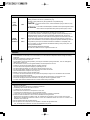
If a fault occurs, run through the table below before taking your unit for repair.
If the fault persists, attempt to solve it by switching the unit off and on again. If this fails to resolve the situation, consult your dealer. Under no circumstances should you repair the unit yourself as this will invalidate the guarantee!
PROBLEM
POSSIBLE CAUSE
REMEDY
No power
• The AC input cord is disconnected.
• The POWER switch is not pressed
correctly.
• Connect the cord securely.
• Press the POWER switch to ON.
No play
• The disc is loaded upside down.
• Reload the disc with the printed side
up.
• Clean the disc.
• Load another disc.
• See "Unplayable discs" on page 10.
• Dirty disc.
• Defective or deeply scratched disc.
• The CD-R/CD-RW disc is nonstandard.
No sound
• Incorrect connections.
• Incorrect operation of the amplifier/
receiver.
• The " " indicator lights up.
• Make connections correctly.
• Operate the amplifier/receiver correctly.
• Press the "
" button to cancel
the pause mode.
Poor or distorted sound
• The unit is connected to the
PHONO input jacks of the amplifier/
receiver.
• Poor connections.
• Make connections correctly.
Sound skips
• Defective or deeply scratched disc.
• This unit is placed on a surface that
is subject to vibration or physical
shock.
• Play another disc.
• Place this unit on a stable surface.
Programming does not
perform.
• The disc is dirty or badly scratched.
• The programming procedure is not
correct.
• The number of the programmed
tracks is 20.
• Try again with a scratch-free disc.
• Try again.
• It may take a longer time to read
Audio CD/MP3 disc with many
tracks, etc.
• This is not mulfunction.
It takes a long time to
read Audio CD/MP3 disc.
18
• Check the connections and connect
all cords securely.
• Check the number of the programmed tracks.