1
Cloud Voice Service
Table of Content
1.
Phone Set Features and Functions .................................................................................................. 2
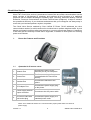
Operation for IP Phone 7911G.................................................................................................... 2
Location of Control ...................................................................................................................... 2
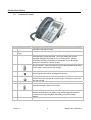
Location of Control ...................................................................................................................... 3
Preference Setup .............................................................................................................................. 4
2.1
Adjusting the Handset Volume .................................................................................................... 4
2.2
Adjusting the Speakerphone Volume .......................................................................................... 4
2.3
Adjusting the Ringer Volume....................................................................................................... 4
2.4
Personalizing the Ringer Sound.................................................................................................. 4
2.5
Changing the LCD Contrast ........................................................................................................ 5
Basic Features .................................................................................................................................... 6
3.1
Placing a Call .............................................................................................................................. 6
3.2
Answering a Call ......................................................................................................................... 6
3.3
Using Call Waiting ....................................................................................................................... 6
3.4
Ending a Call ............................................................................................................................... 7
3.5
Muting a Call ............................................................................................................................... 7
3.6
Putting a Call on Hold ................................................................................................................. 7
3.7
Transferring a Call to another Party ............................................................................................ 7
3.8
Redialing the Last Number Dialed .............................................................................................. 7
3.9
Forwarding Calls to another Phone............................................................................................. 7
3.9.1
Setting up Call Forwarding from your IP Phone ................................................................. 7
3.9.2
Setting up Call Forwarding from your Mobile ..................................................................... 8
3.9.3
Setting up Call Forwarding Via Internet .............................................................................. 8
3.10
Placing a Conference Call........................................................................................................... 8
3.11
Call Pickup .................................................................................................................................. 9
3.11.1
Call Pickup within your Group............................................................................................ 9
3.11.2
Directed Call Pickup (Specific Group Member) ................................................................. 9
3.12
Sim-Ring ...................................................................................................................................... 9
3.12.1
Enable/ Disable Sim-Ring .................................................................................................. 9
3.12.2
Switching Phone Conversation from IP Phone to Mobile ................................................ 10
3.12.3
Switching Call Conversation from Mobile Back to IP Phone ........................................... 10
VoiceMail Service ............................................................................................................................... 10
4.1
Setting up VoiceMail ................................................................................................................. 10
4.1.1
Activating VoiceMail on your IP Phone .............................................................................. 10
4.1.2
Remote Activation of VoiceMail ......................................................................................... 10
4.2
Accessing VoiceMail ................................................................................................................. 11
4.3
Remote Access to VoiceMail .................................................................................................... 11
4.4
Retrieval of VoiceMail via Outlook 2000 ..................................................................................... 11
Using the Phone Log .......................................................................................................................... 12
5.1
Viewing and Dialing from the Phone Log .................................................................................. 12
5.2
Deleting Records in the Phone Log .......................................................................................... 12
Extension Mobility ........................................................................................................................... 13
6.1
Login.......................................................................................................................................... 13
6.2
Logout ....................................................................................................................................... 13
Change the Cloud Voice Password ................................................................................................ 13
Change the IP Phone PIN .............................................................................................................. 14
1.1
1.2
1.2
2.
3.
4.
5.
6.
7.
8.
Version 1.0
1
©Wharf T&T Limited 2013