1
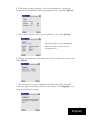
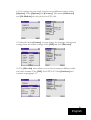
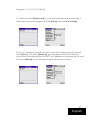
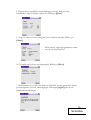
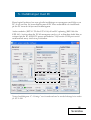
4. This menu contains settings of the tuner parameters, channel or
frequency and bandwidth. Enter appropriate values and click [Next].
5. Now choose which service you would like to use. Click [Next].
This menu gives you information
about the name of the service,
encryption etc.
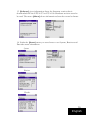
6. Choose the language of the audio and video streams you want to use.
Click [Next].
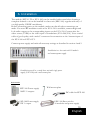
7. The installation is now completed and audio and video from the
correct program should be present on the output. Click [Again] if you
want to modify the settings.
7
English