1
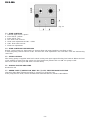
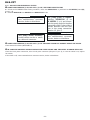
DLS-CC
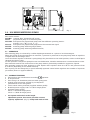
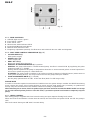
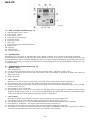
Fig. 23
9.4 - DLS- CC PUMP CONTROLS (Fig. 23)
1 - ON/OFF light switch “green”
2 - Level L.E.D. “yellow”
3 - Pulse L.E.D. “red”
4 - Functions selection button
5 - Functions L.E.D.
6 - Decrease button
7 - mA L.E.D.
8 - Functions selector (mA/manual pulse)
9 - Stroke L.E.D.
10 - Display
11 - Enter button
12 - Increase button.
9.5 - CALIBRATION
Switched On (1), the pump is automatically in the “Meter” function, this is shown in the display imp/min.
Pressing button mA pulse (8) will show the actual mA input signal. To go back to strokes/min press again. The
manual function is also used when priming the pump. In order to avoid programming and setting errors during
the system functioning, the pump is programmed to automatically return to the Meter Mode each time the unit
is switched OFF.
9.6 - PARAMETERS SETTING MODE (Fig. 23)
• “Manual” Mode
Turn pump ON (1)
A. On the control panel press button F (4) and start manual mode: (“Manual” L.E.D. 5 ON )
B. By means of button 12 (increase) and 6 (decrease), select the number of imp/min. To prime the pump set
pulse rate at 75%.
C. Prime the pump.
•
A.
B.
C.
D.
•
A.
B.
C.
D.
E.
“Set 1” Mode
Mode Set 1 is used to select the mA input value/min. dosing pump flow and pulse frequency.
Press button 4; Set 1, L.E.D. ON. The display will show the pulse frequency previously set.
Select the minimum pump output required pressing buttons 6 and 12. If the minimum output is zero, set 000.
Confirm with enter (11).
Press button 8 “mA” L.E.D. ON:
By pressing buttons 6 and 12, you can select the mA input value corresponding to minimum pump output
required. Confirm with enter 11. To finish the programming procedure and modify the maximum output
value, press button 4 which will automatically change to mode Set 2.
“Set 2” Mode
Mode Set 2 selects the mA input value/max. dosing pump flow and pulse/frequency.
Press button 4 Set 2 L.E.D. ON, the display will show the frequency previously set.
Press buttons 6 and 12 to set the desired imp/frequency at the maximum pump output required.
Press button 8 “mA/pulse”, the display will show the value previously set.
Pressing 6 and 12 select the mA input value at the maximum pump output required.
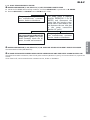
Press button 11 to enter. The pump will automatically return to “METER” mode and is operational according
to the selected functioning mode; two modes are available: direct/reverse.
• 46 •