1
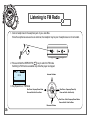
Listening to FM Radio
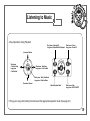
Short Press: Frequency and
Memory Function
Press and Hold: FM ON/OFF
VOL·N
AV
NU·
I
ME
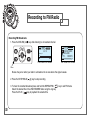
Broadcast Recording
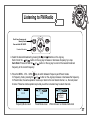
4. Select the desired broadcast by pressing the
and
buttons on the Jog key.
Each click of the
or
button on the Jog key increases or decreases frequency by a step.
Auto Scan: Press and Hold the
or
button on the Jog key to scan for the nearest broadcast
frequency to the current frequency.
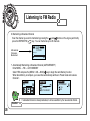
5. Press the MENUŋVOLŋNAVI
key to switch between Frequency and Preset modes.
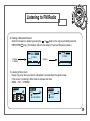
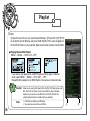
In Frequency mode, pressing the
or
button on the Jog key increases or decreases the frequency.
In Preset mode, the same operation moves up or down to the next stored channel, i.e., the next preset
channel. These two-mode operations provide you with a convenient way to select channels.
PRES
MONO
PRES
88.30
Ch 01
Frequency Mode screen
MONO
PRES
88.30
Memory 02
Preset Mode screen
Ch 01
MONO
88.30
No Preset
Channel
When there are no channels memorized
27