1
2. Operation
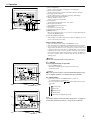
2.3. Selecting a temperature
TEMP.
s To decrease the room temperature:
button to set the desired temperature.
1 Press
A The selected temperature is displayed.
• Each time you press the button, the temperature value decreases by
1 °C.
A
˚C
˚C
TEMP.
s To increase the room temperature:
1 Press
button to set the desired temperature.
A The selected temperature is displayed.
• Each time you press the button, the temperature value increases by
1 °C.
ON/OFF
1
FILTER
CHECK TEST
TIMER SET
• Available temperature ranges are as follows:
Cooling & Drying:
19 - 30 °C
Heating:
17 - 28 °C
Automatic:
19 - 28 °C
Circulation:
— (Not available)
• The display flashes either 8 °C - 39 °C to inform you if the room temperature is lower or higher than the displayed temperature.
A
2.4. Selecting a fan speed
1 Press
button to select a desired fan speed.
• Each time you press the button, available options change with the display A on the remote controller, as shown below.
˚C
Fan speed
˚C
Low
Remote controller display
Medium
High
3-stage
ON/OFF
The display and the fan speed of the unit will differ in the following situations:
• When STAND BY and DEFROST are displayed.
• Just after the heating mode (while waiting to change to another mode).
• When the temperature of the room is higher than the temperature setting of the unit operating in the heating mode.
• In the dry operation, the indoor fan automatically turns to low-speed
operation. Switching of fan speed is impossible.
FILTER
CHECK TEST
TIMER SET
1
A
B
C
D
F
˚C
˚C
ON/OFF
FILTER
CHECK TEST
TIMER SET
1
4
E
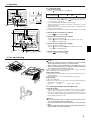
2.5. Adjusting vertical airflow direction
The vertical air vane helps select the vertical direction of the airflow.
1 Press
button to select the vertical airflow direction.
• Each time you press the button, the option changes are displayed on
the remote controller, as shown below.
A (Swing) → B → C → D → E → A
1Hr.
TEMP.
▼
TEMP.
▼
▼
• If the room temperature is higher than the temperature set on the remote controller while the unit is defrosting or preparing for heating, the
vertical air vane will move to the horizontal airflow position (B).
• In either cooling or dry mode, if you select C, D or E when the fan
speed is low, middle 2, a display reading “1Hr.” F will appear.
After one hour, the air conditioner will switch automatically to horizontal
air mode B and the display “1Hr.” F will disappear.
• When the heating thermostat is OFF, the louver automatically turns horizontally during defrosting or preparation for heating.