1
On-Screen Menu (continued)
SYSTEM CONFIGURATION SUBMENU
Video Configuration Submenu
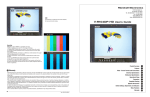
■ Internal SMPTE Color Bars
Use to display internally generated SMPTE split-field color bars.
■ User-Definable Function Buttons
Use the FUNCTION 1 and FUNCTION 2 menu items to define each function button on the front panel of the monitor.
The following options are available for each button:
•
•
•
•
•
•
•
•
DELAY
RATIO
BACK
CENTER
MARKER
MONO
CTEMP
PTP
Enable and rotate amongst delay modes.
Toggle between 4:3 and 16:9 aspect ratios.
Rotate amongst marker backgrounds.
Enable/disable center marker.
Enable and rotate amongst marker settings (choices depend on aspect ratio setting).
Enable/disable monochrome mode.
Rotate amongst color temperature settings.
Enable/disable Pixel-to-Pixel™ mode.
FUNCTION 1 is set to RATIO by default.
FUNCTION 2 is set to PTP by default.
■ Status Display
Use to enable on-screen display of input/format status in the upper-left corner of the screen.
■ Saving and Loading User Configuration Presets
Use the SAVE CONFIG and LOAD CONFIG menus to save current settings to one of 6 presets, or load a preset. All
monitor settings on the monitor are saved, including the image adjustment knob settings.
•
Use the LOAD CONFIG menu to load one of presets USR1 – USR6. Factory default settings can also be loaded
by selecting MFG. (Factory defaults cannot be overwritten.)
•
Use the SAVE CONFIG menu to save the current settings to a preset from USR1- USR6.
15