1
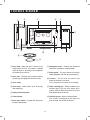
FEATURES DIAGRAM
1
2
3
5
6
4
7
8
0
9
q
e
w
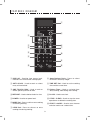
1 DISPLAY - Cooking time, power level,
indicators and current time are displayed.
8 Auto Defrost Pads - Press to select
DEFROST feature by weight.
2 AUTO COOK - Used to cook or reheat
many of favorite food.
9 TIME SET Pad - Used to set the cooking
time and the current time.
3 ONE TOUCH COOK - Used to cook or
reheat specific quantites of food.
0 Kitchen Timer - Used as a minute timer,
delay cooking, hold setting after cooking.
4 DEFROST - Used to defrost foods for time.
q CLOCK - Used to set clock.
5 POWER - Used to set power level.
w STOP / CLEAR - Used to stop the oven
operation or to delete the cooking data.
6 MORE Pad - Press to add an extra cooking
time during working.
e START / +30 SEC - Used to start the oven
and also used to set a reheat time.
7 LESS Pad - Press to subtract an extra
cooking time during working.
9