1
Servicing
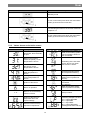
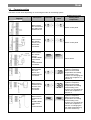
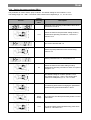
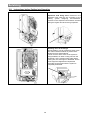
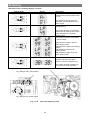
Activation of the “chimney-sweeper” function:
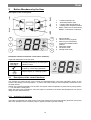
Control panel
Screen
Description
Press down buttons 3,4 and 5
simultaneously and hold them down
for 10s.
The number of the currently set
parameter will start flashing on the
boiler screen
Press down buttons 3 and 4
simultaneously.
The screen will show LP (minimum
output) and the value for the current
water temperature in the boiler
heating circuit
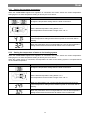
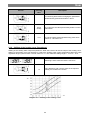
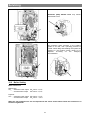
Using buttons 3 and 4 it is possible
to set the output
„LP“ Minimum output in the hot
water heating mode
„hP“ Minimum output to the heating
system
„cP“ Maximum output to the
heating system
“dP“ Maximum output in the hot
water heating mode
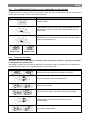
For deactivation of the “chimneysweeper” function press down
buttons 3,4 and 5 simultaneously
The screen will show indication for
the summer or winter operation
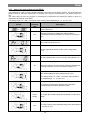
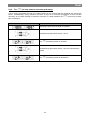
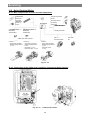
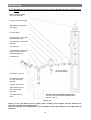
CO2 setting at max. power output
+
-
-
+
CO2 setting at min. power output
Fig. no. 30
Gas valve adjusting screw
48