1
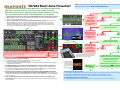
SR7002 Multi-Zone Flowchart
The SR7002 includes a feature called ‘Multi-zone’. This means it can be used to
play music in another room in your home, or even outside. This 4-step
flowchart covers the basics in getting a pair of speakers working in another
room, using two of the seven the on-board amplifiers in your SR7002.
•
•
First, install your multi-zone speakers and connect them to the multizone speaker terminals. Now, follow these steps…
Analogue input sockets, SR7002 rear panel
Connect all
sources with
analogue
audio cables.
(Multi-zone only
uses analogue
audio.)
The music playing in your other room can be completely different to the music playing in your home
theatre room. For example: a DVD can be playing in your lounge room, while a CD can be playing in the
kitchen — and at different volumes, too!
The set-up described here is a basic method of achieving multi-zone sound. There are other, more
sophisticated ways to send music and video around your home using the SR7002—you can even
control the SR7002 from another room, using the supplied RC101 multi-zone remote. These types of
systems are more advanced, so we suggest you consult with a professional Custom Installer to help
you specify, install and configure a system exactly to your needs.
1. Are all sources connected
using analogue L/R audio cables?
SR7002 Set-up menu using On Screen Display;
Inset: Set-up Menu message in front window
SR7002 rear panel
Set Surround B.
(Back) speakers to
‘None’ in the Setup Menu under
2. Speaker Set-up/
Manual
Press the ‘MULTISPEAKER’ button.
(The ‘MULTI’
button turns on
the LINE LEVEL
output only.)
•
1.
2.
3.
•
•
•
Speaker ‘C’ switch
must be OFF for
multi-zone use
In this basic multi-zone system you will need:
An additional pair of speakers (such as bookshelf, in-wall or in-ceiling)
Good quality speaker cable of appropriate length
An ability to install and conceal the speaker cables to your desired location (if in doubt, we again suggest
using a professional Installer).
The SR7002 features special speaker terminals (highlighted in a green box above) for either multizone use or bi-amping use. This allows the SR7002 to be wired for 7.1 home theatre use AND multi-zone
use. The multi-zone feature can then be used when desired and the home theatre runs in 5.1 mode). When
the multi-zone is shut down, the home theater can operate in 7.1 mode again.
Activating multi-zone speakers can be performed using either the ‘MULTI-SPEAKER’ button on the
front panel, or the remote control supplied with your receiver (model RC8001SR). Once activated, you
can use either the front panel or the RC8001SR remote to choose a source and set the volume for the speakers
in the multi-zone.
There are additional multi-zone ‘control’ features and a multi-zone video feature, which are not
discussed here. Read your User Guide and contact your professional Custom Installer for advice on how to
use these features.
Using the RC8001SR remote: Press AMP; press >
(page right) button (under the D5 button) until
page 4 appears; press the ‘D2’ button.
The ‘MULTI’ indicator
flashes when the
SR7002 is in multizone mode. While
flashing, multi-zone
adjustments can be
made.
YES
2. Is the Surround B. (Back) speakers
setting set to ‘None’?
NO
YES
3. Are you pressing the
‘MULTI-SPEAKER’ button?
SR7002 front panel
The ‘MULTI’ button on the remote control activates the line-level output, not the ‘multi-speaker’
speaker terminals. This line-level output is used for an external amplifier (such as the Marantz
SR4021) or to send sound to a second room TV.
NO
Enjoy!
NO
YES
4. While ‘MULTI’ is flashing in the
SR7002 front display (shown left):
1. Choose a source to listen to
(using the remote or the
front panel input dial).
2. While ’MULTI’ is still flashing, set
the multi-zone volume (with front
panel volume dial or the remote).
To adjust the volume up or down:
1. Press ‘MULTI-SPEAKER’ button. The ’MULTI’ indicator goes out and multi-zone speakers are turned off.
2. Press ‘MULTI-SPEAKER’ again. Multi-zone speakers activate again and ‘MULTI’ flashes.
3. While ‘MULTI ’ is flashing, use the volume dial or the remote control to adjust the volume.
To SHUT DOWN the multi-zone speakers:
Press the ‘MULTI-ZONE’. the ’MULTI’ indicator goes out and multi-zone speakers are turned off.