1
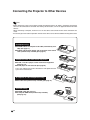
Connecting the Projector to Other Devices
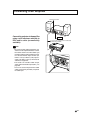
Connecting the thumbscrew cables
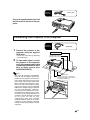
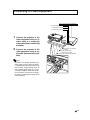
■ Connect the thumbscrew cable making sure that it
fits correctly into the terminal. Then, firmly secure
the connectors by tightening the screws on both
sides of the plug.
■ Do not remove the ferrite core attached to the RGB
cable.
Ferrite core
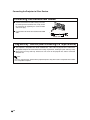
“Plug and Play” function (when connecting to a 15-pin terminal)
■ This projector is compatible with VESA-standard DDC 1/DDC 2B. The projector and a VESA DDC
compatible computer will communicate their setting requirements, allowing for quick and easy setup.
■ Before using the “Plug and Play” function, be sure to turn on the projector first and the connected
computer last.
Note
! The DDC “Plug and Play” function of this projector operates only when used in conjunction with a VESA
DDC compatible computer.
-18