1
Chapter 2. Normal Operation
2.1.5.
Monitor Operation
Display or Action
Explanation
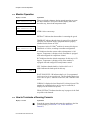
23:04 F02S01 02:37
TEMP A168/D170 LEV 1
These two displays alternate during normal operation on some
E-P Plus® models. E-P Express® models display other data
about the step, but not bath temperature data.
23:04 STEP 01 02:37
TEMP A168/D170 SPD 0
23:04
F02S01
02:37
STEP01 is the current step.
EXTRACT indicates that the machine is extracting the goods.
TIMEHALT indicates that the timer is stopped for a chemical
injection. The chemical supply equipment must be properly
installed for this feature to work.
TEMP A168/D170 LEV 1
Temperature in this E-P Plus® machine is measured in degrees
Fahrenheit or Celsius, according to machine configuration.
A168 indicates that the current achieved temperature is 168
degrees. Temperature is displayed only if machine is equipped
with and configured for temperature control.
D170 indicates that the desired temperature for this step is 170
degrees. Temperature is displayed only if the machine is
equipped with and configured for temperature control.
LEV 2 indicates that the bath level achieved is Level 2.
SPD 0 indicates the bath speed for this step.
SPD 0
LEV 2
WAIT FOR LEVEL 2 H indicates that Level 2 is programmed
for this step, but is not yet achieved. The H indicates that the hot
water valve is open; C indicates cold water, and 3 indicates extra
water.
CHEM 03 is displayed when Chemical 03 is being injected. The
number for each chemical (up to five may be connected) is
displayed as the chemical is injected.
FINAL EXTRACT indicates that the step in progress is the final
step of the wash formula.
2.1.6.
How to Terminate a Running Formula
Display or Action
Explanation
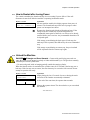
z
PELLERIN MILNOR CORPORATION
Cancels the current formula and returns the machine to the Run
Formula display (see Section 2.1.4 “Select and Start a
Formula”).