1
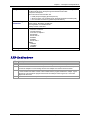
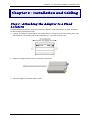
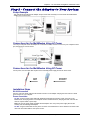
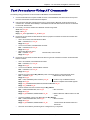
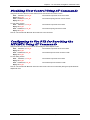
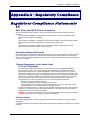
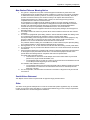
MultiConnect Adapter Serial-to-Bluetooth Adapter MTS2BTA MTS2BTA-R User Guide Copyright and Technical Support User Guide MTS2BTA and MTS2BTA-R MultiConnect Serial-to-Bluetooth Adapter S000370A Rev. A Copyright This publication may not be reproduced, in whole or in part, without prior expressed written permission from MultiTech Systems, Inc. All rights reserved. Copyright © 2005 Multi-Tech Systems, Inc. Multi-Tech Systems, Inc. makes no representations or warranty with respect to the contents hereof and specifically disclaims any implied warranty of merchantability or fitness for any particular purpose. Furthermore, Multi-Tech Systems, Inc. reserves the right to revise this publication and to make changes from time to time in the content hereof without obligation of Multi-Tech Systems, Inc. to notify any person or organization of such revisions or changes. Revision A Date 03/31/05 Description Initial release. Patents This device is covered by one or more of the following patents: 6,031,867; 6,012,113; 6,009,082; 5,905,794; 5,864,560; 5,815,567; 5,815,503; 5,812,534; 5,809,068; 5,790,532; 5,764,628; 5,764,627; 5,754,589; 5,724,356; 5,673,268; 5,673,257; 5,644,594; 5,628,030; 5,619,508; 5,617,423; 5,600,649; 5,592,586; 5,577,041; 5,574,725; 5,559,793; 5,546,448; 5,546,395; 5,535,204; 5,500,859; 5,471,470; 5,463,616; 5,453,986; 5,452,289; 5,450,425; D353,598; 5,355,365; 5,309,562; 5,301,274. Other patents pending. Trademarks Multi-Tech, the Multi-Tech logo, and MultiConnect are registered trademarks of Multi-Tech Systems, Inc. All other brand and product names mentioned in this publication are trademarks or registered trademarks of their respective companies. Technical Support Country France: India: U.K.: U.S. and Canada: Rest of the World: By Email [email protected] [email protected] [email protected] [email protected] [email protected] By Phone (33) 1-64 61 09 81 91 (124) 6340778 (44) 118 959 7774 (800) 972-2439 (763) 717-5863 Internet Address: http://www.multitech.com World Headquarters Multi-Tech Systems, Inc. 2205 Woodale Drive Mounds View, Minnesota 55112 U.S.A. (763) 785-3500 or (800) 328-9717 Fax (763) 785-9874 http://www.multitech.com Multi-Tech Systems, Inc. Serial-to-Bluetooth Adapter User Guide (S000370A) 2 Table of Contents Contents Chapter 1 – Description and Specifications ..............................................................................................................4 Product Description ....................................................................................................................................................4 Applications ................................................................................................................................................................4 Features .....................................................................................................................................................................4 Product Build Options.................................................................................................................................................5 MultiConnect Package Contents ................................................................................................................................5 AT Commands............................................................................................................................................................5 Handling Precautions .................................................................................................................................................5 General Safety............................................................................................................................................................6 Vehicle Safety........................................................................................................................................................6 Maintenance of the Serial-to-Bluetooth Adapter ....................................................................................................6 Technical Specifications .............................................................................................................................................7 LED Indicators ............................................................................................................................................................8 Chapter 2 – Installation and Cabling ..........................................................................................................................9 Step 1 – Attaching the Adapter to a Fixed Location....................................................................................................9 Step 2 – Connect the Adapter to Your System .........................................................................................................10 Setup Example ....................................................................................................................................................10 Connections for the MultiModem Using AC Power..............................................................................................10 Connections for the MultiModem Using DC Power..............................................................................................10 Chapter 3 – AT Commands .......................................................................................................................................11 AT Command Reference Guide ...............................................................................................................................11 Using AT Commands ...............................................................................................................................................11 Default Settings / Changing Configuration...........................................................................................................11 Setting Parameters..............................................................................................................................................12 Test Procedures Using AT Commands ....................................................................................................................13 Disabling Flow Control Using AT Commands...........................................................................................................14 Configuring to Use DTR for Resetting the MTS2BTA Using AT Commands ...........................................................14 Chapter 4 – Peripheral Devices.................................................................................................................................15 Antenna Requirements .............................................................................................................................................15 Pin Assignments for the Serial Port ..........................................................................................................................15 Appendix A – Regulatory Compliance .....................................................................................................................16 Regulatory Compliance Statements .........................................................................................................................16 EMC, Safety, and R&TTE Directive Compliance .................................................................................................16 International Adapter Restrictions........................................................................................................................16 Telecom Requirements for the United States ......................................................................................................16 Industry Canada ..................................................................................................................................................16 New Zealand Telecom Warning Notice ...............................................................................................................17 South African Statement......................................................................................................................................17 Other ...................................................................................................................................................................17 Appendix B – Multi-Tech Warranty Statement and Product Repair.......................................................................18 Warranty ...................................................................................................................................................................18 Product Repair..........................................................................................................................................................18 Repair Procedures for U.S. and Canadian Customers ........................................................................................18 Repair Procedures for International Customers (Outside U.S.A. and Canada) ...................................................19 Repair Procedures for International Distributors..................................................................................................19 Replacement Parts ..............................................................................................................................................19 Index............................................................................................................................................................................20 Multi-Tech Systems, Inc. Serial-to-Bluetooth Adapter User Guide (S000370A) 3 Chapter 1 – Description and Specifications Chapter 1 – Description and Specifications Product Description The MultiConnect Serial-to-Bluetooth adapter enables communication between an installed host serial device and a peripheral wireless device. The serial side of the MultiConnect provides transparent serial data-to-Internet protocol conversion, eliminating the need for any hardware modifications. The embedded Bluetooth wireless technology of the MultiConnect provides a secure, standards-based wireless connection between the host and the peripheral device. Bluetooth provides wireless data transfer up to 100 meters, completely eliminating the need for a serial cable connection. Applications The MultiConnect adapters will IP-enable any device to provide remote monitoring, control and configuration of any system. The solution is ideal for the following applications: • • • • • • • • • Retail Environment ∗ POS (Point of Sale) Devices ∗ Bar Code Scanners ∗ Credit Card Reader Restaurant Environment ∗ Order Printer ∗ Receipt Printer ∗ Credit Card Reader Outdoor Signs Gas pumps Security Systems / Surveillance Cameras Emergency Vehicles Delivery Trucks Home Health Care Connecting to Other Bluetooth-enabled Devices ∗ Modem ∗ Mobile Phone ∗ Headset ∗ Computer ∗ PDA Features Instant Serial Cable Replacement Running serial cabling can be expensive and sometimes problematic especially if it is in an outdoor environment. With the SocketWireless, you can eliminate the cable and connect your peripheral devices effortlessly with a Bluetooth wireless network. In a point-to-point connection, one SocketWireless is embedded in a host device, such as a PC; the other is attached to a serial peripheral device such as a barcode scanner, receipt printer or scale. Now you can use the wireless network to transfer information between the host and the device for up to 100 meters. Wireless Host Connection SocketWireless Bluetooth can also connect to any other Bluetooth-enabled device, such as a PDA or WAN radio increasing user mobility in mission-critical applications such as emergency vehicles, delivery trucks, medical monitoring, and point-of-sale environments. SocketWireless Bluetooth is operating system independent and can be seamlessly embedded in any peripheral device. No application software is needed. Secure, Robust Communication SocketWireless Bluetooth complies with the Bluetooth specifications for security which includes 128-bit encryption and 10 alphanumeric Personal Identification Number (PIN) authentication. It utilizes FHSS (Frequency Hopping Spread Spectrum) technology. In addition, SocketWireless Bluetooth uses error correction schemes for guaranteed packet delivery. Multi-Tech Systems, Inc. Serial-to-Bluetooth Adapter User Guide (S000370A) 4 Chapter 1 – Description and Specifications Product Build Options Product MTS2BTA MTS2BTA-R Description Serial-to-Bluetooth Adapter AC-Powered Serial-to-Bluetooth Adapter DC-Powered Region North America and Europe North America and Europe MultiConnect Package Contents AC-Powered Version • • • • • • • • One Serial-to-Bluetooth Adapter One antenna One mounting bracket RS-232 serial cable One universal power supply with power cord A set of four self-adhesive plastic feet One printed Quick Start Guide One Serial-to-Bluetooth Adapter product CD containing the adapter drivers, User Guide, Quick Start Guide, AT Commands Reference Guide, Global Wizard software, PhoneTools (a data communications program), and Acrobat Reader DC-Powered Version • • • • • • • • One Serial-to-Bluetooth Adapter One antenna One mounting bracket RS-232 serial cable One fused power cable A set of four self-adhesive plastic feet One printed Quick Start Guide One Serial-to-Bluetooth Adapter product CD containing the adapter drivers, User Guide, Quick Start Guide, AT Commands Reference Guide, Global Wizard software, PhoneTools (a data communications program), and Acrobat Reader Note: Part Supplied by User Mounting screws (screw shaft diameter =.17" maximum) AT Commands AT commands for the Serial-to-Bluetooth Adapter are published in a separate Reference Guide included on the product CD and posted on the Multi-Tech Web site. Handling Precautions All devices must be handled with certain precautions to avoid damage due to the accumulation of static charge. Although input protection circuitry has been incorporated into the devices to minimize the effect of this static buildup, proper precautions should be taken to avoid exposure to electrostatic discharge during handing and operation. Multi-Tech Systems, Inc. Serial-to-Bluetooth Adapter User Guide (S000370A) 5 Chapter 1 – Description and Specifications General Safety The adapter is designed and intended to be used in either fixed or mobile applications. In the “Fixed” application, the device is physically secured at one location and not easily moved to another location. In the “Mobile” application, the device may be regularly moved to different locations. Caution! Maintain a separation distance of at least 20 cm (8 inches) between the transmitter’s antenna and the body of the user or nearby persons. The adapter is not designed for, nor intended to be, used in applications within 20 cm (8 inches) of the body of the user. Such uses are strictly prohibited. Avoid possible radio frequency (RF) interference by carefully following the safety guidelines below. • Switch OFF the Adapter when in an aircraft. The use of cellular telephones in aircraft is illegal. It may endanger the operation of the aircraft and/or disrupt the cellular network. Failure to observe this instruction may lead to suspension or denial of cellular telephone services to the offender, legal action, or both. • Switch OFF the Adapter in the vicinity of gasoline or diesel-fuel pumps or before filling a vehicle with fuel. • Switch OFF the Adapter in hospitals and any other place where medical equipment may be in use. • Respect restrictions on the use of radio equipment in fuel depots, chemical plants, or where blasting operations are in progress. • There may be a hazard associated with the operation of your Adapter in the vicinity of inadequately protected personal medical devices such as hearing aids and pacemakers. Consult the manufacturers of the medical device to determine if it is adequately protected. • Operation of the Adapter in the vicinity of other electronic equipment may cause interference if the equipment is inadequately protected. Observe any warning signs and manufacturers’ recommendations. Vehicle Safety • Do not use your Adapter while driving. • Respect national regulations on the use of cellular telephones in vehicles. Road safety always comes first. • If incorrectly installed in a vehicle, the operation of adapter could interfere with the correct functioning of vehicle electronics. To avoid such problems, be sure that the installation has been performed by qualified personnel. Verification of the protection of vehicle electronics should be part of the installation. • The use of an alert device to operate a vehicle’s lights or horn on public roads is not permitted. Maintenance of the Serial-to-Bluetooth Adapter Your adapter is the product of advanced engineering, design and craftsmanship and should be treated with care. The suggestions below will help you to enjoy this product for many years. • Do not expose the adapter to any extreme environment where the temperature or humidity is high. • Do not attempt to disassemble the adapter. There are no user serviceable parts inside. • Do not expose the adapter to water, rain or spilled beverages. It is not waterproof. • Do not abuse your adapter by dropping, knocking, or violently shaking it. Rough handling can damage it. • Do not place the adapter alongside computer discs, credit or travel cards, or other magnetic media. The information contained on discs or cards may be affected by the phone. • The use of accessories not authorized by Multi-Tech or not compliant with Multi-Tech’s accessory specifications may invalidate the warranty of the MultiConnect Adapter. • In the unlikely event of a fault in the adapter, contact Multi-Tech Technical Support. Multi-Tech Systems, Inc. Serial-to-Bluetooth Adapter User Guide (S000370A) 6 Chapter 1 – Description and Specifications Technical Specifications Category Description Serial Interface Supports speeds from 1200bps to 230Kbps RF Interface Frequency………………2402 – 2480MHz Modulation……………...FHSS/GFSK Channel Intervals………1MHz Number of Channels….79CH Transmission Rate…….721Kbps For Serial Interface - Asynchronous, 8-N-1, Default is 9600bps Hardware -80dBm typical 20dBm maximum Class 1 - 100 meters (330 feet) Inquiry, Idle, Data, Fast Data, Park, Sniff, Command, Master, Slave Serial Port (SPP), Dial-up Network (DUN) Serial 50 bytes RF 50-byte RX buffer 0.6 oz. (0.017 Kg.) 1.045" x 2.541" x 0.680" (2.65cm x 6.45cm x 1.7cm) Idle: 2mA (0.0066W @ 3.3Vdc) (0.01W @ 5Vdc) Connected: 7mA (0.0231W @ 3.3Vdc) (0.035W @ 5Vdc) Fast Data: 45mA (0.1485W @ 3.3Vdc) (0.225W @ 5Vdc) Inquiry: 70mA (0.231W @ 3.3Vdc) (0.35W @ 5Vdc) Notes: These power measurements were taken with no LEDs connected. Driving an LED through 330 ohm resistor to GND draws an additional 4mA on 5V for each LED. Data Format Flow Control RF Receive Sensitivity Output Level (Class 1) RF Range Modes of Operation Device Profiles Buffer Weight Dimensions Power Operational Temperature Storage Temperature Voltage Default Power Up Settings -40 to +70° C -40 to +85° C 9Vdc to 25Vdc AT Command Response Form = Long Form Bluetooth Service Profile = Serial Port Profile {SPP} Device Role = Slave Baud Rate = 9600bps Data Bits = 8 bits Parity = None Stop bits = 1 bit Hardware Flow Control RTS/CTS = Enabled Power Mode = Never go into deep sleep mode Country Code = North America and Europe Name of Device (local name) = Serial-to-Bluetooth Adapter My Radio Status = 1,0 {slave, disconnected} Service Name = COM0 Power up default ATSW24 settings = 0,0,0,0 {long response, no authentication, no auto SCO connect, no minor} Power up default ATSW25 settings = 0,1,0,0 {slave, data, allow data to pass, SPP} Major & Minor Class Of Device (COD) = 00000000 {undefined} Security PIN and Encryption Disabled Default PIN = “default” caps sensitive Page Scan Interval = 0x400 {2560msec.} Page Scan Window = 0x200 {11msec.} Inquiry Scan Interval = 0x400 {2560msec.} Inquiry Scan Window = 0x200 {11msec.} Timeout Connection Parameters Inquiry = 60 seconds Slave Connect = 60 seconds Master Connect = 60 seconds ATDM idle mode = 60 seconds ATDM Master Mode = indefinitely (need to perform ATUCL to cancel last command) Timeout for loss of Bluetooth connection = 4 seconds Multi-Tech Systems, Inc. Serial-to-Bluetooth Adapter User Guide (S000370A) 7 Chapter 1 – Description and Specifications Category Description Intelligent Features Can be configured, commanded, and controlled through simple ASCII strings over the Bluetooth RF link or directly through the hardware serial UART. Low power consumption. Secure and robust communication link. • FHSS (Frequent Hopping Spread Spectrum) • 56-bit encryption, and 10 alphanumeric Personal Identification Number (PIN) • Error correction schemes for guaranteed packet delivery Trade Name: MultiConnect Model Number: MTS2BTA, MTS2BTA-R FCC Registration: AU792U05A28780 Industry Canada: 125A-0016 EMC Approvals: FCC Part 15 Class B Canada (Class B) FCC Part 15, Subpart C EN 300 328 EN 301 489-17 EN55022 EN55024 EN 301 489-1 Safety: UL60950 cUL60950 EN60950 Two Years Manufacturing Information Certifications Warranty LED Indicators LED Description TD RD CD Transmit Data. This LED is lit when adapter is transmitting data to another adapter. Receive Data. This LED is lit when the adapter is receiving data from another adapter. Carrier Detect. This LED is lit when the adapter detects a valid carrier signal from another adapter. It is on when the adapter is communicating with the other adapter and off when the link is broken. Terminal Ready. (Also called Data Terminal Ready.) This LED indicates the PC is turned on and ready to communicate. This LED is lit when a data communications program initializes the adapter. It goes off when the communications program disconnects the COM port. When it goes off, a connected adapter will disconnect. Power. This LED Indicates the presence of DC power when lit. TR PWR Multi-Tech Systems, Inc. Serial-to-Bluetooth Adapter User Guide (S000370A) 8 Chapter 3 – AT Commands, S-Registers, and Result Codes Chapter 2 – Installation and Cabling Step 1 – Attaching the Adapter to a Fixed Location The Serial-to-Bluetooth Adapter is design to be used on the desktop or to be panel-mounted. To attach the bracket for panel-mounting, following these steps: 1. Typically, the adapter is mounted against a flat surface with two mounting screws. Drill the mounting holes at the desired location. The mounting holes must be separated by 4 -7/16 inches center-to-center. 2. Slide the mounting bracket into the slot on the back of the chassis. 3. Attach the adapter to the surface with two screws. Multi-Tech Systems, Inc. Serial-to-Bluetooth Adapter User Guide (S000370A) 9 Chapter 3 – AT Commands, S-Registers, and Result Codes Step 2 – Connect the Adapter to Your System Setup Example This example shows a BlueTooth Adapter setup at a fixed site and ready to communicate with the Bluetooth Adapter at a remote location. Connections for the MultiModem Using AC Power Turn off your computer. Place the adapter in a convenient location, and then connect it to your computer’s serial port, the phone line, and AC power. Connections for the MultiModem Using DC Power For DC power, use the fused cable in place of the Universal Power Supply and the AC Power Cord. Fused Cable Fused Cable Connection Installation Steps RS-232 Connection Plug one end of the serial cable into the RS-232 connector on the adapter and plug the other end into a serial port connector on your computer. Power Connection For AC – Plug the power supply cable with attached transformer block into the power connector on the MultiConnect. Then plug the AC cord receptacle into the transformer block, and plug the other end of the AC cord into a power outlet or power strip. Note: Use only the power supply supplied with the Adapter. Use of any other power supply will void the warranty and could damage the adapter. For DC – Plug the fused cable into the power connector on the MultiConnect. Then attach the two wires at the other end of the fused cable to a DC power source. Multi-Tech Systems, Inc. Serial-to-Bluetooth Adapter User Guide (S000370A) 10 Chapter 3 – AT Commands, S-Registers, and Result Codes Chapter 3 – AT Commands AT Command Reference Guide AT commands for the Serial-to-Bluetooth Adapter are published in a separate Reference Guide included on the product CD and posted on the Multi-Tech Web site. Using AT Commands Default Settings / Changing Configuration Parameters, such as the Bluetooth Name, Service Name, Class of Device and Serial Port settings can be viewed and configured. This can be done locally through the serial port UART or from a remote Bluetooth RF link. To configure the Bluetooth SocketWireless device, the device must be in command mode by issuing ATMC. While in command mode, the Bluetooth SocketWireless device will accept ASCII bytes as commands. You can use the developer board and the RS-232 cable to connect to a PC and pass ASCII characters through the terminal to the Bluetooth SocketWireless device. The communications settings should match the settings used when the Bluetooth SocketWireless device connects. For example, the defaults are: 9600bps 8 bits No Parity 1 stop bit Hardware flow control enabled. Once you change these parameters, you have the option to store them permanently in the non-volatile memory. Run your favorite terminal emulator, HyperTerminal, or other program. • Type AT on your screen and follow it with a carriage return <cr_lf>. You should see "OK" returned to you. This will verify that your cable and communications settings are correct. When the SocketWireless device is not connected to another Bluetooth device, you can type the AT commands directly into the SocketWireless' UART; e.g., you do not have to type ATMC to change from data mode to command mode. • Now you can enter any of the AT commands discussed in the following sections. Follow these commands by <cr_lf>. Valid commands will return an "OK" or a valid response. Invalid commands will reply ERROR. • To return to data mode, type ATMD. You can now pass or receive data from a remote connected Bluetooth device. Notes: • If you change communications parameter settings, remember to change your terminal or emulator communications settings to correspond to the newly created parameter settings. • AT commands will not echo back to the terminal. Multi-Tech Systems, Inc. Serial-to-Bluetooth Adapter User Guide (S000370A) 11 Chapter 3 – AT Commands, S-Registers, and Result Codes Setting Parameters This section covers how to send AT commands at the PC connected to a BlueTooth Adapter to query and set parameters for Bluetooth communication. Example of a Slave Command Sequence From Power Up: 1. Check and verify Communication to Slave. Sent : AT<cr_lf> Reply:<cr_lf>OK<cr_lf> 2. Get information on Slave Bluetooth address. Sent : ATSI,1<cr_lf> Reply: 12-digit address <cr_lf>OK<cr_lf> 3. Set Slave to automatically connect in Fast Data Mode and SPP on Bluetooth connection. Sent : ATSW25,0,0,0,0 <cr_lf> Reply:<cr_lf>OK<cr_lf> 4. Either cycle power or send ATURST. Note: This command sequence assumes the radio is in factory default in which it automatically comes up and is connectable as a Slave from a Master request. Example of a Master Discovery/Connection Sequence From Power Up and No Connection 1. Verify local device is Master in Data Mode. Sent: ATSi,7 <cr_lf> Reply: <cr_lf>1,1,0,0<cr_lf> 2. If not Master, set to Master and Data Mode. Sent: ATSW25,1,1,0,0 <cr_lf> Reply: <cr_lf>OK<cr_lf> 3. Perform an Inquiry to obtain BT_Addresses (unless it is already known). Sent: ATMC <cr_lf> // Places Radio in Command Mode Reply: <cr_lf>OK<cr_lf> Sent: ATUCL // Clears radio state Reply: <cr_lf>OK<cr_lf> Sent: ATDI,1,00000000 {Class of Device}<cr_lf> // Looks for only one Bluetooth device Reply: <cr_lf>00A0961F2023,00000104,SOCKETWIRELESS<cr_lf>DONE<cr_lf>CONNECT <cr_lf> 4. Perform a Master Connect over SPP using the BT_Address. Sent : ATDM, 00A0961F2023,1101<cr_lf> // SPP connection Reply:<cr_lf>CONNECT,00A0961F008F <cr_lf> // Returns Slave BT address radios is in data mode 5. Place radio into Fast Data Mode. Sent : ATMC <cr_lf> // Places Radio in Command Mode Reply:<cr_lf>OK<cr_lf> Sent : ATMF<cr_lf> // Places radio in Fast Data Mode Reply:<cr_lf>OK<cr_lf> 6. Send Data. Note about Sending Commands from the Slave When the Slave Connects in Fast Data Mode (ATSW25/or issuing ATMF) All valid AT commands sent through the Slave's UART will be interpreted and responded by the Master as if it were the local Slave radio. Basically, in this configuration from the Slave end, you can obtain status and configure the remote Master radio. This is a unique feature that may be useful in some applications, but it can be confusing if you think you are talking to the Slave. To Get Out of Data Mode and Check Status 1. Delay at least 50 milliseconds; this could be less or more. 2. Perform a Set Command Mode. Sent : ATMC<cr_lf> Reply:<cr_lf>OK<cr_lf> 3. Delay at least 50 milliseconds. 4. Check Status, perform a Disconnect … Sent : AT<cr_lf> Reply:<cr_lf>OK<cr_lf> Note about Being Connected in Fast Data Mode If connected in Fast Data Mode, it is necessary to reset the device to break the connection. Multi-Tech Systems, Inc. Serial-to-Bluetooth Adapter User Guide (S000370A) 12 Chapter 3 – AT Commands, S-Registers, and Result Codes Test Procedures Using AT Commands The following tesing procedures can be used with the MTS2BTA and the MTS2BTSMI. 1. Connect serial cable from computer to DB9 connector of each MTS2BTA, then attach antenna and power. Do this for both master and slave Bluetooth adapters. 2. Use terminal emulator like Hyperterminal or ZOC to communicate to Bluetooth socket modem using AT command set. Set baud rate to 9600bps. If MTS2BTA has label with different baud rate then set emulator to match with this baud rate. 3. If necessary, can retrieve address from Bluetooth module being tested. Sent: ATSI,1<cr_lf> Reply: OK<cr_lf> Reply: <cr_lf>12-digit address <cr_lf>OK<cr_lf> 4. Issue these AT commands at slave Bluetooth device to prepare for wireless connection and transfer data between modules. • How to set to Slave, Fast Data Mode and DUN. Sent : ATSW25,0,0,0,1 <cr_lf> Reply: OK<cr_lf> • Or how to set to Slave, Fast Data Mode and SPP. Sent : ATSW25,0,0,0,0 <cr_lf> Reply: OK<cr_lf> • Reset slave Bluetooth device. Sent : ATURST <cr_lf> // Resets radio, wait 5 seconds Reply: OK<cr_lf> 5. Issue these AT commands at master Bluetooth device to generate a wireless connection and transfer data between modules. • How to set to Master, Fast Data Mode and DUN. Sent : ATSW25,1,0,0,1 <cr_lf> Reply: OK<cr_lf> • Or how to set to Master, Fast Data Mode and SPP. Sent : ATSW25,1,0,0,0 <cr_lf> Reply: OK<cr_lf> • Perform an Inquiry to detect BT_Address (unless it is already known) of slave Bluetooth device. Sent : ATURST <cr_lf> // Resets radio, wait 5 seconds Reply: OK<cr_lf> Sent : ATDI,1,00000000 {Class of Device} <cr_lf> // Looks for only one Bluetooth device Reply: OK<cr_lf> // Search completed when DONE appears Reply: <cr_lf>00A0961F2023,00000104,SOCKETWIRELESS<cr_lf> Reply: <cr_lf>DONE<cr_lf> • Perform a Master Connect over SPP using the BT_Address. Sent : ATDM, 00A0961F2023,1101<cr_lf> // SPP connection Reply: OK<cr_lf> Reply:<cr_lf>CONNECT,00A0961F008F <cr_lf> // Returns Slave BT address radios is in data mode Or perform a Master Connect over DUN using the BT_Address. Sent : ATDM, 00A0961F2023,1103<cr_lf> // DUN connection Reply: OK<cr_lf> Reply:<cr_lf>CONNECT,00A0961F008F <cr_lf> // Returns Slave BT address radios is in data mode Send and receive Data by transferring file or holding down key on keyboard. • • Multi-Tech Systems, Inc. Serial-to-Bluetooth Adapter User Guide (S000370A) 13 Chapter 3 – AT Commands, S-Registers, and Result Codes Disabling Flow Control Using AT Commands Using terminal screen with flow control enabled, issue commands to turn off flow control.l. Sent : ATSW22,3,1,0 <cr_lf> // Set PIO3 as output and do not store in flash Reply: OK<cr_lf> Sent : ATSW23,3,1,0<cr_lf> // Set PIO3 output high and do not store in flash Reply: OK<cr_lf> To store setting in flash: Sent : ATSW22,3,1,1 <cr_lf> Reply: OK<cr_lf> Sent : ATSW23,3,1,1<cr_lf> Reply: OK<cr_lf> // Set PIO3 as output and store in flash // Set PIO3 output high and store in flash Now can communicate with Bluetooth device with flow control turned off. Configuring to Use DTR for Resetting the MTS2BTA Using AT Commands Using terminal screen issue commands so when DTR goes off the adapter is reset. Sent : ATSW22,6,1,0 <cr_lf> // Set PIO6 as output and do not store in flash Reply: OK<cr_lf> Sent : ATSW23,6,0,0<cr_lf> // Set PIO6 output low and do not store in flash Reply: OK<cr_lf> To store setting in flash: Sent : ATSW22,6,1,1 <cr_lf> Reply: OK<cr_lf> Sent : ATSW23,6,0,1<cr_lf> Reply: OK<cr_lf> // Set PIO6 as output and store in flash // Set PIO6 output low and store in flash Now can communicate with Bluetooth device and when serial connection is terminated (DTR goes off) the Bluetooth adapter will reset. Multi-Tech Systems, Inc. Serial-to-Bluetooth Adapter User Guide (S000370A) 14 Chapter 4 – Peripheral Devices Chapter 4 – Peripheral Devices Antenna Requirements Frequency Range Impedance VSWR Gain Radiation Polarization Wave Connector 2.4-2.5 Ghz 50 ohm nominal <2.0:1 2 dBi Omni Vertical Half Wave Dipole Reverse Polarity SMA Plug An antenna that meets the requirements for use with the SocketWireless product can be ordered, for example, from Nearson. www.nearson.com Part number: S131AH – 2450S Pin Assignments for the Serial Port Female DB9 MultiConnect Adapter Side PC Side Carrier Detect 1 Receive Data 2 Transmit Data 3 Data Terminal Ready 4 Signal Ground 5 Data Set Ready 6 Request to Send 7 Clear to Send 8 Ring Indicator 9 Multi-Tech Systems, Inc. Serial-to-Bluetooth Adapter User Guide (S000370A) 15 Appendix A – Regulatory Compliance Appendix A – Regulatory Compliance Regulatory Compliance Statements EMC, Safety, and R&TTE Directive Compliance The CE mark is affixed to this product to confirm compliance with the following European Community Directives: Council Directive 89/336/EEC of 3 May 1989 on the approximation of the laws of Member States relating to electromagnetic compatibility; and Council Directive 73/23/EEC of 19 February 1973 on the harmonization of the laws of Member States relating to electrical equipment designed for use within certain voltage limits; and Council Directive 1999/5/EC of 9 March on radio equipment and telecommunications terminal equipment and the mutual recognition of their conformity. International Adapter Restrictions Some dialing and answering defaults and restrictions may vary for international adapters. Changing settings may cause a adapter to become non-compliant with national telecom requirements in specific countries. Also note that some software packages may have features or lack restrictions that may cause the adapter to become non-compliant. Telecom Requirements for the United States FCC Part 15 Regulation This equipment has been tested and found to comply with the limits for a Class B digital device, pursuant to Part 15 of the FCC rules. These limits are designed to provide reasonable protection against harmful interference in a residential installation. This equipment generates, uses, and can radiate radio frequency energy, and if not installed and used in accordance with the instructions, may cause harmful interference to radio communications. However, there is no guarantee that interference will not occur in a particular installation. If this equipment does cause harmful interference to radio or television reception, which can be determined by turning the equipment off and on, the user is encouraged to try to correct the interference by one or more of the following measures: Reorient or relocate the receiving antenna. Increase the separation between the equipment and receiver. Plug the equipment into an outlet on a circuit that is different from the one used by the receiver. Consult the dealer or an experienced radio/TV technician for help. This device complies with Part 15 of the FCC rules. Operation of this device is subject to the following conditions: (1) This device may not cause harmful interference, and (2) this device must accept any interference that may cause undesired operation. WARNING – Changes or modifications to this unit not expressly approved by the party responsible for compliance could void the user’s authority to operate the equipment. Industry Canada This Class B digital apparatus meets all requirements of the Canadian Interference-Causing Equipment Regulations. Cet appareil numérique de la classe B respecte toutes les exigences du Reglement Canadien sur le matériel brouilleur. Multi-Tech Systems, Inc. Serial-to-Bluetooth Adapter User Guide (S000370A) 16 Appendix A – Regulatory Compliance New Zealand Telecom Warning Notice 1. 2. 3. 4. 5. 6. 7. 8. The grant of a Telepermit for any item of terminal equipment indicates only that Telecom has accepted that the item complies with minimum conditions for connection to its network. It indicates no endorsement of the product by Telecom, nor does it provide any sort of warranty. Above all, it provides no assurance that any item will work correctly in all respects with another item of Telepermitted equipment of a different make or model, nor does it imply that any product is compatible with all of Telecom’s network services. This equipment is not capable under all operating conditions of correct operating conditions of correct operation at the higher speed which it is designated. 33.6 kbps and 56 kbps connections are likely to be restricted to lower bit rates when connected to some PSTN implementations. Telecom will accept no responsibility should difficulties arise in such circumstances. Immediately disconnect this equipment should it become physically damaged, and arrange for its disposal or repair. This adapter shall not be used in any manner which could constitute a nuisance to other Telecom customers. This device is equipped with pulse dialing, while the Telecom standard is DTMF tone dialing. There is no guarantee that Telecom lines will always continue to support pulse dialing. Use of pulse dialing, when this equipment is connected to the same line as other equipment, may give rise to 'bell tinkle' or noise and may also cause a false answer condition. Should such problems occur, the user should NOT contact the Telecom Faults Service. The preferred method of dialing is to use DTMF tones, as this is faster than pulse (decadic) dialing and is readily available on almost all New Zealand telephone exchanges. Warning Notice: No '111' or other calls can be made from this device during a mains power failure. This equipment may not provide for the effective hand-over of a call to another device connected to the same line. Some parameters required for compliance with Telecom’s Telepermit requirements are dependent on the equipment (PC) associated with this device. The associated equipment shall be set to operate within the following limits for compliance with Telecom’s Specifications: For repeat calls to the same number: • There shall be no more than 10 call attempts to the same number within any 30 minute period for any single manual call initiation, and • The equipment shall go on-hook for a period of not less than 30 seconds between the end of one attempt and the beginning of the next attempt. For automatic calls to different numbers: • The equipment shall be set to ensure that automatic calls to different numbers are spaced such that there is no less than 5 seconds between the end of one call attempt and the beginning of another. For correct operation, total of the RN’s of all devices connected to a single line at any time should not exceed 5. South African Statement This adapter must be used in conjunction with an approved surge protection device. Other The above country-specific examples do not cover all countries with specific regulations; they are included to show you how each country may differ. If you have trouble determining your own country's requirements, check with Multi-Tech's Technical Support for assistance. Multi-Tech Systems, Inc. Serial-to-Bluetooth Adapter User Guide (S000370A) 17 Appendix B – Multi-Tech Warranty Statement and Product Repair Appendix B – Multi-Tech Warranty Statement and Product Repair Warranty Multi-Tech Systems, Inc., (hereafter “MTS”) warrants that its products will be free from defects in material or workmanship for a period of two, five, or ten years (depending on model) from date of purchase, or if proof of purchase is not provided, two, five, or ten years (depending on model) from date of shipment. MTS MAKES NO OTHER WARRANTY, EXPRESS OR IMPLIED, AND ALL IMPLIED WARRANTIES OF MERCHANTABILITY AND FITNESS FOR A PARTICULAR PURPOSE ARE HEREBY DISCLAIMED. This warranty does not apply to any products which have been damaged by lightning storms, water, or power surges or which have been neglected, altered, abused, used for a purpose other than the one for which they were manufactured, repaired by Customer or any party without MTS’s written authorization, or used in any manner inconsistent with MTS’s instructions. MTS’s entire obligation under this warranty shall be limited (at MTS’s option) to repair or replacement of any products which prove to be defective within the warranty period or, at MTS’s option, issuance of a refund of the purchase price. Defective products must be returned by Customer to MTS’s factory — transportation prepaid. MTS WILL NOT BE LIABLE FOR CONSEQUENTIAL DAMAGES, AND UNDER NO CIRCUMSTANCES WILL ITS LIABILITY EXCEED THE PRICE FOR DEFECTIVE PRODUCTS. Online Warranty Registration If you have access to the World Wide Web, you can register your Multi- Tech product online at the following URL: http://www.multitech.com/register/ Product Repair Repair Procedures for U.S. and Canadian Customers In the event that service is required, products may be shipped, freight prepaid, to our Mounds View, Minnesota factory: Multi-Tech Systems, Inc. 2205 Woodale Drive Mounds View, MN 55112 Attn: Repairs, Serial # ____________ A Returned Materials Authorization (RMA) is not required. Return shipping charges (surface) will be paid by MTS to destinations in U.S. and Canada. Please include, inside the shipping box, a description of the problem, a return shipping address (must have street address, not P.O. Box), your telephone number, and if the product is out of warranty, a check or purchase order for repair charges. For out of warranty repair charges, go to www.multitech.com/DOCUMENTS/Company/warranty/ Extended two-year overnight replacement service agreements are available for selected products. Please call MTS customer service at (888) 288-5470 or visit our web site at www.multitech.com/PARTNERS/Programs/orc/ for details on rates and coverage’s. Please direct your questions regarding technical matters, product configuration, verification that the product is defective, etc., to our Technical Support department at (800) 972-2439 or email [email protected]. Please direct your questions regarding repair expediting, receiving, shipping, billing, etc., to our Repair Accounting department at (800) 328-9717 or (763) 717-5631, or email [email protected]. Repairs for damages caused by lightning storms, water, power surges, incorrect installation, physical abuse, or user-caused damages are billed on a time-plus-materials basis. Multi-Tech Systems, Inc. Serial-to-Bluetooth Adapter User Guide (S000370A) 18 Appendix C – Warranty and Service Repair Procedures for International Customers (Outside U.S.A. and Canada) Your original point of purchase Reseller may offer the quickest and most economical repair option for your MultiTech product. You may also contact any Multi-Tech sales office for information about the nearest distributor or other repair service for your Multi-Tech product. The Multi-Tech sales office directory is available at www.multitech.com/PARTNERS/Channels/offices/ In the event that factory service is required, products may be shipped, freight prepaid to our Mounds View, Minnesota factory. Recommended international shipment methods are via Federal Express, UPS or DHL courier services, or by airmail parcel post; shipments made by any other method will be refused. A Returned Materials Authorization (RMA) is required for products shipped from outside the U.S.A. and Canada. Please contact us for return authorization and shipping instructions on any International shipments to the U.S.A. Please include, inside the shipping box, a description of the problem, a return shipping address (must have street address, not P.O. Box), your telephone number, and if the product is out of warranty, a check drawn on a U.S. bank or your company’s purchase order for repair charges. Repaired units shall be shipped freight collect, unless other arrangements are made in advance. Please direct your questions regarding technical matters, product configuration, verification that the product is defective, etc., to our Technical Support department nearest you or email [email protected]. When calling the U.S., please direct your questions regarding repair expediting, receiving, shipping, billing, etc., to our Repair Accounting department at +(763) 717-5631 in the U.S.A., or email [email protected]. Repairs for damages caused by lightning storms, water, power surges, incorrect installation, physical abuse, or user-caused damages are billed on a time-plus-materials basis. Repair Procedures for International Distributors International distributors should contact their MTS International sales representative for information about the repairs for their Multi-Tech product. Please direct your questions regarding technical matters, product configuration, verification that the product is defective, etc., to our International Technical Support department at +(763)717-5863. When calling the U.S., please direct your questions regarding repair expediting, receiving, shipping, billing, etc., to our Repair Accounting department at +(763) 717-5631 in the U.S.A. or email [email protected]. Repairs for damages caused by lightning storms, water, power surges, incorrect installation, physical abuse, or user-caused damages are billed on a time-plus-materials basis. Replacement Parts SupplyNet, Inc. can supply you with replacement power supplies, cables, and connectors for selected Multi-Tech products. You can place an order with SupplyNet via mail, phone, fax, or the Internet at the following addresses: Mail: SupplyNet, Inc. 614 Corporate Way Valley Cottage, NY 10989 Phone: 800 826-0279 Fax: 914 267-2420 Email: [email protected] Internet: http://www.thesupplynet.com Multi-Tech Systems, Inc. Serial-to-Bluetooth Adapter User Guide (S000370A) 19 Index Index A AC power connections......................................................10 Antenna Requirements......................................................15 Applications........................................................................4 AT commands...................................................................11 B Build Options......................................................................5 C Canadian Regulations .......................................................16 Carrier Detect .....................................................................8 Changing Bluetooth Configurations .................................11 Connecting the AC Power ................................................10 D DC power connections......................................................10 E EMC Approvals ..................................................................8 EMC, Safety, and R&TTE Directive Compliance ............16 F FCC Regulations...............................................................16 Flow control......................................................................14 G General Safety ....................................................................6 H Handling Precaution ...........................................................5 I Installation ..........................................................................9 International Restrictions..................................................16 L LED Indicators ...................................................................8 M Maintenance of the Adapter................................................6 Master Discovery/Connection Sequence ..........................12 N New Zealand Telecom Warning Notice ........................... 17 O Ordering Replacement Parts............................................. 19 P Package Contents ............................................................... 5 Parts Supplied by User ....................................................... 5 Pin Assignments............................................................... 15 Power Connection ............................................................ 10 Power LED......................................................................... 8 Product Description............................................................ 4 R Receive Data ...................................................................... 8 Register your adapter ....................................................... 18 Repair............................................................................... 18 Replacement Parts ............................................................ 19 RS-232 Connection .......................................................... 10 S Safety Certifications........................................................... 8 Setting Parameters............................................................ 12 Setup Example ................................................................. 10 Slave command sequence................................................. 12 South African Statement, Regulations.............................. 17 T Technical Specifications .................................................... 7 Terminal Ready.................................................................. 8 Tesing procedures ............................................................ 13 Transmit Data..................................................................... 8 U Use DTR for Resetting..................................................... 14 V Vehicle Safety .................................................................... 6 W Warranty............................................................................. 8 Warranty Statement.......................................................... 18 Multi-Tech Systems, Inc. Serial-to-Bluetooth Adapter User Guide (S000370A) 20