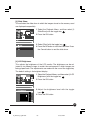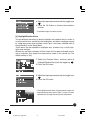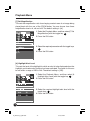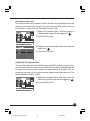
1
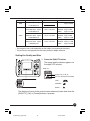
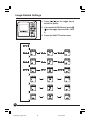
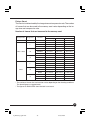
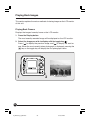
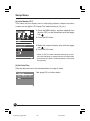
Digital Back
User’s Manual
English
DCUG1205N01
Printed in Japan
00-1_ZD back_E _hyou1&4
1
07/3/9, 20:35
Foreword
Thank you for purchasing a Mamiya Product. Make sure that you read and understand
all of the explanations detailed in this User’s manual before using this product. Keep the
User’s manual in a safe place for future reference.
Testing the camera functions
Make sure that the camera is recording images correctly by taking trial shots before
actually using this product.
Mamiya assumes no responsibility for memory data of the photographed images that
could not be saved or uploaded due to camera (main unit) or recording medium (memory
card) problems.
Copyright
Except for the purposes of personal enjoyment, unauthorized use of the images of the
subject that is copyright protected using this product is prohibited. There are also times
when use of professional and personal photographic devices is restricted in some performances, shows, and other exhibitions.
Trademark
• Mamiya, Mamiya 645ADF, Mamiya 645ADF II, Mamiya RZ67PRO IID, and MamiyaZD
Back are the trademarks of Mamiya digital imaging Co., Ltd.
• Adobe and Photoshop are the trademarks of Adobe Systems Incorporated.
• CompactFlash is a trademark of Sandisk Corporation.
• Windows is the registered trademark or the trademark in the U.S.A. and foreign
countries of Microsoft Corporation.
• Macintosh is the registered trademark In the U.S.A. and foreign countries of Apple
Computer.
• All other product names are the trademarks or registered trademarks of their respective manufacturers.
2
00-2_ZD back_E _hyou2&3
2
07/3/9, 20:35
Cautionary points on safe operation and handling
Safety cautions
• Please read this “Safety cautions” section in order to operate this product safely and
correctly and to prevent any harm coming to the user or any third party.
• The definition of each symbol and display is explained as follows:
The following refer to where inappropriate use by disre-
Warning ........ garding these displays can result in serious injury or even
death.
following refer to where inappropriate use by disreCaution......... The
garding these displays can result in injury.
Warning
• The lithium ion battery and its charger are designed exclusively for this product.
Only charge this battery using the specified charging system. Make sure that you
read and understand the instructions detailed in the User’s manual for correct use
of the battery and its charger.
• Do not heat or throw the battery into an open fire.
• Do not connect the positive and negative terminals of the battery with metal objects,
or carry or store together with metal items or metal accessories.
• Do not use or leave the camera in extremely hot conditions, such as in places
where it is exposed to direct sunlight, in sun-heated vehicles or near stoves.
• Do not attempt to weld, deform, modify or disassemble the battery or camera. The
terminals may be damaged or the contents scatter.
• Loss of sight can result if any battery acid makes contact with the eyes. If any
battery acid does get into the eyes, do not rub them. Wash the infected eyes under
clean running water and consult a doctor as soon as possible.
• Do not use in the vicinity of flammable and explosive gases. Refrain from using this
product in areas where this type of gas may exist. Fires or explosions can result.
• Keep the camera in a safe place out of the reach of young children. The following
cases show where accidents can occur.
• Accidental strangling from wrapping the strap around the neck.
• Swallowing the battery or other small items. Consult a doctor immediately in the
event any item is swallowed.
• Do not use the camera to observe the sun or any bright light. This can cause eye
damage.
Immediately stop using the camera and consult the local sales branch or service
center when the following conditions are noticed.
• If the power plug and cord over-heat, emit a burning smell or start to smoke.
• The charger or the AC adapter becomes damaged, wires become severed; or the
power plug is damaged or suffers from a faulty connection.
3
00-3_ZD back_E_p003-010
3
07/3/9, 20:36
Cautionary points on safe operation and handling
Caution
• Do not touch the AC adaptor, charger, or battery while charging for an extended
period. The charger and the battery become warm during the charging process.
When the AC adapter has been used for an extended period, the unit becomes
warm. Extended periods of skin contact can produce a low-heat burn.
• Do not use or store in dusty, humid, oily, smoky, or steamy place for extended
periods. Fire or electrical shocks can result.
• Do not dismantle or modify this product. This can result in injury or electrical shock.
• Do not allow water or other foreign particles to enter the mechanism of this product.
If by chance water enters the unit, there is a possibility of fire or electrical shock.
Turn off the main power and remove the battery. Consult your sales branch or nearest service center.
• Do not use in the event the product starts to produce any unusual smells, sounds,
or smoke. Taking special care not to burn yourself, remove the battery and consult
your sales branch or nearest service center. These can cause fires or burns.
• Do not use with wet hands. There is a danger of electrical shock. Do not try to insert
or disconnect the AC adapter with wet hands.
• Make sure that the strap is not caught on anything when carrying the camera. Care
should be taken in order to avoid catching the strap on other objects when carrying
the camera. This can result in injury or accidents.
• Do not place this product in places with high temperature. This will cause deterioration of the parts and may cause fire.
• Only use the provided AC adapter, charger and batteries. A malfunction of this product or its power system may cause unexpected accidents. The warrantee does not
cover any injury sustained from using an unspecified AC adapter.
• Do not damage the cord of the charger or the AC adapter. Always remove and insert
by holding the plug. Never remove the plug by pulling on the cord. Do not use with
an extension cord.
• If the battery terminals become dirty from sweat or grease, connections may become faulty. Always wipe clean with a clean, dry cloth.
• Do not use this battery with products from other manufacturers.
• Do not remove the battery from the camera immediately after the camera has been
used for an extended period. Burns can result.
• In order to prevent short circuiting of the battery terminals, make sure that they are
insulated for carrying and storage.
• Remove the battery from this product when it will not be used for long periods.
Battery acid leakage can cause heat, fire and injury.
4
00-3_ZD back_E_p003-010
4
07/3/9, 20:36
Cautionary points on handling this product
• This product is a precision instrument. Do not drop or use in a rough manner.
• This product is not waterproof and therefore should not be used in or near water. Consult your customer service center as soon as possible if this product comes into contact with water. Use a clean, dry cloth to remove any water or salt particles.
• Never place this product near any magnetic or motorized devices that produce strong
magnetic fields. Avoid using or placing this product near radio towers, etc., that produce radio waves. Malfunction or damage to recorded data may result if the unit is
exposed to electromagnetic waves or when used inappropriately.
• Keep this product away from direct sunlight or in areas where the temperature may
exceed the manufacturer’s standards. Avoid exposing this product to these conditions
as damage can occur.
• Do not try to dismantle this product. This product is equipped with precision circuitry.
• Do not use cleaners including organic solvents to clean this product. Consult your
nearest customer service center if this product becomes soiled.
• Do not touch the electrical connection points of this product. This can result in corrosion of the points. Corrosion of the points can result in the malfunctioning.
• Suddenly moving this product from particularly cold areas to hot areas can result in
condensation buildup within this product. To avoid condensation buildup within this
product, it is suggested that this product be placed inside a plastic bag and sealed.
Remove this product from the bag when the conditions are suitable for this product to
be exposed to the outside environment.
• Condensation can cause this product to malfunction and breakdown. Do not use when
condensation is present. Remove the lens, memory card, and battery, and refrain from
use until the condensation clears from inside this product.
• Remove the battery and store this product in a cool, well-ventilated area when it will not
be used for an extended period.
• Avoid storing this product in areas such as laboratories, etc., where chemicals could
cause this product to rust or corrode.
• Inspect this product before use after it has been stored for an extended period. Before
using this product after extended storage or use overseas, it is important that this
product be inspected by the owner or customer service center to ensure that this product is operating correctly.
• The LCD screen has been manufactured employing precision technology with 99.99%
effective pixels, however, pixels at 0.01% and below or black/red spots can appear.
This is not considered to be a malfunction. This will not affect any recorded images.
• One of the characteristics of LCD screens is that the display reaction time will slow
when operated in low temperatures and may turn darken in high temperatures. Normal
operation should resume when the temperature returns to normal levels.
5
00-3_ZD back_E_p003-010
5
07/3/9, 20:36
Cautionary points on safe operation and handling
Safe operating cautions
Usable memory cards
The following memory cards have been verified for compatibility.
• SanDisk CF Card: Ultra II/Extreme III
• SanDisk SD Card: Ultra II/Extreme III
• LEXAR MEDIA CF Card: X40 and over
• Matsushita Electrics SD Card: 5MB/s to 2GB
• Microdrive CF Card: 2GB, 4GB
Any one of the memory cards with over 256MB can be used.
Check with the specific memory card manufacturer for any questions regarding the operation or functionality of a memory card.
Memory cards other than those stated above have not been verified for compatibility.
Safe operation of Memory cards
• Memory cards are precision instruments. Do not drop or allow them to be exposed to
strong vibrations. This can corrupt data that is stored in the memory card.
• Do not use or store around television sets, speakers, or magnets where there are high
levels of static electricity. There is the possibility of recorded image data being erased
from the memory card.
• Do not leave in areas where exposed to direct sunlight or near heating devices, etc.
The memory card may become deformed.
• Do not spill any liquid onto the memory card.
• In order to protect important image data stored within the memory card, always store
the memory card in its intended case.
• Do not store in hot, dusty, or areas of high humidity.
6
00-3_ZD back_E_p003-010
6
07/3/9, 20:36
Caution
Cautions when throwing away/giving away memory cards
• Due to the Format and Delete function of this product and personal computers, file
information can be altered but the data may not be completely deleted. Data can be
recovered through restoration software. Important recorded data may remain and is
subject to revelation after disposing of/giving away the card. In order to avoid these
problems, we recommend that the memory card be physically destroyed or special
data deletion software (available separately) be used to delete any remaining data
completely before disposing of/giving away the memory card.
The customer must assume the responsibility for data stored within the memory
card.
About this User’s manual
• Button operation and setting positions explained in the following use pictorials to
display the buttons, dials and marks on this product.
• The ** in the bracketed figures (**) refer to reference pages.
• Explanations are provided on the assumption that the menu functions are in default
mode.
The following marks shown in the columns are explained by each of the following.
Important: Refers to cautionary points to help avoid problems when taking photos.
MEMO: Points that are based on fundamental operations that should be remembered.
7
00-3_ZD back_E_p003-010
7
07/3/9, 20:36
Contents
Foreword ................................................................................................... 2
Cautionary points on safe operation and handling ................................... 3
Contents ................................................................................................... 8
Before Taking Pictures
Digital Back “Mamiya ZD Back” .............................................................. 12
Checking the Contents of the Package .................................................. 13
Names of Parts ....................................................................................... 14
Front View ....................................................................................... 14
Back View ....................................................................................... 14
Left-side View .................................................................................. 15
Bottom View .................................................................................... 15
Digital LCD Panel ............................................................................ 16
Buttons and Toggle Key Operations ................................................ 16
Preparing the Mamiya ZD Back .............................................................. 17
Attaching the Mamiya ZD Back to the Camera
(for the 645AFD II) .......................................................................... 17
Attaching the Mamiya ZD Back to the Camera
(for the RZ67PRO IID) .................................................................... 18
Removing the Mamiya ZD Back (for the 645AFDII) ........................ 20
Removing the Mamiya ZD Back (for the RZ67PRO IID) ................. 20
Preparing the Lithium Ion Battery PB401 for Mamiya ZD Back ...... 21
Removing the Battery ...................................................................... 24
Date Settings and Preparing a Memory Card ................................. 25
Removing the Memory Card ........................................................... 28
IR Cut Filter YB401 (Standard)/Low-pass Filter YC401 (Optional) ......... 29
Basic Setting
Image-Related Settings .......................................................................... 32
RAW Data ....................................................................................... 32
Image Size ...................................................................................... 32
Setting the Quality and Size ............................................................ 33
Picture Count .................................................................................. 35
Number of Frames for Continuous Shooting ................................... 36
Turning the camera off (L) while saving to the memory card .......... 36
Color Space ............................................................................................ 37
Color Space .................................................................................... 37
White Balance ......................................................................................... 38
Color Temperature .......................................................................... 39
Mired ............................................................................................... 40
Customized White Balance ............................................................. 41
ISO Sensitivity (Image Sensitivity) .......................................................... 43
8
00-3_ZD back_E_p003-010
8
07/3/9, 20:36
Setting the Color Mode ........................................................................... 44
Setting the Sharpness, Tone and Saturation .......................................... 45
Selecting a Memory Card and Creating Folders ..................................... 47
Creating a Folder ............................................................................ 48
Automatically Creating a Folder ...................................................... 49
File Numbering ................................................................................ 50
Folder and File Number Display ...................................................... 51
Playing Back Images
Playing Back Images .............................................................................. 54
Playing Back Frames ...................................................................... 54
Zoom-in Display .............................................................................. 55
Displaying the Information Screen .................................................. 56
Erasing Images ....................................................................................... 58
Erasing1 Frame ............................................................................... 58
Erasing All Images (Entire Folder) .................................................. 59
Protecting Images ................................................................................... 60
Protecting Images ........................................................................... 60
Menus
Menu Screen Operations ........................................................................ 62
Recording Menu ..................................................................................... 63
Recording Menu .............................................................................. 63
Playback Menu ....................................................................................... 67
Playback Menu ................................................................................ 67
Setup Menu ............................................................................................ 75
Setup Menu ..................................................................................... 75
Connecting to the PC
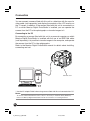
Connection .............................................................................................. 84
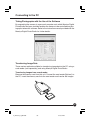
Connecting to the PC .............................................................................. 85
Taking Photographs with the Use of the Software .......................... 85
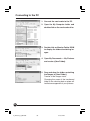
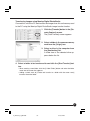
Transferring Image Data ................................................................. 85
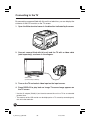
Connecting to the TV .............................................................................. 88
Maintenance
Maintenance ........................................................................................... 90
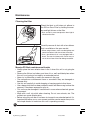
Cleaning the filter ............................................................................ 90
Mamiya ZD Back maintenance/checks ........................................... 90
Troubleshooting
Being Prepared for Problems ................................................................. 92
Error Messages and Recovery ............................................................... 94
9
00-3_ZD back_E_p003-010
9
07/3/9, 20:36
Appendix
Digital Terminology .................................................................................. 96
Index ..................................................................................................... 101
Specifications ........................................................................................ 104
10
00-3_ZD back_E_p003-010
10
07/3/9, 20:36
Before Taking Pictures
This chapter describes what you need to do before you start using this unit for the first time.
01_ZD back_E_p011-020
11
07/3/9, 20:37
Digital Back “Mamiya ZD Back”
By replacing the magazine to the Mamiya ZD Back, the Mamiya 645ADF, Mamiya 645ADF
II , and Mamiya RZ67PRO IID can be used as digital cameras.
MEMO
The optional Digital Back Adapter HX701 (sold separately) is required to attach the Mamiya ZD
Back to the RZ67PRO IID.
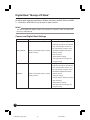
Camera and Digital Back Settings
Camera Setting
Digital Back Setting
• Settings about digital images
• Following settings can be adjusted
when connecting the camera to a
PC and opening a capture screen
RZ67 PRO IID
• Shutter speed and aperture setting
with Mamiya Digital Photostudio.
• Shutter release
• Shutter release
• ISO sensitivity
• White balance setting
• Storage mode and storage size
• Image rotating
• Settings about digital images
• Following settings can be adjusted
when connecting the camera to a
PC and opening a capture screen
with Mamiya Digital Photostudio.
645AFD II
• Shutter speed and aperture setting
• Shutter speed
• Shutter release
• Aperture setting
• Shutter release and AF operations
• ISO sensitivity
• White balance setting
• Storage mode and storage size
• Image rotating
12
01_ZD back_E_p011-020
12
07/3/9, 20:37
Checking the Contents of the Package
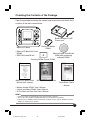
Open the package containing the camera and accessories and check that it
contains all the items shown below.
Battery charger PC401
Power cord
Lithium ion battery
PB401
Mamiya ZD Back
• Mamiya ZD Back Soft Case
KD403
• IEEE1394 cable BL301
Mamiya Digital PhotoStudio
(RAW data processing
software) BS301
Focusing Screen Type A SV403
Mamiya ZD Back User’s
Manual (this manual)
Mamiya ZD Setup Guide
Mamiya Digital
PhotoStudio User’s
Manual
• Battery charger PC401 User’s Manual
• Lithium ion battery PB401 User’s Manual
• IR Cut filter/Low Pass filter User’s Manual
MEMO
• A memory card for recording images must be purchased separately.
• The low-pass filter YC401 for Mamiya ZD Back must be purchased separately.
• Protective Cover KE403 for Mamiya ZD Back, viewfinder screen (type A) SV403, IR cut filter
YB401 are attached to this product.
13
01_ZD back_E_p011-020
13
07/3/9, 20:37
Names of Parts
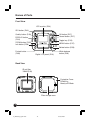
Front View
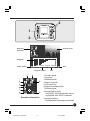
LCD monitor (P.54)
ISO button (P.43)
OK button (P.27)
Cancel button (P.27)
Quality button (P.33)
DISPLAY button
(P.54)
ZOOM button (P.55)
Toggle key (P.16)
MENU button (P.27)
Info button (P.56)
Delete button (P.58)
Protect button
(P.60)
Digital LCD panel (P.16)
White balance
button (P.38)
Back View
IR cut filter
YB401(P.29)
Protective Cover
KE403 for
Mamiya ZD Back
Filter storage case
14
01_ZD back_E_p011-020
14
07/3/9, 20:37
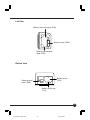
Left View
Memory card slot cover (P.26)
Terminal cover (P.84)
Memory card access
lamp (P.36)
Bottom View
Battery cover
(P.22)
Video terminal
cover (P.88)
Battery cover lock
(P.22)
15
01_ZD back_E_p011-020
15
07/3/9, 20:37
Names of Parts
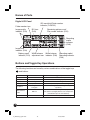
Digital LCD Panel
ISO sensitivity/Folder number
indicator (P.43/P.52)
Folder number icon
Image quality
indicator (P.33)
ISO icon
(P.43)
Remaining picture count/
File number indicator (P.52)
SD
JPEG
CF
CUSTOM
PC
Recording
media
indicator
(P.48)
Image size
indicator (P.33)
Battery power
indicator (P.23)
White balance
adjustment icon
White balance
indicator (P.38)
Recording media/
Recording indicator
(P.36)
Buttons and Toggle Key Operations
The following functions can be set by various combinations of the toggle keys
and buttons.
Indicator
Toggle key
ISO
Sets the ISO sensitivity
Quality button
Quality icon
Selects the image quality
Display button
Image
Selects an image
Zoom position mark
Moves position up, down, left and right
Shooting data &
histogram
Selects shooting data and histogram display
(up/down)
White balance
button
WB icon
Selects the white balance (up/down) Adjusts the
white balance (left/right)/Selects color temperature
(excluded the pre-set white balance)
MENU button
MENU
Moves the menu items up, down, left and right
ISO button
Zoom button
Info button
16
01_ZD back_E_p011-020
16
07/3/9, 20:37
Preparing the Mamiya ZD Back
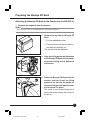
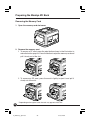
Attaching the Mamiya ZD Back to the Camera (for the 645AFD II)
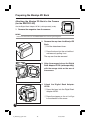
1. Remove the magazine from the camera.
MEMO
Refer to the instructions for the 645AFDII when removing the magazine.
2. Remove the cap from the Mamiya ZD
Back.
q Pull the detachment lever.
w Press the lever into the unit while simultaneously pulling it out.
The cap can then be detached.
3. Align the fitting groove on the bottom
of the Mamiya ZD Back with the holder
attachment fitting on the bottom of
the camera.
4. Press the Mamiya ZD Back onto the
camera, and then insert the fitting
groove at the top into the holder attachment fitting on the top of the camera to secure it in place.
The noise of the shutter being set in
place will be heard when the camera is
turned on.
17
01_ZD back_E_p011-020
17
07/3/9, 20:37
Preparing the Mamiya ZD Back
Attaching the Mamiya ZD Back to the Camera
(for the RZ67PRO IID)
Get the Digital Back Adapter HX701 (sold separately) ready.
1. Remove the magazine from the camera.
MEMO
Refer to the instructions for the RZ67PROIID when removing the magazine.
2. Remove the cap from the Mamiya ZD
Back.
q Pull the detachment lever.
w Press the lever into the unit while simultaneously pulling it out.
The cap can then be removed.
3. Align the orange circle on the Digital
Back Adapter HX701 (sold separately)
with the orange circle on the rear of
the camera.
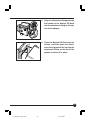
4. Attach the Digital Back Adapter
HX701.
q Press the lever into the Digital Back
Adapter HX701.
w Press the stopper as far as it will go
in the direction of the arrow.
18
01_ZD back_E_p011-020
18
07/3/9, 20:37
5. Align the attachment fitting groove on
the bottom of the Mamiya ZD Back
with the attachment fitting on the bottom of the adapter.
6. Press the Mamiya ZD Back onto the
camera, and then insert the attachment fitting groove at the top into the
attachment fitting on the top of the
adapter to secure it in place.
19
01_ZD back_E_p011-020
19
07/3/9, 20:37
Preparing the Mamiya ZD Back
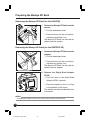
Removing the Mamiya ZD Back (for the 645AFDII)
1. Remove the Mamiya ZD Back from the
camera.
q Pull the detachment lever.
w Press the lever into the unit while simultaneously pulling it out.
The Mamiya ZD Back can then be detached from the camera.
C
A
N
C
E
L
O
K
W
M
B E
N
U
Removing the Mamiya ZD Back (for the RZ67PRO IID)
1. Remove the Mamiya ZD Back from the
Adapter.
q Pull the detachment lever.
w Press the lever into the unit while simultaneously pulling it out.
The Mamiya ZD Back can then be detached from the adapter.
C
A
N
C
E
L
O
K
W
M
B E
N
U
2. Remove the Digital Back Adapter
HX701.
q Push the lever on the Digital Back
Adapter HX701 outwards.
w Press the stopper as far as it will go
in the direction of the arrow.
The adapter can then be detached from
the camera.
MEMO
The Digital Back Adapter HX701 can be detached with the Mamiya ZD Back fitted.
20
01_ZD back_E_p011-020
20
07/3/9, 20:37
Preparing the Mamiya ZD Back
Preparing the Lithium Ion Battery PB401 for Mamiya ZD Back
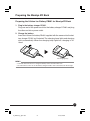
1. Plug in the battery charger PC401.
Plug one end of the power cord into the battery charger PC401 and plug
the other end into a power outlet.
2. Charge the battery.
Insert the Lithium ion battery PB401 supplied with the camera into the battery charger PC401 as illustrated. The charging lamp lights and charging
starts automatically. When the charging lamp lights-out, charging is finished.
The charging lamp
MEMO
• It will take about two hours to charge the battery for the first time when new.
• For instructions on how to use the battery charger PC401, refer to the manual for the charger.
21
02_ZDback_E_p021-030
21
07/3/9, 20:38
Preparing the Mamiya ZD Back
3. Load the battery into this unit.
1 Push down the battery cover lock to
open the cover.
2 Load the charged battery into the camera and close the battery cover.
Caution
Be sure to turn this unit off before loading or unloading the battery.
22
02_ZDback_E_p021-030
22
07/3/9, 20:38
4. Check the battery power indicator.
1 Check the battery condition on the Digital LCD panel.
SD
JPEG
CF
CUSTOM
PC
Battery power indicator
The battery is sufficiently charged.
There is little power remaining.
Have a charged battery ready. (The camera will still operate.)
Flashing
There is very little power remaining.
Replace the battery with a charged battery.
Flashing
When the battery is spent, “batt” and the battery power
indication flash on the Digital LCD panel and viewfinder
LCD when the shutter release button is pressed.
batt
23
02_ZDback_E_p021-030
23
07/3/9, 20:38
Preparing the Mamiya ZD Back
Removing the Battery
1. Press the battery cover lock to open the battery cover.
2. Press the and remove the battery.
Caution
Be sure to turn this unit off before loading or unloading the battery.
24
02_ZDback_E_p021-030
24
07/3/9, 20:38
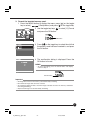
Date Settings and Preparing a Memory Card
1. Set this unit date and time.
1 Press the MENU button to display the menu, press [ ] on the toggle
key to select [
] (Setup Menu) and press [ ] on the toggle key.
to select [9] Date/Time
2 Use the toggle key
and press the OK button.
OK button
3 The current date and time is displayed. Press the
OK button.
4 The year entry field is selected. Press [
the toggle key to set the year.
] on
5 After setting the year, press [ ] on the toggle key
to select the month.
6 Select the month, day, hour and minutes in the
same way.
After the date and time are set, press the OK button to save the settings.
25
02_ZDback_E_p021-030
25
07/3/9, 20:38
Preparing the Mamiya ZD Back
2. Insert a memory card (purchased separately).
1 Hold a finger on the top of memory card slot cover, and pull it in the
direction of the arrow.
2 Insert the memory card as far as it will go, making sure it is oriented as
illustrated.
Compact flash (CF) card slot
SD card slot
3 Close the memory card slot cover.
MEMO
• This camera uses an SD card or CF card.
• SD memory cards with a capacity of up to 2GB can be used.
Important
Use a CF card with a capacity of 256MB or more or an SD card with a capacity of 256MB (5MB/S)
or more.
26
02_ZDback_E_p021-030
26
07/3/9, 20:38
3. Format the inserted memory card.
1 Press the MENU button to display the menu, press [ ] on the toggle
key to select [
] (Setup Menu) and press [ ] on the toggle key.
2 Use the toggle key keys
and press the OK button.
to select [11] Format
OK button
3 Press [ ] on the toggle key to select the slot that
the memory card has been inserted in, and press
the OK button.
4 The confirmation dialog is displayed. Press the
OK button to format.
MEMO
• To cancel formatting, press the Cancel button. The display
returns to Step 2.
Cancel button
Important
• All image data stored on the memory card is deleted by formatting.
• Once deleted, image data cannot be restored.
• To avoid losing important data, check the images and data stored on the memory card before
formatting (initializing).
• All protected images are also deleted by formatting.
27
02_ZDback_E_p021-030
27
07/3/9, 20:38
Preparing the Mamiya ZD Back
Removing the Memory Card
1. Open the memory card slot cover.
2. Remove the memory card.
1 To remove a CF card, press the eject button shown in the illustration to
make the button pop out. Press the button to eject the memory card and
pull it slowly out of the slot.
2 To remove an SD card, press the card in lightly to eject it and pull it
slowly out of the slot.
* Depending on the type of card, the card may pop out of the slot.
28
02_ZDback_E_p021-030
28
07/3/9, 20:38
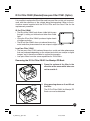
IR Cut Filter YB401 (Standard)/Low-pass Filter YC401 (Option)
It is possible to replace the IR cut filter and low-pass filter on this unit in accordance with the conditions of the subject being photographed. Refer to the instruction manual supplied with the IR Cut Filter and Low-Pass Filter for the
replacement procedure.
IR Cut Filter YB401
• The IR cut filter YB401 only allows visible light to pass
through it, cutting out infrared and other non-visible
light.
• Using the IR cut filter YB401 produces higher levels
of image resolution.
• The IR cut filter YB401 does not reduce false colors,
moiré and other phenomena that are unique to digital images.
Low-Pass Filter YC401
• The low-pass filter YC401 reduces false colors, moiré and other phenomena
that are produced depending on the subject and which are unique to digital
images, and is therefore suitable for normal photography.
• Low-pass filters have the same capabilities as IR cut filters.
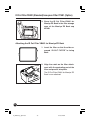
Removing the IR Cut Filter YB401 for Mamiya ZD Back
1. Press the surface of the filter in the
direction of the arrow while take care
not to scratch it.
2. Keep pressing down on it and lift out
the filter.
The IR Cut Filter YB401 for Mamiya ZD
Back can now be detached.
29
02_ZDback_E_p021-030
29
07/3/9, 20:38
IR Cut Filter YB401 (Standard)/Low-pass Filter YC401 (Option)
3. Store the IR Cut Filter YB401 for
Mamiya ZD Back in the filter storage
case of the Mamiya ZD Back cap
KE403.
Attaching the IR Cut Filter YB401 for Mamiya ZD Back
1. Invert the filter so that the side engraved “IR CUT FILTER” is facing
back.
2. Align the notch on the filter attachment with the protruding part of the
filter and press it into place.
The IR Cut Filter YB401 for Mamiya ZD
Back is now attached.
30
02_ZDback_E_p021-030
30
07/3/9, 20:38
Basic Setup
The functions available with the Mamiya ZD Back can be set up
to match the style of photography required. This chapter contains
explanations on the basic settings for photographic styles.
03_ZD back_E_p031-052
31
07/3/9, 20:39
Image-Related Settings
Image Quality
You can select the quality of the images you capture.
There are three image settings to choose from: RAW uncompressed format,
JPEG compressed format and RAW+JPEG format.
Quality
RAW
Description
Images are recorded in RAW (uncompressed) format.
Images are recorded in RAW (uncompressed) and JPEG (compressed)
RAW + JPEG
format.
For JPEG format, you can choose from 3 images sizes (L, M, S) and 3
compression rates (FINE, NORMAL, BASIC).
Images are recorded in JPEG (compressed) format.
JPEG
For JPEG format, you can choose from 3 images sizes (L, M, S) and 3
compression rates (FINE, NORMAL, BASIC).
RAW Data
RAW data is image data that has not undergone any processing in this unit
and has the extension .MEF. To view RAW image data on a computer, it must
first be converted to processing, editing and general use format (TIFF, JPEG)
by Mamiya Digital PhotoStudio software. This process is called “developing.”
MEMO
• RAW+JPEG images can be erased simultaneously, or you can use the menu settings to erase
them separately. (Playback Menu [10] Select File Type to Erase P.129)
Image Size
You can choose the size of the images you capture. A large image size is best
if you want to print large pictures.
Choose the image size when selecting the image quality.
32
03_ZD back_E_p031-052
32
07/3/9, 20:39
Quality mode
RAW
Image size
Approximate print size
Approx. 35MB
21,300,000 pixels
L
FINE
5328×4000 pixels Approx.
386.7 × 290.3mm
21,300,000 pixels
M
JPEG
File size
5328×4000 pixels Approx.
4096×3072 pixels Approx.
297.3 × 222.9mm
12,600,000 pixels
S
3008×2256 pixels Approx.
218.3 × 163.7mm
6,800,000 pixels
Approx. 10MB
NORMAL Approx. 5MB
BASIC
Approx. 2.5MB
FINE
Approx. 6MB
NORMAL Approx. 3MB
BASIC
Approx. 1.5MB
FINE
Approx. 3MB
NORMAL Approx. 1.5MB
BASIC
Approx. 0.8MB
* The image file size varies depending on the subject and shooting environment.
* The print size is the approximate size when printing in 350dpi resolution.
Setting the Quality and Size
1. Press the QUALITY button.
The image quality indicator appears on
the digital LCD monitor.
* JPEG Icon
○ ○ ○ ○ ○
JPEG
Image size (L, M, S)
File size (Compressed mode)
FINE :
JPEG
NORMAL:
CUSTOM
BASIC :
The display will return to the normal screen when any button other than the
[QUALITY], [OK] or [Cancel] buttons is pressed.
33
03_ZD back_E_p031-052
33
07/3/9, 20:39
Image-Related Settings
2. Press [ ] [ ] on the toggle key to
select the quality.
3. If you selected JPEG format, press [ ]
[ ] on the toggle key to select L, M or
S.
4. Press the QUALITY button to set.
JPEG
JPEG
JPEG
JPEG
JPEG
JPEG
JPEG
JPEG
JPEG
JPEG
JPEG
JPEG
JPEG
JPEG
JPEG
JPEG
JPEG
JPEG
34
03_ZD back_E_p031-052
34
07/3/9, 20:39
Picture Count
The file size is determined by the image size and compression rate. The number
of frames that can be saved to the memory card varies depending on the image size and compression rate.
Number of frames that can be saved to the memory card
Quality mode
Image size
File size
RAW
—
L
RAW + JPEG
M
S
L
JPEG
M
S
Picture count
1GB memory
2GB memory
4GB memory
—
27 frames
56 frames
112 frames
FINE
21 frames
43 frames
87 frames
NORMAL
22 frames
47 frames
95 frames
BASIC
24 frames
50 frames
101frames
FINE
22 frames
46 frames
92 frames
NORMAL
24 frames
50 frames
101 frames
BASIC
25 frames
52 frames
105 frames
FINE
24 frames
50 frames
100 frames
NORMAL
25 frames
53 frames
106 frames
BASIC
26 frames
54 frames
108 frames
FINE
94 frames
195 frames
390frames
NORMAL
152 frames
315 frames
629 frames
1101 frames
BASIC
266 frames
551 frames
FINE
128 frames
266 frames
532 frames
NORMAL
257 frames
533 frames
1065 frames
1709 frames
BASIC
413 frames
856 frames
FINE
238 frames
494 frames
988 frames
NORMAL
477 frames
989 frames
1976 frames
BASIC
766 frames
1587 frames
3170 frames
* The number of frames that can be taken varies depending on the shooting conditions.
The above figures are approximate.
* The figures for RAW+JPEG show the total frame count.
35
03_ZD back_E_p031-052
35
07/3/9, 20:39
Image-Related Settings
Number of Frames for Continuous Shooting
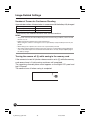
Approximate number of frames taken in succession with the battery fully charged
Temperature
Frame Count
Normal temperature (20°C)
Approx. 450 frames
Low temperature (0°C)
Approx. 70 frames
* Under Mamiya test conditions based on CIPA standard conditions.
MEMO
• The picture count may be reduced depending on the actual shooting conditions, amount of LCD
monitor use, etc.
• Battery performance deteriorates in low temperatures.
When using the camera in cold regions, have a spare battery ready and keep it warm in your
pocket.
• When taking a lot of pictures, be sure to have a spare battery at hand.
• The shape of plugs and power outlets varies from country to country. When traveling abroad, be
sure to check the shape of the outlet beforehand and take a correctly shaped adapter plug for
the battery charger.
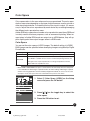
Turning the camera off (L) while saving to the memory card
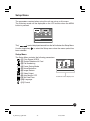
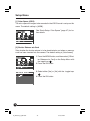
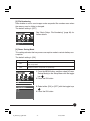
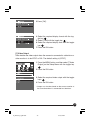
If the camera is turned off (shutter release mode is set to [L]) while the memory
card access lamp is lit, data saving continues until completed.
The remaining unsaved picture count appears on the digital LCD panel and
top LCD panel.
The camera turns off when saving is completed.
CF
36
03_ZD back_E_p031-052
36
07/3/9, 20:39
Color Space
Color space refers to the area where colors are reproduced. The color reproduction area varies depending on the type of digital camera, monitor, printer or
other input/output device. To match the colors from input to output, it is necessary to adjust the colors reproduced by each device by correcting/managing
the different color reproduction areas.
Adobe RGB color space has a broader color reproduction area than sRGB and
is mainly used for business purposes, such as commercial printing. When images taken in Adobe RGB mode are output on an sRGB device, they will appear slightly paler than output images taken in sRGB mode.
Color Space
You can set the color space of JPEG images. The default setting is [sRGB].
RAW images can be specified when developing images using Mamiya Digital
PhotoStudio.
Setting
sRGB
Description
Sets the color space to sRGB. Suitable for general image use.
Sets the color space to Adobe RGB. With a broader color reproduction area
AdobeRGB
than sRGB, it is suitable for uses such as commercial printing. However, the
same gamut can only be reproduced on an image output device with the
Adobe RGB color reproduction area.
NOTE:
• When sRGB or AdobeRGB color space is selected in the this unit Setup menu, the ICC profile
is not embedded in JPEG images captured with this unit. When editing JPEG images captured
with this unit using applications other than Mamiya Digital PhotoStudio, be sure to use the same
work space as the color space that was selected when the pictures were taken.
1. Select [1 Color Space (JPEG)] on the Setup
menu and press the OK button.
2. Press [ ] [ ] on the toggle key to select the
color space.
3. Press the OK button to set.
37
03_ZD back_E_p031-052
37
07/3/9, 20:39
White Balance
The adaptability of the human eye enables us to see white as white regardless
of the light source, such as daylight, cloudy skies, incandescent lighting or
fluorescent lighting. To capture white as white in the same way as the human
eye in images taken with a digital camera, the camera must be adjusted to suit
the light conditions under which the subject is captured.
Available white balance settings
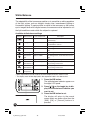
Indicator
White balance
Color temperature
Description
Auto
Approx. 2900_6000K
The camera adjusts the white balance
Daylight
Approx. 5200K
For taking pictures in fine weather with the
Cloudy
Approx. 6000K
For taking pictures in overcast weather.
Shade
Approx. 7500K
For taking pictures in the shade on a sunny
Electric light
Approx. 3200K
For taking pictures under incandescent light.
Fluorescent
Approx. 4200K
For taking pictures under white fluorescent
automatically.
sun behind the camera.
day.
light
light.
Flash
Approx. 5500K
For taking pictures using the flash.
Customized
Approx. 2900_6000K
For adjusting the white balance according to
Approx. 2900_6000K
For adjusting the white balance according to
white balance 1
Customized
the shooting environment.
white balance 2
Color
the shooting environment.
Approx. 2800_10000K For adjusting the color temperature.
temperature
* Minor adjustments can be made to the color temperature from Auto to Flash.
* The display mark will be displayed in the sequence listed in the above chart.
1. Press the WB button.
The white balance indicator appears on
the digital LCD panel.
○ ○ ○ ○
2. Press [ ] [ ] on the toggle key to display the white balance indicator you
want to set.
3. Press the WB button to set.
The display will return to the normal
screen when any button other than the
[WB], [OK] or [Cancel] buttons is
pressed.
SD
CUSTOM
CF
PC
38
03_ZD back_E_p031-052
38
07/3/9, 20:39
Color Temperature
Light has various hues and may be reddish or bluish, for example. Reproducing such hues requires an objective gauge (scale). The color temperature describes the hue by the absolute temperature (K: kelvin).
The higher the color temperature, the bluer the hue and the lower the color
temperature, the redder the hue.
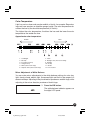
Approximate color temperature
Redder
Bluer
1 : Candlelight
2 : Oil lamp
3 : Incandescent lamp
4 : Halogen lamp
5 : White (fluorescent lamp)
6 : Daytime white (fluorescent lamp)
7 : Flash
8 : Daylight color (fluorescent lamp)
9 : Sunlight
10 : Cloudy
11 : Shade
12 : Fine weather
Minor Adjustment of White Balance
You can make minor adjustments to the white balance settings for auto, daylight, cloudy, shade, electric light, fluorescent light and flash in the range of ±3
decamired steps. Adjusting in the plus direction produces a reddish tinge, while
adjusting in the minus direction produces a bluish tinge.
1. Press the WB button.
The white balance indicator appears on
CF
the digital LCD panel.
SD
JPEG
CUSTOM
PC
39
03_ZD back_E_p031-052
39
07/3/9, 20:39
White Balance
SD
JPEG
CUSTOM
CF
PC
2. Press [ ] [ ] on the toggle key to
select the number of adjustment
steps.
When an adjustment is made, the adjustment icon +/– and number of steps
appear. The number displayed with the
adjustment icon indicates the number of
adjustment steps.
3. Press the WB button.
Setting the Color Temperature
You can set the color temperature used for the white balance by the color
temperature setting (kelvin value).
1. Press the WB button on the back of
SD
this unit.
JPEG
CF
CUSTOM
The WB indicator appears on the LCD
PC
monitor.
2. Press [ ] [ ] on the toggle key to select the color temperature setting [ ].
3. Press [ ] [ ] on the toggle key to
select the color temperature (kelvin
value) you want to set.
Press and hold down the toggle key to
change the color temperature continuously.
4. Press the WB button.
Trial Shot
Check that the color temperature you have set is the correct white balance for
the shooting conditions by taking a test shot using the white balance set by the
color temperature setting.
Mired
The color temperature of the light source is expressed in kelvins (K), but it
does not correspond to the color difference of the light source.
A difference of 500K in the high color temperature area is very different from a
difference of 500K in the low color temperature area. The mired is a measure
for expressing this breadth of variation. The mired value is the reciprocal of the
color temperature multiplied one million times.
40
03_ZD back_E_p031-052
40
07/3/9, 20:39
Customized White Balance
Use the customized white balance when the desired white balance cannot be
obtained by the manual white balance settings or color temperature settings.
Two customized white balance settings can be saved. This function is useful
when taking pictures in a limited color temperature environment.
1. Press the MENU button to display the menu.
2. Use the toggle key to select [6 Customize White
balance] in the Recording menu and press the
OK button.
3. Select customized white balance [1] or [2] in
the customize window and press the OK button.
Customized white balance [1] is used in this explanation.
The Customize White Balance window appears.
4. Aim the camera so that a white or gray object
fills as much of the picture area as possible
and take the picture.
The customized white balance data appears on
the LCD monitor.
5. Check that the white or gray object is inside
the frame in the customize window and press
the OK button.
Half-press the shutter release button or press the
MENU button to return to the normal display.
To cancel or redo, press the Cancel button and
return to the customize window.
41
03_ZD back_E_p031-052
41
07/3/9, 20:39
White Balance
Important
• The white balance can be customized in any exposure mode, but auto mode is recommended.
• The white balance can be customized without focusing (
can be used).
• Take the white or gray object in standard exposure.
If excessively under- or overexposed, the correct customized white balance may not be obtained.
• Select as achromatic an object as possible when customizing the white balance.
As photocopying paper and other OA paper contains a fluorescent coating, the correct customized white balance may not be obtained.
• If the captured white or gray object is smaller than the frame in the customize window, the
correct customized white balance may not be obtained.
• The image used for customizing the white balance is not saved.
Using the Customized White Balance
SD
JPEG
CUSTOM
CF
PC
1. Press the WB button.
2. Press [ ] [ ] on the toggle key to select customized white balance [
]
or [
].
3. Press the WB button to set.
4. Take the picture.
42
03_ZD back_E_p031-052
42
07/3/9, 20:39
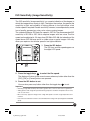
ISO Sensitivity (Image Sensitivity)
The ISO sensitivity (image sensitivity) is a numeric indication of the degree to
which the image sensor reacts to light. The higher the number, the greater the
sensitivity to light and suitability to taking pictures in low light where a fast
shutter speed is required. Greater sensitivity, however, is accompanied by some
loss of quality, apparent as noise, color noise or grainy images.
The standard Mamiya ZD Back film speed is ISO 50. The recommended ISO
sensitivity is ISO 50 to ISO 100 to capture images with low noise. The film
speed can be adjusted in 1/3 steps from ISO 50 to ISO 400, but selecting a film
speed above ISO 200 may result in visible noise or grainy images. Use only
when you require a fast shutter speed in low light conditions.
○ ○ ○
1. Press the ISO button.
The ISO icon and film speed appear on
the digital LCD panel.
JPEG
CUSTOM
2. Press the toggle keys
to select the film speed.
The display will return to the normal screen when any button other than the
[ISO], [OK] or [Cancel] buttons are pressed.
3. Press the ISO button to set.
You can also press any button other than the toggle key
to set.
Important
• Selecting a high ISO sensitivity will result in greater noise, such as color noise or graininess.
• Taking pictures with a high film speed under long exposure conditions will produce more noise,
such as color noise.
• More noise may appear in images when a high film speed is used in a high temperature environment.
• Use of the noise reduction function is recommended when using a film speed higher than ISO200.
(P.78)
43
03_ZD back_E_p031-052
43
07/3/9, 20:39
Setting the Color Mode
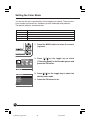
You can set the color reproduction of the images you capture. There are four
color modes to choose from: standard, portrait, landscape and products.
The default setting is standard mode.
Color mode
Standard
Description
Produces the most natural color tones. Suitable for most pictures.
Portrait
Emphasizes skin tones. Suitable for portrait pictures.
Landscape
Emphasizes bright greenery and blue skies. Suitable for landscape pictures.
Products
Emphasizes primary colors. Suitable for pictures of products.
1. Press the MENU button to select the recording menu.
2. Press [ ] [ ] on the toggle key to select
[1 Shooting Mode] in the Recording menu and
press the OK button.
3. Press [ ] [ ] on the toggle key to select the
desired color mode.
4. Press the OK button to set.
P59
44
03_ZD back_E_p031-052
44
07/3/9, 20:39
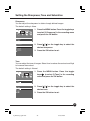
Setting the Sharpness, Tone and Saturation
Sharpness
You can adjust the sharpness to obtain sharply defined images.
The default setting is None.
1. Press the MENU button. Press the toggle keys
to select [2 Sharpness] in the recording menu
and press the OK button.
2. Press [ ] [ ] on the toggle key to select the
desired sharpness.
Sharpness
None
Minimum
Medium
3. Press the OK button to set.
Maximum
OK
Tone
You can adjust the tone of images. Select Low to reduce the contrast and High
to increase the contrast.
The default setting is Normal.
1. Press the MENU button. Press the toggle
keys
to select [3 Tone] in the recording
menu and press the OK button.
2. Press [ ] [ ] on the toggle key to select the
desired tone.
3. Press the OK button to set.
45
03_ZD back_E_p031-052
45
07/3/9, 20:39
Setting the Sharpness, Tone and Saturation
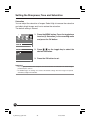
Saturation
You can adjust the saturation of images. Select High to increase the saturation
and obtain bright images and Low to reduce the saturation.
The default setting is Normal.
1. Press the MENU button. Press the toggle keys
to select [4 Saturation] in the recording menu
and press the OK button.
2. Press [ ] [ ] on the toggle key to select the
desired saturation.
3. Press the OK button to set.
Important
• Any changes you make to the sharpness, tone and saturation are reflected in the JPEG images
produced by the camera.
• For RAW images, the settings are saved as the default settings when the images are opened
with Mamiya Digital PhotoStudio.
46
03_ZD back_E_p031-052
46
07/3/9, 20:39
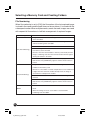
Selecting a Memory Card and Creating Folders
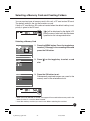
You can use two types of memory card in this unit, a CF card and an SD card.
The default setting is the slot that contains a card.
If both a CF card and an SD card are inserted when the default setting is set,
priority is given to the SD card.
SD
JPEG
CF
CUSTOM
PC
[
] will be displayed by the digital LCD
panel’s memory card mark that has been
specified as the storage destination.
Selecting a Memory Card
1. Press the MENU button. Press the toggle keys
to select [7 Storage] in the recording menu and
press the OK button.
2. Press [ ] on the toggle key to select a card
slot.
Slot 1(SD)
3. Press the OK button to set.
Subsequently captured images are saved to the
memory card in the selected card slot.
SD
JPEG
CF
CUSTOM
PC
* When you have selected a card slot, no images will be saved to the memory card in the
other card slot, if a card has been inserted.
* Insert the memory card that you want to use before selecting the card slot.
47
03_ZD back_E_p031-052
47
07/3/9, 20:39
Selecting a Memory Card and Creating Folders
Creating a Folder
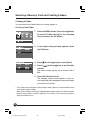
You can create and select folders for storing images in.
Creating a New Folder
1. Press the MENU button. Press the toggle keys
to select [5 Folder Setting] in the recording
menu and press the OK button.
2. A new folder setting window appears. Press
the OK button.
3. Press [ ] on the toggle key to select [New].
] on the toggle key to set the folder
4. Press [
number.
The folder number can be set up number 100 to
999.
5. Press the OK button to set.
The selected folder number appears in the current folder field and subsequently captured images
are saved to this folder.
* The number after the highest existing folder number appears in the new folder field in
a new folder display window.
* When folder numbers have been skipped between folder settings, the folder numbers
between these folders cannot be specified. The memory card must be formatted in
order to enable their use.
48
03_ZD back_E_p031-052
48
07/3/9, 20:39
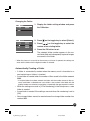
Changing the Folder
1. Display the folder setting window and press
the OK button.
2. Press [ ] on the toggle key to select [Select].
3. Press [
] on the toggle key to select the
number of an existing folder.
4. Press the OK button to set.
The selected folder number appears in the current folder field and subsequently captured images
are saved to this folder.
* When the camera is turned off or the memory card cover is opened, the settings are
reset and the folder with the highest number is selected.
Automatically Creating a Folder
• A folder is automatically created when the memory card is formatted or a
card containing no folders is inserted.
• A new folder is created when the number of files saved to the folder exceeds
9999.
* If multiple folders have been created, the folder with the number closest to the currently used folder is selected and a new folder is not created. If the folder with the
highest number was selected, a new folder is created with the next sequential number.
• When the settings are reset in [3 File Numbering] in the Setup menu, a new
folder is created.
• A new folder is created if the settings are reset when file numbering is set to
[ON].
• New storage folders cannot be created once the storage folder number has
reached 999.
49
03_ZD back_E_p031-052
49
07/3/9, 20:39
Selecting a Memory Card and Creating Folders
File Numbering
When file numbering is set to [ON], the file number of the last captured image
is stored in the camera and the next time you take a picture, it is saved with the
subsequent number. When multiple memory cards are used, images are saved
with sequential file numbers to facilitate management of captured images.
Setting
Description
• Images are saved in folders according to file number until the memory
card is formatted.
• When the memory card is formatted, folder numbering starts from 100
and file numbering starts from 0001.
• A new folder is created when the file number reaches 9999.
OFF (File Numbering)
• File numbering starts from 0001 when a new folder is selected or a
new memory card is inserted.
However, when the selected folder or memory card already contains
images, numbering starts from the next file number after the highest
existing file number in the folder.
• When the memory card is full, [FOLDER NO. FULL] appears on the
LCD monitor, then [CARD FULL] appears and the shutter release is
locked.
• Images are saved with sequential file numbers, regardless of the file
numbers in the memory card.
However, if a file number in a folder is duplicated or a file number that
is higher than the current file number already exists, the image is
ON (File Numbering)
saved with the subsequent file number.
• A new folder is created when the maximum number of image files is
reached.
• When the memory card is full, [FOLDER NO. FULL] appears on the
LCD monitor, then [CARD FULL] appears and the shutter release is
locked.
• You can reset the file numbers stored in the camera in file numbering
RESET
mode.
When the settings are reset, a new folder is created and file
numbering starts from 0001.
50
03_ZD back_E_p031-052
50
07/3/9, 20:39
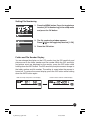
Setting File Numbering
1. Press the MENU button. Press the toggle keys
to select [3 File Numbering] in the setup menu
and press the OK button.
2. The file numbering window appears.
Press [ ] [ ] on the toggle key to select [1 ON].
3. Press the OK button.
Folder and File Number Display
You can change the display on the LCD monitor from the ISO sensitivity and
picture count to the folder number and file number. While the ISO sensitivity
and picture count are displayed on the monitor, press the ISO button while
holding down the INFO button. The ISO sensitivity and picture count change to
the folder number and file number. The setting is saved when the camera is
turned off. To restore the normal display, press the ISO button while holding
down the INFO button again.
ISO sensitivity and picture count display
Folder number and file number display
SD
JPEG
CF
CUSTOM
SD
JPEG
CF
CUSTOM
PC
PC
51
03_ZD back_E_p031-052
51
07/3/9, 20:39
03_ZD back_E_p031-052
52
07/3/9, 20:39
Playing Back Images
This section explains how to playback and delete photographs
with this unit attached to the camera.
Refer to the instruction manual for the software in use when playing back images on a computer.
04_ZD back_E_p053-060
53
07/3/9, 20:40
Playing Back Images
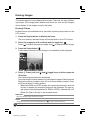
This section explains the various methods of viewing images on the LCD monitor
of this unit.
Playing Back Frames
Displays the images frame by frame on the LCD monitor.
1. Press the Display button.
The most recently recorded image will be displayed on the LCD monitor.
2. Select the image you wish to display with the toggle key
.
Press [ ] to display the previous image, and [ ] to display the next image. When the most recently taken photograph is displayed, pressing the
[ ] key on the toggle key will display the first photograph taken.
2
1
LCD monitor display
54
04_ZD back_E_p053-060
54
07/3/9, 20:40
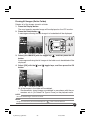
Zoom-in Display
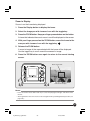
Zooms in on the frame being displayed.
1. Press the Display button to display the frame.
2. Select the image you wish to zoom in on with the toggle key.
3. Press the ZOOM button. Keep your finger pressed down on the button.
A frame that indicates the area to zoom in on will be displayed on the screen.
4. With your finger pressed on the ZOOM button, move the frame to the
.
area you wish to zoom in on with the toggle key
5. Release the ZOOM button.
A zoom-in image of the area selected with the frame will be displayed.
Use the toggle key to scroll around the zoomed-in image.
6. Press the ZOOM button once again to return to the normal viewing
screen.
Zoom area frame
1
3,5
2,4
LCD monitor display
Memo:
• Press the shutter release button half-way to cancel the playing back images and switch off the
monitor.
• The magnification ratio of the zoom can be changed with the [7 Set Magnification] function (see
page 128.)
55
04_ZD back_E_p053-060
55
07/3/9, 20:40
Playing Back Images
Displaying the Information Screen
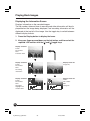
Displays information on the recorded images.
The file number, date and time of recording and other information will be displayed below the image being displayed, and recording information will be
displayed at the top left of the image. Use the toggle key to switch between
different display formats.
1. Press the Display button to display the frame.
2. Keep your finger pressed down on the Info button, and then select the
required LCD monitor with the [ ] and [ ] toggle keys.
Display screen #1
Folder
File number
Date
Protection mark
Display screen #2
Folder
File number
Date
Recording
information
Display screen #5
Image only
Display screen #3
Folder
File number
Date
Histogram
Highlight and
shadow alerts
Display screen #4
Folder
File number
Date
Histogram
56
04_ZD back_E_p053-060
56
07/3/9, 20:40
2
1
2
Recording
information
Preview screen
Histogram
Folder number
Date
Image file number
1
2
3
4
5
6
7
9
8
Recording Information
Time
1
2
3
4
5
6
7
8
Shutter speed
Aperture
Metered mode
Exposure mode
ISO sensitivity
Exposure compensation
White balance
Image Quality mode
Only “RAW” will be displayed if recording together with JPEG is selected.
9 Image protection
Displayed when the image is protected.
57
04_ZD back_E_p053-060
57
07/3/9, 20:40
Erasing Images
This section explains how to delete taken images. There are two ways of deleting images: [One Image] which deletes one frame at a time and [All Images]
which deletes all the images stored in the folder.
Erasing1 Frame
Enables frames to be deleted one by one while confirming the process on the
LCD monitor.
1. Press the Display button to display the frame.
The most recently recorded image will be displayed on the LCD monitor.
.
2. Select the image you wish to delete with the toggle key
Press [ ] to display the previous image, and [ ] to display the next image.
3. Press the Delete button
.
A message confirming that the image is to be deleted will be displayed.
4. Select [1 Frame] with the [ ] and [ ] toggle keys, and then press the
OK button.
The frame being displayed will be deleted.
Once the image has been deleted, the subsequent image will be displayed.
Repeat the above procedure from #3 to continue deleting images. Press
the [Cancel] button to abort deletion.
• When both RAW and JPEG images are stored simultaneously and one
of them is deleted, the remaining image will be displayed. The next image taken will be displayed when [0. RAW & JPEG] is selected with [10.
Select File Type to Erase] on the playback menu.
Important:
Note that deleted images cannot be restored.
NOTE:
Images that have been protected and display the [
] mark cannot be deleted.
58
04_ZD back_E_p053-060
58
07/3/9, 20:40
Erasing All Images (Entire Folder)
Deletes all of the images stored in a folder.
1. Press the Display button.
The most recently recorded image will be displayed on the LCD monitor.
2. Press the Delete button
.
A message confirming that the image is to be deleted will be displayed.
4,5
1
3,5
2
3. Select [ALL IMAGES] with the toggle key
, and then press the OK
button.
A message confirming that all images in the folder are to be deleted will be
displayed.
4. Select [OK] with the [ ] and [ ] toggle keys, and then press the OK
button.
All of the images in the folder will be deleted.
• Simultaneously stored images are deleted in accordance with the parameters set on [10. Select File Type to Erase] on the playback menu.
NOTE:
Note that deleted images cannot be restored.
Memo:
Images that have been protected and display the [
] mark cannot be deleted.
59
04_ZD back_E_p053-060
59
07/3/9, 20:40
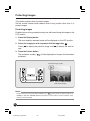
Protecting Images
This section explains how to protect images.
Set the shutter release mode selector lever to any position other than L to
protect images.
Protecting Images
Enables frames to be protected one by one while confirming the image on the
LCD monitor.
1. Press the Display button.
The most recently recorded image will be displayed on the LCD monitor.
2. Select the image you wish to protect with the toggle key
.
Press [ ] to display the previous image, and [ ] to display the next image.
3. Press the Protect button.
The protection symbol [
] will be displayed on images that have been
protected.
Protected image symbol
LCD monitor display
Memo:
Images that have been protected and display the [
] mark cannot be deleted with the [1
FRAME] or with [ALL IMAGES] deletion procedures, but they will be erased completely if the
memory card is formatted.
60
04_ZD back_E_p053-060
60
07/3/9, 20:40
Menus
This chapter explains the functions that can be selected from this
unit’s menu screen.
There are three types of menu mode available; Recording Menu,
Playback Menu and Setup Menu.
05_ZD back_E_p061-066
61
07/3/9, 20:41
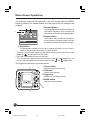
Menu Screen Operations
The following screen will be displayed on the LCD monitor when the MENU
button is pressed. This screen enables all of the various this unit settings to be
modified.
2
3
1 Recording Menu
The Recording Menu includes the settings for
color mode, sharpness, tone, saturation and
other elements related to taking photographs.
1
2 Playback Menu
The Playback Menu includes the settings for
erasing images, enlarging images and other
parameters related to playing back images.
3 Setup Menu
The Setup Menu includes all of the basis settings relating to this unit, such as
memory card formatting, date setup, and other settings.
• To set up each parameter, select the required parameter symbol with the use of the
toggle key
, and then press the OK button.
• Press the Cancel button to return by one step.
• The front control dial performs the same functions as the [ ] and [ ] toggle keys, and
the rear control dial performs the same functions as the [ ] and [ ] toggles keys.
The toggle key operations are shown below.
1
1 Cancel button
2
Returns to the previous screen.
2 OK button
Confirms the selection.
3 Toggle key
Selects the required parameter.
4 MENU button
Displays the menu screen.
3
4
62
05_ZD back_E_p061-066
62
07/3/9, 20:41
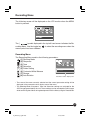
Recording Menu
The following screen will be displayed on the LCD monitor when the MENU
button is pressed.
The [
] symbol displayed in the top left-hand corner indicates the Recording Menu. Use the toggle key
to select the recording menu when the
menu symbol has been selected.
Recording Menu
The Recording Menu contains the following parameters:
: [1] Shooting Mode
: [2] Sharpness
: [3] Tone
: [4] Saturation
: [5] Folder Setting
: [6] Customize White Balance
: [7] Storage
: [8] Auto Rotation
Parameter status display area
• The name of the menu currently selected and the current parameter setting will be
displayed at the parameter status display area of the menu.
• The Shooting Mode, Sharpness, Tone and Saturation settings are activated for the
JPEG images generated by this unit. These settings can be amended for RAW images
while confirming the effects during development with the Mamiya Digital PhotoStudio.
63
05_ZD back_E_p061-066
63
07/3/9, 20:41
Recording Menu
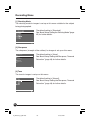
[1] Shooting Mode
The shooting mode for images is set up on this menu suitable for the subject
being photographed.
The default setting is [Standard].
See “Basic Setup: Setting the Shooting Mode” (page
45) for further details.
[2] Sharpness
The sharpness (strength of the outlines) for images is set up on this menu.
The default setting is [None].
See “Basic Setup: Setting the Sharpness, Tone and
Saturation” (page 46) for further details.
Sharpness
None
Minimum
Medium
Maximum
OK
[3] Tone
The tone for images is set up on this menu.
The default setting is [Normal].
See “Basic Setup: Setting the Sharpness, Tone and
Saturation” (page 46) for further details.
64
05_ZD back_E_p061-066
64
07/3/9, 20:41
[4] Saturation
The saturation for images is set up on this menu.
The default setting is [Normal].
See “Basic Setup: Setting the Sharpness, Tone and
Saturation” (page 47) for further details.
[5] Folder Setting
The folder in which recorded images are to be stored is set up on this menu.
See “Basic Setup: Creating a Folder” (page 49) for
further details.
[6] Custom White Balance
The customized white balance for images is acquired on this menu. A maximum of two customized white balances can be registered.
See “Basic Setup: Customized White Balance”
(page 41) for further details.
65
05_ZD back_E_p061-066
65
07/3/9, 20:41
Recording Menu
[7] Storage
The memory card onto which images are to be stored is selected on this menu.
Two different types of memory card can be used,
CF cards (Compact Flash Cards) and SD cards,
but images cannot be stored on both types of card
simultaneously. See “Basic Setup: Selecting a
Memory Card” (page 48 for further details on selecting the storage medium.
[8] Auto Rotation
This menu sets up whether to rotate images or not.
When set at [OFF], horizontal and vertical images are stored in the horizontal
display format, and when set at [ON], horizontal and vertical images are stored
and displayed in the vertical format. The default setting is [OFF].
1 Press the MENU button, select [8 Rotate or Not?]
with the toggle key
, and then press the OK
button.
2 Select [ON] or [OFF] with the toggle keys
3 Press the OK button.
66
05_ZD back_E_p061-066
66
07/3/9, 20:41
.
Playback Menu
The following screen will be displayed on the LCD monitor when the MENU
button is pressed.
The [
] symbol displayed second from the left indicates the Playback
Menu. Use the toggle key
to select the playback menu when the menu
symbol has been selected.
Playback Menu
The Playback Menu contains the following parameters:
: [1] Erase Image
: [2] Playback Folder
: [3] Slide Show
: [4] LCD Brightness
: [5] Protect/Unprotect
: [6] Highlight/Shadow Alerts
: [7] Set Magnification
: [8] Highlight Alert Level 1
Parameter status display area
: [9] Shadow Alert Level
: [10] Select File Type to Erase
* The name of the menu currently selected, the details of the icon, and the current parameter setting will be displayed at the parameter status display area of the menu on
the digital LCD panel.
67
06_ZD back_E_p067-082
67
07/3/9, 20:42
Playback Menu
[1] Erase Image
Images stored in either each individual folder or the entire contents of the
memory card are erased on this menu.
1 Select the Playback Menu, and then select [1
Erase Image] with the toggle key
.
2 Press the OK button.
3 Select erasing the contents of the folder or erasing all images stored on the memory card, with
the toggle key
.
4 Press the OK button to erase the images.
Important:
• When Deleting All Images at a Time
When the [2 All folders] has been select and all images are
erased at a time, note that all images in the folder currently
being played back will be erased together will all images in
every other folder. Images that have been deleted cannot
be restored.
[2] Playback Folder
This menu selects the folder for which images stored on the memory card are
to be played back. The default setting is [Capture folder].
1 Select the Playback Menu, and then select [2
Playback Folder] with the toggle key
.
2 Press the OK button.
3 Select the folder in which the images to be played
back are stored with the toggle key
.
4 Press the OK button.
68
06_ZD back_E_p067-082
68
07/3/9, 20:42
[3] Slide Show
This activates the slide show in which the images stored on the memory card
are displayed sequentially.
1 Select the Playback Menu, and then select [3
Slide Show] with the toggle key
.
2 Press the OK button.
3 Select [Start] with the toggle key
.
4 Press the OK button to start the slide show. Press
the Cancel button to end the slide show.
[4] LCD Brightness
This adjusts the brightness of the LCD monitor. The brightness can be adjusted to six different stages to match the environment in which images are
being played back. The adjustments are made with the use of the toggle key.
The default setting is the brightest display.
1 Select the Playback Menu, and then select [4 LCD
Brightness] with the toggle key
.
2 Press the OK button.
3 Adjust the brightness level with the toggle
keys
.
4 Press the OK button.
69
06_ZD back_E_p067-082
69
07/3/9, 20:42
Playback Menu
Switching Across to the High Contrast Screen
It is possible to switch the display across to the high contrast screen when
images are difficult to see on the LCD monitor owing to the surrounding environment being so bright that the brightness adjustment is ineffective.
Press the MENU button for one or more consecutive seconds with the LCD
display switched off to switch across to the high contrast screen.
To return to the normal brightness display, press and hold the MENU button
again with the LCD display switched off.
[5] Protect/Unprotect
This function enables the protection function to be activated or deactivated for
the images stored on the memory card individually or in bulk for all images in
the folder.
Parameter
Protect capture folder:
Unprotect capture folder:
Protect Mamiya folders:
Unprotect Mamiya folders:
Details
Activates the protection function for all images in the selected
playback folder or the recording folder.
Deactivates the protection function for all images in the
selected playback folder or the recording folder.
Activates the protection function for all of the images stored in
multiple Mamiya folders on the memory card.
Deactivates the protection function for all of the images stored
in multiple Mamiya folders on the memory card.
1 Select the Playback Menu, and then select [5
Protect/Unprotect] with the toggle key
.
2 Press the OK button.
70
06_ZD back_E_p067-082
70
07/3/9, 20:42
3 Select the required parameter with the toggle keys
.
4 Press the OK button to activate the protection
function.
* Protected images cannot be erased.
[6] Highlight/Shadow Alerts
This establishes the setting to display highlight and shadow alerts in order to
avoid the white blurs caused by over-exposures and black smudging caused
by under-exposures when preview format Type 3 has been selected with [6
Image Review] on the Setup Menu.
These alerts can be selected for highlights only, shadows only, or both highlights and shadows.
White blurs and black smudges will flash when this has been activated, providing an indication that exposure compensation needs to be carried out. The
default setting is [No].
1 Select the Playback Menu, and then select [6
.
Highlight/Shadow Alerts] with the toggle key
2 Press the OK button.
3 Select the required parameter with the toggle keys
.
4 Press the OK button.
• The highlight/shadow alerts for played-back images are
displayed with preview format Type 3, which has been
selected with [6 Image Review] on the Setup Menu.
71
06_ZD back_E_p067-082
71
07/3/9, 20:42
Playback Menu
[7] Set Magnification
This sets the magnification ratio for enlarging a certain area of an image being
played back with the use of the ZOOM button. You can choose from three
magnification levels: x4, x9 and x16. The default setting is [x4].
1 Select the Playback Menu, and then select [7 Set
Magnification] with the toggle key
.
2 Press the OK button.
3 Select the required parameter with the toggle keys
.
4 Press the OK button.
[8] Highlight Alert Level
This sets the level of the highlight for which an alert is to be displayed when the
highlight and shadow alert function has been activated. The value for this can
be set within a range of 255 to 246. The default setting is [255].
1 Select the Playback Menu, and then select [8
Highlight Alert Level] with the toggle key
.
2 Press the OK button.
3 Select the required highlight alert level with the
toggle keys
.
4 Press the OK button.
72
06_ZD back_E_p067-082
72
07/3/9, 20:42
[9] Shadow Alert Level
This sets the level of the shadow for which an alert is to be displayed when the
highlight and shadow alert function has been activated. The value for this can
be set within a range of 0 to 9. The default setting is [0].
1 Select the Playback Menu, and then select [9
Shadow Alert Level] with the toggle key
.
2 Press the OK button.
3 Select the required shadow alert level with the
toggle keys
.
4 Press the OK button.
[10] Select File Type to Erase
This sets the method in which RAW images and JPEG images stored simultaneously on the memory card are to be erased. The method selected here will
be used when erasing single images and when erasing all images. Also, the
parameter set here is only used for erasing images taken simultaneously. The
default setting is [RAW & JPEG].
1 Select the Playback Menu, and then select [10
Select File Type to Erase] with the toggle key
.
2 Press the OK button.
73
06_ZD back_E_p067-082
73
07/3/9, 20:42
Playback Menu
3 Select the required parameter with the toggle keys
.
4 Press the OK button.
• All images will be deleted regardless of the parameter set here if all images
have been selected with the [
] erase button or [1. Erase Image] on the
playback menu.
• When both RAW and JPEG images are stored simultaneously and one of
them is deleted, the remaining image will be displayed.
• Images that have been protected and display the [
] mark will not be
deleted when individual images or all images (contents of the folder) have
been specified for deletion, but all images will be deleted completely if the
memory card is formatted.
74
06_ZD back_E_p067-082
74
07/3/9, 20:42
Setup Menu
The parameters required when using this unit are set up on this menu.
The following screen will be displayed on the LCD monitor when the MENU
button is pressed.
The [
] symbol displayed second from the left indicates the Setup Menu.
Use the toggle key
to select the Setup menu when the menu symbol has
been selected.
Setup Menu
The Setup Menu contains the following parameters:
: [1] Color Space (JPEG)
: [2] Shutter Release w/o Card
: [3] File Numbering
: [4] Power Saving Mode
: [5] Noise Reduction
: [6] Image Review
: [7] Video Output
: [8] Auto Monitor OFF
: [9] Set Date/Time
: [10] Language
: [11] Format
Parameter status display area
75
06_ZD back_E_p067-082
75
07/3/9, 20:42
Setup Menu
[1] Color Space (JPEG)
The color space for images to be recorded in the JPEG format is set up on this
menu. The default setting is [sRGB].
See “Basic Setup: Color Space” (page 37) for further details.
[2] Shutter Release w/o Card
Sets whether the shutter release is to be deactivated or not when no memory
card has been inserted into the camera. The default setting is [Not allowed].
1 Press the MENU button, and then select [2 Shutter Release w/o Card] on the Setup Menu with
the toggle key
.
2 Press the OK button.
3 Select either [Yes] or [No] with the toggle keys
.
4 Press the OK button.
76
06_ZD back_E_p067-082
76
07/3/9, 20:42
[3] File Numbering
Sets whether or not to save images under sequential file numbers even when
the memory card or folder is changed.
The default setting is [OFF].
See “Basic Setup: File Numbering” (page 64) for
further details.
[4] Power Saving Mode
This setting activates the low-power consumption mode to restrain battery consumption.
The default setting is [ON].
Parameter
ON:
OFF:
Details
Activates the low-power consumption mode, but it slows down the activation
of the sleep mode.
Activation from the sleep mode is speeded up.
1 Press the MENU button, and then select [4 Power
Saving Mode] on the Setup Menu with the toggle
key
.
2 Press the OK button.
3 Select either [ON] or [OFF] with the toggle keys
.
4 Press the OK button.
77
06_ZD back_E_p067-082
77
07/3/9, 20:42
Setup Menu
[5] Noise Reduction
Images taken with the ISO sensitivity set high or with long exposures tend to
be grainy. This phenomenon is reduced when the noise reduction function is
activated.
The default setting is [OFF].
1 Press the MENU button, and then select [5 Noise
Reduction] on the Setup Menu with the toggle
key.
2 Press the OK button.
3 Select either [ON] or [OFF] with the toggle keys.
4 Press the OK button.
* Image resolution is reduced when noise reduction is
activated.
* This function cannot be cancelled for images recorded
in the RAW format with Mamiya Digital PhotoStudio.
* Refer to ISO Sensitivity Setup (page 56) when setting
up this parameter.
[6] Image Review
This function sets up the display format and display time of images that are to be
displayed on the monitor at the same time as recording. There are four different
types of display format, and the display time can be selected from three different
choices of 2 seconds, 4 seconds, and continuous. This parameter can also be
set not to display the images. The default settings are [Type 3] and [2 sec.].
Type 1
Type 2
Type 3
1 Press the MENU button, and then select [6 Image Review] on the Setup Menu with the toggle
key
.
2 Press the OK button.
The [6 Image Review] screen will be displayed.
Type 4
78
06_ZD back_E_p067-082
78
07/3/9, 20:42
3 Press [OK].
4 Select the required display format with the toggle key
.
5 Select [Time] with the toggle key
.
6 Select the required display time with the toggle
key
.
7 Press the OK button.
[7] Video Output
Sets whether the video output when the camera is connected to a television or
other monitor is to be NTSC or PAL. The default setting is [NTSC].
1 Press the MENU button, and then select [7 Video
Output] on the Setup Menu with the toggle key
.
2 Press the OK button.
3 Select the required video output with the toggle
keys
.
4 Press the OK button.
• Images can also be viewed on the camera monitor at
the same time when it is connected to a television.
79
06_ZD back_E_p067-082
79
07/3/9, 20:42
Setup Menu
[8] Auto Monitor OFF
This menu sets the display time for displaying playback images and menu
screens on the digital LCD display. The default setting is [15 sec.].
1 Press the MENU button, and then select [8 Auto
Monitor OFF] on the Setup Menu with the toggle
key
.
2 Press the OK button.
3 Select the required display time with the toggle
key
.
4 Press the OK button.
* When [4 OFF] has been selected, the display will continue until the power is switched off or the shutter button
pressed half-way down. But battery power is consumed
more quickly.
[9] Set Date/Time
Sets the date and time to be recorded when an image is taken.
See (page 25) for further details.
80
06_ZD back_E_p067-082
80
07/3/9, 20:42
[10] Language
This menu sets the language to be used on the menu screens displayed on the
LCD monitor. A total of five different languages can be selected; Japanese,
English, German, French and Spanish.
The default setting is [Japanese].
1 Press the MENU button, and then select [10 Language] on the Setup Menu with the toggle key
.
2 Press the OK button.
3 Select the required language with the toggle keys
.
4 Press the OK button.
[11] Format
Memory cards must be formatted before they can be used. The formatting
procedure is performed from this menu.
1 Press the MENU button, and then select [11 Format] on the Setup Menu with the toggle key
.
2 Press the OK button.
3 Select the memory card that is to be formatted
with the toggle key
.
4 Press the OK button.
A message to confirm that formatting is to be performed will be displayed.
5 Press the OK button to start the formatting process. Press the Cancel button to abort formatting.
81
06_ZD back_E_p067-082
81
07/3/9, 20:42
Setup Menu
* Before Performing the Formatting Process
Note that all images on the memory card will be deleted when the formatting process is
executed, even if they are protected.
It is recommended that the contents of the memory card are re-confirmed once again
before going ahead with the formatting process.
* Precautions during Formatting
Do not switch off the power or open the slot cover to the memory card when formatting
is in progress.
Do not remove the batteries or the memory card when formatting is in progress under
any circumstances.
* File Formatting
Memory cards with a capacity of up to 2 GB will be formatted in the FAT16 format, and
memory cards with a capacity that exceeds 2 GB will be formatted in the FAT32 format.
Important:
Precautions When Memory Cards are to be Disposed of or Given to Third Parties
• Note that the formatting and deletion procedures carried out by the camera or personal computers only amends the file’s management information, and the data is not completely wiped from
the memory card.
• It is therefore recommended that the memory card is physically destroyed before being disposed of, or the data is completely wiped from the card with the use of special data erasure
software sold on the open market before it is given to a third party.
• The data recorded on memory cards is the full responsibility of the user.
82
06_ZD back_E_p067-082
82
07/3/9, 20:42
Connecting to the PC
This section explains how to connect a camera fitted with the
Mamiya ZD Back to a personal computer or television. Refer to
the software instruction manual for detailed operation procedures.
07_ZD back_E_p083-088
83
07/3/9, 20:43
Connection
You can connect a camera fitted with this unit to a television with the use of a
video cable (sold separately) and display the contents of the LCD monitor on
the TV screen. In addition, if the camera fitted with this unit is connected to a
PC on which Mamiya Digital PhotoStudio is installed, you can operate the
camera from the PC to take photographs or transfer images to it.
Connecting to the PC
By connecting a camera fitted with this unit to a personal computer on which
Mamiya Digital PhotoStudio is installed with the use of an IEEE1394 cable
(sold separately) it is possible to transfer images to the computer, and operate
the camera from the PC to take photographs.
Refer to the Mamiya Digital PhotoStudio manual for details about installing,
connecting and use.
Terminal cover
* Use the AC adapter PA301 when using camera fitted with this unit connected to a PC.
Memo:
To connect camera fitted with this unit to a PC, it is necessary to install the driver (Windows).
Refer to the Mamiya Digital PhotoStudio manual for instructions on installing the driver.
84
07_ZD back_E_p083-088
84
07/3/9, 20:43
Connecting to the PC
Taking Photographs with the Use of the Software
By connecting the camera to a personal computer onto which Mamiya Digital
PhotoStudio has been installed enables the camera to be controlled and photographs taken with software. Refer to the instruction manual provided with the
Mamiya Digital PhotoStudio for further details.
Transferring Image Data
There are two methods available for transferring image data to the PC: using a
card reader (sold separately) and using Mamiya Digital PhotoStudio.
Transferring images from a card reader
Remove the memory card from this unit. Connect the card reader(Optional) to
the PC, insert the memory card into the card reader and transfer the images.
85
07_ZD back_E_p083-088
85
07/3/9, 20:43
Connecting to the PC
1. Connect the card reader to the PC.
2. Open the My Computer folder and
double click on the card reader drive.
3. Double click on Mamiya Folder DCIM
to display the folders containing images.
4. Open My Documents — My Pictures
and create a [New Folder].
5. Drag and drop the folder containing
the images to [New Folder].
Transfer of the images starts.
Changing the name of the transferred
folder to the shooting date or place will
facilitate management of your pictures.
86
07_ZD back_E_p083-088
86
07/3/9, 20:43
Transferring images using Mamiya Digital PhotoStudio
Connect this unit to the PC and transfer the images from this unit memory card
to the PC using the Mamiya Digital PhotoStudio image transfer function.
1. Click the [Transfer] button in the [Remote Capture] screen.
The [Data Transfer] screen appears.
2. Select a folder in the camera memory
card from the [Origin] tree.
3. Select a drive in the computer from
the [Destination] list.
A folder tree of the selected drive appears below the list.
4. Select a folder to be transferred to and click the [Start Transfer] button.
• When creating a new folder, click the [A New Folder] button and enter the folder
name into the screen that appears.
• Adding a check mark to [Create and transfer to a folder with the same name]
transfers the entire folder.
87
07_ZD back_E_p083-088
87
07/3/9, 20:43
Connecting to the TV
By connecting a camera fitted with this unit to a television, you can display the
contents of the LCD monitor on the TV screen.
1. Open the Video terminal cover in the direction indicated by the arrow.
2. Connect camera fitted with this unit and the TV with a video cable
(sold separately), as shown in the diagram.
Video cable
(commercially available)
3. Turn on the TV and select video input as the input source.
4. Press DISPLAY to play back an image. The same image appears on
the TV screen.
* Use the AC adapter (PA302) if you intend to connect this unit to a TV for an extended
period of time.
* The contents of the LCD monitor can be displayed on a TV screen by connecting only
this unit to the television.
88
07_ZD back_E_p083-088
88
07/3/9, 20:43
Maintenance
This chapter explains the daily maintenance procedures for this
unit.
08_ZD back_E_p089-090
89
07/3/9, 20:43
Maintenance
Cleaning the filter
Check that dust or dirt does not adhere to
the IR/Low Pass Filter by holding the camera and light shines on the filter.
* Dust and dirt is more conspicuous when light is
shined on the filter.
Carefully remove all dust with a lens blower
that is available on the open market.
* When using a blower, make sure the tip does not
come into contact with the surface of the filter.
* Use a lens blower that is not equipped with a
brush. The use of a blower with a brush may result in the surface of the filter being scratched.
Mamiya ZD Back maintenance/checks
• Always place the lens selector lever in the L when this unit is not going be
used.
• Remove the lithium ion battery and store it in a well ventilated place when
this unit is not going to be used for an extended period.
• Never try to dismantle or modify the camera in any way.
• The connections could become loose or corroded if they are damaged or
become dirty.
• Use this unit carefully to avoid dropping or banging against other items.
• Use a damp cloth that has been soaked in water and then wrung to clean the
camera if it has been exposed to salty air.
• This unit may be damaged if used/stored in areas where chemical gasses
are present.
• Wipe with a soft, dry cloth when cleaning. Do not use solvents, etc. The
product can cause discoloration.
• Before using this unit after it has been in storage for an extended period, it is
important that either you or your nearest customer service center carry out a
few simple checks to make sure this unit is operating correctly.
90
08_ZD back_E_p089-090
90
07/3/9, 20:43
Troubleshooting
This chapter contains information that should be read thoroughly
before problems occur with this unit.
09_ZD back_E_p091-094
91
07/3/9, 20:44
Being Prepared for Problems
Before deciding that you have a problem with this unit, check the problem
against the following list to ascertain its cause.
• I cannot recharge the battery.
• Are you using the correct battery?
Make sure you use the special lithium ion battery PB401.
• Is the lithium ion battery properly set in the special battery charger?
Set the lithium ion battery PB401 properly in the special battery charger.
• Has the lithium ion battery run out?
Recharge the lithium ion battery.
• Is the lithium ion battery properly set in this unit?
Set the lithium ion battery PB401 properly in this unit.
• The battery runs out quickly.
• Are you sure you have fully charged the lithium ion battery?
Make sure it has been fully charged.
• Has the lithium ion battery reached the end of its life-span?
Purchase a new lithium ion battery PB401.
• I can’t take photographs or store images
• Have you left the memory card slot cover open?
Make sure the memory card has been fully inserted, and then close the
memory card slot cover firmly.
• Has the memory card been set in place correctly?
Set the memory card firmly in place.
• Is the memory card full up?
Either replace the memory card with a new one, or erase unwanted images.
• Is the camera focusing correctly? (Is the < > focus mark in the viewfinder
flashing?)
Half-press the shutter button once again to realign the focus. If it will still
not focus, focus it yourself manually.
92
09_ZD back_E_p091-094
92
07/3/9, 20:44
• The LCD monitor displays and images are blurred.
• Is the screen dirty or otherwise soiled?
Wipe the screen with a lens cleaner or similar type of soft cloth.
• Has the LCD reached the end of its life-span?
Contact our Customer Service Center.
• I can’t erase images.
• Are the images protected?
Cancel the protect function.
• Is the SD card protected?
Unprotect the SD card.
• The date and time of taking the images are not correctly displayed.
• Have you set the date/time parameters correctly?
Set the date/time parameters correctly.
93
09_ZD back_E_p091-094
93
07/3/9, 20:44
Error Messages and Recovery
Error messages are displayed on the LCD monitor when errors occur with the
camera.
Error Messages and Recovery
Error Message
Recovery
The card cover is open.
Close the memory card cover.
A card does not exist in the specified slot.
Place a memory card in the specified slot, or
change the memory card setting with [7 Storage].
Remove the memory card, and then replace it. If
Replace the card.
the same message is displayed, replace it with a
The card is not formatted.
Format the memory card.
FOLDER No. FULL. Cannot create folder.
Format the memory card.
different memory card.
CARD FULL. Cannot create folder.
The card is full up. Erase all unwanted images,
and then try again to create a folder.
The card is full up. Either erase all unwanted
CARD FULL. The card is full.
images, or replace the memory card.
The images on the memory card are protected.
Protected.
Release the SD memory card lock switch.
Replace the memory card with one that contains
No images.
recorded images.
The image format cannot be played back with the
Cannot playback this image.
camera.
Cannot zoom this image.
The image cannot be enlarged.
Processing. Please wait.
94
09_ZD back_E_p091-094
94
07/3/9, 20:44
Appendix
This chapter provides information on digital terminology, an index, and the camera specifications.
10_ZD back_E_p095-106
95
07/3/9, 20:44
Digital Terminology
Channel
The image’s color component. On a “Curve/histogram” screen, there are
four channels, “RGB”, “R-ch (red)”, “G-ch (green)”, “B-ch (blue)”, and the
component distribution in each channel can be adjusted.
CMS
Abbreviation for “Color Management System”. Refer to “Color management
system”.
CMYK
A method of expressing color. By changing the mix ratio of Cyan (C), Magenta (M), Yellow (Y), and Black (K), all colors can be expressed.
It is a method originally used in color printing.
Theoretically is possible to express every color using only the three primary
colors, CMY, however black is added to the three primary colors in order to
facilitate clean printing of the color black.
CMY are complimentary colors to RGB, and CMY is known as a subtractive
color mixture method, as opposed to RGB, which is known as an additive
color mixture method.
Color management system
A system for correcting any discrepancy in the color space depending on the
output device and ensuring the same color is reproduced for the same data.
Typical examples are Macintosh’s “ColorSync” and Windows’ “ICM”.
Color space
This refers to the area where color can be displayed. Color space varies
depending on the output device. To match the colors from input through to
output it is necessary to correct and manage the different color spaces of
each device and then match the colors reproduced (color management).
96
10_ZD back_E_p095-106
96
07/3/9, 20:44
Compression
The process of reducing the size of a file using a predetermined method.
Conversely, the process of restoring compressed data is known variously
as, “decoding”, “unpacking”, “expansion”, “decompression”, or “extraction”.
Compression is necessary for saving or transmitting full color high resolution
image data as the file sizes become large.
There are two types of compression method: “Reversible compression”, in
which the image quality is not lost, and “non-reversible compression”, in which
the compression ratio can be dramatically increased in return for allowing a
certain amount of loss of image quality.
Crop
Selecting a range to be outputted in the case where only part of the file is to
be outputted rather than the whole file. Crop is also used to denote the selected range.
FireWire
This is the nick name of the “IEEE1394” standard, which is a transmission
mode/protocol that connects a computer and a peripheral device.
Refer to “IEEE1394”.
Gamma value
The ratio of the change in image brightness and output voltage.
Where the gamma value is greater than 1, the image is darker than at the
time of input, and in the case of a gamma value less than 1, the image is
brighter than at the time of input.
Gradation
The degree of fineness refers to the slight changing gradation of color. It is
expressed in units of n bits, or n gradations. The higher the number of gradations, the smoother the expression of color.
Histogram
A distribution graph of the image’s luminance.
The horizontal axis represents the level luminance, and the vertical axis represents the occurrence rate of each level luminance.
97
10_ZD back_E_p095-106
97
07/3/9, 20:44
Digital Terminology
IEEE 1394
A high speed serial transmission system/protocol that connects a computer
with a peripheral device such as an MO drive or digital camera. High speed
data transmission is performed through a connection cable.
JPEG
Abbreviation for “Joint Photographic Experts Group”.
A compression system for still image data, the JPEG file format takes the
name of a professional organization established by ISO.
During compression, the operator may choose between a compression
method that entails slight loss of image quality (irreversible compression), or
a method with no loss of quality (reversible compression), and in the case of
the image quality loss compression, the degree of quality loss can be specified.
LCD
Abbreviation for “Liquid Crystal Display”. A display device that uses liquid
crystal.
LCD is thinner and lighter than other display devices, and consumes comparatively less power. It is often used in digital equipment.
Mired
This value is one million times the reciprocal number of the color temperature.
Even where the difference in color temperature is the same, where the color
temperatures are low the color change in the color temperature is large, and
where the color temperatures are high, the color change in the color temperatures is small.
For example, for a color temperature difference of 100K, in the 6000K range
the color will hardly change at all, while in the 3000K range the color change
will be large.
Mired is a standard for expressing the variation widths that are substantially
the same. Mired is also used as a unit for color temperature correction filters.
Noise
Conventionally, noise was unnecessary in an image and caused the image
to deteriorate.
98
10_ZD back_E_p095-106
98
07/3/9, 20:44
ppc
This is an abbreviation for a unit of resolution, “pixels per centimeter”.
It expresses the number of pixels in one centimeter. A higher number relates
to a higher resolution.
ppi
This is an abbreviation for a unit of resolution, “pixels per inch”.
It expresses the number of pixels in one inch. A higher number relates to a
higher resolution.
Profile
A file that defines the color characteristics, and the color reproduction area
of each input device.
In a color management system, this profile is used to correct color differences between input devices and to perform color matching.
RAW image
An image captured with the picture quality mode set to “RAW”, in which the
raw output from the CCDs (image capture element) is stored in non-compressed, 12 bit format.
These images can only be opened with this software, and if the image is to
be used in another application it is necessary to develop it and save it in
JPEG or TIFF format first.
The settings of various types of image retouch information such as tone
curve, white balance, or color balance can be stored in a RAW image, so the
image can be adjusted without any loss of image quality.
Resolution
A standard for expressing the fineness of an image and the smoothness of
the image quality.
Resolution is expressed as how many points can be expressed as a cluster
within a unit width. The higher this value is, the finer the image that can be
obtained.
The number of dots displayed on the screen represents the quality of the
picture. Printed or scanned documents are expressed in dpi or ppi.
99
10_ZD back_E_p095-106
99
07/3/9, 20:44
Digital Terminology
RGB
A method of expressing color.
Colors are expressed by overlaying and combining the three colors, red (R),
green (G), and blue (B). These three colors are called the three primary colors
of light, and by overlaying and combining them, every color can be expressed.
Like light, the image becomes brighter as more colors are overlaid and combined, (if red, green and blue are all combined at 100%, they become white),
so this method is known as the additive color mixture method.
TIFF
An abbreviation for “Tagged Image File Format”.
TIFF is an image data format developed by Aldus and Microsoft.
It is able to organize and store the data of a single image into a single file
with various different resolution, encoding systems and number of colors.
During compression, non-quality loss systems (irreversible compression) such
as LZW or pack bit can be selected.
Thumbnail
An image that has been compressed in order to display a number of such
images together in a list format.
Originally this comes from the words “thumb” and “nail”. In this software,
thumbnails are displayed when the imported images are displayed in list
format on the thumbnail screen.
Threshold value
The boundary limit where some photographic processes do not work.
For example, the UnSharp Mask process defines the applicable criteria of
whether or not an edge is added.
Tone Curve
When the shape of a curve is changed, the relationship between the input
(original image color) and output (image color after adjustment) changes,
and the brightness and contrast within a certain gradation range can be finely
adjusted.
Unsharp mask
One of the sharpness processes, when unsharp mask is applied the color
and brightness of outline parts is accentuated.
100
10_ZD back_E_p095-106
100
07/3/9, 20:45
Index
A
Auto Monitor OFF ................................................................................................... 79
Auto Rotation ......................................................................................................... 66
B
Battery charger ....................................................................................................... 12
Battery power indicator .................................................................................... 16, 23
C
Cancel button ......................................................................................................... 14
Card access lamp .................................................................................................. 14
Charging lamp ........................................................................................................ 21
Color Space ........................................................................................................... 75
Custom White Balance ........................................................................................... 65
D
Delete 1 frame ........................................................................................................ 58
Delete button .......................................................................................................... 14
Digital LCD panel ................................................................................................... 14
DISPLAY button ..................................................................................................... 14
E
Erase Image ........................................................................................................... 68
F
File Numbering ....................................................................................................... 77
File Type to Erase .................................................................................................. 73
Folder number icon ................................................................................................ 16
Folder Setting ......................................................................................................... 65
Format .................................................................................................................... 81
H
Highlight Alert ......................................................................................................... 72
Highlight/Shadow Alerts ......................................................................................... 71
I
IEEE1394 cable ..................................................................................................... 84
Image quality indicator ........................................................................................... 16
Image Review ........................................................................................................ 78
Image size indicator ............................................................................................... 16
Info button .............................................................................................................. 14
101
10_ZD back_E_p095-106
101
07/3/9, 20:45
Index
Image Quality ......................................................................................................... 33
IR Cut filter case ..................................................................................................... 14
ISO button .............................................................................................................. 14
ISO icon ................................................................................................................. 16
ISO sensitivity/folder number indicator ................................................................... 16
ISO sensitivity ........................................................................................................ 43
L
Language/ .............................................................................................................. 81
LCD Brightness ...................................................................................................... 69
LCD monitor ........................................................................................................... 14
Lithium ion battery .................................................................................................. 13
M
Magnification .......................................................................................................... 72
Mamiya Digital PhotoStudio ................................................................................... 13
Memory card slot cover .......................................................................................... 15
MENU button .......................................................................................................... 14
N
Noise Reduction ..................................................................................................... 77
O
OK button ............................................................................................................... 14
P
Playback 1 frame ................................................................................................... 54
Playback Folder ..................................................................................................... 68
Playback menu ....................................................................................................... 67
Power Saving Mode ............................................................................................... 77
Protect button ......................................................................................................... 14
Protect/Unprotect ................................................................................................... 70
Protecting Image .................................................................................................... 60
Q
Quality button ......................................................................................................... 14
102
10_ZD back_E_p095-106
102
07/3/9, 20:45
R
Recording indicator ................................................................................................ 16
Recording media indicator ..................................................................................... 16
Recording menu ..................................................................................................... 63
Remaining picture count ........................................................................................ 16
S
Saturation ............................................................................................................... 63
Set Date/Time ........................................................................................................ 80
Set up menu ........................................................................................................... 75
Shadow Alert .......................................................................................................... 73
Sharpness .............................................................................................................. 64
Shooting Mode ....................................................................................................... 64
Shutter Release w/o Card ...................................................................................... 76
Slide Show ............................................................................................................. 69
Storage ................................................................................................................... 66
T
Toggle key ........................................................................................................ 14, 16
Tone ....................................................................................................................... 46
V
Video Output ........................................................................................................ 134
W
White Balance ........................................................................................................ 38
White balance button ............................................................................................. 14
White balance indicator .......................................................................................... 16
White balance adjustment icon .............................................................................. 16
Z
Zoom button ........................................................................................................... 14
103
10_ZD back_E_p095-106
103
07/3/9, 20:45
Specifications
Camera Type
Compatible Cameras
Image sensor
Aspect ratio
Total Pixels
Effective pixels
Card Slot
ISO sensitivity
Recording format
Image quality mode
File size
Shooting speed
Color space
White balance: Auto
LCD monitor
Playback function
Erase function
Language
Video Output
External I/F
Filter
: AF single-lens reflex digital camera
: Mamiya 645AFD/645AFD II/RZ67PRO IID (The Digital Back Adapter
HX701 (sold separately) is required with the RZ67PROIID)
: 48mm x 36mm full-frame-transfer dimetric RGB CCD
: 4:3
: Approximately 21.7 mega pixels
: Approximately 21.3 mega pixels
: Twin-Slot, Slot #1: SD Card, Slot #2: CF Card (Type I/II) (256MB or
more)
: ISO 50 to 400 (1/3 steps)
: RAW/JPEG (Exif 2.2 compliant), simultaneous RAW & JPEG
: JPEG: L (5,328 x 4,000 pixels), M (4,096 x 3,072 pixels), S (3,008 x
2,256 pixels)
: RAW: 35 MB (5,328 x 4,000 pixels) without compression
JPEG L: Fine approximately 10MB, L: Normal approximately 5MB,
L: Basic approximately 2.5MB
JPEG M: Fine approximately 6MB, M: Normal approximately 3MB,
M: Basic approximately 1.5MB
JPEG S: Fine approximately 3MB, S: Normal approximately 1.5MB,
S: Basic approximately 0.8MB
* File sizes may differ depending on ISO sensitivity and subject.
: 1.2 frames/second, 10-frame continuous burst possible
(when attached to the 645AFD II)
: sRGB /Adobe RGB
: Daylight/Overcast/Shade/Light bulb/Fluorescent/Flash (all of these
six can be finely adjusted)
Preset 1/Preset 2/Color Temperature (can be set in units of 100K
between 2,800K and 10,000K)
: 1.8 inch low-temperature polysilicon TFT (thin-film transfer)
LCD, Field of view = 100%, luminance adjustable, with white
LED back light
: Zoom, slideshow, histogram, highlight alert, shadow alert
: Frame (selected image,) all images, card formatting
: Japanese/English/German/French/Spanish (total of five languages)
: Switching between NTSC and PAL
: IEEE1394 4-pin
: IR Cut Filter included (can be used to replace the low-pass filter
YC401 for Mamiya ZD Back, sold separately)
104
10_ZD back_E_p095-106
104
07/3/9, 20:45
Power supply
Battery check
Dimensions
Weight
Working environment
: PB401 lithium ion battery (7.4V-DC 1500mmAh)
AC power supply can also be used with the PA302 AC adapter set
(sold separately)
: Remaining battery power indicator on LCD monitor
: 106 mm (W) x 90 mm (H) x 62 mm
: 450g (camera only), Battery: 100g
: Working temperature: 0 deg. C to 40 deg. C, Working humidity: 75%
or less
* These specifications are subject to change without prior notice for quality improvements.
* Although the LCD monitor is manufactured with extremely high-precision technology, there are
cases in which pixels may be missing or constantly illuminated.
105
10_ZD back_E_p095-106
105
07/3/9, 20:45
106
10_ZD back_E_p095-106
106
07/3/9, 20:45