1
Chapter 2 - Installation
Cabling Your MultiVOIP
Cabling your MultiVOIP involves making the proper Power, Command Port, and Internet connections.
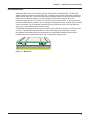
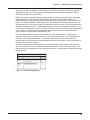
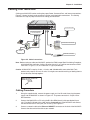
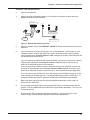
Figure 2-2 shows the back panel connectors and the associated cable connections. The Cabling
Procedure has step-by-step instructions for cabling your MultiVOIP.
Voice/Fax Channel 1
E&M
FXS
FXO
Voice/Fax Channel 2
FXO
FXS
E&M
Ethernet RS232
10Base-T Command
1
Power
0
Power Connection
Voice/Fax Channel
1 & 2 Connections
E&M
FXS
FXO
Command Port Connection
PBX
PSTN
Network Connection
Hub
Figure 2-2. Cable Connections
Note: Before starting to cable your MultiVOIP, perform the E&M Jumper Block Positioning Procedure,
which follows this procedure, if either voice/fax channel (1 or 2) will be connected to an E&M
trunk that is a Type 1, 3, 4, or 5 rather than a Type 2 (the default).
Caution: All MultiVOIP’s require +5 volts, +12 volts, and -12 volts while some other Multi-Tech
products only require +5V and +12 volts. You might even consider marking or labeling them to
ensure that they are kept together.
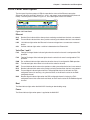
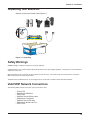
ITE POWER SUPPLY
INPUT:100-250V~50-60HZ 0.9A
OUTPUT:= 5V 3.0A
12V 0.5A
-12V 0.2A
Cabling Procedure
1.
Using the supplied cable, connect the power supply to a live AC outlet, then plug the power
supply into the MultiVOIP as shown in Figure 2-2. The power connector is a 6-pin circular
DIN connector.
2.
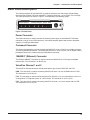
Connect the MultiVOIP to a PC using the RJ-45 to DB9 (female) cable provided with your
unit. Plug the RJ-45 end of the cable into the Command port of the MultiVOIP and connect
the other end to the PC serial port you are using. See Figure 2-2.
3.
Connect a network cable to the Ethernet 10BASE-T connector on the back of the MultiVOIP.
Connect the other end of the cable to your network.
17