1
Configuration/Driver Installation
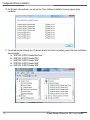
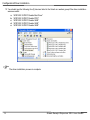
3. On the right panel, expand the “Smart card readers” group. You will see one of the following depending on
how up to date the version of Windows Vista/7 is on the POS computer:
a. No default driver has been installed. Continue to Step 4.
b. The default “Microsoft Usbccid Smartcard Reader (WUDF)” has been selected and installed for the
reader. Continue to Step 4.
4. Right click on the “Microsoft Usbccid Smartcard Reader (WUDF)” item to select the “Update Driver
Software…” option.
5
Green Receipt Dispenser NFC User Guide