1
MRS802v2(E).fm 4 ページ 2004年5月27日 木曜日 午後5時59分
Continuous project playback (sequence play function)
4.
About sequence play
The MRS-802 Version 2.0 can play the master tracks of
multiple projects stored on the hard disk in succession
(sequence play). This is useful to record several projects
in one go on an external recorder or to create automatic
accompaniment for a number of songs.
Up to 99 projects can be specified for sequence play, and
the selection can be saved as a playlist. You can have up
to 10 different playlists.
Because the playlist information can be imported to an
album for burning tracks on a CD in the order of the
playlist, you can use the function to check the song
sequence before deciding on the final content of the CD.
Creating a playlist
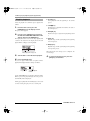
Turn the dial to select the playlist for which
you want to register projects, and press the
[EDIT] key.
The screen for registering projects in the playlist appears.
The indication “END OF LIST” denotes the end of the
playlist. When the playlist is empty, the indication “END
OF LIST” appears at the beginning of the list.
END OF
LIST
0 0
1
0
5.
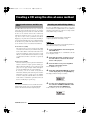
Turn the dial to select the project to register
at the beginning of the project.
The display indication changes as follows.
Project number and project name
Number and name of project to write as a track
Register projects in a playlist as follows.
1.
PRJ 001
PRJ001
Verify that the V-take you want to play is
selected for each project’s master track.
1
436120
Track number
Number of track to write on
CD-R/RW disc
2.
From the main screen, press the
[PROJECT] key in the display section.
The project menu for various project-related functions
appears.
V-take duration
Length of the V-take selected for the master track of
the project, in hours (H), minutes (M), seconds (S),
and milliseconds (MS)
NOTE
PROJECT
SELECT
• Projects in which an unrecorded V-take is selected for the
master track cannot be registered in a playlist. If the name of
3.
Use the cursor left/right keys to bring up
the indication “PROJECT SEQ PLAY” on the
display, and press the [ENTER] key.
The display shows the screen for selecting a playlist. If
there are no existing playlists, the display shows
“EMPTY”.
SEQ PLAY
EMPTY
0 0
0
a desired project does not appear on the display, check the Vtake selected for the master track.
• If the V-take is less than 4 seconds long, the master track
cannot be registered in the playlist.
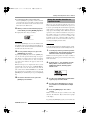
6.
Press the cursor right key.
The display indication changes as follows. (The END OF
LIST indication has moved to the second position.) In
this condition, you can select the second project to play.
1
END OF
LIST
2
ZOOM MRS-802 Ver 2.0
4