1
MEM (Memory)
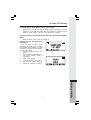
Press the DEL softkey.
Handset will display:
The
•
To delete this record press
THIS. To delete all record, press
ALL.
•
To confirm the deletion of ALL
records, press YES. To exit
without deleting press NO.
ANDREW
1234567
To Edit a Number/Name:
•
•
•
•
•
•
•
•
•
•
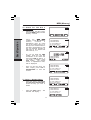
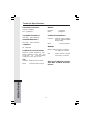
Use the steps in To Search for
and Dial a Number/Name to
locate the entry you want to edit.
After you locate the entry, press
the EDIT softkey twice. The
Handset will display :
Press NAME to edit the name.
softkey move the
Press
cursor to the character you want
to edit.
Press MORE softkey you will
have more editing function.
• DEL : You can delete the characters
• BACK : You can return to the
pervious screen.
• SPACE : You can inset space
between characters.
After finish editing the name,
press SAVE. Then, you can go
to edit the number by pressing
NUM softkey.
softkey move the
Press
cursor to the character you want
to edit.
Press MORE softkey you will
have more editing function.
• DEL : You can delete digits
• BACK : You can return to the
pervious screen
• PAUSE : You can insert a
pause.
After editing the number, press
SAVE.
Finally, you can press OFF key
to exiting the editing mode.
ANDREW SMITH
555-123-4567
ANDREW SMITH
555-123-4567
ANDREW SMITH
555-123-4567
ANDREW SMITH
555-123-4567
21
Basic Operation
•