1
Welcome to ISDN 2e
Contents.
4
Welcome to the fast lane
Go faster
4
ISDN 2e in a nutshell
Go further
4
Before we visit
Go for savings
11 Technical Information
Decide where you want your ISDN 2e
box installed
12 Your ISDN 2e box
Check with your Internet Service
Provider
5
Do two things at once
13 Usage tips
When we visit
Important information
Simple installation
5
15 Digital Select Services
After we visit
17 Straightforward billing
Phone numbers
18 Call charges
Phoning and faxing
6
Communicating through your computer
7
Now you’re connected
20 Answering your questions
21 Troubleshooting tips
23 Useful numbers
2
Installing ISDN 2e
is just the beginning
3
and hear the person at the other end of the line, as
well as see, discuss and amend work in real time. And
you’ll be able to do it through your phone system or in
stand-alone mode.
Welcome to the fast lane
Thank you for ordering ISDN 2e. This guide explains
how to set up the service and get the most from it. It
also tells you what your bill will look like and provides
useful BT numbers to call in case you have an enquiry
or encounter a service problem. We very much hope
that you enjoy life in the fast lane with ISDN 2e.
Apart from the generic benefit of increased clarity for
voice calls (digital lines are not so susceptible to
interference as analogue ones), working through a
phone system gives you the freedom to send and
receive data directly from the desktop. What’s more,
you’ll be able to do so faster than ever before (at up to
128k if you bond your two digital channels together to
form a super-fast link). Other possibilities include
LAN-to-LAN access and remote access to your
company network when working from home.
ISDN 2e in a nutshell
ISDN 2e is a digital communications service from BT
that speeds existing working and opens up the door to
exciting new ways of working that will save you time
and help you to control costs.
Before we visit
At its most simplistic, ISDN 2e transforms an existing
phone line into two channels and enables you to do
two things at once. For example, you can phone while
you’re receiving a fax, or take a phone call while you
access your e-mail. Moreover, while you’re working on
the Internet, perhaps downloading files or searching
for business information, you’ll be able to do
everything faster than you can with the fastest modem.
Decide where you want your
ISDN 2e box installed
Before our engineer arrives, you will need to decide
where you would like your ISDN 2e box to be fitted.
The best place is probably near your computer or
phone system, as this will avoid the need for
extension wiring.
You also have the option of connecting a computer and
other equipment (including supported digital phones,
Group 4 fax machines and videoconferencing terminals)
to ISDN 2e through a digital phone system (most
modern digital phone systems, such as BT’s Norstar and
Meridian 1 ranges, are compatible with the service).
If we’re converting an existing line to ISDN 2e, we
would typically replace your existing BT line box with
its ISDN 2e equivalent. That said, we would be happy
to locate your new box anywhere in your office/home
at no extra charge. You should also bear in mind that
a Terminal Adapter (which effectively connects your
digital equipment to BT’s ISDN network) needs a
power supply to operate (see ‘Communicating
through your computer on page 6).
Take videoconferencing as an example. With the
appropriate hardware (a dedicated terminal or an
adapted computer) and software, you’ll be able to see
4
If you want to take advantage of 128k digital working,
you will need to refer to your Internet Service
Provider or network administrator to check access is
provided at this speed and determine any additional
configuration changes that may be required. You will
be charged for two calls when working at 128k.
Important supporting information:
•
If you want to use analogue phones, faxes, answer
machines and so on, you’ll need a Terminal
Adapter with analogue ports. These are available
from BT and other suppliers (see ‘Communicating
through your computer’ on page 6).
•
The number of digital extensions you can have is
largely determined by how far they are located
from your ISDN 2e box, although the maximum
is eight devices, regardless of distance (see page
12 for more information)
•
When we visit
Simple installation
We can install your ISDN 2e box wherever you want
within your building. It’s simplicity itself to fit and
very easy to service. The actual positioning will be
dictated by how you’re going to be using your new
digital service. For example, if ISDN 2e is running off
a phone system, you would want to locate your box
close to that system. Similarly, if you’re connecting
ISDN 2e to a computer, the box should be positioned
nearby, as this will avoid the need for extension
wiring. And if you’re videoconferencing, consider
if you will need to move the computer or terminal in
the future!
Plan where you may need extension wiring
throughout your premises. We can install digital
extension wiring for a fee. For advice, please call
the ISDN Helpdesk on Freefone 0800 18 15 14.
An alternative is to buy a wiring extension kit
from another supplier and install it yourself. If
you decide to do this, you must check that the
wiring for digital extensions complies with
Category 5 cabling, conforms to ISO/IEC 11801
and is fitted with RJ45 type plugs.
Check with your Internet
Service Provider
After we visit
If you already have an Internet Service Provider,
check that they support digital access. If they do,
inform them that you require ISDN 2e access. They
may give you an alternative dial up number. You will
then need to re-configure your Internet dialler
software. This also applies to any file transfer or
remote network access connections you may have.
Phone numbers
You will have one telephone number with ISDN 2e
for your computer and other digital equipment. If you
want additional numbers, perhaps for other computers,
a Group 4 fax machine or for videoconferencing,
consider Multiple Subscriber Numbering (MSN).
5
With MSN (see ‘Digital Select Services’ on page 15),
you can have up to 10 numbers associated with
ISDN 2e. Each number attracts a connection charge
and a quarterly line rental.
Apple Mac computers will need additional software for
dial-up applications, such as Internet access or remote
access. This is available from most Apple Mac retailers.
If your computer isn’t fitted with an ISDN Card (like a
modem card but digital) or you haven’t got a Terminal
Adapter (like an external modem but digital, which
connects to your computer’s serial port), you will need
to purchase ISDN 2e compatible hardware (meaning it
is compatible with the latest version of ISDN). This
equipment is available from BT and other suppliers.
We recommend that you note down your numbers in
the Useful Numbers section at the back of this guide
and also on the label on the ISDN 2e box itself.
Phoning and faxing
As soon as your ISDN 2e box has been fitted, tested
by the engineer and correctly configured, you should
be able to plug in ISDN phones and use them straight
away. Check with your supplier on what configuration
is necessary. If you have opted for MSN (see ‘Digital
Select Services’ on page 15) individual phones,
extensions, Terminal Adapters and videoconferencing
terminals may need to be configured so that each
knows when to allow another device to take an
incoming call.
ISDN Cards cost from around £50 and Terminal
Adapters cost from around £100. Details can be found
on www.bt.com, or call us on Freefone 0800 18 15 14.
Important supporting information:
Phone systems may need expert installation and
configuration, so it’s absolutely vital to check with your
supplier on this front.
Communicating through
your computer
ISDN 2e will work with most desktop PCs and Apple
Macintosh computers, as long as they are fitted with a
suitable ISDN Card or connected to a suitable
Terminal Adapter and configured properly. The
recommended minimum PC specification is a 486DX
processor running at 100Mhz, or an Apple Mac with a
68040 processor.
6
•
While an ISDN Card offers you optimum
performance, fitting one may invalidate your
computer warranty. You should confirm this with
your computer supplier.
•
You will need to get in touch with your
equipment supplier for advice on configuration
issues. Their contact details are usually provided
with their documentation.
Now you’re connected
7
faster.
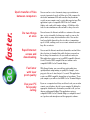
Quick transfer of files
between computers
You can send or receive documents, images, presentations or
reports at guaranteed speeds of 64k or up to 128k, compared to
an absolute maximum of 56k with a modem. Any documents
created on your computer can be sent in this super-fast way. This
application requires a compatible ISDN Card or Terminal
Adapter and e-mail or file transfer software. A 128k data call is
treated as two simultaneous calls and will be charged as such.
Do two things
at once
You can browse the Internet and talk to a customer at the same
time, receive a fax while checking your e-mail, or even use the
phone while accessing data from another office. You can also
bond your digital channels together to achieve a transmission
speed of 128k, enabling you to access remote networks and send
large files even faster.
Rapid Internet
access and
downloading
You can surf the Internet much faster than with a modem. It also
takes less time to download data, while the time you spend online is charged at normal rates. So you could save money too.
This application requires access to an ISDN compatible Internet
Service Provider, ISDN compatible Internet software and a
compatible ISDN Card or Terminal Adapter.
Fax faster
with laser
print quality
With Group 4 faxing, you can send laser print quality faxes
quickly without compromising on quality. For example, a twopage price list can be faxed in just 2.3 seconds. This application
requires an ISDN compatible fax machine or fax software. To use
your computer, you will need an ISDN Card or Terminal Adapter.
Use your PC
for speedy
calling
If you use a computer-based diary or address book, you can often
connect your telephone directly to your computer. By hitting the
appropriate button next to the number you wish to call, you can
dispense with manual dialling. This application requires a
compatible ISDN Card or Terminal Adapter, a compatible sound
card, speakers and microphone and the appropriate software.
8
further.
Videoconference
around the world
If you link up videoconferencing equipment to ISDN 2e, you can
hold meetings with overseas or UK based clients and suppliers
without leaving the office. And because the service provides
digital capability, high quality images are transmitted in real
time. This application requires ISDN compatible
videoconferencing hardware and software.
Work from home
With ISDN 2e installed in your home, you can access your office
network without ever going there. So you could work as
effectively at home and save time, money and the stress of travel.
This application requires an ISDN compatible router in the office
and a compatible ISDN Card or Terminal Adapter at home.
Link up with
other offices
ISDN 2e is an invaluable tool when you need to work on a project
with other offices. By connecting Local Area Networks (LANs),
several people in different offices can access the same
information on their computer screens through desktop
conferencing. Everyone can also update information at the same
time. This application requires an ISDN compatible LAN router
or bridge at each office and the appropriate software.
Stay in touch
with your
customers
ISDN 2e offers you a number of value-added features. For
example, you can use Calling Line Identity (CLI) to see the
number of whoever is calling you before you pick up the phone.
So you could have a customer’s account details on screen before
you start to speak to them! This application requires a
subscription to Calling Line Identity Presentation (CLIP) and the
appropriate hardware and software for Computer and Telephony
Integration (CTI). For more information about these services,
see ‘Digital Select Services’ on page 15.
For fast advice on any of the following applications and how to connect them,
call our Helpline on Freefone 0800 18 15 14
9
for savings.
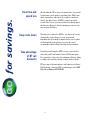
Save time and
spend less
Keep costs down
Take advantage
of BT call
discounts
All calls within the UK are charged at normal rates. So you won’t
be paying more for the privilege of working faster. What’s more,
where you may have waited up to 30 seconds for a modem to
connect, the digital service on ISDN 2e connects in about 4
seconds. Also, because you can send data faster than the fastest
modem, your calls may be shorter, meaning you can save even
more on your call charges.
Now that you’re connected to ISDN 2e, you don’t need to worry
about postal or courier charges, because you can send
information directly to another computer for the cost of a phone
call. And with videoconferencing, you can cut the cost of
accommodation and travelling to meetings and presentations.
If you find yourself using the ISDN 2e service a great deal for
short calls, you’ll benefit from the Short Call Discount option.
For a quarterly fee, this reduces the minimum call charge during
weekdays, and even further during evenings and at weekends.
BT has a range of discount options to suit businesses of all sizes.
To find out more contact your BT account manager or the ISDN
Helpdesk on Freefone 0800 18 15 14.
10
Technical information
11
ISDN extension wiring
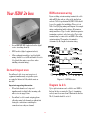
Your ISDN 2e box
•
Green SERVICE LED (indicates that the digital
service is working when lit)
•
ISDN sockets (digital equipment sockets)
•
S-Bus configuration switches (used for digital
wiring. Switch 1 is set to IN and Switch 2 is set to
S by default. An engineer uses these when
installing extension wiring).
If you are fitting extension wiring terminate the cable
with an RJ45 plug and use either of the two linebox
sockets. Cable to specification ISO/IEC 11801 should
be used to complete the installation. Please refer to
Table 1 for RJ45 plug wiring and Diagram 1 for sample
wiring configuration/switch settings. All extension
wiring must have a Type 2 socket (which incorporates
terminating resistors), as the last socket. Up to eight
terminals may be connected to an ISDN 2e line using
extension wiring. The number of terminals is
determined by the length of extension wiring.
NTE8
NTE8
NTE8
Do two things at once
You will now be able to use any two pieces of
equipment simultaneously, except when you’re
accessing the Internet at 128k, which counts as
two calls.
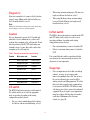
Diagram 1 – ISDN Extensions
Important supporting information:
Diagram 1a & b.
•
When both channels are being used
simultaneously for digital calls, incoming calls
will receive an engaged tone.
•
You will not be able to make outgoing phone
calls when using both channels or without first
closing the connection or switching the
connection to use only one channel.
Up to eight extensions can be added to one ISDN 2e
linebox. In these scenarios the Type 2 (terminating
socket) must be no more than 150m from the linebox.
The L/S switch should be set to S.
12
Diagram 1c
If just one terminal is to be connected to the linebox,
it may be up to 800m from the linebox. In this case,
the L/S switch should be set to L.
Note.
•
When using extension wiring up to 150 metres in
length overall from the linebox, select S.
•
When using Medium or Long extension wiring
between 150 and 800 metres in length overall
from the linebox, select L.
ISDN sockets look similar to ordinary phone sockets but the plugs
and other wiring accessories are not interchangeable.
In/Out switch
Caution
The ISDN 2e linebox incorporates a switch marked IN
and OUT which enables you to select the correct
operating conditions, depending on the wiring
configuration you have chosen.
It is very important to operate the L/S switch only
when there are no terminals in use, as this could
result in data corruption or the call being lost. Do not
alter the position of the IN/OUT switch when any
terminal is in use, because this could result in data
corruption or the call being lost.
•
If no extension wiring is connected switch to IN.
•
If there is extension wiring connected, switch to
OUT.
Table 1. Terminal connections for extension wiring.
Terminal
Wire colour code
Function
1.
White/orange band
Power source 3
2.
Orange/white band
Power source 3
3.
White/green band
Transmit
4.
Blue/white band
Receive
5.
White/blue band
Receive
6.
Green/white band
Transmit
7.
White/brown band
Power sink 2
8.
Brown/white band
Power sink 2
It is essential that the switch is repositioned in this
way whenever the extension wiring is connected or
disconnected even temporarily.
Usage tips
•
L/S switch
The ISDN 2e linebox incorporates a switch marked
L/S, which enables you to select the appropriate
mode of operation, depending on the wiring
configuration you have chosen.
•
For one or two terminals plugged directly into
the linebox, with no extension wiring, select S.
13
It is very important you check that your dial-up
software, or router, is not set-up to make
unnecessary multiple short calls. You can view
the cost of calls made since your last bill by
visiting www.bt.com/billing-payments. We advise
that you do this soon after your equipment has
been connected to ISDN 2e. BT will not refund
call charges raised due to incorrectly configured
equipment. If you do require your equipment to
make lots of short calls then why not consider
our Reduced Minimum call fee discount
scheme (see page 10).
Important information:
•
Do not, under any circumstances, open the
ISDN 2e box or remove it from the wall. There
are no customer serviceable parts inside.
•
Although ISDN/digital sockets look similar to
standard phone sockets, they are not compatible.
A standard plug will not fit into an ISDN socket
and using force may result in damage to the unit.
•
When using the digital service, care must be
taken to end the call correctly. Simply turning off
the computer may not close the connection.
Failure to end a call correctly may result in it
continuing until the line is next used, which can
result in unnecessarily long calls. Please ensure
that anyone using your computer or other ISDN
equipment is aware of how to end a call correctly.
For further information about terminating calls,
contact your equipment supplier.
ISDN 2e is not compatible with RedCARE analogue or
any other analogue alarm line security services.
Please check with your security supplier.
•
ISDN 2e digital ports are ISDN 2e (European)
compatible. Any approved ISDN 2e equipment
(ISDN Telephones, ISDN PC Cards, Terminal
Adapters and so on) will work with ISDN 2e.
However, some ISDN Telephones will require an
Auxiliary Power Supply (a mains power
transformer) to work correctly. You should
confirm this with your supplier.
14
•
Digital Select Services
For a nominal charge you can take advantage of the
following Digital Select Services for equipment
connected to either socket on your ISDN 2e box:
Important supporting information:
If you use Customer Controlled Call Forwarding, you
will be charged for the forwarding part of calls.
Customer Controlled Call Forwarding is activated and
controlled by your equipment, be that an ISDN phone,
phone system, Terminal Adapter, Router or ISDN
Card, so you must make sure any equipment you have
connected to the digital sockets supports Customer
Controlled Call Forwarding and that it is set-up
correctly. Any Customer Controlled Call Forwarding
using customer equipment will overwrite any BT set
up Call Forwarding options on the line.
Direct Dialling In (DDI)
Allows you to use ISDN 2e for all your office
communications. For example, you could group your
ISDN 2e lines together and use hunt groups and line
hunting when they’re connected to a phone system.
If you had three ISDN 2e lines (i.e. 6 channels), you
could have 10 numbers associated with each one,
which adds up to a possible total of 30 different
extension numbers. One of those numbers could then
become a central number for customers to call. The
other 29 could serve as personal extension numbers,
so that regular customers could contact individuals
directly, without having to go through your
switchboard.
Multiple Subscriber Numbering
Allows you to have up to 10 directory numbers
allocated to the digital service on ISDN 2e, so you
could advertise different telephone numbers for fax,
video, telephone and data devices. This option is
highly recommended if you’re connecting more than
two digital devices to ISDN 2e.
Customer Controlled Call Forwarding
Services for voice and data calls
•
•
Unconditional Call Forwarding allows you to
have all incoming calls forwarded to any
telephone number that you choose that is
capable of receiving the calls.
Call Forwarding on Engaged (providing you
ensure that any overflow traffic at one location
can be answered elsewhere). Your calls will be
automatically re-routed to any telephone number
that you choose that is capable of receiving the
calls. This will happen when both digital
channels are busy, or when individually-called
digital devices are busy.
Important supporting information:
Your terminal equipment must be able to support the
Multiple Subscriber Numbering service, as individual
directory numbers will need to be programmed into
the equipment. The total number of telephone
numbers available on ISDN 2e is 10 .
Call Forwarding on Ring Tone No Reply allows
your calls to be forwarded to any telephone
number that you choose that is capable of
receiving the calls if unanswered within
approximately 20 seconds.
15
Sub Addressing
(for ISDN or Business Highway to
ISDN or Business Highway calls only)
Connected Line Identity Presentation
(COLP)
Allows you to confirm that the number you have
dialled is the number you are connected to and that
you have not been forwarded to another location.
Activation/deactivation of this facility is not available
on a per call basis.
Allows you to associate different combinations of
characters (up to 20 alphanumeric characters, except
#) to the number you are dialling, so you can select
particular ISDN devices (or processes within
computers) but still call a single number.
Connected Line Identity Restriction
(COLR)
Important supporting information:
Calls from ISDN 2e to ISDN 2 or ISDN 30 (DASS2)
lines are restricted to 6 characters. Likewise, calls
from ISDN 2 or ISDN 30 (DASS2) lines will only send
6 alphanumeric characters.
You can ask for your telephone numbers not to be
released to callers. Please note that
activation/deactivation is not available on a per call
basis.
Calling Line Identity (CLI)
Terminal Portability
Allows your telephone number to be displayed on the
terminal equipment of the person you’re calling
(assuming they have subscribed to CLIP).
Allows equipment to be disconnected from its digital
socket and reconnected to another digital socket on
the same extension during a call without losing the
call, if the equipment itself supports this facility.
Calling Line Identity Presentation
(CLIP)
Call Barring
Allows you to see who is calling you. You will only
receive this information if the caller has not restricted
the sending of their number.
Permanent Outgoing Call Barring to, for example,
International numbers, is available, as is Incoming
Call Barring.
Calling Line Identity Restriction (CLIR)
You can ask for your telephone number(s) not to be
released.
16
ISDNconnect
Call Deflection
This service enables small packets of data to be sent
to a pre-determined site from your ISDN 2e line
without making a call. So you can make large volumes
of short data transmissions without call charges.
While this is going on, you can still use your two
digital channels to make calls and send data.
Allows ISDN 2e, Business Highway and ISDN 30e
customers to deflect up to 4 incoming voice or data
calls to another ISDN number during the alerting
phase of the incoming call. Call Deflection can be set
up by customers equipment to deflect calls of certain
types, calls from certain numbers or calls to specific
numbers or DDI extensions. The functionality for
these services is controlled by your equipment, be
that an ISDN phone, phone system, Terminal Adapter,
Router or ISDN Card, so you must make sure any
equipment you have connected to the digital sockets
supports Call Deflection and is set-up correctly.
ISDNconnect is ideal for simple data transactions,
such as credit card validation, remote telemetry and
remote monitoring. You can also use ISDNconnect to
notify you of new e-mail and send data overnight
without raising call charges. For more information
about this service, visit the ISDN web site at
www.bt.com/isdn.
Straightforward billing
Call Waiting and Call Hold
These services are provided together and are similar
in functionality to Call Waiting and Call Hold on
normal analogue phone lines, but they support data
calls on ISDN 2e and Business Highway. The
functionality for these services is controlled by your
equipment, be that an ISDN phone, Terminal Adapter,
Router or ISDN Card, so you must make sure any
equipment you have connected to the digital sockets
supports Call Waiting and Call Hold and is set-up
correctly. Call Hold allows you to switch between calls
without losing either call. These calls can be incoming
or outgoing. Call Waiting alerts you to another voice
or data call trying to get through and gives you the
option to take that call. Call Waiting is able to keep up
to four voice or data calls waiting for a limited time
and the called party is able to accept any one of those
calls.
17
•
You will receive one quarterly bill.
•
You will receive a summary sheet of all calls
made.
•
Connection or conversion charges will appear on
the summary sheet as a one-off payment.
•
When two channels are used simultaneously (i.e.
two computers at 64k or one computer at 128k),
they will be shown as two simultaneous calls.
Remember, when you use one computer working
at 128k, you will be charged for two calls.
•
Call Charges
•
All UK calls are charged at the same rate as
normal phone calls. You pay more for 128k
access (two calls).
•
If you have opted for an inclusive call allowance,
eligible calls include those made to Lo-Call
numbers (e.g. 0845), which are common
numbers for Internet access via Internet Service
Providers. Ineligible calls for inclusive call
allowances on Start Up and Call Plan are:
Operator controlled calls, calls to Premium Rate
services, non-geographic calls charged at
national rate (e.g. 0870, 0990), calls to mobile
networks, calls to Directory Enquiries (including
Chargecard calls), and Digital Select Service
facility fees.
Ineligible calls for inclusive call allowances on
BT Together for Business are: Operator
controlled calls, calls to Premium Rate services,
non-geographic calls charged at national rate
(e.g. 0990), calls to Directory Enquiries
(including Chargecard calls), calls made via the
CreditCall Service, calls to Information Services,
Chargecard calls via an operator, and Digital
Select Service facility fees.
Please also bear in mind that any unused call
allowances cannot be carried forward to your
next ISDN 2e bill.
•
If you are billed monthly or the bill does not
cover the full quarterly period, your rental and
any associated call allowance will be reduced
pro rata.
18
International data calls are charged at a higher
rate. For further details on these rates, consult
BT’s Pricing Information Service on
Freefone 0800 800 990, or visit www.bt.com
Troubleshooting
19
need to refer to your Internet Service Provider for
advice. This will probably involve re-configuring your
access application (typically Dial-up Networking). You
should also remember that a 128k digital call is
treated as two calls and you will be charged as such.
Answering your
questions
Q. Can I use ISDN 2e straight away?
A. You can plug Group 4 fax machines, ISDN phones and
videoconferencing terminals into either socket on
your ISDN 2e box and once configured, use them
straight away. To connect a computer, you’ll need a
properly configured ISDN Card or a Terminal
Adapter. These are available from BT and other
suppliers and cost from around £50 for an internal
device and from around £100 for an external one.
You’ll also need to check that your Internet Service
Provider supports digital access. On top of that, you’ll
have to configure your software to make ISDN calls.
If you’re connecting a digital phone system to ISDN 2e,
you’ll need to refer to the documentation that came
with your PBX and/or consult your supplier.
Q. How can I tell if I have been disconnected from
a call?
A. Most phone systems and Group 4 fax machines
provide a straightforward method for indicating call
status. In order to avoid paying for unnecessarily long
calls, you should familiarise yourself with how each
device displays whether or not a call is connected.
When using computers, ask your ISDN Card or
Terminal Adapter supplier how your software
indicates call status.
Q. How do I get extension wiring?
A. BT can install digital (‘S’ Bus) extension wiring for an
additional charge. Alternatively, you can buy a wiring
extension in kit form from other suppliers and install
it yourself. The cabling must be Category 5 compliant,
conform to ISO/IEC 11801 and be fitted with RJ45
type plugs. Please refer to ‘ISDN Extension wiring’ on
page 12 for details of how to connect extension wiring.
Q. How many calls can I make at any one time?
A. Two. You can make two simultaneous digital voice
calls, two data calls or one digital voice call and one
data call.
Q. How many digital phones, computers and other
devices can I attach to the line at once?
A. Eight, any two of which can be used simultaneously.
To use analogue phones, faxes, answering machines
and modems, you’ll need an ISDN Terminal Adapter
with analogue ports. These are available from BT and
other suppliers from around £150.
Q. Can I use Select Ser vices on ISDN 2e?
A. No. Select Services, such as Call Sign, Call
Minder and Call Diversion, cannot be used with
ISDN 2e. However, a range of comparable Digital
Select Services, such as Call Forwarding, Call Barring
and Calling Line Identity (CLI), are available. Digital
Select Services are controlled and activated by your
equipment, be that an ISDN phone, phone system,
Terminal Adapter, Router or ISDN card, therefore you
must ensure that your equipment supports Digital
Select Services and is configured correctly.
Q. What is channel bonding?
A. This is the option to combine your two 64k ISDN 2e
channels to create a speedy digital link operating at
128k. If you want to do this over the Internet, you’ll
20
Q. Can I use ISDN 2e to connect to a customer or
supplier who only has an analogue modem?
A. It depends on the ISDN interface you have in your
computer. Some modern ISDN Cards can emulate an
analogue modem, which effectively limits its speed to
that of the modem being dialled. If your equipment
supports this feature, you should have no difficulty in
connecting to someone with an analogue modem.
ISDN 2e
Troubleshooting tips
Q. Can I use a modem with the digital lines?
A. You cannot plug a modem directly into the ISDN 2e
box, however you can plug a modem into an analogue
port on a Terminal Adapter – you will then be able to
send data this way but will not see any of the speed
enhancement benefits of ISDN.
Q. The green SERVICE LED has gone out.
A. There may be a fault on the line or exchange. Call BT
Fault Reporting on Freefone 0800 800 154.
Q. I don’t think anything is wrong. I just want more
information.
A. Call the ISDN Helpdesk on Freefone 0800 18 15 14.
Q. I’m having trouble getting ISDN 2e to do what
I want.
A. Check that the green SERVICE LED is lit. If it is,
check that your hardware (phone, fax, phone system
or router) is compatible with ISDN 2e and is properly
configured. This may involve contacting your hardware
supplier. Remember that you can only make two
simultaneous calls. So, if others are using the service,
you won’t be able to. If you still have a problem, phone
the ISDN Helpdesk on Freefone 0800 18 15 14.
Q. What happens to the digital connection if I am
using both channels and someone picks up the
phone?
A. Unlike analogue connections, the digital connection
will not be disrupted, but the person picking up the
phone will not hear a dial tone and will not be able to
dial out.
Q. My computer doesn’t seem to be working with
ISDN 2e.
A. Check that the green SERVICE LED is on. Ensure
that your computer is correctly fitted with an ISDN
PC Card or a Terminal Adapter. If you’re using
extension wiring, plug your digital device directly into
either of the sockets on the ISDN 2e box. If it works,
you may have a problem with your extension wiring
and will need to check the S-Bus configuration
switches on your ISDN 2e box and/or refer to your kit
supplier. If you can’t get on the Internet or access a
remote computer, check the paragraph below.
Q. Do call charges differ from normal analogue
lines?
A. Voice call charges are exactly the same as before.
Data calls in the UK are also the same, but
international 64k data calls are charged at different
rates.
Q. What do I do if ISDN 2e isn’t working?
A. Follow the Troubleshooting tips.
21
For a quarterly fee, this reduces the minimum call charge
during weekdays, and even further during evenings and
at weekends. For more information, call the ISDN
Helpdesk on Freefone 0800 18 15 14.
Q. I’m having trouble accessing a remote computer
or network/Internet Access.
A. Ensure that your application (typically Dial-Up
Networking) is configured to make digital calls.
Consult your software and hardware supplier or the
ISDN Helpdesk on Freefone 0800 18 15 14.
Have you told your Internet Service Provider that you
require digital access? They may give you a different
number to call. If you’re dialling into a remote
computer or network, make sure that it supports
digital access and that your software is configured
correctly. If you still can’t get on the Internet or
access your office network, phone the ISDN Helpdesk
on Freefone 0800 18 15 14 .
Q. I can connect to the Internet at 64k, but
not at 128k.
A. Ensure that your Internet Service Provider offers
access at 128k and that you have told them that you
wish to work at this speed. Ask your equipment
supplier if your equipment is capable of operating at
128k and ensure that it’s properly configured.
Q. A large number of short calls are appearing on
my bill.
A. Your equipment may not be properly configured.
Some computers, LAN applications and routers can be
set to ‘poll’ each other at regular intervals, raising a
minimum call charge each time. Some e-mail
applications send e-mails as soon as they are written.
The best way to avoid this happening is to set your
routers to ‘poll’ each other less frequently and to reconfigure your e-mail application so that it sends
e-mails in batches, rather than individually. You can
check to see if this has worked by visiting
www.bt.com/billing-payments. Bear in mind that a
short call discount scheme is available for ISDN calls.
22
Useful numbers
If you have any questions relating directly to ISDN 2e, please call the relevant free number below.
Alternatively, you will find more information about ISDN 2e on our website at:
www.bt.com/isdn
•
ISDN Helpdesk: Freefone 0800 18 15 14 (8am to 6pm Monday to Friday).
•
Fault Reporting: Freefone 0800 800 154 (24 hours/7days a week).
Please use the space below to note down important numbers:
•
Main number
•
MSN numbers
•
Computer help line number
•
ISDN Card/Terminal Adapter help line number
•
Internet Service Provider help line number
•
Internet Service Provider digital access dial-up numbers: (64k)
(128k)
23
Offices worldwide
The telecommunications services described in this publication
are subject to availability and may be modified from time to time.
Services and equipment are provided subject to British
Telecommunications plc’s respective standard conditions of contract.
Nothing in this publication forms part of any contract.
© British Telecommunications plc 2002.
Registered office: 81 Newgate Street, London EC1A 7AJ.
Registered in England No. 1800000.
Produced by BT UK Marketing.
Designed by Unigraph Limited D20547.
Printed in England by Leycol Printers Limited.
PHME 40081/01/02
Printed on paper which meets international environmental standards.
24